Buy anything from 5,000+ international stores. One checkout price. No surprise fees. Join 2M+ shoppers on Desertcart.
Desertcart purchases this item on your behalf and handles shipping, customs, and support to Croatia.
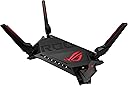
🎮 Dominate your digital domain with ASUS ROG Rapture – where speed meets style!
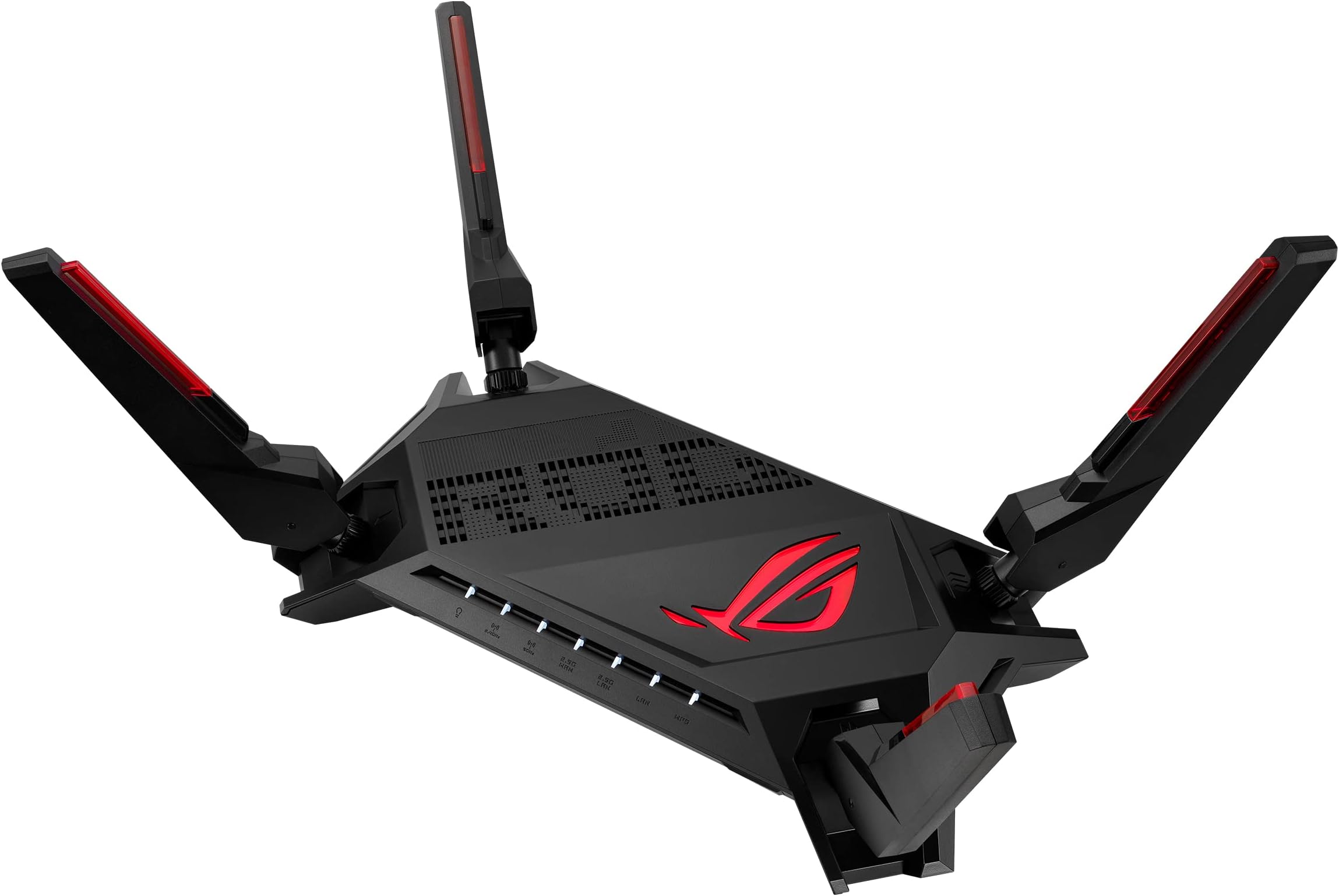
The ASUS ROG Rapture GT-AX6000 is a premium WiFi 6 gaming router delivering ultra-fast 6000 Mbps speeds, dual 2.5G WAN/LAN ports for prioritized traffic, and a powerful 2.0 GHz quad-core CPU. Designed for gamers and power users, it features triple-level game acceleration, mobile game mode, and customizable Aura RGB lighting. Compatible with AiMesh for scalable home coverage and equipped with lifetime internet security, it’s engineered to eliminate lag and elevate your online experience.


| ASIN | B09L8PCTPT |
| Antenna Location | Gaming, Home |
| Antenna Type | Internal |
| Best Sellers Rank | #31,001 in Computers ( See Top 100 in Computers ) #561 in Routers |
| Brand | ASUS |
| Built-In Media | Power Adapter, Ethernet Cable |
| Color | Black |
| Compatible Devices | Gaming Console, Personal Computer, Smart Television, Smartphone, Tablet |
| Connectivity Protocol | Wi-Fi |
| Connectivity Technology | Ethernet, Wi-Fi |
| Control Method | App |
| Controller Type | App Control |
| Coverage | Extensive coverage |
| Customer Reviews | 4.5 4.5 out of 5 stars (797) |
| Data Transfer Rate | 6000 Megabits Per Second |
| Frequency | 5 GHz |
| Frequency Band Class | Dual-Band |
| Is Modem Compatible | No |
| Item Dimensions L x W x H | 33.8L x 19.6W x 22.1H centimeters |
| Item Type Name | Networking Router |
| Item Weight | 1.12 kg |
| LAN Port Bandwidth | 2500 Mbps |
| Manufacturer | Asus |
| Maximum Upstream Data Transfer Rate | 6000 Megabits Per Second |
| Mfr Part Number | GT-AX6000 |
| Model Name | GT-AX6000 |
| Model Number | GT-AX6000 |
| Number of Antennas | 3 |
| Number of Ports | 6 |
| Operating System | ASUSWRT |
| Other Special Features of the Product | Wi-Fi 6 |
| RAM Memory Installed | 1 GB |
| Security Protocol | WPA2, WPA3 |
| UPC | 195553394512 195553394505 |
| Unit Count | 1 Count |
| Voltage | 110 Volts (AC) |
| Wi-Fi Generation | WiFi 6 |
| Wireless Compability | 802.11a, 802.11ac, 802.11ax, 802.11g, 802.11n |
A**O
Sin duda es el mejor router que he tenido, he pasado por varias marcas, y me anime a adquirirlo, si bien ya para la epoca actual es un poco viejo, este router, la verdad es que administra muy bien la RED, si te gusta tener el control de la red a detalle tiene muchas opciones que son muy buenas, incluso para para el acceso a servicios que puedes crear externamente, asi mismo puedes crear tu propio servicio en la nube si te place, tiene vpn y certificados de seguridad que el mismo router los genera de manera automatica sin tener que usar un certbot o algo semejante, la verdad estoy super satisfecho, he explorado casi todas sus opciones y me han dejado encantado, la velocidad intera de la red WIFI es estable y rapida, casi todos mis aparatos son via WIFI y no veo freezeos usando la red interna o comunicandome con otros equipos, ya sea transfiriendo archivos o usando recursos de red como impresoras o carpetas
C**Y
Updates at the bottom: I’ve purchased this router twice but I ultimately wanted a different set of features. I first purchased this router 2 months ago and love the dual 2.5Gb ports as I have AT&T fiber 2 Gbps tier. I returned it a week or so later. I purchased the router again recently trying to give it a chance with the hardware specs. Ultimately, the router didn’t fit my network needs. After research, Merlin wouldn’t have met my needs either. The good: If you are a gamer, this’ll be great for low lag. Easy setup for dual WAN. Fast CPU that handles all tasks you can throw at it. It’s got nice RBG. I’m not into that so it can be turned off. Wifi is strong and stable. Too many features to list. The bad (in my opinion): Traffic history lacks several options. I like to get info on hours/days/weeks and which devices uses the data. The Traffic Analyzer can take up to 5% of your download peak in my testing. I like to set my reboot cycle monthly but the UI only gives the option of daily or weekly. If my network/internet goes down, I would like some type of notification from the router. This router lacks that feature. Conclusion: This will be a great router for many users but it did not work out for my needs. Update 12/22 Purchased the Synology 6600ax router in November and found that device lacking hardware wise, 1 USB and 1 single 2.5 GbE port. Solid software. Returned that router. Re-purchased the GT-AX6000 w/dual 2.5 GbE ports. After some tweaks and the latest 388.1 Firmware and Merlin, I'm satisfied enough to keep this device. The Software can be adapted/tweaked for my needs. The Hardware is solid and the best for future-proofing outside 6E/7 or Tri-Band that this router lacks. 5G Wifi speeds over 1Gbps at about 20 Ft is great.
B**Z
I recently moved into an area that offered 1.2GB download speeds. I was using the service provider equipment at a cost of $25 additional per month. The equipment was an all in one modem+router which also had a 2.5g port. In an effort to save some money, I decided to purchase and invest in a new Router and Modem for the service. The caveat being that I will lose out on Unlimited data using my own equipment which was a risk I was willing to take. I bought the AX6000 to pair with a Arris S33 2.5g port Surfboard Modem as the AX6000 has a 2.5g port as well. The Asus AX6000 packaged arrived pristine with no physical damage. Setup - be very careful with the Antennas, I noticed that one my antennas for the router was not tightening properly, you have to ensure you can adjust without breaking the antenna. I noticed my antenna sounded like it was about to break as I was adjusting to access the bottom of the antenna to tighten. The process to get the Router up and running was a breeze, I used my sons Desktop PC hard wired into the 2.5G port and the browser recognized the router pretty quickly. Once my Arris S33 modem was activated, the router acquired the IP very quickly. At this point once I acquired the IP, I immediately did a speed test and....the speed remained the same as the ISP rental equipment. I did not lose out on speed; ISP equipment speedtest was 914GB down and 25up and with the Asus AX6000+Arris S33 was equally the same. I was hoping to at least get some increase in speed (this test was wired). I continued with my setup and began to open ports for my sons games. I noticed that the interface has port forwarding in two areas which was a bit confusing, I used the gaming section to port forward and i believe i have set it up correctly as i did not receive and conflict notification. Also, this is limited to a max of 38 ports. I am not sure what is the difference between the Gaming NAT section and the Port Forwarding section of the router and I found this to be confusing. WiFi Range seemed to be very good and I did see a slight improvement in range against the ISP rental Modem+Router. My laptop would struggle with zoom calls when i used it outside in my backyard, I did not test zoom with the new router in that area but i noticed the wifi status bar on my laptop improved. I have a number of devices that are on WiFi IoT's + Gaming Consoles. Xbox Series X download speeds are equally the same as the rental equipment and no decrease in speed or increase unfortunately. Overall I am happy with the Asus AX6000 but I was hoping for a bit of speed boost for 2.5G port. Even the dedicated gaming port did not improve this. I was going to give it 4 stars for that but so far it's remained stable with not decrease in performance so that will keep it at 5 stars for now. Bonus: In my previous location, I had 2 Asus AX-3000 routers which i kept, these were being used with AT&T's Modem in Passthrough. I decided to put these in Mesh Mode with the AX6000, this was extremely easy to do. I now have 1 AX3000 in my Laundry and 1 in the master bedroom. Devices seem to hop from the mesh without problem and I have increase range all throughout the home.
O**A
Me gusta el diseño agresivo y futurista que tiene este router, tiene una app para que puedas configurarlo desde el cel. Tiene 4 entradas para conectar alambricamemte y una más que vendría siendo la del internet directo, entonces si es buena opción por su velocidad 2.4ghz y 5gHz, además que tiene buen alcance aunque no he hecho la prueba, hubo ocasiones que saliendo de mi casa todavía alcanzaba a otras dos casas aproximadamente (teniendo en cuenta que en México las casas están pegadas a la de los vecinos según varía la zona), entonces eso sí me sorprendió además de que puedes cambiar el led al gusto.
J**Z
Desde el segundo 1 se nota el cambio en la red de internet, tengo 10 dispositivos conectados y puedo seleccionar el modo gaming en mis computadoras y play y tengo un gran pung sin que se paralize los juegos y todos en la casa pueden estar viendo peliculas descargando cosas y no tengo ningun problema con mi internet jugando, en league of legends me daba un pin de 50 a 60 con todos conectados excelente producto!! Vale la pena la inversión
Trustpilot
2 weeks ago
4 days ago