Buy anything from 5,000+ international stores. One checkout price. No surprise fees. Join 2M+ shoppers on Desertcart.
Desertcart purchases this item on your behalf and handles shipping, customs, and support to Croatia.
🚀 Upgrade to the future of Wi-Fi — never settle for slow or spotty again!
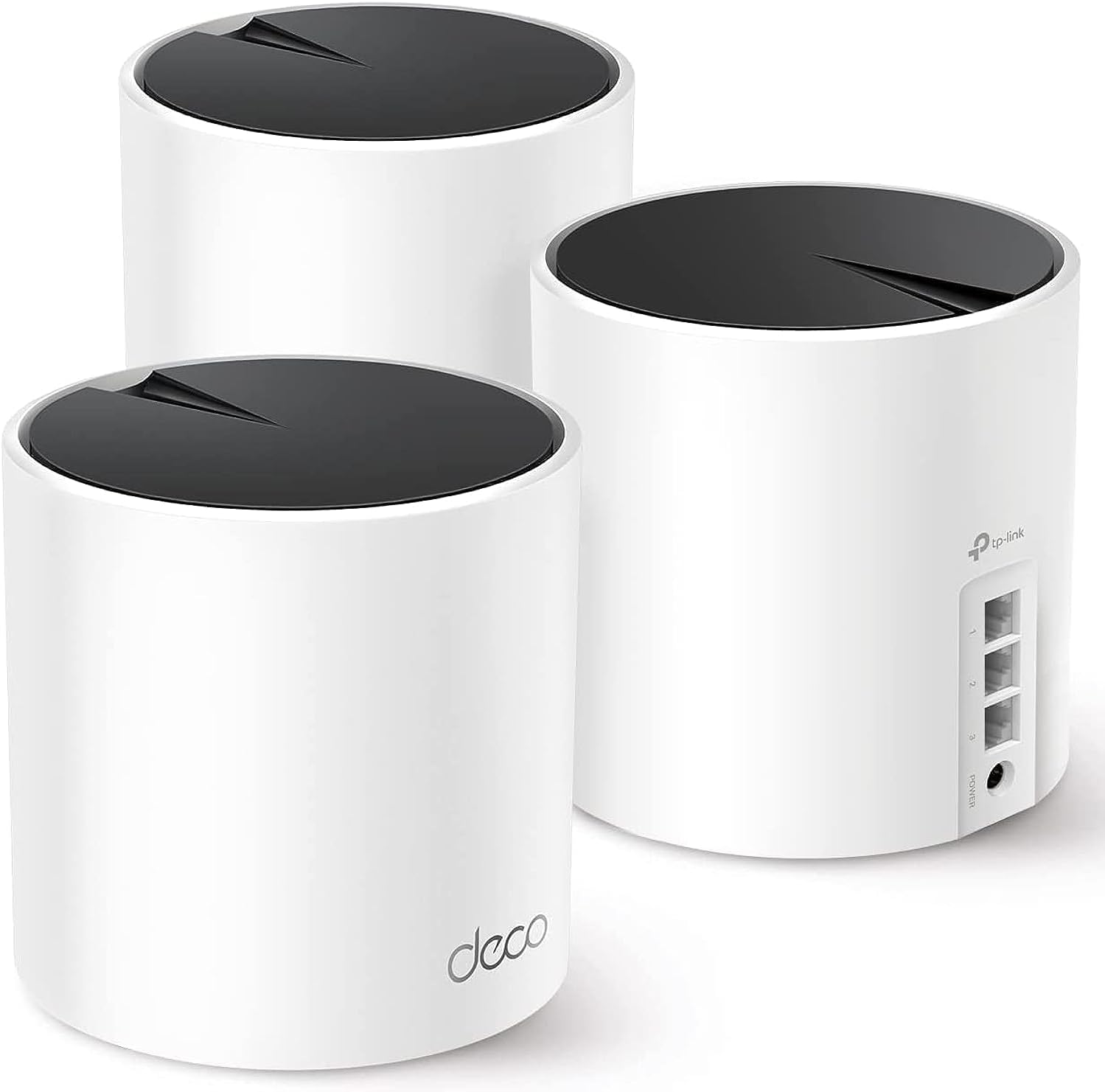
The TP-Link Deco AX3000 WiFi 6 Mesh System (Deco X55) is a powerful 3-pack mesh router set designed to deliver ultra-fast AX3000 Wi-Fi 6 speeds across up to 6500 sq.ft. It supports seamless roaming, connects over 150 devices, and features 3 Gigabit Ethernet ports per unit with Ethernet backhaul for enhanced stability. Ideal for modern smart homes and high-bandwidth users, it replaces traditional routers and extenders with a sleek, easy-to-manage system controlled via the Deco app, backed by 24/7 support and a 2-year warranty.


| ASIN | B09PRB1MZM |
| Antenna Location | Home |
| Antenna Type | Internal |
| Best Sellers Rank | #548 in Computers ( See Top 100 in Computers ) #2 in Whole Home & Mesh Wi-Fi Systems |
| Brand | TP-Link |
| Built-In Media | 1 x Quick Installation Guide, 1 x RJ45 Ethernet cable, 3 x Deco X55 units, 3 x Power adapters |
| Color | Black, White |
| Compatible Devices | Smartphone, Personal Computer, Security Camera, Smart Television, Tablet, Printer, Gaming Console |
| Connectivity Protocol | Wi-Fi |
| Connectivity Range | 6500 Square Feet |
| Connectivity Technology | Ethernet, Wi-Fi |
| Control Method | App |
| Controller Type | App Control |
| Coverage | Up to 6500 sq. ft. |
| Customer Reviews | 4.4 4.4 out of 5 stars (12,282) |
| Data Transfer Rate | 3000 Megabits Per Second |
| Frequency | 5 GHz |
| Frequency Band Class | Dual-Band |
| Has Internet Connectivity | Yes |
| Has Security Updates | Yes |
| Is Modem Compatible | Yes |
| Item Dimensions L x W x H | 11L x 11W x 11.4H centimeters |
| Item Type Name | Mesh WiFi |
| LAN Port Bandwidth | 1000 Mbps |
| Manufacturer | TP-Link |
| Maximum Upstream Data Transfer Rate | 3000 Megabits Per Second |
| Mfr Part Number | Deco X55 |
| Model Name | Deco X55 |
| Model Number | Deco X55 |
| Number of Antennas | 3 |
| Number of Ports | 3 |
| Operating System | Omada |
| Other Special Features of the Product | Guest Mode |
| Router Firewall Security Level | True |
| Router Network Type | router |
| Security Protocol | WPA3 |
| UPC | 840030703010 |
| Unit Count | 3 Pack |
| Voltage | 12 Volts |
| Wi-Fi Generation | Wi-Fi 6 |
| Wireless Compability | 802.11ac, 802.11ax, 802.11b, 802.11g, 802.11n |
M**E
vraiment top
E**T
Super easy to install
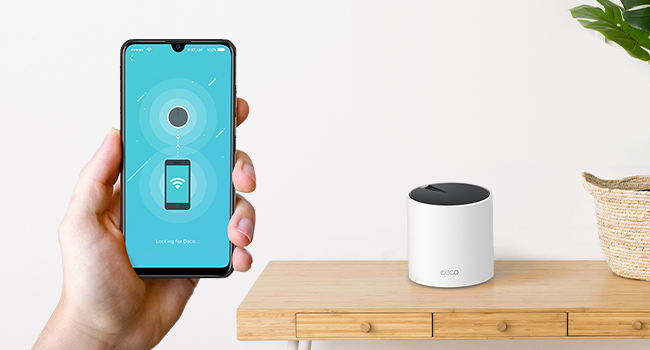
Recently moved into a new home - which was larger than our previous. The three pack covers it perfectly. It is a game-changer for home connectivity in a larger home. With blazing-fast speeds and reliable coverage, it's a breath of fresh air for anyone tired of dead zones. The setup is a breeze, thanks to the user-friendly app, and the small Deco units seamlessly blends into almost any decor.
C**V
Great system
Really easy to set up and gives great coverage. Also easy to add on to with external units available as well.
A**R
Decent coverage and easy to setup
Provide good coverage and easy to setup. Once connected an update is needed for the firmware, other than that it should be straight forward. I’m giving it a 4 star rating due to the range it covers. Most of the rooms (4 rooms) have at least 4/5 signal strength except for 1 room where the signal is weak and keeps dropping.
Z**I
Easy installation. Very good coverage
Great product
A**S
As usually
No comment for this great product Really 💯 satisfied
N**R
Don’t waste your money!
Generally, a terrible piece of equipment! I could be stood next to it, and my phone will still try to connect to the satellite device downstairs with the worst signal. Devices constantly drop out, satellites constantly drop out. I’ve tried all the methods mentioned on the app to improve coverage and reliability, but have come to the conclusion that it’s just a terrible expensive product!
A**N
May Wi-Fi issue resolve
Thanks a lot tp link
M**D
السلام عليكم ورحمة الله وبركاته اولا لوفيه اكثر من ٥ نجوم راح اعطيه المنتج هذا تمنيت الاقي تقييم وافي قبل اشتري ولكن حبيت اوثق لكم تجربتي كامله النت الرئيسي فايبر بسرعه ٣٠٠ ميقا بالملحق حطيت معاه جهاز ووصلته بسلك واعطاني نفس السرعه ماشاء الله ثم حطيت جهاز بالدور الثاني واعطاني ١٩٠ بالصاله تحت الرئيسي بالضبط ثم الجهاز الثالث والاخير حطيته بالصاله بالدور الارضي واعطاني ٩٠ ميقا تقريبا صراحه منظومة خيالية تستحق كل ريال ينحط فيها وسهله الاعداد للامانه فوق ماتتصور انصح وبقوه غطت لي فيلا دورين وملحق بكل سلاسه
G**G
This is a great product perfect for gamers and streaming movies on amazon prime and others seamless maximum internet speed trough the entire house. Always reaching near the maximum speed in any room. The setup is extremely easy, plug any of the boosters on the the main modem then it becomes automatically the main one. I found that where it gets a little tricky is placing the two other boosters. For an optimal performance, you should not have more then one wall separating the boosters from one an other and not have to many electronics around it (magnetic field) otherwise it looses significant speed. but after about one hour trying to figure out where are the optimal places for each unit i get near maximum speed regardless of the room or level I'm on. WIFI 6 is a faster signal but also a shorter one so the units cannot be places to far apart. The time it took to setup and find the perfect spot is really worth the results and hassle free experience of high speed internet the the house. It really is trial and errors on where you place each unit. my suggestion connect the first one on to the router then plug the second unit where you would think is most appropriate then with your phone go on the deco app make sure your phone is connected to the second unit and do a speed test until you get the maximum speed (or at least near it) then repeat for the 3rd unit. An other tip : if you can try to put them at a certain height to get less interference. My las unit is placed near the basement ceiling and just by doing that i gained about half more of the speed. i love the fact that each unit has 3 ethernet ports on the back to be able to plug things that could be too far to reach the maximum speed on WIFI. 3 units was enough to get the main floor and basement covered at maximum WIFI speed. pros: Easy setup app is really easy to use and offers many options create a guest connection in less than 10 seconds small and discreet seamless internet trough the house (does not disconnect when changing unit connection) gives you a weekly report about your WIFI cons: if you have more than one wall separating one unit form another it looses significant speed but this is not due to the product but to the type of signal overall score A+
P**R
We have a long house (4,000 sq. feet) and because my modem was at one end we have used range extenders to reach TVs and computers at the other end. My son works in sales from home and required a faster and more stable connection than he had in his office at the far end from my modem. We decided to install a mesh WIFI system and chose TP-link's Deco S4 (3-pack). Once up and running (easy) we weren't able to achieve a faster speed than the range extenders. Although, things were slightly better in coverage and stability. After reading a lot about do's and don'ts of mesh WIFI systems we decided to return the Deco S4 and get the Deco AX3000 X55 (3-pack) system. Here are the early results: 1. My son's speed more than doubled to 535 Mbps, which is almost the same speed I get being directly connected to the modem at the other end of the house. In other words the rated speed that our ISP sold us. 2. The TVs haven't buffered even though we use streaming exclusively on 3 sets. Plus we have mobile phones and other assorted gadgets that use the internet. 3. My wife's PC, even farther than my son's, is getting almost double the speed (145 Mbps) that it got with the S4 and triple the speed she received from the range extenders. 4. Very easy setup via the mobile app. Here are some of the reasons why the newest mesh system is better from a technical perspective: 1. The AX3000 is rated at double the speed of the S4 (at less than double the cost on Amazon using their coupon). 2. The AX3000 has a maximum of 6500 sq. feet of coverage vs. 5500 sq. feet for the S4. 3. The AX3000 is WIFI 6 vs. WIFI 5 on the S4. This means a 50% increase in "streams" providing greater functionality and speed because there are more paths to the base station router. One of the x55s (base station) sits next to our ISP's modem and the other two are set up as satellites at the other ends of the house. Satellites can be connect via ethernet cable (called a backhaul) if you have cable already installed in some rooms. This should increase the throughput. Unfortunately, we weren't able to do this. 4. The AX3000 is smaller than the S4 and thus doesn't stand out as much. This is not a technical issue, however we plan to mount two of the units on the wall with wall mounts that can be purchased separately. The S4 is almost twice as tall so may tip out of the mounts easier. Plus the cord and charger is white rather than black so doesn't stand out as much. 5. Other systems are faster and cover more area, but are significantly more expensive for a 3-pack. Also most use WIFI 6E, which we don't need because we're in a single family home. I understand WIFI 6E comes with those systems because it's good for people in large apartment buildings. It's not faster but does have a third band in the 6 Ghz range which WIFI 6 does not. Update: I have had trouble connecting our solar panel gateway to the new system. Our solar system installer suggested connecting to the 2.4 Ghz band because or WIFI is now mesh. I didn't know we had that capability until I read an earlier post by another happy user. I will now research how to do this.
J**Z
Hice una investigación previa para reemplazar los dispositivos mesh anteriores que ya estaban siendo intermitentes y degradando la señal de wifi. Fácil de configurar, me funcionó perfecto en una casa antigua con muros de concreto en un área de aproximadamente 240m2 distribuidos en dos plantas, la señal de internet llega perfecto a todos los rincones de la casa y se puede administrar con buenos features de seguridad a través de la aplicación. El diseño es discreto y elegante, en mi caso los coloqué en zonas donde no se ven. Llegaron en tiempo y forma y todo sin contratiempos.
R**A
In a world where a strong and reliable Wi-Fi connection is paramount, the TP-Link Deco AX3000 stands tall as a beacon of connectivity, effortlessly blanketing my 140-square-meter apartment with its powerful signal. This review encapsulates why the Deco AX3000 deserves its place as a frontrunner in the realm of mesh Wi-Fi systems, highlighting its exceptional signal coverage and unbeatable cost-effectiveness. As a Brazilian, I brought a mash system to Brazil, even though it's not sold locally. I'm quite satisfied with the features it offers and with the complete automation of my home. Having a reliable network is crucial to ensure the effective operation of all devices. Signal Coverage: 5/5 One of the most impressive feats of the TP-Link Deco AX3000 is its ability to deliver consistent, high-speed Wi-Fi throughout every nook and cranny of my home. From the living room to the farthest corner of the bedroom, the Deco AX3000 ensures a strong and stable connection, eliminating dead zones with remarkable efficiency. Streaming 4K videos, gaming online, or video conferencing – no task is too demanding for this powerhouse of a mesh system. Performance: 5/5 Equipped with the latest Wi-Fi 6 technology, the Deco AX3000 not only provides extensive coverage but also delivers lightning-fast speeds and low latency. Whether I'm downloading large files or engaging in bandwidth-intensive activities, the Deco AX3000 consistently exceeds expectations, offering a seamless online experience for all connected devices. With support for up to 150 devices, it effortlessly handles the demands of a modern smart home without breaking a sweat. Ease of Setup: 5/5 Setting up the Deco AX3000 is a breeze, thanks to the intuitive Deco app. In just a few simple steps, I was able to configure and optimize my mesh network to suit my specific needs. The app provides comprehensive control over network settings, allowing me to prioritize devices, set up parental controls, and monitor network traffic with ease. Whether you're a tech novice or a seasoned enthusiast, the Deco AX3000 makes the setup process hassle-free. Cost-Effectiveness: 5/5 Perhaps the most impressive aspect of the TP-Link Deco AX3000 is its exceptional affordability. Despite offering premium features and performance that rival more expensive competitors, the Deco AX3000 comes at a fraction of the cost, making it an unbeatable value for budget-conscious consumers. With the Deco AX3000, you get top-tier performance without having to break the bank, making it a wise investment for any home or small business. Final Verdict: In conclusion, the TP-Link Deco AX3000 is a true standout in the world of mesh Wi-Fi systems, offering unparalleled signal coverage, blazing-fast speeds, and unbeatable affordability. Whether you're looking to eliminate Wi-Fi dead zones, upgrade to the latest Wi-Fi 6 technology, or simply enhance your online experience, the Deco AX3000 delivers on all fronts. With its stellar performance and budget-friendly price tag, it's a clear winner in my book. Highly recommended!
Trustpilot
1 week ago
1 month ago