


Desertcart purchases this item on your behalf and handles shipping, customs, and support to Croatia.
๐ Power up your HP Envy X360 with confidenceโstay charged, stay unstoppable!
The Menlonigt LK03XL battery is a 4-cell, 52.5Wh lithium-ion replacement designed specifically for HP Envy X360 and Pavilion X360 laptops. Operating at 11.55 volts, it offers reliable, long-lasting power with Grade A cells for fast charging and low energy consumption. The package includes two screwdrivers for easy installation and is backed by a 1-year warranty, ensuring seamless compatibility and peace of mind for professionals on the go.
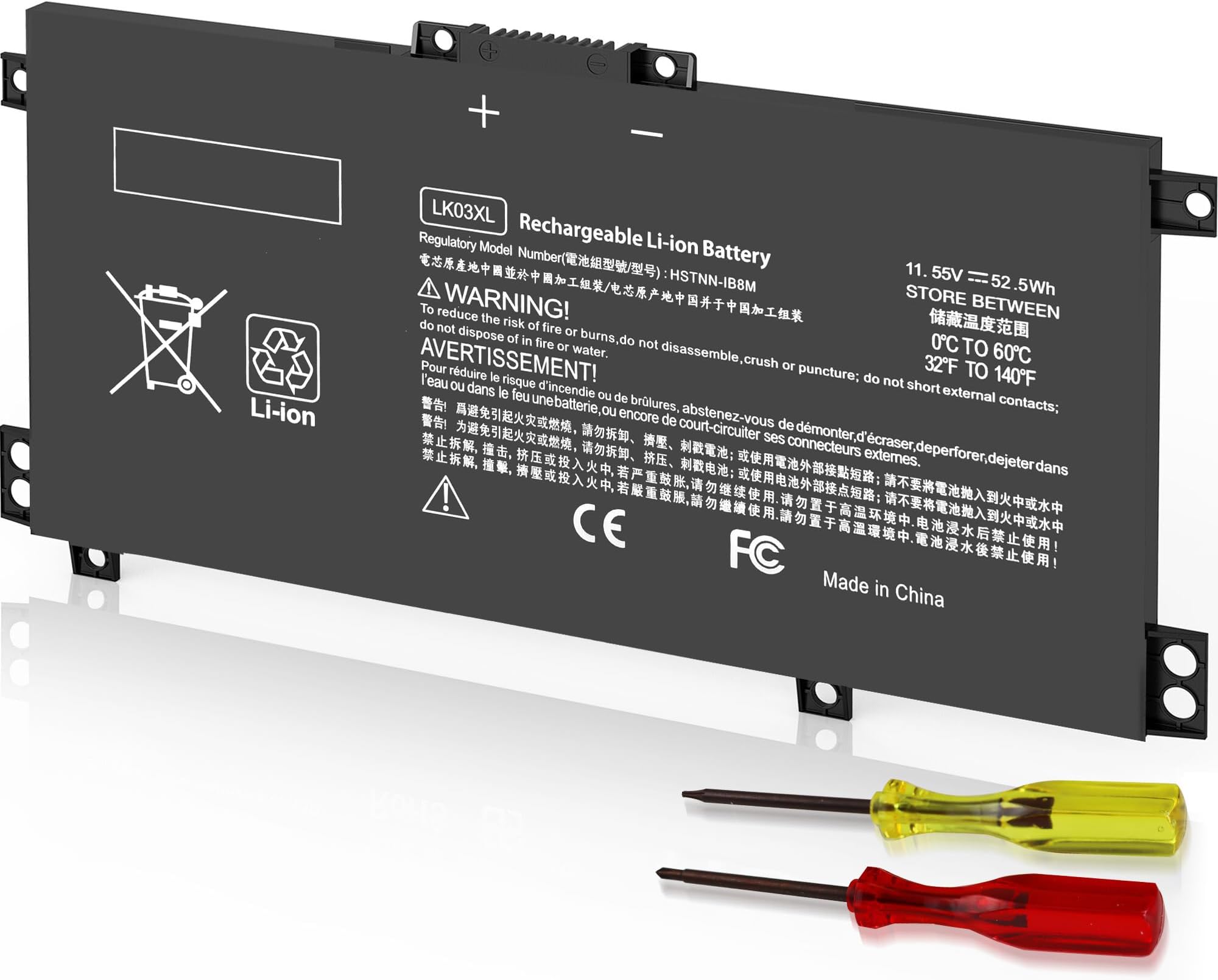


| ASIN | B09NCZ8J6J |
| Antenna Location | Laptop |
| Battery Cell Composition | Lithium Ion |
| Battery Cell Type | Lithium Ion |
| Brand | Menlonigt |
| Customer Reviews | 4.4 out of 5 stars 977 Reviews |
| Item Dimensions | 7.35 x 3.5 x 0.5 inches |
| Item Weight | 0.63 kg |
| Manufacturer | DONG GUAN BOYU ELECTRONICS CO., LTD. |
| Model Name | lk03xl |
| Model Number | LK03XL |
| Recommended Uses For Product | Laptop |
| Reusability | Rechargeable |
| UPC | 616519791157 |
| Unit Count | 1 Count |
| Voltage | 11.55 volts |
C**R
Easy to replace the battery and it works like a champ!
I can't believe how easy this was to install. It works perfectly and saved a costly visit to a computer repair place. The battery stays charged for a long time. I followed the advice of other reviews and did a system reset/complete shutdown and it worked great. The battery arrived with a 65% charge. It now holds a 100% charge and stays charge enough to handle email and browsing and some streaming just fine. The tools that were supplied worked perfectly to remove the laptop case, then remove the screws from the battery mount. I didn't need to use the square head screw driver, just the phillips. It was a little tricky to get the battery cable connection points to line up and plug in, but eventually got it. The whole job took about 20 minutes. (I watched a YouTube video a few times to ensure I did it right). The battery didn't come with a cable so I re-used the one from the old battery. I have a Dell 7306 silver 2 in 1 computer. So glad I did this.
D**V
Affordable and quality spare battery.
Pay attention: After removing stock battery and before installing this one, press and hold power button for 30 secs. this will reset all the power system. At first try I installed this batt without resetting power system, so laptop was working but constantly warned about critical battery and etc. After resetting a system it works perfectly. The longevity similar to stock one, charging time is the same. I didn't use it for heavy tasks so far, but for daily usage (office apps and browsing on bing) works pretty long.
E**W
just what I needed
Install easily and working well. Holds and recharges
B**A
It worked!
Easy installation, fit perfectly, and worked. My laptop's battery had warped, my guess is it overheated, but this battery got it running again.
H**C
Great product
Great product, only problem is my problem is with the computer charging port.
J**H
Product will Fit as described
Package came as promised. It was the right battery needed for my laptop and can be no longer be found on the manufactures website. The battery replacement went in with not problems, has a great life expectancy on it and was ready to use out of the box without needing charging.
R**N
Battery keep cutting out - read update to reset battery
My laptop (Dell Inspiron 7500 2in1 Silver) recognizes the battery and it appeared to work fine then the computer went off/dark. I restarted it and it seemed to work but any time you would move the laptop, the battery would stop or lose connection. I put my old battery back in and it worked fine (except the old battery doesnโt hold a charge long at all). Returning this replacement battery as something is defective with it. UPDATE: My original battery started cutting out the same way after reinstalling it back in. Therefore, I tried a battery reset after finding this on Dell: Reset the battery sensor. This can sometimes fix problems with the battery not being recognized. To do this, follow these steps: - Shut down your laptop. - Unplug the power adapter. - Remove the battery. - Press and hold the power button for 30 seconds. - Reinsert the battery. - Connect the power adapter. - Turn on your laptop. Now this new replacement battery appears to be working great! If it continues, I will cancel the return and keep it. ๐ค๐ป. I am changing my review from 1 star to 5 stars! UPDATE #2 - After a week my laptop would not recognize this battery at all. The BIOS said no battery was installed. No matter what I tried or how many times I reset it, the battery was not detected in my computer. I am back down to a 1 and returning it.
K**D
Buy one
Works good for my older Dell Laptop and less expensive than I thought it would be
M**O
Perfetta
Ho una Dell Inspiron 15 3000 Series (3878) e questa batteria funziona benissimo. Mi offre 4/5 ore di autonomia.
C**A
Good product
Working properly. Good quality..
Trustpilot
2 weeks ago
1 week ago