


Desertcart purchases this item on your behalf and handles shipping, customs, and support to Croatia.
🚗 Stay ahead of the curve with Garmin’s stealthy, smart dash cam!
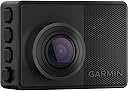
The Garmin Dash Cam 67W is a compact, windshield-mounted camera that records ultra-clear 1440p video with an extra-wide 180-degree lens. Featuring voice control, Wi-Fi connectivity for automatic uploads, and smart parking surveillance, it offers professional-grade vehicle monitoring and safety alerts in a discreet, durable design.


| ASIN | B093244D1J |
| Are Batteries Included? | No |
| Auto Part Orientation | Front |
| Auto Part Position | Top |
| Battery Cell Type | Lithium Ion |
| Best Sellers Rank | 81,887 in Electronics & Photo ( See Top 100 in Electronics & Photo ) 1,132 in Car On-Dash Mounted Cameras |
| Box Contents | [{'memory card:'16.0 GB'}] |
| Brand | Garmin |
| Brand Name | Garmin |
| Colour | Black |
| Compatible Devices | Car |
| Compatible with Vehicle Type | Car |
| Connectivity Technology | Wi-Fi |
| Connectivity technology | Wi-Fi |
| Control Method | Voice |
| Customer Reviews | 4.2 out of 5 stars 1,222 Reviews |
| Display Type | LCD |
| Field of View | 180 Degrees |
| Flash Memory Supported Size Maximum | 512 GB |
| Frame Rate | 60 FPS |
| Included Memory Card Size | 16 GB |
| Item Dimensions D x W x H | 56D x 22W x 40H millimetres |
| Item Weight | 57 Grams |
| Manufacturer | Garmin |
| Manufacturer Part Number | 010-02505-05 |
| Model Name | 67W |
| Model Number | 010-02505-05 |
| Model name | 67W |
| Mounting Type | Windshield mount (Magnetic) |
| Number of Items | 1 |
| Number of Packs | 1 |
| Optical Sensor Technology | CMOS |
| Other Special Features of the Product | Built-In WiFi, Voice Control |
| Real Angle of View | 180 Degrees |
| Screen Size | 2 Inches |
| Special feature | Built-In WiFi, Voice Control |
| UPC | 753759269395 |
| Unit Count | 1.0 count |
| Vehicle service type | Car |
| Video Capture Resolution | 1440p |
| Video capture resolution | 1440p |
M**E
Great little camera must have
Excellent for trucks and cars been using this for quite some time, it keeps your speed location It also works great with the app that you’re able to download from Garmin, video quality is excellent
B**T
iOS VPN apps can break WiFi connectivity to dashcam
I like the camera (67W) - It's pretty simple to use if you don’t run into the issues I had, the image/audio quality is great, the 140d wide angle lens captures a lot and after about a year of use, the camera has had no problems recording video/audio on a 256GB micro SD card (extreme environment version). The file retention @1440p with audio is about 2 weeks. I live in the southeast, so it's pretty hot during the summer. The camera started falling off the windshield with the included foam mounting tape at around 8-9 months. I ended up buying some good 3M high strength outdoor foam mounting tape, cut it to size, and replaced what came with the camera. The camera mount I chose was the hexagonal piece of steel that attaches to the windshield with the foam tape, and the camera has a hexagonal cup with a strong magnet it in it. The dashcam is pretty light, and they do include enough mounting/cable length to mount this where you'd need it. The Garmin drive setup software can use some help as the pairing process is very manual, and if you are not paying attention, and you miss hitting pair on both the phone and camera at the same time, you will need to reset the camera to factory defaults, and then remove the botched bluetooth connections in your phone. The bluetooth pairing process doesn't explain that you will have two different bluetooth connections for the one camera, so pay careful attention to the pairing process - Both bluetooth connections will be DC-67W and the other is DC67W-#####-BT Aside from this, I ran into a very difficult issue to solve after a few months of usage, but eventually figured it out - VPN apps in iOS will disrupt your ability to connect to the dashcam's WiFi connection depending on the VPN app settings. Basically VPN applications can become a middleman between your phone's wireless adaptor and the wireless connection or "SSID". These VPN settings can alter IP addressing/routing, and will prevent you from connecting to the camera with your phone/app to export or even watch the footage on your cameras SD-card. This is because the Garmin drive app is very simple in that when you try and view footage on your dashcam, the drive app actually tells the dashcam via bluetooth to "enable wireless", essentially making your dashcam a wireless access point, then the drive app connects your phone to the cameras SSID, enters in the wireless password for you (this is happening behind the scenes), and then allows you to manage the footage, update the firmware of the camera, etc. It is during this wireless connection process that VPN apps can enable itself to protect you and will basically change IP information of your phone, which then stops your camera and phone from communicating with eachother. I suspect this is because the dashcam only knows about the network 192.168.0.0/24, where as your VPN app may force your wireless adaptor to be on a different private network to basically hide your phone from untrusted WiFi SSIDs. I'm sure there could be more variables, but this is what was happening in my case. Disabling VPN was my resolution to this issue. If you have the option to set your VPN app to disable itself when connecting to trusted WiFi connections, that might be an easy fix. Garmin needs to streamline the software, and pairing process to help avoid having users that don't have I.T. or networking knowledge, getting stuck dealing with these types of connectivity issues. Garmin should include additional pop-ups in the app for when things aren't working or during setup like "please disable VPN connectivity when connecting to the camera's wireless connection", or "You must accept the bluetooth pairing prompts on both the mobile device, and on the dashcam at the time of pairing", etc. Other than the above, I do recommend this dashcam.
J**Z
Graba y sobre escribe cuando se llena la memoria
Fácil de instalar, el cable es lo suficientemente largo para ocultarlo. Trae micro sd
O**Y
Garmin - A Good Brand.
I see very few dash cameras that have brand names I recognize. Garmin does not have that problem. I have several GPS units and this is my third dashcam from Garmin. I bought my first Garmin dash cam more than ten years ago, and other than needing a replacement rechargeable battery, it has had no problems and is still working fine. A few years ago I bought a 65W for my wife's car. The car needed a tiny dash cam, and this one fit nicely right in the corner of the windshield. This one has worked well with only two concerns. First, it eats micro SD cards. They just don't last. Second, there is a vertical line in the display that does not affect operation at all. I have read that the SD card failures are more common in dash cams that are left on 24/7. These cards are only good for so many writes. I also got in the habit of buying smaller SD cards, so they are overwritten more frequently. I have not yet explored using larger cards, made by more reputable companies, to see if that helps, or wired the camera to go off with the ignition. I am comfortable fiddling with SD cards, but my wife is not. So, I bought the 67W for her for Christmas. I will install her dash cam in another vehicle that does not have one. The 67W and the 65W cameras use exactly the same mounting technique and power cable. This was important to me because I had to fabricate a custom mount to tuck this camera up and out of the way. This will save me a lot of time. Plus, the mounts and power cords from the new 67W will work on the old 65W. This new camera does not have some of the fancier features the newer ones do - like a link to a cell phone to retrieve pictures. That is easier that taking the micro SD card into the house, putting it into an adapter, and retrieving photos on my laptop. But realistically, I only do this once a year or so. Garmin does have some models that look like they may take the same mount as the 65W that have more features. I would have bought one of those but Garmin did not specify that they would use the same mount. My oldest Garmin dash can does not take good enough pictures to capture license plates. Neither does the 65W. The 67W does have a slightly better camera, but it is still an older model and other reviewers said it falls short on license plates. I'm also not convinced that these other brands I've never heard of, who claim 4k, are any better. So I went with what I know to be reliable. Based on my experiences with Garmin, I recommend their products.
T**R
Teeny Tiny
This Dash Cam lives up to the write up on the web site. When opening the box i was surprised at how small it was. When seeing it online there is nothing next to the camera that would indicate its size. Never the less, I am please with the purchase and the camera takes great photos and all the funtions work as advertised. I do have a bit of fiddling to get the live view from the camera via WiFi. I have to go to stored videos, then select live to get a picture. I might be doing something wrong and will work on that. As my car , when parked, is not in WiFi range, live view really does not come into play. I think 180° view is more than needed and the x210, with 140° would be lots. I tried using the down facing, short, cable in the car but it does not work. It only works when plugged into a computer for down loads etc.
Trustpilot
2 weeks ago
2 weeks ago