Buy anything from 5,000+ international stores. One checkout price. No surprise fees. Join 2M+ shoppers on Desertcart.
Desertcart purchases this item on your behalf and handles shipping, customs, and support to Croatia.
🖱️ Elevate your workflow, not your wrist—comfort that clicks with you.
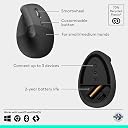
The Logitech Lift Vertical Ergonomic Mouse combines a 57-degree vertical design with whisper-quiet clicks and customizable buttons to promote natural wrist posture and reduce strain. Compatible across Windows, macOS, iPadOS, and more, it offers versatile wireless connectivity via Bluetooth or Logi Bolt USB receiver. With a 24-month battery life and ergonomic certification, it’s engineered for professionals seeking all-day comfort and seamless multi-device productivity.


| ASIN | B07W4DGC27 |
| Antenna Location | Office |
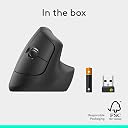
| Are Batteries Included? | Yes |
| Are Batteries Required | Yes |
| Battery Average Life | 24 months |
| Best Sellers Rank | 515 in Computers & Accessories ( See Top 100 in Computers & Accessories ) 26 in Mice |
| Box Contents | 1 product |
| Brand Name | Logitech |
| Button Quantity | 4 |
| Colour | Grey |
| Compatible Devices | Android devices on Android 8.0 or later, Chromebook, Mac, Personal Computer, iPad on iPadOS 14 or later |
| Country of Origin | China |
| Customer Reviews | 4.5 4.5 out of 5 stars (10,115) |
| EU Spare Part Availability Duration | 2 Years |
| Embellishment Feature | LED |
| Enclosure Material | Plastic |
| Global Trade Identification Number | 05099206099784 |
| Hand Orientation | Right |
| Hardware Platform | Mac, PC |
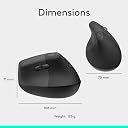
| Item Dimensions L x W | 10.8L x 7W centimetres |
| Item Type Name | Wireless Ergonomical Mouse |
| Item Weight | 210 Grams |
| Manufacturer | Syktcjgs |
| Model Name | Lift Ergonomical Vertical Mouse |
| Model Number | 910-006473 |
| Mouse Maximum Sensitivity | 4000 Dots per Inch |
| Movement Detection | Laser |
| Network Connectivity Technology | Bluetooth, Logi Bolt, USB |
| Number of Batteries | 1 AA batteries required. (included) |
| Operating System | Chrome OS, Linux, Windows® 10, Windows® 11 or later, iPadOS 14 or later, macOS 10.15 or later |
| Power Source | Battery Powered |
| Product Features | Ergonomic Design, Lightweight, Wireless |
| Product Finish Type | Matte |
| Product Warranty | 2 year manufacturer |
| Range | 10 meters |
| Style Name | Mouse |
| Theme | Ergonomics and health |
@**F
Superb handling and connectivity
Did a lot of research and landed on this model to ease shoulder pain during daily use. The connectivity and compatibility with other devices and operating systems is excellent and it is very responsive and comfortable to use for long periods on any surface. Awkward shape, so strongly recommend investing in a specific case to prevent any damage from knocks or drops.
P**S
Left handed mouse.
Good mouse for left handers. Comfortable, easy to set up. Already own one, this for easier moving across different devices, tablets, pc’s etc. Bluetooth and logi bolt connectivity. Easy to connect to multiple devices (3). Overall great purchase even if not the cheapest. Recommended.
B**.
Good quality
Provides good user feedback. Feels well made. Good grip and hand positioning. Long battery life. Adjustable scrolling speed options. Large for a mouse with a tendency to tip if knocked over but overall very good. Would recommend.
M**R
Superb generally, but can have ergonomic issues when using 2nd-ary buttons + scroll
As one of the few left-handed vertical mice out there I went for this as wanted a second set of buttons to programme for vertical and horizontal zoom shortcuts. That all works great, and from a software perspective (using Logi Options+) it does exactly what I wanted. (I run an audio DAW application where I wanted the scroll wheel to work as a vertical zoom when holding down one of those buttons by the thumb, and a horizontal zoom when holding down the other. It is easy to set up, and per application configuration is a fab feature). The only issue is around the balance of this. I don't mean it topples over, but - for my hand at least - I find that to get a hand position where I can press one of those thumb buttons means I also need a finger on the top of the mouse to stabilise it when then rotating the wheel. So, I end up using my index finger to sit on the top, and then scrolling with my middle or ring finger. A very contrived way of saying this works fine, but I don't know the balance and relative positions of the controls are 100% thought out. As a guitar player my dexterity is pretty good so I don't think it's purely me being a muppet, but it could be! Aside from trying to use this function: for just holding, it's very comfy and a quick adjustment to make. For general clicking and scrolling (without the thumb buttons) it's also 100%.
P**S
The best Bluetooth wireless ergonomic mouse on the market
Excellent product - probably the best Bluetooth mouse on the market - extremely quick and easy setup and works within seconds. The ergonomic shape of the mouse is perfect for grip and the buttons and scroll wheel are very slick. I have tried similar products and, in my opinion, this is by far the best wireless Bluetooth mouse out there. I paid around €46/£40 so well worth it if you can get it at that price.
A**R
A must have for long working sessions.
I must admit it. I didn't expect this level of comfort by simply changing the holding position of the mouse. I've always been extremely sceptical, thinking that vertical mice were simply a different design for a wider "audience". You know, typical marketing move. And, I was really wrong. Fortunately, I didn't come from a position where I needed a vertical mouse. I never had wrist problems, although it happened that during busy periods at work I had a bit of wrist fatigue after several hours of intense work. Over the past many years I used first the Apple Magic Mouse, which I always considered one of the few positive things Apple has ever done; then the Microsoft Surface Arc mouse, which I really enjoyed using, I found it much more comfortable than the Magic Mouse, with the only complaint being for the price. Way overpriced for what you get. Finally, I really wanted to try one of those vertical mice. And, apparently, I picked the right one. The Lift is super responsive and comfortable especially for long working sessions. It is precise and works seamlessly with both Windows and Mac. What I love the most, comfort aside, is that it can be paired with three different devices, which means you can switch between them effortlessly. It works with two double A batteries which even with intense use they seem to never drain. I never used it for gaming although in some reviews they say it is fine but not for competitions. Overall I’m really loving the comfort of this mouse especially for long working sessions.
A**W
Fixed my finger RSI
I was struggling with index finger RSI due to clicking too much. I was using the MX master and tried the MX vertical but they both require the same clicking pressure. This needs such a light click my RSI issues were gone and recovered after a couple of weeks! Would recommend to anyone with finger rsi problems. Only thing that would be nice is USB C charging instead of a AA battery.
A**L
منتح فوق الخيال ماتوقعت ابدا انه ممتاز للهدرجة المسكه مريحه جداً لليد في البدايه احتجت وقت اتعود عليه، الحين ما اقدر استخدم غيره لكنه غير جيد للالعاب لازلت استخدم نوع super light للالعاب
J**O
The moment I held it and used it, I felt the difference between the Logi Lift and other cheaper vertical mouse I've been using. The Lift is more luxurious in the hand. It just glides on my table. The buttons are indeed silent and the scroll button is very responsive and smooth, unlike the other brands I have been using. I had been postponing to buy this because of its price; but it is worth it. I should have bought one sooner. The only thing I don't like is that I cannot wrap my hand snuggly on the mouse, not like in cheaper brands, so there is a bit of tension on my middle and ring fingers. But it does the job of alleviating discomfort on my wrist.
J**R
Jag började använda Logitech Lift vertikal ergonomisk mus eftersom jag fick ont i handen och handleden efter många timmar vid datorn. Efter att ha bytt till denna mus märkte jag snabbt en tydlig skillnad i komfort. Det som fungerar riktigt bra 1. Ergonomisk design som minskar belastning Musen har en cirka 57° vertikal vinkel, vilket placerar handen i en mer naturlig “handshake-position”. Det gör att handleden inte vrids på samma sätt som med en traditionell mus och kan därför minska belastning och muskelaktivitet i handen och underarmen. 2. Hjälper mot smärta i hand och handled För mig gjorde detta en stor skillnad. Efter att ha använt musen ett tag försvann mycket av den smärta jag tidigare hade i handleden när jag arbetade länge vid datorn. Ergonomiska möss är just utvecklade för att minska belastning och repetitiv stress på handen och handleden. 3. Bekvämt grepp och naturlig handposition Musen har ett mjukt gummigrepp och ett bra tumstöd som gör att handen vilar avslappnat på musen. Formen känns ovan i början men efter några dagar blir den mycket naturlig att använda. 4. Tyst och smidig i vardagen Klickljuden är relativt tysta och scrollhjulet fungerar smidigt. Den trådlösa anslutningen fungerar både via Bluetooth eller Logi Bolt USB-mottagare, vilket gör den enkel att använda med flera olika datorer. 5. Lång batteritid Musen drivs av ett AA-batteri som kan räcka upp till cirka 24 månader, vilket betyder att man nästan aldrig behöver tänka på laddning. Något att tänka på Det kan ta några dagar att vänja sig vid en vertikal mus om man tidigare använt en traditionell modell. Sammanfattning Den här musen har varit en stor förbättring för mig. Den ergonomiska designen gör att handen ligger mer naturligt och belastningen på handleden minskar. Fördelar ✔ minskar belastning på hand och handled ✔ mycket bekväm ergonomisk form ✔ tysta klick ✔ stabil trådlös anslutning ✔ mycket lång batteritid Slutsats: En mycket bra ergonomisk mus – särskilt för den som arbetar många timmar vid datorn och vill undvika eller minska smärta i hand och handled.
W**O
The mouse itself is a mouse so nothing really to write home about, but it's been a month and my AA battery is still going strong. It's nice not having to constantly charge it. Also note, the do in fact include a AA with this mouse
H**B
J’utilise maintenant la souris Logitech Lift depuis une semaine, et je suis globalement très satisfait. Le mode sans fil est vraiment un plus pour passer facilement d'un ordinateur à l'autre, ça simplifie beaucoup le travail. Lors de la première connexion, l'ordinateur vous propose de télécharger le logiciel Logitech standard. Je recommande plutôt d’aller manuellement télécharger "Logi Options+" directement sur le site du fabricant (le lien est indiqué dans la boîte). Cela permet une meilleure reconnaissance et configuration de la souris via l'application. Au niveau de la taille, elle est un peu petite pour les mains légèrement plus grandes que la moyenne, mais reste confortable à utiliser. Si vous avez de très grandes mains, disons plus de trois fois la largeur d’une carte bancaire, je vous conseillerais plutôt de vous tourner vers la Logitech MX Vertical (un modèle plus ancien qui pourrait être renouvelé cette année ou la prochaine). Dans l'ensemble, c'est une excellente souris ergonomique pour ceux qui cherchent à améliorer leur posture et leur confort au travail.
Trustpilot
2 months ago
3 days ago