🖨️ Print smarter, faster, and connected—because your workflow deserves the best.
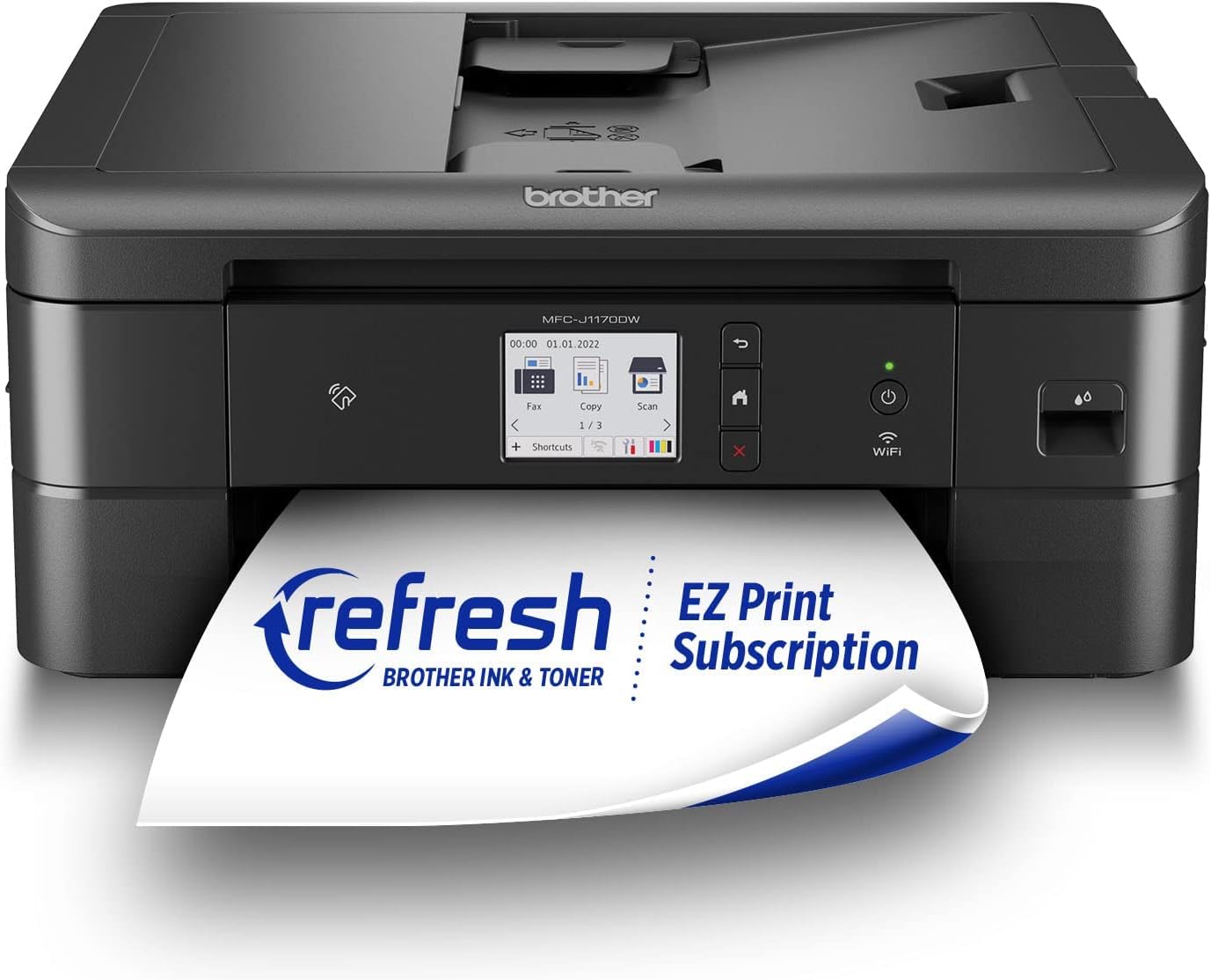
The Brother MFC-J1170DW is a compact wireless color inkjet all-in-one printer designed for home offices and small businesses. It delivers fast print speeds up to 17 ppm (black) and 16.5 ppm (color), features a 2.7" color touchscreen, NFC one-touch printing, automatic duplexing, and versatile connectivity options including Wi-Fi, Ethernet, USB, and mobile app control. Integrated smart features like Brother Page Gauge and Alexa compatibility ensure hassle-free ink management and seamless cloud printing.


| ASIN | B09WZBX4Z1 |
| Additional Printer Functions | All In One |
| B&W Pages per Minute | 17 ppm |
| Best Sellers Rank | #11,015 in Office Products ( See Top 100 in Office Products ) #44 in Inkjet Computer Printers |
| Brand | Brother |
| Built-In Media | Brother MFC-J1170dwBlack, Cyan, Magenta, Yellow Starter Ink CartridgesQuick Setup Guide Product Safety Guide Reference Guide Warranty Card Telephone Line Cord |
| Color | Black |
| Color Depth | 24 bpp |
| Color Pages per Minute | 16.5 ppm |
| Compatible Devices | Smartphones |
| Connectivity Technology | Ethernet, USB |
| Control Method | App, Touch, Voice |
| Controller Type | Android |
| Customer Reviews | 4.2 out of 5 stars 1,292 Reviews |
| Display Type | color touchscreen |
| Dual-sided printing | Yes |
| Duplex | Automatic |
| Hardware Interface | Ethernet, USB 2.0 |
| Initial Page Print Time | 6.9 Seconds |
| Ink Color | Color |
| Is Electric | Yes |
| Item Dimensions D x W x H | 13.5"D x 15.7"W x 6.8"H |
| Item Type Name | Inkjet Printer |
| Item Weight | 16.4 Pounds |
| Manufacturer | Brother |
| Maximum Copy Resolution Black and White | 1200 x 1200 dpi |
| Maximum Copy Resolution Color | 1200 x 1200 dpi |
| Maximum Copy Speed Black and White | 13 ppm |
| Maximum Media Size | 8.5 x 14 inch |
| Maximum Print Resolution Black and White | 17 dpi |
| Maximum Sheet Capacity | 150 |
| Maximum print Resolution Color | 6000 x 1200 dpi |
| Model Name | MFCJ1170DW |
| Model Number | MFCJ1170DW |
| Model Series | J1170 |
| Number of Ethernet Ports | 1 |
| Number of Licenses | 1 |
| Number of Trays | 2 |
| Other Special Features of the Product | Auto Document Feeder, Auto-Duplex, Display Screen, Network-Ready, Touch Screen |
| Output sheet capacity | 150 |
| Paper Size | 8.5 x 11, 8.5 x 14 Inches |
| Power Consumption | 21 Watts |
| Print media | Envelopes, Glossy photo paper, Paper (plain) |
| Printer Connectivity Type | Ethernet, USB |
| Printer Output Type | Color, Monochrome |
| Printer Type | Inkjet |
| Printing Technology | Inkjet |
| Processor Count | 1 |
| Resolution | 6000 x 1200 |
| Scanner Type | Sheetfed |
| Series Number | 1170 |
| Special Feature | Auto Document Feeder , Auto-Duplex , Display Screen, Network-Ready, Touch Screen |
| Specific Uses For Product | Home, Office, business, home office |
| Total USB 2.0 Ports | 1 |
| Total Usb Ports | 1 |
| UPC | 012502663966 |
| Unit Count | 1.0 Count |
| Warranty Description | 2-year limited |
| Warranty Type | Limited Warranty |
| Wattage | 21 watts |
N**R
Good for new 5ghz Wifi connection, good value, sturdy machine
I had to upgrade to a printer with 5ghz wifi capability and shopped around quite a bit before deciding on this one. The printer arrived earlier than scheduled. It was well packaged and all components were wrapped securely. It's sturdy and has some weight to it. After unboxing, total set-up with downloads for the apps/connecting to wifi took a little over an hour. The ink is easy to install, much better than the cartridges of older models. The printer doesn't come with a cable to connect it to your laptop/computer, but I had one from my old printer and was able to use that, making set-up easy. It took a while to find where to plug it in; the illustration was vague. Instructions were cookbook. Print quality is excellent: great colors, crisp, aligned well. The value is excellent for this printer/scanner/fax unit. It comes with a phone cord if you need it for faxing. It was up and running wirelessly with no problem right away. No problems with paper feed. I'm pleased with this printer!
B**D
Easiest setup, worth the cost
I returned an HP model and purchased this Brother one at a much higher price. It was worth the extra cost! This printer was so simple to set up. Basically remove a few packing/shipping things, plug in, add paper, insert ink cartridges (they include enough ink for about 200 pages). Follow the screen messages and connect to your WiFi, set the date/time, etc. If you download the Brother Mobile Connect app, you’ll gain some additional useful features, like scanning directly to your mobile device. The paper tray has good capacity, the machine prints fast and in good quality, you can select to print double-sided (and it does that automatically), it’s quiet, and the NFC printing option works amazingly well. I’m very pleased with this printer and scanner. One caution though - if you’re in the US, you should be registering on the US Brother website. For some reason, the sticker on my printer had a QR code that brought me to the Canadian website (url ends in .ca).
S**S
LOVE IT!! (HELPFUL REVIEW - with 1 year update)
So I just received my Brother printer and so far so good! Set-up was super easy like everyone said! Initially I saw the fold-out paper of the instructions and was like, “UH THAT’S A LOT OF STEPS” …but it actually wasn’t once I started LOL. Literally took me like 5 minutes to setup. The only thing that threw me off is when I tried to get the Remote Print setup connected. It kept saying it wouldn’t connect so I got frustrated. Turns out, it’s not supposed to connect in the app. According to the Brother’s instructions online, you actually are SUPPOSED to select “Activate Later” — and in order to print from your phone, you have to go to Settings on your printer, click Network, click Wifi-Direct (if you’re using your printer and phone wirelessly), select Manual and remember your SSID and Password. Then go to your phone’s wifi settings and select your SSID, enter the password. TADA! You can now print from your phone. So don’t be alarmed if you can’t connect the Remote Print in the Mobile Connect app, it’s not supposed to connect. Follow the steps above! I also added a video of how fast it prints! Along with the print quality for color photos. I will say, if you’re suuuuuper picky about photo quality, this one may not be for you. Though the pictures came out pretty, you can clearly see a little bit of grainy-ness in the video (I tried to zoom in with a clear shot so you can tell during the video - the only reason why I gave this printer 4 stars). But if you’re not too picky and want something that can just get the job done, get it! I’m picky with photo quality but I can definitely deal with this, it’s not that bad. I also don’t understand why the people giving bad reviews on not being able to find the Black ink didn’t just sign-up for the subscription…. I only have to pay $2.50 a month for 40 pages (you can obviously pay more for more pages, $4.50 for 80 pages, $9.99 for 200 pages, or $15.99 for 400 pages a month, and if you use more page outside of the subscription it’s an additional $1 per 10/15 pages — and the ink will auto-deliver to your home once it detects your ink is low. Put it this way: I pay $2.50 a month. I can print super colorful pictures with my 40 pages and run my ink low. They’ll ship me new ink cartridges right away. So I just got 40 pages + ink for $2.50. Get what I’m saying?). The subscription is 100% worth it. I owned an HP printer for 4 and a half years before owning this Brother printer and I was also on the HP subscription - SUPER CONVENIENT PEOPLE!!! You can easily cancel at any time, but I promise you won’t. Thank me later!! Hope my review is helpful! :) Update: Purchased on 03/24/2023, it has malfunctioned around 06/01/2024 :( keeps saying there is a paper jam, but there isn’t a paper jam. Did all of the inspection steps, looked into all of the lil tiniest of areas inside of the printer — no paper jam. System has officially given up and malfunctioned with a paper jam glitch. Luckily my printer is still within warranty, working on getting a replacement.
S**R
Hands down the best in inkjet printers.
This Brother All in One Inkjet Printer from the get go has been hands down our best to date. Our last two printers had problems. We got rid of each one before the end of a year. The brother was a breeze to set up. Most of it was done on the screen of the printer. It was all laid in a very comprehensible format. Modern technology is quite low in my interests and I was able to grasp all the information. This machine prints very fast. Copy off the internet and the wait time is less then minimal. I bought generic ink by mistake and was led to believe it would not be accepted. This is not Brother ink. Our only negative response, generic ink is now in use. From the get go, finding a network and hooking up to the Wi-Fi was mostly done by the printer. Good for me, and up to this point it has not lost the connection. Even with my modest Wi-Fi knowledge, Getting the Brother back up is going to be a very simple ordeal. We have not had the Brother set up for long, so far this has been very uneventful. Nothing to complain about.
K**C
Frustrating because of INK issues!
I really wanted to like this printer! I have heard good things about Brother, and truthfully the installation was easy, and I liked that I could print from my phone too. Here's the issue that killed the deal for me - multiple times the printer tells me I'm out of ink. Yesterday I put in a yellow cartridge - but I pulled out an entirely full yellow cartridge - only to replace it with another one that was all the way full. I printed one sheet of paper, which was black and white. Then today I go to print something time sensitive so I can sign it and scan it... and the printer tells me blue is out. I pop out the blue cartridge (which is full!) and replace it with another full, on-brand ink cartridge and the printer isn't recognizing it's own ink. I turn it off, reset everything, still the same issue. I have had issues like this all along. Although I've had the printer 16 months, I've used less than 100 pages for printing and have gone through 3 different cycles or more of each color. I'm SO FRUSTRATED. And after I tried to fix it today with the last blue color, the entire screen of the printer quit working. I'm just done. I have to drive to my office in a different city just to print a document because of this printer! Don't get it, you can't rely on it. Go with something else.
T**L
Easy setup. Great ink service. Handles legal size paper ok
My previous printer died and I reordered the same brand (which shall remain nameless). It arrived quickly but I was unable to setup as the software in the printer was out of date and the update required too much effort and expense. Back it went. Looking at printer reviews I chose this Brother. Easy to setup. 70+ me had no problem. The ink delivery is fast and on time. My only issue is that the legal size printing is tricky. Sometimes it doesn’t feed well. Since I only print a max of four legal size at a time it’s not a big deal. Would be if you needed to print many legal size pages. Basically. It prints. Easy communication with my Pc and iPad. Does tap to print but I haven’t tried that.
D**N
Worth it
This is the second Brother printer I've purchased and once again I'm very pleased. The first is an black & white laser printer. My daughter is starting to receive Homework/projects from school where teachers are requesting they be printed out in color. Honestly I think we are at a point where a teacher can reasonably expect the kids to have access to a regular printer but expecting a color printer is kinda pushing it cause of how much more they cost....anyway back on topic. The price isn't to bad and I have to admit the print quality is fairly decent. One of the biggest reasons to choice a Brother printer is that they don't gatekeep their toner cartridges and force you to buy first part toner. They recommend it sure but there isn't any physical or software obstacles that exist solely to force you to buy 1st part toner. You are free to buy whatever you wish, at your own risk of toner quality of course but that seems fair trade off. Setup is fairly straight forward as is connecting to the internet. My only complaint is that if you need this for use with a single computer and it'll be located fairly close to the computer you might want to connect via a usb cable for the sake of simplicity and to eliminate the lag that can occur from printing over the network. So while you "can absolutely" connect via usb to a computer you have to buy the cable separately. It doesn't come with it which I found puzzling cause lets be real the cable would cost the manufacturer like a dollar if that so there really isn't a reason not to include the cable. In the end I'd say the next printer I buy will also likely be a Brother.
D**Y
There is not a years worth of ink in the box.
Pro: Prints faster than my old Brother J-985 Cons: Misleading on amount of ink "in the box." Wants users to subscribe to ink like HP. WIFI connection problems. Recently my old Brother J-985 died. For years, I had bought nothing except HP printers, but I couldn't continue with their high-priced ink cartridges and their nags for me to subscribe to their ink service. Indeed, the total cost of HP cartridges for me far exceeded the cost of my HP printers. Moreover, I was left with $100 of almost full, obsolete HP cartridges when a print head on my last HP went out after less than two years of light service. Replacing the print head would have cost more than buying a new printer. Like ink, printers are designed as consumables, and each new generation of printers obsoletes previous printer cartridges to increase the cash flow to manufacturers. So, for a complete change from HP, I switched to the Brother J-985. Although my Brother J-985 did not print as fast as any of my HPs, it used large, inexpensive ink cartridges, and the printer automatically ordered new ones from Amazon only when needed, much different than a monthly subscription service. My J-985 died two months ago after five years of good but slow service, and again I was stuck with a set of obsolete, almost full cartridges, but they were half the price of HP cartridges which were not as large. During the five years of service by the J-985, I used nothing except Brother OEM ink cartridges. Hoping for similarly good service from a replacement printer, I purchased a Brother J-1170 which looks a lot like the J985. However, the J-1170 is a much faster printer. Unfortunately, I soon discovered that the "high capacity" LC401 black ink supplied "in the box" for the J-1170 are less than half the capacity of the economical, and now obsolete, black LC20 cartridge for the J985. This was quite a disappointment. Even worse, Brother followed HP's lead by claiming in the product description that up to a year's worth of ink came "in the box." It did not. The supplied small LC 401 black ink cartridge was half full at installation and empty within a week even though we don't do a lot of printing. Apparently, the offer for a free, three-month ink subscription was supposed to provide ink for up to a year. Ridiculous, and NOT "in the box." Ink subscriptions and high cartridge prices were why I quit HP. This tactic by Brother aggravated me sufficiently that I decided not to use official Brother ink cartridges at all. So, I declined the free trial and instead ordered non-OEM LC401xl Ink Cartridges for the Brother J-1170. Caveat: because of my latest experience with cartridge printers, this Brother J-1179 printer is the last cartridge-style printer I ever intend to buy. So far, the non-OEM cartridges are printing just fine. Second problem. Connectivity. The J1170 easily connected to my WIFI system. Pressing the WIFI icon on the printer displays the printer's IP address. On the same LAN, I have at least one desktop and one laptop computer running Windows 11. Most of the connectivity problems arise with the laptop, but they have also happened with the desktop. Note: I've updated the Brother App several times in an effort to overcome this problem. I also updated the printer firmware/software immediately after installation and set it to make automatic updates. After printing flawlessly for several days, suddenly the laptop can no longer find the printer. However, it usually continues to work fine from the desktop. I check the printer. It claims to be connected to the WIFI using the same IP address as usual. I run Brother's incredibly useless network troubleshooter. The app comes up announcing that it cannot find the printer. It then offers to try to connect to the printer by trying a RANDOM IP address. I can reject this RANDOM IP address and another RANDOM IP address replaces it. What I cannot do is type in the correct IP address as displayed on the printer screen. That is not allowed. The app tries to find the device at the RANDOM IP address for six seconds and then offers a new RANDOM IP address to try. You can waste a lot of time trying RANDOM IP addresses. Just stupid. At one point another of the Brother management tools actually displays the correct printer and the correct IP address for me to select, but if I select it, the app announces it cannot connect because the printer is not online. I check the printer. The printer believes it is online and connected by the correct IP address. The only way I've managed to get around this, which apparently isn't documented on Brother's help site, is to hold down the WIFI icon on the printer until it indicates that I should select a different WIFI system to connect to. I select the same WIFI system, but then must re-enter the password. Then the printer reconnects to the same WIFI system it was previously connected to, and when I check it, it is using the same IP address. However, the printer then suddenly starts printing the queue from the laptop and works fine thereafter until the next tiime. This is completely insane, and highly irritating. If the printer didn't print so nicely, and didn't take non-OEM cartridges with only a warning and no nag, I would give it 2 stars instead of 3. Despite HP's other flaws, I seldom had trouble with a WIFI connection. I admit that the Brother app for printing, ink levels, and scanning works well but only when the printer agrees to be found. The last Epson I owned was a dot matrix. I once had a Canon portable printer. Neither of those used WIFI. Maybe it's time for another brand change...?
Y**.
Producto bueno, mal embalaje
Me llegó con muchos detalles de maltrato como se puede ver en las fotos, sin cintas de embalajes, sin plástico protector en la pantalla, sin tapones de seguridad en dónde van los cables. En dónde escanea estaba un poco tallado de la parte de apoyo. Supongo que porque la compré con descuento. No la devolví porque realmente la necesitaba, al principio se trababa y me aparecía que tenía atascon, la revisaba y seguía con el mismo problema, hasta que la voltie y vi que en el riel había un tapón anaranjado de una entrada de cable. Sin contar todo lo anterior funciona perfecto, más rápida que la que tenía, imprime perfecto a doble cara, la calidad de las copias y escaneo tu las eliges, la pantalla touch es genial. Lo malo es el material de dicha pantalla es muy sensillo. La tinta de los cartuchos que vienen en la caja me alcanzó para muchas impresiones y copias. Si no hubiera sido por los detalles con lo que llegó yo le pondría 5 estrellas, realmente vale la pena.
V**A
Consumibles
Falta de cartuchos en mexico
A**B
Great printer
This printer works great for my needs, and was super simple to setup. Love Brother equipment.
A**S
No hay cartuchos en venta por ningún lado. Se vuelve inservible sin sin tinta..
No hay cartuchos a la venta y sin tinta se vuelve solo una basura porque ni escanear se puede. Sólo tiré mi dinero a la basura.
J**A
OMG... PERFECT!
I have been "fighting" with my previous brand of printer to make it wireless. We moved and I needed to set it up elsewhere. Also, I didn't like filling the cartridges. So, I bought this FABULOUS Brother MFC-J1170DW !! It arrived in a day and a half. (Congratulations, Amazon!) I had it set up and printing in no time flat. It is totally wireless and it prints from our desktop, two I-pads, and two I-phones. It is not a huge footprint which i really appreciate in this 'new-to-us' house. I have had Brother printers years ago. I should have stayed with the Brand. I heartily recommend this printer.
Trustpilot
1 month ago
3 days ago