🔗 Connect & Conquer: Your Bluetooth Bridge to a Wireless World!
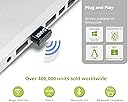
The Kinivo BTD-300 Bluetooth 3.0 Low Energy USB Adapter is your ultimate solution for connecting computers and laptops to Bluetooth-enabled devices. With compatibility across multiple operating systems and a wireless range of up to 30 feet, this compact adapter ensures seamless connectivity and reliable performance, backed by a 2-year warranty.


| ASIN | B005Z5HT2M |
| Brand | Kinivo |
| Compatible Devices | Desktop, Keyboard, Laptop, Printer |
| Compatible Operating System Family | Windows |
| Customer Reviews | 4.1 out of 5 stars 3,049 Reviews |
| Data Link Protocol | Bluetooth, USB |
| Global Trade Identification Number | 00609465955933 |
| Hardware Interface | Bluetooth, USB |
| Item Weight | 0.09 Pounds |
| Manufacturer | Kinivo |
| Mfr Part Number | BTD-300 |
| Model Number | BTD-300 |
| UPC | 609465955933 |
| Unit Count | 1 Count |
J**K
Works flawlessly with an old iMac + OS X El Capitan! Love this thing...
Brief Summary: I've used this for the past couple weeks with an old IMac (mid-2009) and OS X El Capitan v. 10.11.4 and so far it has worked flawlessly. Backstory: Several months ago, I purchased a refurbished iMac and a macbook air in order to use Scrivener and Ulysses for a writing project. I bought a bluetooth Apple Magic Mouse for the macbook and fell in love with it -- it's solidly built and I love the gestures. The macbook air has bluetooth built into the laptop, but the iMac is old enough to lack it. I wanted to upgrade the iMac to use a wireless bluetooth keyboard and mouse and, after reading through a couple hours of reviews, decided to give the Kinivo a whirl. I'm embarrassed to even use the word "installation" for this thing -- all you do is plug it in to an unused USB port and, at least with OS X, Bob's your uncle. It just works. There's a little LED light thingie on the side that let's you know that it's powered up and ready to do its thing. Pairing the iMac with the Apple Wireless Keyboard with Apple Magic Bluetooth Mouse (Certified Refurbished) was easy -- click on the little apple icon in the upper left hand corner of the top level menu bar, then System Preferences... Bluetooth... and a dialog box pops up that lets you see what devices it has discovered. I picked the keyboard, then the mouse, and that was that. They both just worked. Have there been any issues so far? Not really. It took me a bit to figure out that when the iMac was sleeping, I could click on the power button on the side of the keyboard and then hit the "fn" button to wake it up. The keyboard works almost immediately. I've discovered that it can take a few seconds for the mouse to be discovered, so I have to be a bit patient with it from time to time. I've also discovered that if I turn the mouse off and forget to turn it back on before starting or waking the system up, I'm without a mouse. No fears, however... if I turn the mouse on, jiggle it a bit, and sit back and wait for a moment, a dialog box generally comes up and informs me that it's looking for a mouse. When it locates it, it generally takes a few seconds for the mouse to pair up. Then I'm good for the rest of the session. I've also tried this with a cheap pair of BT headphones -- I'm kind of regretting the purchase, but the cans work OK I suppose. As a musician and wannabee cheapo audiophile, the cheap BT headphones sound horrible for music, but they're usable if all I'm doing is listening to anime on crunchyroll or watching a news reel on CNN. Anyway, the point of this is that this little BT dongle thingie has worked great so far. I didn't have to install any software -- on OS X 10 it just works and it's worked pretty much flawlessly once I figured out its minor idiosyncrasies. Would I buy another one? Absolutely. Being able to add bluetooth functionality to an old iMac for $12 is a killer deal. Would I recommend this to someone else? Absolutely and without hesitation. If you need BT and you have an open USB port, you're golden.
J**E
Bluetooth 3.0 adapter used with bluetooth 3.0 headset
I got this adapter to use with my bluetooth headset at work (I have a Plantronics M70 headset). I also got one for my coworker who uses another brand. I would say this works well. Definitely follow the instructions for installation! (I didn't and my coworker did. Hers worked, and I had to redo mine. Oops). A couple of notes: This supports bluetooth 3.0 or LOWER, so if your device uses anything higher than 3.0, get a different adapter. Both of our devices are 3.0 and this works well. Both of our headsets are capable of "multipoint" connections (can be connected to 2 devices at the same time), which is great if you have it connected to your cell phone and this. However we've found that things get a bit wonky when connected to 2 devices. Sound doesn't come through simultaneously. For example, if I'm listening to music off my phone, but then my computer makes a noise (such as an email notification), the headset "flips a switch" and my music cuts out so it can play the sound from the computer, and then I have to press the play button to go back to my music. This happens to my coworker, too. I'm sure this is more to do with the "multipoint" functionality of our headsets, so it's just a word of caution if that's what you're getting this adapter to do. We've found it's just easier to have our device linked to only one item at a time. As an adapter, it works very well. Range seems to be dependent on your bluetooth device more than this adapter (my headset is about 30-feet, which is pretty standard). Overall we're both pretty happy with this adapter, especially for the price!
M**B
Works well, installed on both Mac and Windows 8 with small hassle
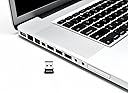
I purchased this to replace an AZIO bluetooth dongle that had a loose cap and bluetooth was dropping out unexpectedly. The package for the BTD-300 includes 2 mini-CD's containing drivers for XP, Windows Vista and Windows 7. Since I have recently upgraded to Windows 8, I was a little frustrated initially since inserting the dongle into my PC laptop did not result in the correct driver being installed. I had to go to the Kinivo website to find and download the appropriate Windows 8 driver. After doing so, the USB bluetooth dongle worked perfectly and I was able to pair with my bluetooth speaker easily. Out of curiosity I also installed the dongle on my mid-2012 MacBook Pro, just to see what would happen. I already have bluetooth by default in my MBP but by turning bluetooth off first, then plugging in the dongle then turning bluetooth back on from the menubar, I was able to connect to previously paired devices as well as add a new device. So it worked well and did not require any driver installation whatsoever. The BTD-300 seems to go into power-saving mode when not in use since the blue LED light that is on during periods of activity will go off completely when there is no bluetooth device connected. The dongle is tiny. It does not stick out very far from the USB port and it does not prevent using any immediately adjacent USB ports either due to being wide... it isn't wide and is barely wider than the USB port itself. Since it is so small, I just leave it plugged in 99% of the time. So far it seems to provide reliable bluetooth connectivity. I've not had any issues other than the Windows 8 driver installation not happening automatically. You can't really beat the price and the 2-year warranty is reassuring, This is a great and inexpensive solution for adding bluetooth capability to a laptop that does not already have bluetooth or may have a broken or otherwise inoperative bluetooth capability.
A**N
Use the install disc as a coaster.
I gave it only three stars because of the installation difficulty. Once you get past that, the adapter works just fine. I initially installed the drivers using the included install disc. That was a mistake. The only reason I bought this adapter was to use my new headphones for listening to music and movies on my laptop computer. However, with the install disc, the Stereo Headphone option was not to be found. All I could get out of my headphones was crappy mono audio (like you get if you try to listen to music from your phone using a cheap Bluetooth earpiece). So I tried downloading and installing the drivers direct from Broadcom WITHOUT uninstalling the existing ones first (because the instructions on Broadcom's download page said I didn't need to uninstall them first). That was a mistake, too. I should have learned by now that you always have to uninstall the old ones first, no matter what they say. So, I removed the headphones from my Bluetooth Devices in Control Panel. Then I uninstalled the old software and drivers (forcing a restart). So after a good two hours of fiddling around, I'm back to square one... Save yourself that two hours, and do the next paragraph FIRST... like I should have. So I started over again with the downloaded setup program from Broadcom. It took a good 30 minutes or so for it to download the driver software (the setup program is only 12MB, but when you run it, it downloads the actual software - about 200MB of it), and then another 30 minutes or so to actually install it. Then, in my case at least, when it got all done with all that, it informed me that the installation had failed, and I had to click on "Cancel Installation" to close out of it. I was preparing myself to become seriously annoyed. However, after restarting my computer again (just for good measure), everything seems to be working just fine. I paired my headphones with the adapter, but I had to turn them off and back on before they would actually connect. Note (not directly related to this adapter): To get stereo sound, I had to uncheck the Hands-free Headset option under "Supported Audio Services" so they would connect only as Stereo Headphones. I don't know if that problem is unique to this particular set of headphones, or if it is a malady common to all Bluetooth stereo headphones, but it's actually mentioned in the user manual for my headphones.
K**N
Really Well Built and Easy to Install
Pros: -Cheap -Easy install -Uses Broadcom chip -Well built and compact Cons: -Looks like a tooth and has a blue light (Get it? Bluetooth) -Uses a slightly older Bluetooth 3.0 (not really a con) This was a great purchase for connecting my Wii and PlayStation 3 Dualshock controllers. I used Touchmote drivers for my Wii remote to use as a gyro mouse and it connected easily. Using the remote for 3 hours had no problems with the connection dropping. I used the Xinput DS3 Wrapper for my Dualshock and played from a distance of about 15 ft. I had bought another Bluetooth adapter before this from Amazon, the CSR 4.0 Bluetooth Adapter for $4.99, but it didn't work no matter what I did. The drivers for that were almost impossible to find and it reported a device malfunction the first time I used it, and after hours of trying to get it to work with any of my computers I decided to return it and buy this one instead. I knew I made the right purchase when Windows installed the drivers as soon as I plugged it in. It had a much better housing than my previous purchase, much thicker plastic and a more sturdier design. It uses a Broadcom BCM2070 Bluetooth 3.0 chip so finding driver updates will be easier to find and it is from a reliable manufacturer. This uses the slightly older Bluetooth 3.0 which may be a con for some people, especially laptop users as Bluetooth 4.0 introduces drastically lower energy use for a longer battery life, but for us desktop users it shouldn't be a problem. Knivivo also sells a Bluetooth 4.0 adapter so check that out if you need Bluetooth 4.0. I bought my previous Bluetooth adapter for $4.99, but for the headaches and time it has caused me it wasn't worth the $3 I saved. Save yourselves the trouble and time and get this one.
M**L
Has been a lot of trouble...
So I purchased this adapter for my computer after the success I had with the Kinivo bluetooth car adapter thinking the results would be similar. Unfortunately this is not the case. For starters, this thing seems to have a lot of trouble pairing with my LG HBS750 headset. It took several tried initially, including having to move the USB dongle to several different USB ports before this would connect. Once it finally connected, it sounded and worked fine until the next day when I sat back down at my computer to work. Now I could no longer connect the headset and listen to music. Apparently the headset was still paired, but would not connect. After unpairing, repairing, unplugging, and replugging multiple times, I was finally able to get it to connect again. Again this lasted about a day before I had to fight to get it to reconnect. Once I got it reconnected this time, I noticed the sound was way off. It was incredibly 'tinny' and had no depth or bass. It sounded like a single-channel radio playing through $3 earbuds. I connected my LG headset to my phone via bluetooth to confirm the headset was not at fault, and sure enough the headset sounded crystal clear when connected to my phone. Even though I have Windows 10 and the support website says all you have to do for Windows 10 is plug and play, I still thought maybe the default drivers weren't working, so I went to Kinivo's website looking for drivers to install manually. I was unable to find any for Windows 10, but did find some for Windows 8. Considering most of my Win8 drivers work with Win10, I figured this may help. After installing the Win8 drivers, I was now no longer to pair or connect at all. In addition to that, it seemed my headset was stuck in a constant state of "removing device". I eventually had to install a third party uninstaller (since the Kinivo drivers for Win8 do not have a native uninstaller) and remove the drivers that way. Once I had the incorrect drivers removed and everything back to the state it was in previously, I began getting BSOD's caused by BthA2DP.sys, which is a system file related to Bluetooth's A2DP protocol. I am still unable to get this headset to pair with this dongle without ending up with tinny sound, an issue this exact headset does not have when connected to other Bluetooth sources. I'm wondering if perhaps I got a lemon (since, like I said before, the car adapter I purchased from the same company has worked fine for over a year). I'd really appreciate it if someone from Kinovo will reach out to me regarding a replacement. Thanks for reading.
M**T
Kinivo BTD 300 bluetooth adapter
I have only had this adapter for a few days now and so far it works very well. I've never been a Bluetooth fan, I've never been able to get it to work right. Usually most of the drivers would load and install during setup, but I would find out later that a few didn't install, generally the critical ones, so I was stuck will partial functionality. This little bugger installed all by itself. Windows 8 picked it up and I had it working in less then 30 seconds. Wish I could say that for a few of the other product brands that have brought me nothing but headaches. I noticed that another review was done where a someone running windows 8 couldn't load or find drivers for it. Odd that my version on windows 8 found drivers and this persons didn't. I know the pain and frustration when trying to find and load compatible drivers, most of them don't work correctly or only partially work. Only real bad thing about this technology is its SLOW. My beard grows faster then these things transmit and receives. If your looking for a reliable and not concerned with speed way to up or download small files or listen to music between your phone and laptop or tablet, this will do the job. For the price, this adapter can't be beat and it seems to function much better then those costing 3 times as much. Its simple and software drivers work fine even though I didn't use the provided disks. I wont use those 2 inch diameter disks, had one tear up a dvd drive and another got jammed up to the point that I had to take the drive apart to get it out. Your better off downloading the drivers from the internet. As with any product, do your home work and check for compatibility issues. Make sure your devices will work with the Bluetooth adapter you plan on buying.
H**N
it works, just a hassle to set up
once you get it set up, it works great. i have a desktop with windows 8 and a laptop with both windows 8 and windows 7. when i plugged it into my desktop, it installed the drivers automatically and thought i was done. but since i had drivers but no interface, i was not done. i then put in the windows7/vista install disc and auto run failed. i tried windows 7 and vista compatibility, both failed. if you open the help document on the disc, there's a link to a software download site. i went to it, downloaded their installer and that worked. then i tried the installer on my windows 7 laptop, failed. tried the disc, and it worked. THEN i tried the installer on my windows 8 on the same laptop, failed. tried the disc, failed. as of yet, the software and drivers are not installed on my windows 8 partition on my laptop, so purchase with caution. it's an acer aspire o725 netbook. my desktop is a Gigabyte 880-gm usb 3.0 mobo with an AMD athlon x3 455 Rana now that's its working properly, i love it. i've tested sending pictures, documents and music to and from my galaxy s2 and everything seems to work okay. it occasionally fails mid-transfer but not often. it also randomly fails to transfer in the first place, but i think these are more just general issues with the use of bluetooth in general and not a product of the adapter itself. overall pretty happy with it.
S**M
Works on windows 7 64 bit with a2dp profile for headphones
After trying out two other BT adapters (and wasting time researching for and trying out work-arounds), I was fortunate to have stumbled upon this one since previous searches in Amazon did not show this. The other adapters had driver problems--L2CAP interface, handsfree audio and remote control failed to install--even with the adapter being advertised as having a2dp support and indicated for headsets. Unlike the previous ones I've tried, this is branded, came with an installation guide and installer discs for XP, Vista and Windows 7 (plug and play for Mac), and was boxed and sealed with plastic. This is not plug and play for windows OS (I have win 7 64 bit)and you have to remove all BT programs that were previously installed. Installation using the disc took quite some time. But after the time wasted on the two other adapters, I didn't really mind waiting for the installer to do its work. And don't mind the pop out window from microsoft that will also be searching for the drive. I didn't cancel it when it was chugging along with the disc installation. However, whilst the disc installer managed to install the drivers I needed to connect my BT headphone to the laptop, the Microsoft automatic driver search failed to install some drivers. Do not be bothered by this; just close it (I think you may even cancel this while it is still searching; I'm not just sure). My headphone paired and connected anyway. It is very small--as wide as my logitech unifying receiver and only a tad longer (about 1 mm); so I leave it attached to the laptop even when traveling. It streamed audio just fine and audio quality is quite good. However, I find it laggy sometimes when watching videos, the audio lags about 1 sec or less from the video. However, pause and play most often resolved this issue. And the tech support at Kinivo is good. Since the product did not have any review, I emailed them about the supported profiles and they replied promptly. I did not have to take them up on their offer of further assistance because the adapter worked just fine out of the box and the installation guide is very easy to follow.
A**R
Great for Lenovo PC
I bought this product as an additional Bluetooth option for my Lenovo Laptop. It helped support my wireless mouse and keyboard. I initially bought it because the Bluetooth built into the laptop didn't support everything I wanted it to. This product did not support my iMac (late 2008) edition.
Y**N
Bluetooth Perfecto
Gran calidad de producto y me funcionó en un mac os X 10.11.3 a la primera y sin necesidad de driver de ningún tipo. Precio muy bueno y gran calidad.
オ**ラ
私にとっては非常に良い商品
PC(w-8.1)で音楽を聴くために購入。 PC本体に差し込むだけですぐに認識してくれました。 ヘッドセット(プラントロニクス M70-BR ) とのペアリングも問題なくスムーズにできました。 ヘッドセット電源オフ状態からオンにする時も瞬時に接続され、今のところまったくノンストレスで使えています。 PCから離れても障害さえなければ10mぐらいまではきれいに聞こえますが 体の向きや動きによっては雑音が入ることもあります。 ただ障害物に弱いのはBTの特徴であり、この商品自体の評価とは全く別の問題だと思っています。 最初PCの裏側に差し込んで使っていましたが、 何かの拍子に音が途切れることがあり表側に移動させました。 その後はまったく雑音もなくきれいに受信できています。 おかげでふたが閉まらなくなったのはちょっと残念なのですが、 これは私のPCの仕様のせいであり、この商品自体が悪い訳ではありません。 これまでは携帯やウォークマンをBTで繋いで音楽を聴いていましたが、 それらのバッテリーの心配をする必要がこれでなくなりました。 耐久性についてはまだ何とも言えませんが、とにかく良いものが安く手に入り大満足です。
C**S
super produit pour macbook pro 2011
J'avais un souci avec le BT de mon macbook pro 2011 en 2.1 coupure de son quand j'écoutais avec mon casque sans fil. on m'a dit que ça provenait sûrement de la coque en alu. banco j'ai acheté cette petite clé pour 10euros port compris et ça fonctionne à la perfection et elle ne dépasse pas trop, elle se fait discrète avec une jolie led bleue :-) par contre si vous êtes sur PC à priori WINDOWS 7 ok mais 8 non....
Trustpilot
2 weeks ago
3 days ago