Desertcart purchases this item on your behalf and handles shipping, customs, and support to Croatia.
๐จ๏ธ Print smart, live sharp โ your home office MVP!
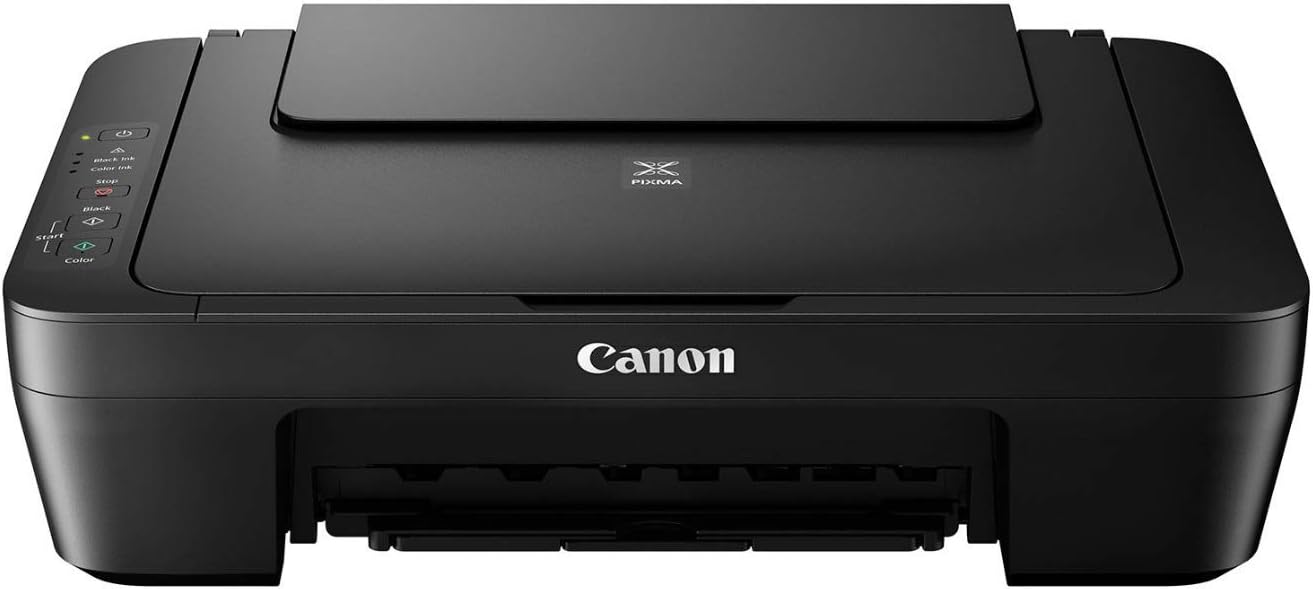
The Canon PIXMA MG2525 is a compact, all-in-one inkjet printer designed for efficient home use. It delivers high-quality color prints at 4800 x 600 dpi and black & white prints at 8 ppm. With USB connectivity and support for XL ink cartridges, it combines affordability with reliable performance, making it an ideal choice for millennial professionals seeking hassle-free, vibrant printing solutions.


| Additional Printer Functions | All In One |
| Asin | B01LZ662EM |
| B W Pages Per Minute | 8 ppm |
| Best Sellers Rank | #100,380 in Office Products (See Top 100 in Office Products) #82 in Ink Tank Printers #588 in Digital Cameras |
| Brand | Canon |
| Built In Media | Printer, Power Cable |
| Color | black |
| Color Depth | 48 bits |
| Color Pages Per Minute | 4 ppm |
| Compatible Devices | Laptops, PC |
| Control Method | App |
| Controller Type | USB controller |
| Customer Reviews | 4.0 4.0 out of 5 stars (3,546) 4.0 out of 5 stars |
| Display Type | LCD |
| Dual Sided Printing | Yes |
| Duplex | Yes |
| Global Trade Identification Number | 00013803279153 |
| Hardware Interface | USB |
| Ink Color | Cyan, Magenta, Yellow |
| Item Dimensions D X W X H | 12.1"D x 16.8"W x 5.8"H |
| Item Weight | 7.6 Pounds |
| Manufacturer | Canon, Inc |
| Maximum Copies Per Run | [N/A: Estimated to be more than 1, but not specified in the product details] |
| Maximum Copy Resolution Black And White | 1200 x 600 dpi |
| Maximum Copy Resolution Color | 4800 x 600 dpi |
| Maximum Copy Speed Black And White | 8 ppm |
| Maximum Media Size | A4 |
| Maximum Print Resolution Black And White | 600 x 600 dpi |
| Maximum Print Resolution Color | 4800 x 600 dpi |
| Maximum Sheet Capacity | 60 |
| Model Name | MG2525 |
| Model Number | MG2525 |
| Model Series | PIXMA |
| Number Of Drivers | 1 |
| Number Of Trays | 1 |
| Output Sheet Capacity | 60 |
| Paper Size | 4 inch x 6 Inches, 5 inch x 7 Inches |
| Power Consumption | 9 Watts |
| Print Media | Envelopes, Glossy photo paper, Paper (plain) |
| Printer Connectivity Type | USB |
| Printer Output Type | Color |
| Printer Type | Inkjet |
| Processor Count | 1 |
| Resolution | 4800 x 600 |
| Scanner Type | Flatbed |
| Series Number | 25 |
| Specific Uses For Product | Office |
| Total Usb 2 0 Ports | 1 |
| Total Usb Ports | 1 |
| Unit Count | 1.0 Count |
| Upc | 013803279153 |
| Warranty Type | limited warranty |
User
So Happy to have this Wonderful Printer
Used the PIXMA MG2522 for eight years and loved it. Updated to the 2525 version and love it too. What made it extremely important was the in between I tried another Canon that was impossible to download on Windows 11. 11 kept changing the download to another verison of a Canon printer as I never could find the drop down list and had to do it manually. Help from Cox Complete Care and two tech from Canon failed. Gave up and donated it to a charity and finally the 2525 was in stock. It comes with a disc, no download needed, and Windows 11 behaved perfectly! I won! Would love to bill Microsoft for my time spent on this issue.
User
Doesnโt take up much space
For a Printer this little sucker is great . Does just about everything a bigger one does but doesnโt need much space to do it in . Prints wireless, very quiet, can run around 100 sheets loaded and came with two ink cartridges. Was very easy to set up and loading those cartridges ( black and color) was a snap . Was really surprised at the fair $$ considering how well it is made . No problem with paper jaming either like those big bulky ones . Great purchase and product . Iโm a happy camper , thank you very much !!
User
Good Printer But Loud and Slow
I received my Canon Pixima MG2525 printer a few days ago. It's surprisingly light weight and easy to take out of the box. The box indicates that it does not include the USB cord, but disregard this as it is included in the box along with the power cord and two ink cartridges - black and color. Set up was not easy for me, it took about an hour. I found the included written instructions to be sparse. More detail would have been nice. I found a really great setup video for this printer on YouTube. It was much more helpful than the included directions. Like most people, I'm a visual learner so seeing the setup through a video was much more helpful to me than the written instructions. Please note that the orange error light will blink until you snap in the ink cartridges. The written instructions don't say this nor does the setup video. I thought I had done something wrong, until I added the ink cartridges and the orange light went out. This model prints well, but be forewarned that it's slow and loud. For home use it's great as my printing needs are minimal. If you need to print a lot daily, the noise and slowness will probably drive you crazy. I have yet to use the scanning feature, so I can't comment upon that. Overall, it's a decent, cost effective printer.
User
Do NOT buy! Cheap plastic inner parts break easily.
Update 5/22/2026: so as Iโm dismantling this printer for the dumpster, I discovered what the culprit was of the ink mysteriously running out too soon, and thatโs what caused the repeated error symbol. It was something I definitely would not be able to fix without paying just as much to have it fixed as it cost me two years ago ($99). Below is a picture of ink leaking onto an absorber pad. Basically all the black ink spilled out of it and thatโs why the black ink kept running out! Too bad it was already a problem since day one and the printer never worked correctly anyway as it also had a hard time rolling the paper into the machine. What a piece of junk. Iโve since bought a more efficient printer from another company and Iโm glad that I could personally figure out what it was. I tried for several hours to fix the machine before giving up on it and taking it apart for the dumpster.Absolute cheap plastic trash! I purchased this piece of crap in February 2024. Today, when I really needed to print important paperwork quickly, I learned I cannot trust this product. Not one, but a few pieces easily broke apart in the ink cartridge. Therefore, I am now unable to put ink in my printer rendering it useless. Donโt buy this printer for $229 like it says right now. Two years ago I purchased it for only $99! It is the exact same printer. I had another printer through another company that lasted me at least 15 years before the wheel didnโt want to turn the paper and it kept getting jammed and then a spring broke off. Another thing about this Canon printer is that itโs frustrating to put the ink cartridges in and thatโs what broke the plastic on the inside. I also always had issues with getting the paper to go down to where the machine would pull it out and actually print it. Needless to say I will be going to another brand. I already know that you will not be able to just replace cartridge holders and will have to buy another printer.
User
Best purchase!
This printer has been awesome! Purchased over a year ago and havenโt had any issues since. Have travelled with it, used it to print cardstock or normal documents, itโs been a dream! Would highly recommend this, especially for the price truly feel like you canโt get a better deal
User
Hmm, okay-ish
UPDATE: Original review of Pixma MG2525 follows but after the first ink-death, which came too soon, we find that the PG-243 and CL244 cartridges are very short-lived, even in a world of short-lived cartridges. They're also unusually and needlessly awkward to remove. Not terrible, does the jobs, but I think there are better budget Canons. Here's the original review: WELL . . . IT PRINTS AND copies. Like some of you I've been a Canon fan for a long time; this MG2525 replaces a rock-solid, single-function Canon that lasted almost 14 years and printed beautifully even on Draft, then died suddenly. I needed a printer/copier fast with no time for research so here's the scoop: Lightweight, thin plastic, but aren't they all. The USB cable you get is only 3 feet long so if necessary, like for a desktop setup, have a longer one ready. Setup is not really aggravating -- although inserting the cartridges is awkward -- but DO NOT CONNECT with the USB cable until after you've downloaded the software, using either the enclosed disc or from a Canon download: If you do, it will cause you pain. This model doesn't offer wireless connection but it says it scans, which I haven't tried. I think it prints a little faintly on Draft setting, but to be fair I'm comparing it to my terrific old printer; it also copies a bit faintly. Someone told me I should have shaken the cartridges first . . . worth trying next time. It's fast, I'll give it that. Don't put it near the baby's room: It goes KALUNKK! WHIRR! KRAKK! This is a basic okay budget model at a budget price. And there you have it.
User
perfect for a home office
I have bought three little Canon printers over the last 15 years (two of them this model). I only replaced them when the "ink absorber is full". It always happens around year 5. I couldn't clean the absorber myself because it's inaccessible. Ink cartridges can still be found for less than $20 (I only use black). Printer will not work without the color cartridge, so leave it in there even when it's empty. Printer comes with both cartridges at purchase!One of the print heads seem to go about year 4 but still legible and ok for my work. I print monthly reports. Very easy to set up although the cord it comes with is kind of short, maybe 3 feet. I used my own cord from my tower to the printer which is 5 feet because I have big desk with two monitors. Great value!
User
Excellent printer, but replacing ink cartridges is tricky
This is an excellent printer for my pretty minimal uses. It was easy to put together & has worked very well this past year. Replacing the ink cartridges is a challenge. Open the front of the printer while the copier is on. The cartridge holders are moving. In my Cannon, they donโt stop like the YouTube video demonstration. So, I had to grab the units before they went to their โrestingโ positionโ behind the side. Once tackled, it was easy to pull out each cartridge & replace. Just remember, the black cartridge is on the right, color on the left. It took mine a few copies before it settled into the new cartridge.
User
Great Printer
This is my second one. The first I bought 6 years ago and it got a LOT of use before it died. So, I was quite happy to find the exact same model still available and at a very reasonable price. Only had to reinstall the new software on disc, install and align the ink cartridges, and was up and running. I hope this one lasts as long.
User
A great printer.
It's inexpensive, it works great, and it only requires 2 ink cartridges.
User
Canon is OK
The MG2525 printer stopped warking altogether. Called Canon and explained the problem. Within 4 daysI had a replacement. Very impressed.
User
Customer Service Plays Games
I bought this printer knowing it was basic. I knew there was no wifi connection. I knew it only worked via USB connection. With that in mind, I purchased it. Because I need a printer.Now, was I under the impression that through various USB adapters I would be able to connect my other devices to it? Yes. But I also have a desktop computer so the fact that I could only use it through desktop is inconvenient, yet still doable.With that in mind, I went through the set up CD steps as ive done numerous times before with various printers in my life. Yet it wouldnt work. Evidently, because I had a more advanced canon printer software already downloaded from previous printers, this model would not finish downloading its set up and as a result, I couldnt use it. I then went to the link provided in the instructions for the canon website to get the software online. The link wouldnt work.So I opted to return the printer as I couldnt get it set up. I was responded to the next day and the agent even remarked upon how other customers run into the same issues but "that is the model". Hmm. K. So when I went to print the return label, I come to find that it is NOT prepaid, but a standard "ship it back yourself" style label. I was miffed, because Amazon is supposed to provide free shipping up to 20$ on returns. I was left with the impression that I was not warranted a prepaid label, as they were claiming the printer wasnt inoperable but "that is the model" I ordered. So I took the hit for 18$ return fee and shipped it to the label the Amazon link gave me, which the return address was in Quebec. Now, I am not new to a return process. I shop on amazon a lot and any seasoned shopper knows you don't always get as advertised. I know how to access a return label. I know how to return a product.Cut to over 2 weeks later. My records show the printer had arrived in Quebec 8 days prior to me reaching out to inquire about my refund, as it had not yet been processed. I get, in my opinion, a condescending email from a different agent, claiming I had not followed the "step by step" directions from the previous agent, and had used an "incorrect shipping method" instead. They also claimed that they did send me a prepaid shipping label, and therefore they are not on the hook for refunding my shipping expense because I apparently elected not to use the correct label. I wasnt even asking them to refund my shipping, but yet they felt the need to add some salt to the wound. Now again, I know how returns work, it was NOT prepaid when it was printed. Even the person I had print for me (as I had no printer) commented on how it was NOT prepaid, because as an avid amazoner herself, she too was surprised.He issued the refund, and then I checked my return lable again as my return status had changed. NOW it was showing a prepaid label, this one was not going to Quebec, it was addressed within Ontario. Wtf. Like Im sorry but you can't just change the label type AND address and claim that *I* did it wrong and "didnt follow directions". Classic "covering their own butts" tactics here.Overall, printer was too out of date to be functional, and customer service gives you the runaround. I bought an Epson Ecotank from Staples instead. You get what you pay for!
User
Jโadore
Vraiment parfait
Trustpilot
2 weeks ago
1 month ago