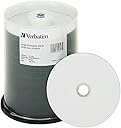






💿 Print. Burn. Impress. Own your digital legacy with Verbatim.
Verbatim Printable CD-R discs offer 100 high-grade, non-rewritable discs with 700MB storage and 80-minute recording capacity. Featuring a unique white inkjet surface for full-color, edge-to-edge printing at up to 5760 DPI, these discs deliver professional photo-quality results compatible with major inkjet printers. With blazing 40x write speeds and a 100-year archival life, they combine speed, durability, and vibrant print quality, all backed by Verbatim’s limited lifetime warranty.


| ASIN | B000YTM4XS |
| Best Sellers Rank | #10 in Blank CD-R Discs |
| Customer Reviews | 4.7 4.7 out of 5 stars (2,130) |
| Date First Available | July 2, 2007 |
| Department | Computer Hardware, Supplies & Data Storage |
| Global Trade Identification Number | 00023942952527 |
| Is Discontinued By Manufacturer | No |
| Item Weight | 3.3 pounds |
| Item model number | 95252 |
| Language | English |
| Manufacturer | Verbatim |
| Product Dimensions | 5.44 x 5.44 x 6.44 inches |
| Recording Capacity | 80 Minutes |
| UPC | 023942952527 |
| Unit Count | 100.0 Count |
| Write Speed | 40x |
F**S
Awesome CDs!
Print quality on label side looks really good when done—pro quality! We were shocked at the results. We had no burn errors when using them. Packaging and storage spindle is good quality and feels sturdy. A great set if you have need of optical media.
T**N
QUALITY AND FLEXIBILITY
These CD-r's are very flexible on what kind of ink can be used on their labels. Everything from pad stampers, to pens and paint. I've duplicated hundreds of these and never had a failure.
A**L
Easy to print on hub
Great price, burn rate easy print on inkjet hub
F**O
Es exactamente lo que esperaba
C**C
No disappointment and the matted white surface makes labeling easy.
Works well. No disappointment so far. Nice to be able to write on top of disk without having the shinning reflection coming back into your eyes. The matted surface is nice and I like it
S**N
CD
Great value
J**R
Records records well
I would advise anyone who reads this to make a physical recording of your albums every time you purchase one. Whether it from Amazon, Apple, BandCamp, or whatevs. Burn a copy, because digital ownership is nothing like owning a physical copy of the music. With that said, I prefer these CDR-s because the top is basically blank & you can write all over it. Title, artist, even the track list, if you so desire. So these are good ones.
R**T
Works great for burning your music
Good price on a good cd that my burner never had an issue with.Highly recommended
V**A
Entrega rápida, antes de lo esperado. De fácil manejo y funcionan a la perfección, gracias!!
G**N
Excellent discs, recording and print exceedingly good. As for longevity, I should live so long. Only down side is the price.
R**T
Eventhough CDs are good but always I get damaged casing of CDs
T**H
The discs are good. And overall I find this brand to be one of the best and most reliable. I don't know if they last any longer than other brands though. Some very good brands I've bought in the past now have disk rot and some not so good brands don't. Some not so good brands do. So there isn't a lot of sense or reason in that respect. This is the first time I've used and purchased the white top version of printable CDs. In the past I've used Verbatim's silver top printable CDs. I wanted the white top version to bring out the designs better because some of the ones I did were pretty faint. The white tops solved that issue. The problem I now have it that since these are edge to edge printable, the aspect ratio of my CD designs are off. Burnt a few coasters to find out. So I will give everyone the benefit of the info so nobody else has to waste any discs to find this out. Inner disc print ratio for these discs should be 22 mm in order to not have a white inner border, in order to get the actual edge to edge effect. Inner diameter for silver discs is 46 mm in order to print to the edge of those discs. Outer diameter for both types is 117 mm. Namely, instead to printing right to the edge of the disc, the designs - because the template is set for the standard CD label size - leaves a stupid white circle in the middle instead of printing the design right to the edge. I can adjust the print aspect ratio or whatever it's called to print closer, but rather than waste a 100 pack of discs trying to figure this out, I would ask if anyone knows the proper setting in millimeters for using these particular discs. You would expect there would be info on this listed, but I can't find anything.
T**Y
These are not new. They have second hand embedded metadata of various Korean pictures and descriptions which appear instead of your own. No good for musicians recording their music with their own metadata.
Trustpilot
3 days ago
3 weeks ago