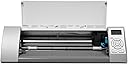
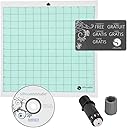
✂️ Craft smarter, not harder — unleash your creative edge with Silhouette Cameo!
The Silhouette Cameo Material Cutting Printer is a versatile, automatic cutting machine designed for scrapbooking, vinyl, stencils, and more. It includes a 12-inch cutting mat, cutting blade, and software compatible with Windows and Mac. Bonus vinyl roll and transfer tape are included to get you started immediately. With precision cutting, software flexibility, and a supportive creative community, it’s the perfect tool for professional-quality DIY projects.
| ASIN | B0060D1LFO |
| Brand | Silhouette America |
| Brand Name | Silhouette America |
| Color | Black |
| Customer Reviews | 3.7 out of 5 stars 38 Reviews |
| Item Height | 21 inches |
| Manufacturer | Graphtec America, Inc. |
| Material | Plastic |
| Material Type | Plastic |
| Operation Mode | Automatic |
| Print media | Fabric |
| UPC | 814792012130 |
P**E
Box a little beat up but product in prime condition
I had concerns when the box looked like it had weathered a storm even though it had been packed inside a larger box! The machine however was in perfect condition and performs with out a problem. It is very easy to use and does all it claims. I am so satisfied, it may replace my Cricut. Software comes with it and it was easy to launch the machine first time making a perfect sample cut. I also own some 3rd party software and this machine will cut with that software too. No more cartridges, yah!
J**R
AMAZING!!!!
The Silhouette Cameo is the way to go. Forget the Cricut with all the high dollar cartridges. With the Cameo, you buy images for 99cents or less and its what you want instead of 40 dollars a cartridge for 3 items you like and want out of it! You're able to use all the fonts on your computer and also download free fonts to your computer and use them! I couldn't be happy. If you have any doubts on what you want between a Cameo and Cricut.... CAMEO is way more reasonable. Cricut is really a rip off. The Cameo has a pause button which I have used several times to stop cutting. YouTube is great to get helpful tips, ideas, also Facebook Silhouette Page/Group is awesome for more ideas. I Loved that it came with Vinyl and transfer tape so I could start! Now slowly I'm building up my vinyl, cardstop and ribbon and on my way to making several crafty things and gifts!!!! Whatever you want to do you're able to do with the Cameo! AMAZING PRODUCT!!!!
V**T
Good starter kit but bad packaging
The kit is an amazing value! and its a silhouette cameo ! but the vinyl that came with it was very bad quality. Also I didnt get to choose the color of vinyl I required for my project. I left a note to the seller saying I needed white and was sent navy blue/ black . It might be because they really dont have that much of vinyl in stock on basic colors. the packaging was bad and the machine came with nicks on it inspite of it being in its own box. Preused? maybe...I returned it !
L**Y
Intimidating But Sort of Easy
I bought this item in February and was too intimidated to actually use it. I'm not entirely sure why I was intimidated. I have used it once to cut vinyl. I found it a bit tricky to load the vinyl and it didn't seem to cut properly. I had to make four trials to get one usable product. I'm sure this will get easier with more experience, but it was a little frustrating. I did not try it with the cutting mat - I just tried to load the media directly. Also, the settings said to set the blade to 1 to cut the vinyl, but I found I had to set it to a 2 or a 3. 1 didn't even cut through the vinyl, it just scratched it. My project was actually using the negative cut to make a stencil for etching glass. The vinyl held up fantastically to the etching cream.
J**R
Terrible directions
Directions were to confusing. I gave it away.
1**W
Not accurate
Purchased this cutter about two weeks ago, just tested it today about half a day. The software is pretty easy to use and the machine responds perfect with the software. It does not include the driver for the machine though, you have to download it from their website. I tried many time with different designs to cut around the design and inside also (for example, I tried to cut a 3D text design)and it just doesn't cut after the design, it cuts thru it or outside of it, but not the contour of it....which it sucks a lot because my designs need to be perfect, especially because the designs go on dark garments and you can see that is not perfect....or at least as close as possible to perfect. I gave two stars just because it's easy to setup, but nothing more.....
Y**A
Pro Stenciling
I have successfully used this machine to make airbrush stencils / masks using transfer paper or frisket film. I did not remove the protective liner on the cutting mat. Instead i just stick my transfer tape or frisket directly to the liner on the mat and cut with a knife setting of 1 and a thickness setting around 7. This way there is no noticeable cut through on the mat liner afterwards. I use a clear frisket that has a medium tack to pick up the cutout and place onto my surface. Then i weed in place on the work surface. I buy the transfer tape and frisket from an auto place that stocks graphics supplies. (See pics of my first try under customer images) Amazon also carries these supplies: 6" x 30' Clear MASKING/TRANSFER FILM-Frisket-Airbrush This way i do not have to track down low tack "paint mask" vinyl to use or worry about high tack vinyl lifting my paint or fiddling with the adhesive of the supplied cutting mat (i've read many complaints about this). For bigger (longer than 12") projects i plan to make my own cutting mat with some mylar or something similar. There are lots of resources online for doing this. I use TurboCAD 15 and Adobe Illustrator in tandem to get my CAD files to open flawlessly in Silhouette Studio. Once the .DXF drawing is open in Adobe Illustrator, just ungroup the entire graphic TWICE and export to .DXF again from Illustrator. This file should then open with no problems in Studio. With this and the millions of free vector logos online i can now pretty much airbrush anything even with my mediocre freehand skills.
T**A
Love My Cameo!
I had a Cricut for a couple of years but dreaded having to buy cartridges over and over again for maybe a few images I liked. I sold my Cricut and plunged in to purchase the Silhouette Cameo (which came out to the same price as the Cricut). Fantastic choice! I have not had a lot of time to practice but it is simple to use. You can create basically anything with it. Looking forward to having more time to play with my new toy! Highly recommend it!
Trustpilot
2 weeks ago
1 month ago