Desertcart purchases this item on your behalf and handles shipping, customs, and support to Croatia.
🚀 Elevate your home WiFi game—never settle for dead zones again!
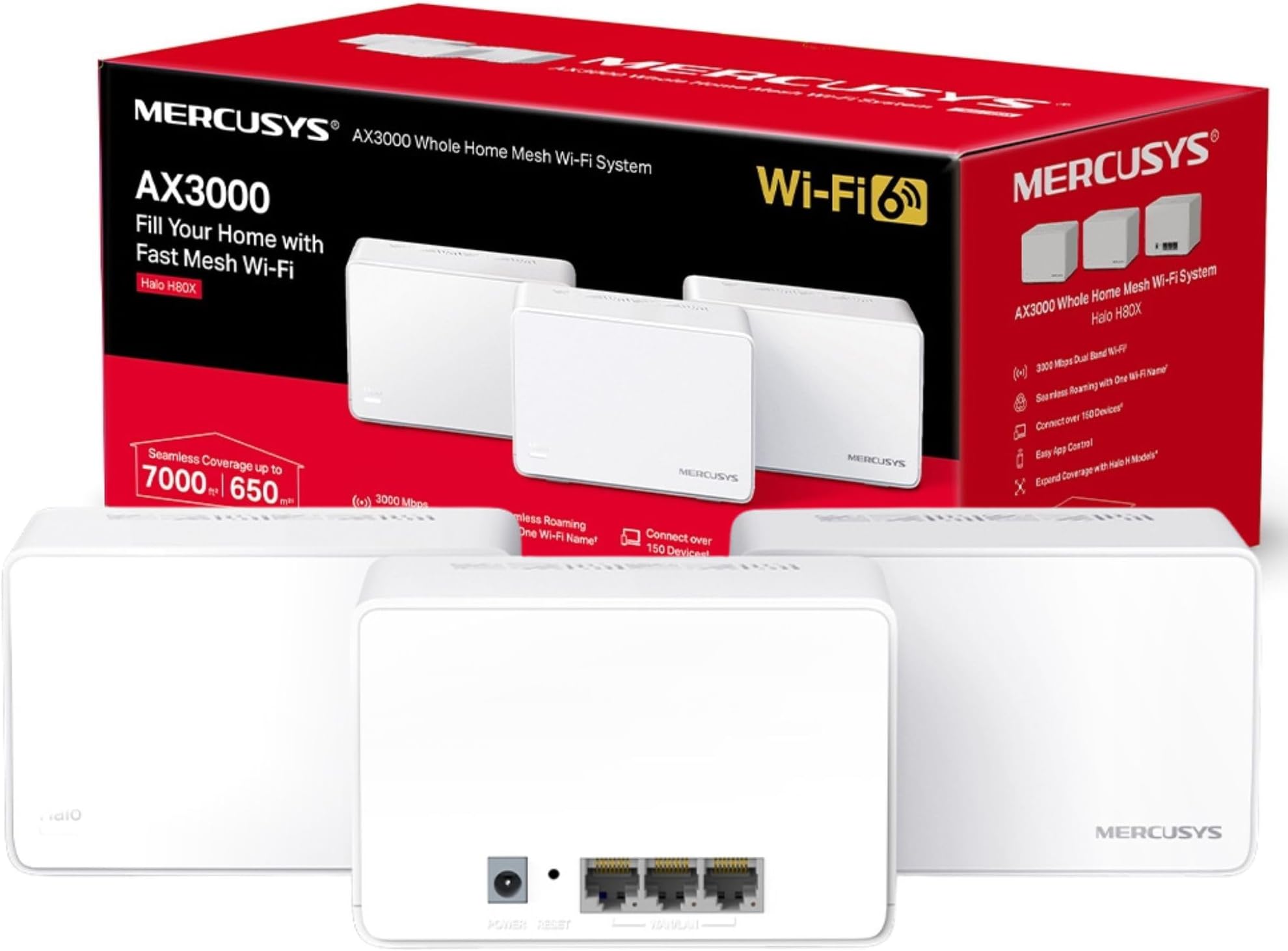
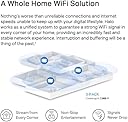
The MERCUSYS Halo H80X 3-pack Mesh WiFi 6 system delivers blazing dual-band speeds up to 3000 Mbps, covering up to 7,000 sq ft with seamless roaming and support for over 150 devices. Featuring 3 gigabit Ethernet ports per unit and easy app-based management, it’s designed to eliminate dead zones and keep your smart home connected effortlessly.


| ASIN | B0B2RQR96Y |
| Antenna Location | Home |
| Antenna Type | Internal |
| Best Sellers Rank | 4,641 in Computers & Accessories ( See Top 100 in Computers & Accessories ) 20 in Whole Home & Mesh Wi-Fi Systems |
| Box Contents | Halo H80X(3-pack) |
| Brand | MERCUSYS |
| Brand Name | MERCUSYS |
| Colour | Multicolour |
| Compatible Devices | Appliances |
| Compatible devices | Appliances |
| Connectivity Protocol | Wi-Fi |
| Connectivity Range | 650 Square Metres |
| Connectivity Technology | Ethernet, Wi-Fi |
| Control Method | App |
| Controller Type | Switch |
| Coverage | 650 |
| Customer Reviews | 4.2 out of 5 stars 2,686 Reviews |
| Data Transfer Rate | 3000 Megabits Per Second |
| Frequency | 5 GHz |
| Frequency Band Class | Dual-Band |
| Frequency band class | Dual-Band |
| Has Internet Connectivity | Yes |
| Has Security Updates | No |
| Is Modem Compatible | Yes |
| Item Dimensions L x W x H | 12.8L x 8.1W x 8.4H centimetres |
| Item Weight | 1.54 Kilograms |
| LAN Port Bandwidth | 1000 Mbps |
| Manufacturer | TP-Link |
| Manufacturer Part Number | HALO H80X(3-PACK) |
| Maximum Upstream Data Transfer Rate | 2402 Megabits Per Second |
| Model Name | Mercusys AX3000 Mesh WiFi |
| Model Number | HALO H80X(3-PACK) |
| Model name | Mercusys AX3000 Mesh WiFi |
| Number of Antennas | 3 |
| Number of Items | 3 |
| Number of Packs | 3 |
| Number of Ports | 3 |
| Operating System | RouterOS |
| Other Special Features of the Product | Remote Access |
| Product Warranty | 1 Year Manufacturer |
| Router Network Type | hybrid |
| Security Protocol | WPA2-PSK or WPA3 |
| Special feature | Remote Access |
| Unit Count | 1.0 count |
| Wi-Fi Generation | Wi-Fi 6 (802.11ax) |
| Wireless Compability | 802.11ax |
| Wireless communication standard | 802.11ax |
K**S
wow
I used to think my WiFi had commitment issues—it would drop out faster than a bad date. Then along came the MERCUSYS Halo H80X, and suddenly my internet and I are in a stable relationship. This 3-pack mesh system banished dead zones from every corner of my house, including the WiFi black hole known as the upstairs bathroom. Five stars, easy. Setup was so simple I half expected it to demand a round of applause. Plug it in, follow a few steps, and boom—lightning-fast internet everywhere. The speed is ridiculously good; streaming, gaming, and Zoom calls all happening at once without a single stutter. My devices now connect faster than I can say “buffering.” Honestly, this thing didn’t just fix my WiFi—it fixed my faith in technology. The coverage is rock solid, the design is sleek, and my family has stopped yelling “the internet’s down!” every ten minutes. Five glowing stars, would buy it again in a heartbeat (though I probably won’t need to, because this setup feels built to last).
K**T
A Game-Changer for Whole-Home Wi-Fi
Set aside 1–2 hours for installation and initial setup. I paired this with a BT Smart Hub 2 router, and the process was straightforward once I knew the steps. The key tip: disable the Wi-Fi signal on your main router through its settings, then assign the exact same network name and password to the first Halo unit that you need to connect to your router via the supplied ethernet cable. From there, place the second Halo roughly in the middle of the same floor, and position the third on the floor above, again, centrally located for the best coverage. Because the mesh network uses the same credentials as your old router, every device in the house reconnects automatically, no manual reconfiguring needed. Previously I relied on a Wi-Fi extender upstairs, which gave a weak and unreliable signal in the furthest room. Since switching to the Mercusys Halo mesh system, signal strength is consistently strong throughout the entire house, including on the 5 GHz band, with zero dropouts. Wish I had found it earlier. Highly recommended for anyone struggling with dead zones.
G**N
So far, so good
Initial thoughts as I've only just completed setup. Had no trouble setting the units up and what problems I did have were due to the Virgin router which I put in modem mode so I could reuse the existing login and password. This allowed all my other devices (cameras and Alexa etc) to act as if nothing had happened. I had already changed the WiFi card in my laptop to be WiFi 6 capable and now I have a fast connection. I'd tried a few things prior to this but these devices so far, seem to work great. I have a large house with lots of walls and the units connect well. A week later: Still impressed with the speed. Further problems with the Virgin router though as the Virgin cable box reported it had no Ethernet connection so plugged it into the Halo (which has enough Ethernet connections) instead of the router and it now works fine. It seems that when converting the Virgin router to modem only mode, it also disconnects all the Ethernet connections although they were still showing flashing lights indicating that they were working. After a few weeks of using these, I am still very happy with the speeds but I have spotted a potential problem for some users. The main base station which is plugged into the router broadcasts to the two satellite units but they in turn do no communicate with each other so it is strictly not a true mesh sytem. Other than that, they work fine. A few months later: I've deducted a star because it isn't a true mesh sytem and it has started acting a little temperamental. Switching the main unit off and on again seems to have cured it for the moment.
A**S
Fantastic Purchase - Made a huge difference
I'll start by saying I never leave reviews, but sometimes you buy something and just have to... 1 - Setup Setup was a breeze, download the app, grab one of the units that you'll use as the main device and select which mode you want to use (I opted to completely replace my router and use the 'main' halo as the router). You're guided through the process and are asked if you want automatic or manual setup. I first tried manual which I'll be honest I couldn't get to work, when selecting automatic I waited about 10 minutes and boom first halo up and running. Get any additional units, place them strategically and again use the guided process to link each unit together. All up and running in about 30 mins. 2 - The app I actually don't quite understand some of the poor reviews stating the app being a limitation. Yes, you can't quite do EVERYTHING you could if you had a web portal like some of the more expensive units. I work in technology (and have worked specifically in a networking capacity) and I honestly couldn't tell you what 99% of users would need that the app doesn't offer. Port forwarding / QoS / priority etc etc can all be done via the app. It also notifies you of any new connections, allows you to name and categorise the devices (great for younguns whom you may want to restrict certain websites from). And you're able to setup 'profiles' for each person so that those profiles are applied to the devices they add. At first, my main PC was dropping (very occasionally), go into the app, select the device and then bind it to the strongest unit (rather than using the roaming capabilitis) and its been absolutely rock solid ever since. Also, the 'network optimisation' function is great too, I've only used it once but it found a really good channel (verified via inSSIDer) and I'm on a quiet channel with little interferance. 3 - Stability / Speed I've had this now for about 8 weeks and I've not had a single problem with it. I've seen in some other reviews they've had to reboot a unit or 2 etc but (whilst I know its early days) I literally haven't had to touch it since setup. Its been absolutely fantastic from the day I installed it. I'm an avid gamer and with my previous setup I'd have the odd disconnect (only breifly) and some games just don't deal with that well. One of my favourite games did this and I'd have to log out/back in again multiple times per night (not good with the type of game played). This setup has COMPLETELY illimintated that and has also reduced my average ping by about 12 (now sitting at 7ms ping on almost all games). Speed wise, from the further point in the house I can get from any of the units, I lose about 10% and no more. My provider gives me 300up/300down and again at the furthest point I get 275/260. 4 - Conclusion For the price paid for these units (I got the pack of 2), at the price of purchase £59.99 they're probably one of the best networking kit I've purchased. Replacing a £300 'WiFi 6' router, these absolutely smoke it out of the park. PC's/Laptops/Phones/Gaming/Downloads have all performed significantly better on these than the previous, much more expensive router I honestly wished I'd tried these much sooner. Finally, downloading/streaming etc on multiple devices all at once this kit doesn't miss a beat. Previously if we had guests round all doing their own thing we'd see some speed drops and inconsistencies. With this, everything I've thrown at it so far no matter what you're doing it just handles it, no questions asked. If you're on the fence about mesh, or even considering a new router I'd honestly suggest giving these a try. They're owned / operated by TP-Link as their 'consumer' focused brand, but honestly they outperform everything I've tried so far (AP points/extenders/very expensive routers) and I'd have no problem purchasing Mercusys again. Fantastic piece of kit and I'd buy it again no question.
B**R
A non-starter with Virgin Hub5?
Just bought the AX1500 to pair with my Virgin Media Hub 5, and had difficulty on the set-up. There is very little in the way of instructions in the box, problem being in the UK the router is the modem, so once you switch the router off, you risk losing the connection altogether - and that’s what happened. When the mesh fails to connect to the router you are left with only the phone app attempting an automatic connection (the manual connection did not work either). At that point I could not get into the modem to alter the settings because modern devices of the portable variety have no Ethernet ports. Fortunately had a friend visiting who is a software and tech consultant, so he had a go too, with no luck. So he just reset the Hub5 and advised me to try an Eero6e - albeit at 4x the price. Easy to set up apparently with an excellent Help Desk in the event. Pity though, because the tutorials in YouTube all assume you have a modem - as in the US. It is fair to say there could have been complicating factors to do with the HUB5, as detailed in some geek rooms.
A**R
Awesome performance and value
I needed to setup a means to cover off the WiFi black spots in certain corners of my house. This absolutely delivers - really easy to setup, took about 15 mins. With my Sky router WiFi turned off, this gives a great signal across the house. Great additional features like parental controls, guest WiFi etc
D**G
AC1900 (2 Pack)
I was going to take a star off because it doesn't have wifi6 but then I thought, I paid £59.99 and at that price you're not going to get wifi6, I live in a 2 bedroom flat or apartment for the Americans amongst us, and my network suppled router was really not meeting my demands especially for things like the smart cameras outside the property even though they are literally no more than 40ft away, so I decided to dive into mesh technology and this system really made a big difference, to be honest I could have done with the 3 pack but unfortunately a 1 pack costs as much as the 2 pack, that being said this system my first experience with mesh has fixed a lot of WiFi issues I had at the the outer regions of my small flat. 2nd January 2026 So I bought these Halo H50G in may 2024 and there are a few issues with the system, there's 2 in the pack set up but for some reason everything wants to be on the one that's wired to the router, the second one always shows 0 devices connected, despite it being right next to several smart home devices and then the problem with the system going down which it does at least say every other month, between staying at my girlfriends and work I can be away from just a few days a week to a couple of weeks and having smart cameras gives me peace of mind that everything is ok back home, it used to be easy to connect using the app through my main router and resetting the halo system, I don't know if they've done an update recently but suddenly I'm away from home I have no communication with my smart locks, cameras or lights and I'm unable to reset the system, I'm now trying to decide whether to dump the system or at least just put the cameras onto the main router for peace of mind, so for that reason I've marked it down from 5 stars to 3, it's telling me the system is online but I can't access it. The App is really good once you get used to it, when I first set it up a lot of smart home tech or IoT don't work with 5ghz WiFi so to set them up you need to turn 5g off, I eventually found it under the more tab bottom right then wifi, one tip I can give is if you have a lot of smart home tech like me, bulbs, power sockets, hubs, door locks as well as computers and mobile devices, connect them one at a time and check the name they show up as and change it if you need to, so you know what the device is otherwise if you just start connecting devices without paying attention you'll have a load of devices showing up as unknown device, then you've got another headache. I like that I can use the app to check the network from anywhere I have Internet connection but I wish there was the ability to run a network speed check and also you should be able to pause connected devices which would be advantageous if you did need to check out a device you don't recognise, at the moment you can block a device but it's not really a self explanatory way of going about it, like I'm still not sure if by blocking a device you completely remove its credentials. On the whole at this price £59.99 the AC1900 (2 Pack) is definitely a good way to start your journey into the world of mesh because I'm sure you'll get to the point were you'll want to upgrade to a stronger, faster mesh system as technology progresses. If you're new to mesh this is a great inexpensive mesh system to start with, think about the size of your property and where you can place the nodes to decide the kind of coverage you need, but it's definitely worth trying this system as you'll learn a few things without shelling out too much.
G**S
Whole-Home Wi-Fi That Actually Covers the Whole Home
Very happy with this mesh system. Setup was straightforward, the nodes paired quickly, and coverage is excellent throughout the house — including the rooms where Wi-Fi previously went to die. Speeds are consistent, connections are stable, and everything from streaming to video calls just works without drama. Once it’s running, you forget it’s there, which is exactly the goal. Two minor points: the units are a bit chunky if you’re tight on plug or shelf space, and advanced settings are fairly basic compared to premium systems. Neither affects everyday performance. Overall, strong coverage, reliable speeds, and no more router rage. A solid mesh system that does what it promises.
S**F
Good for basic wifi mesh extension.
-Works great. -Easy to set up. -The range is good. -Only sometimes the router disconnects from the internet. A restart usually fixes it.
C**S
Perfecto para montar una red mesh en casa
Varios años ya con ellos y encantado. Muy fácil de instalar y la app va increíble. 100% recomendable si loque buscas es montar una red mesh fiable y asequible en casa.
R**A
Experiment with Unit Placement
Works well if units are place such that each unit has a good connection to at least one other.
ع**د
يأدي الغرض ليس قوي جدا
الجهاز يعتبر جيد لقت قمت بتوصيل القطعتين ويبعدان عن بعضهما تقريبا 7 او 8 امتار والجهاز الثاني يقوم ببث نفس القوة تقريبا قوة إنترنتي هي 450 وهو بث 400 اما الجهاز بجانب الراوتر بث 450
F**A
Check the plugs & test asap
It came with EU plugs that won’t work in Ireland so had to order them separate, then when they arrived only one of the two mesh boxes worked.
Trustpilot
1 month ago
4 days ago