Buy anything from 5,000+ international stores. One checkout price. No surprise fees. Join 2M+ shoppers on Desertcart.
Desertcart purchases this item on your behalf and handles shipping, customs, and support to Croatia.
โจ๏ธ Elevate your workspace with comfort and control โ because your fingers deserve the best!
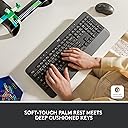
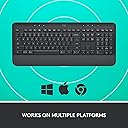
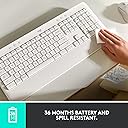
The Logitech Signature K650 is a full-size wireless keyboard designed for professionals who demand comfort and efficiency. Featuring deep-cushioned keys and an integrated soft-touch wrist rest, it supports long typing sessions without fatigue. Connectivity is flexible with Bluetooth Low Energy and a Logi Bolt USB receiver, compatible across Windows, macOS, Chrome OS, Linux, iOS, and Android. Its 36-month battery life ensures hassle-free use, while 24 shortcut keys boost productivity. Crafted with sustainability in mind, the graphite model includes 28% recycled plastic, making it a smart, stylish, and eco-conscious choice for the modern professional.


| ASIN | B0B4ZWZ89X |
| Additional Features | Wrist Rest |
| Antenna Location | Personal |
| Best Sellers Rank | #20 in Computer Keyboards |
| Brand | Logitech |
| Built-In Media | 2 AA batteries (pre-installed), Logi Bolt USB Receiver, User documentation, Wireless Comfort Keyboard |
| Button Quantity | 78 |
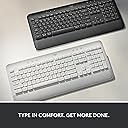
| Color | Graphite |
| Compatible Devices | PC |
| Compatible Operating System Family | ChromeOS, Linux, MacOS, Windows |
| Connectivity Technology | Bluetooth |
| Customer Reviews | 4.3 out of 5 stars 1,391 Reviews |
| EU Spare Part Availability Duration | 36 Months |
| Enclosure Material | Plastic |
| Global Trade Identification Number | 00097855179449 |
| Hand Orientation | Ambidextrous |
| Item Dimensions L x W x H | 18"L x 7.62"W x 0.96"H |
| Item Weight | 707.5 Grams |
| Keyboard Backlighting Color Support | Single Color |
| Keyboard Description | Membrane |
| Keyboard Layout | QWERTY |
| Keyboard Plate Material | Plastic |
| Manufacturer | Logitech |
| Mfr Part Number | 920-010908 |
| Minimum Required Operating System Version | ChromeOs 134, Mac OS 10.12 Sierra, Windows 10 |
| Model Name | K650 |
| Model Number | 920-010908 |
| Number of Batteries Required | 2 |
| Number of Keys | 104 |
| Number of Sections | 7 |
| Power Source | Battery Powered |
| Recommended Uses For Product | Personal |
| Special Feature | Wrist Rest |
| Style Name | Keyboard |
| Switch Type | Mechanical |
| Theme | computing |
| UPC | 097855179449 |
| Unit Count | 1.0 Count |
| Warranty Description | 1 Year Limited Hardware Warranty |
| Water Resistance Level | Not Water Resistant |
A**R
Love this keyboard.... perfect for a legal transcriptionist!
I don't normally give reviews, but this product was honestly worth my time in the case it may help someone else... I am currently starting my new career as a legal transcriptionist and typing thousand of pages a month on my laptop keyboard was not not ergonomic and slowing me down. I researched all of Logitech's keyboard options\ and decided on this one. It was important to me that function keys could be used as primaries (without having to press the function key) as I use them hundreds of times a day in my transcript creation and this keyboard has the feature of setting functions keys as primary shortcuts or primary function keys. It's super easy to toggle back and forth between features with just two key presses. I put a sticky note on the back of the keyboard with the shortcut, so I won't forget it in the future. Also, my USB dongle was floating around in the box, instead of placed inside the secure compartment in the back of the keyboard. I only got lucky and saw it on the floor one day, otherwise it would have been lost so beware when you unbox. On to my review... The Pros: soft, rounded corner keys that feel like pressing clouds and relatively quiet. Is it the quietest keyboard on the market? Probably not. But it's not clunky-sounding and doesn't wake my family when I'm working well into the midnight hours. Connectivity was super easy and had no hang ups. Connects via USB or Bluetooth, which is great because with all my transcription gear, I have no USB space left on my current computer. I've had no issues with lag or it keeping up with key presses and I type fast! There is an LED indicator light on the CAPS LOCK key. All of the shortcut keys are extremely useful, especially the screenshot, as well as the media keys at the top, and there is a dedicated lock key if you work in an office setting where you need to lock your computer if you step away. Even though this keyboard isn't advertised as portable in size, it isn't so large or heavy that it wouldn't fit in a larger size bag to carry with you somewhere or from room to room. I keep mine in a basket beneath my desk when not in use and I love that feature. It's also got a built-in plastic wrist rest that I cannot live without, although some may find that a con as you can not use your own padded or softer version. There are two incline levels, as well as flat, and all three options use premium rubber feet so you've got good traction and shouldn't scar or scratch any surface you place it on. Cons: This keyboard is not backlit. I am worried the white color will likely stain over time and lose it's aesthetics. USB dongle was not packed inside the secure battery storage compartment. No instruction manual - an illustration of the shortcuts and their meanings would have been super useful as well as the primary function key feature switch shortcut. Had it not been for other reviews, I would not have known about this feature and I had look it up on my own from the Logitech website. I cannot get the media controls to control my media when I'm using mini-player mode (ExpressScribe). I'm hoping with some research this may be remedied. Would be better if: It was backlit. Include some instructions-short, sweet and simple would do the trick. Maybe have a manual switch for the primary function key feature. For me personally, the keys could have a little more spacing between them, but this of course would sacrifice space and portability. What I can't speak on... I haven't typed for hours on this yet, so I can't speak to it's durability or battery life. I also have not tried using this with more than one device, so I cannot speak to that either. For my career needs, I can't see finding a better keyboard in this price range and I will likely order a second one in the near future to have as a backup.
S**Y
I like the feel of this keyboard
Keyboard works great. Nice quality.
D**N
Very nice keyboard
Works great
C**M
Small, quiet, & light weight, but could be good or bad depending on the person....
CON's: > Wrist support not as large, or as soft, as the K350 Wave wrist support > I almost threw out the USB receiver because it was not in the battery compartment where there's a holder for it. Instead it was in a cutout in the cardboard inside the box.... > Doesn't have the tactile feel of my K350 > Included batteries are at 65% despite having the paper separator in place upon delivery. > Does not work with the older Logitech "Unifying" keyboard receiver. PRO's > Quiet keyboard - which is also why it doesn't have that tactile feel of the K350 > Lots of user programmable keys. > Doesn't take up as much space as the wave keyboard - but mostly because of the smaller wrist pad.... Only thing I actually docked the keyboard for is the wrist pad. It is only marginally softer than the rest of the plastic in the keyboard. Plus, in natural typing position, the heel of my palms are right on the edge of the keyboard/wrist pad which is only about 2 inches wide. My hands are only slightly larger than average, so I imagine that a LOT of people are going to have this problem as well. The K350 wrist pad is perfect, but I decided to change keyboards due to my old mouse dying, and the new "Logi Bolt" system from the new mouse is not compatible with the old Logitech Unifying Hardware receiver used with the K350 keyboard. I prefer to only have 1 controller in use, saving my USB ports for various other hardware, so I got this keyboard. I may end up sending this back and getting the new version of the Logitech Wave keyboard instead, it looks like it has a better wrist pad with it even if it's a larger keyboard overall.
T**L
Quiet and comfortable
I did not expect this keyboard to be this great at this price point. It's quiet, keys are smooth, and it has Bluetooth. I got this for my wife for her new office setup, and she said it's night and day compared to her previous keyboard, which was also Logitech.
L**S
Quiet and comfortable!
I bought this for work. I am a hard and loud typer, which can disruptive in an office setting. Its very comfortable. Easy set up with a wireless USB receiver or Bluetooth enabled devices.
L**K
Fit and function are great
Very quiet key board. Nice touch on the keys
E**N
No ability to take screenshots - at all.
Maybe it's just on my end, but this keyboard has been a pain. The keyboard itself is great, it connects well, is comfortable to use, etc. However, the software, Logi + options, sucks. I've tried on and off for a couple of months to get it to take full screenshots, but all I can get it to do is take a screen snip, which I already know the keyboard shortcut for. They added so many unnecessary buttons, but removed the print screen button. I've tried remapping the key within the Logi+ Options software, but it keeps defaulting to control P for some reason. It also has had a bunch of issues with the fn buttons not doing what they're supposed to do, either the original fn button, the new feature they set it to, or anything that I custom assign it to. Windows kept getting stuck in fullscreen due to the f11 key not working properly, and I eventually had to go into the settings and just lock the fn keys into their original functions. I'm pretty tech savvy and have tried windows powertoys and a couple other things to get it to work, but unless I use an on-screen keyboard I can't take full size screenshots. This is a very important feature, and I wish I could do this. It's very frustrating that in trying to reinvent the wheel, they broke so many things that I can't take a screenshot, at all (besides screen snip). Like I said, the keyboard itself is great, but the latest software is terrible. If they fix it, I might update the review.
A**S
A comfortable, pleasant to use keyboard.
This wireless Logitech keyboard replaced an earlier somewhat similar wired/battery powered Logitech keyboard that developed an issue in the battery compartment. This led to a constantly flashing red light on the keyboard. Nothing I tried would resolve the problem, so along with experiencing a few keys having become less responsive and precise over the years, I decided to replace it with this one. I am not at all disappointed I did. This keyboard is lighter than my earlier Logitech model but it is in no way flimsy or "cheap" feeling. Once connected to my desktop computer through the Bluetooth connection, a fast and simple process, the keyboard functioned flawlessly. The keys fall readily to hand and were I a better typist, it would no doubt be even more pleasurable to use. As it is, with my tried and true hunt and peck method, it works as well as can be expected. This is a quality accessory from a trusted maker of superior computer accessories. I am very pleased with my purchase.
L**A
Single device only
The only minus is it has single device pairing only. It needs to pair and re-pair if we want to use it for another device. But the rest is good.
D**H
Great basic bluetooth keyboard
I upgraded to this from the Logitech K270. I bought a new PC and wanted to take advantage of Bluetooth and free up my USB ports for other things. I'm quite happy with the key travel and softness and the low noise (I dislike mechanical for noise). I like shortcut buttons for things like emoji and screenshot. The Bluetooth sets up and works like a charm. I accidently turned off my Bluetooth on the PC but was able to get reconnected after connecting the wireless dongle (my Logi mouse also has dual connections). Everything is working as I wanted and I have nothing negative to say about it after a month of use.
A**R
Good but.
I lile it but it has a weird configuration of buttons for the insert button.
G**M
Long lasting and comfortable.
I've had this keyboard for two years. When I purchased it, I was looking for a wireless keyboard that would both fit my aesthetic (my everything in my office is purple and white) and be useful. I find it comfortable and in 2 years, I've never had any issues with it connecting to my computer or with keys getting stuck. I heavily use it as I work on my computer all day and also play games, and the only sign that it's been used is one letter that has been partially scratched out by accident. Other than that, no discoloration, no fading, nothing that sticks. When using rechargeable batteries, it also lasts for a very long time. I've only had to recharge my batteries 2 or 3 times despite using the keyboard more than 6 hours a day. I would definitely recommend.
Trustpilot
1 month ago
2 weeks ago