Buy anything from 5,000+ international stores. One checkout price. No surprise fees. Join 2M+ shoppers on Desertcart.
Desertcart purchases this item on your behalf and handles shipping, customs, and support to Croatia.
🚀 Unlock enterprise-grade speed and storage — because your data deserves the best!
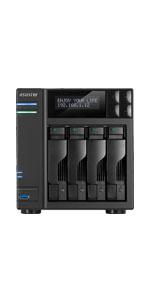
The AS6704T Lockerstor 4 Gen 2 is a high-performance 4-bay NAS featuring an Intel Celeron N5105 Quad-Core CPU with burst speeds up to 2.9GHz, 4GB DDR4 RAM expandable to 16GB, and four M.2 NVMe slots for ultra-fast storage. Equipped with dual 2.5GbE Ethernet ports and upgradeable to 10GbE, it offers enterprise-grade networking and scalability in a sleek metal chassis, ideal for professional-grade data backup and high-speed file sharing.


| ASIN | B09VX5RB6N |
| Best Sellers Rank | #181,887 in Electronics ( See Top 100 in Electronics ) #13 in Network Attached Storage (NAS) Enclosures |
| Brand | Asustor |
| Brand Name | Asustor |
| Colour | Black |
| Compatible Devices | CPU |
| Customer Reviews | 4.3 out of 5 stars 255 Reviews |
| DriveMemory Storage Capacity | 4 GB |
| Global Trade Identification Number | 04710474831432 |
| Hardware Interface | Ethernet |
| Item Dimensions | 24 x 32 x 30 Centimeters |
| Item Weight | 3.5 Kilograms |
| Item dimensions L x W x H | 24 x 32 x 30 Centimeters |
| Language | English |
| Manufacturer | Asustor |
| Memory Storage Capacity | 4 GB |
| Model Number | 116436 |
| Processor Count | 4 |
T**S
Enterprise grade NAS
This is kind of enterprise grade NAS. I am using this as storage backup but I am yet to explore more on other usage for this.
S**A
Excellent product
Very easy to setup and received in excellent condition.
S**N
new features compared to other brands
Easy to Install and some new features compared to other brands
A**B
Decent hardware, poor software, better get Synology
Bought it for the 4 NVME slots. However, the software experience is quite lacking. This is for business use and personal media, both use cases. If the software just works, this would have value. It unfortunately requires a lot of scripting / command line work. The app quality is sub-par too. For apps like the official "Photos 3", the experience is very poor. Apps like Nextcloud, Photoprism, etc are difficult to configure for a moderately skilled team to manage. I regret buying this, is a waste of money for me. Would rather buy a recent Synology model, probably at a lower price too.
T**A
NAS
Habe das NAS mit folgender Hardware ausgestattet: 2 x 8 GB Crucial DDR4-SODIMM CT2K8G4SFRA32A 3200MHz CL22 (problemlos erkannt) 2 x 1 TB Crucial P3-NVMe CT1000P3SSD8 (SSD Cache) 2 x 8 TB Seagate IronWolf 8TB im Raid 1-Verbund (7,28 TB verfügbar - rumpeln hörbar) Der äußere RAM-Riegel ist nach Abnahme des Gehäusedeckels gut erreichbar, für den inneren Riegel muss man einige Steckkarten losschrauben und diese herausziehen (bei Asustor gibt es u. a. zum Thema RAM-Upgrade ein Video). Insgesamt - und bei vorsichtiger Herangehensweise- war die Hardware aber binnen 30 min. montiert. Die Einrichtung des NAS war einfach, da ich die IP anhand der unter dem Gehäuse klebenden MAC-Adressen der beiden LAN-Adapter (oben LAN 1, unten LAN 2) bereits in meiner FritzBox vordefinieren konnte, um wunschgemäße IP-Adressen zu bekommen (kein Muss, sondern ein Kann). Nach Installation und Ausführung des ASUSTOR Control Centers war es sofort möglich, einen neuen Admin-Account anzulegen, wodurch der Standard Admin-Account (admin/admin) direkt und automatisch deaktiviert wurde. Auch durch Sicherheitseinstellungen (Portänderung für http/https) wurde ich sogleich geführt und das vorhandene Update des ASUSTOR Data Master (ADM) in Version 4.2.0.RE71 zur Installation angeboten und schließlich installiert. Da es in 2022 allein 6 ADM-Updates gab, gehe ich auch weiterhin von einer guten Produktpflege aus. Auch auf der Oberfläche ist - aus meiner Sicht - eine gute Informationsunterstützung gegeben. Im Betrieb hört man die Ironwolf ordentlich rumpeln, was für mich jetzt kein Problem darstellt, aber Interessierten bekannt sein sollte. Ob es ein Ironwolf-Phänomen ist, weiß ich allerdings nicht. Ich hatte mich hinsichtlich dieser Festplatten informiert und des Öfteren gelesen, dass sie lauter sind als andere (keine eigenen Erfahrungswerte dazu). Ich habe mich dennoch für diese FP entschieden, da der Lockerstore eine IronWolf Health Management-APP zur Überwachung hat und in meinem Fall das NAS abgesetzt steht. Die Reaktionsgeschwindigkeit des NAS ist m. E. sehr gut und die sonstige Betriebslautstärke -abseits der Festplatten - "im erwartbaren Bereich" (aktiver Lüfter im Betrieb). Die Übertragungsgeschwindigkeiten (ein 2,5 GBit-LAN in Betrieb) sind per WLAN ac und abhängig der übertragenden Daten(größen) gut, d . h im oberen Bereich durchaus um oder auch über dem GBit-Bereich von 125 MBit/s (LAN-Übertragung noch nicht durchgeführt).
P**D
Flexible, silencieux et assez facile à mettre en service
Utiliser en serveur de sauvegarde, multimédia, et d'applications mobiles (Docker).
C**S
Bought as a Plex Server
I've had this NAS since the 6th of April 2023. This is a limited review, using this NAS as a Plex Server. So, buying from Amazon was fine, and delivery was fine, the NAS had no hard drives in it, so no worries about the package being delivered. I had a Western Digital PR4100 before and I loved it.... I bought this NAS for two reasons, 1. I had run out of storage, 2. This NAS will hardware transcode 4K HDR to 1080P, which my lovey Western Digital NAS could not do :( Let's talk about money, so Amazon had the best price... however, this was a BIG investment, we are talking over £600, so it needs to work and be good... and that is without hard drives!!!!!!! I was concerned at first about the ADM? operating system, having watched loads of videos on youtube, with many suggesting it's less refined then what you get with Qnap, or Synology, however, it's fine, in fact, it was easy to use, don't forget, I'm reviewing this as a Plex server, so I'm not experienced all the other NAS stuff. I installed 4 Ironwolf 4TB NAS drives, you have to use a screwdriver, and put very tiny screws in.... crumbs, it was a bit tricky at first, the screws are small, take your time and make sure you don't cross thread them... So it done a ADM operating system update when turned on... and started to build the volume... I'm using Raid 5.... Is it a good Plex Server???? Yes, it's does do 4K HDR hardware transcoding, but only to 1080p, but you will not get anything else then that from any other manufacturer, that is what the chips do right now. It's is fast, so starting a video, and skipping forward is fine... The 4 drives seem a bit noisy, I will be moving it to a cabinet, so it should be okay, but if you wanted it in a living room, and not in a cabinet, it does make some noise... Do I like.... I do... it works just fine, I hated the ADM software at first, but I have now learned where everything is, and it's fine, in fact it's great.
B**S
NCS - Non Ci Siamo
Partiamo da presupposto che lavoro nell' IT da parecchi anni, non sono il "boss" della gestione reti hardware e sorftware ma nemmeno il novellino. Dopo anni (visti i prezzi) decido di comprami un NAS per backup domestico e alcune piccole gestioni da server (ma piccole piccole). Il mio budget max era sui 700 per NAS o PC adibito a NAS e 1000 per dischi. PC adibito a NAS zero assistenza. Scartato. Mi son detto: synology lo usiamo in azienda, funziona da dio, ma con quella cifra ha hardware davvero troppo vecchio e poco performante, inoltre upgrade di parti costano troppo, davvero troppo. Scartato. QNAP ci siamo quasi ma leggevo sui forum di problemi di vulnerabilità dati da software messi lì solo per concorrenza con synology, VPN aziendali bucate, blocchi e riavvi per colpa di prgrammi troppo acerbi (tutto scitto su reddit!). Scartato. Leggo, mi informo, arrivo ad ASUSTOR: tutorial , forum , reddit tutti entusiatri per le prestazioni (poi ne parlo!). Lo compro. Mai scelta fu più azzardata: come sposarsi una escort conosciuta il giorno prima ubriachi e pieni di *oca, come il famoso film... Partiamo lato Hardware: ci siamo , processore decente, upgrade di memoria RAM fino a 32 , anche se alcuni dicono max 16 (8x2). Invece legge i 2 banchi di RAM da 16. Ha 4 alloggiamneti SSD per memoria cache, 4 hard disk meccanici. 2 LAN da 2.5 G che volano. Ci siamo. Lato software, iniziano i problemi: programmi ASUS e i pochi maggiori vanno bene. Per il resto bisogna mettere mano al terminale tramite SSH e leggere forum su forum, video su video. La vostra vita diventerà BESTEMMIE- YOUTUBE e viceversa. Tempo perso per fare cose banali. Risposta dei ticket ASUS inesistenti (ma io personalmente mai aperti, almeno così scrivono i forum). Se c'è un tutorial ufficiale ASUSTOR su come installare TrueNAS sui loro dispositivi una domanda dovremo farcela.... Per farla breve scrivo di sabato , ho ancora 5 gg per provarlo bene in fondo, senno lo restituisco e mi prendo prossimo mese con nuovo stiendio Synology da 1500 che è l'equivlente di questo a livello HD ma non SW.
J**R
Mint
Awesome little system that can handle the latest 22tb hard drives, run Plex great. Remember to enable media mode for hardware transcoding. I’ve paired it with a mini pc for a complete setup
Trustpilot
2 days ago
1 week ago