๐ ZenBook 13: Power, Portability & Prestige in One Sleek Package
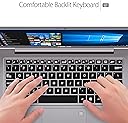
The ASUS ZenBook 13 UX330UA-AH55 is a premium ultra-slim laptop featuring a 13.3-inch Full HD IPS anti-glare display, powered by an 8th Gen Intel Core i5-8250U processor with 8GB LPDDR3 RAM and a fast 256GB M.2 SSD. Weighing only 2.6 pounds, it offers up to 12 hours of battery life, a backlit keyboard, and a built-in fingerprint reader for secure, one-touch login via Windows Hello. Designed for professionals on the go, it combines durability, performance, and sleek aesthetics in a compact grey aluminum chassis.
| ASIN | B075N1YHVK |
| Audio Output Type | Headphones |
| Audio Recording | No |
| Audio features | [Has audio capabilities] |
| Automatic Backup Software Included | Windows 10 |
| Available M2 Slot Count | 1 |
| Battery Average Life Standby | 12 Hours |
| Battery Cell Type | Lithium Ion |
| Battery Life | 12 Hours |
| Best Sellers Rank | #283,419 in Computers & Accessories ( See Top 100 in Computers & Accessories ) #52,564 in Traditional Laptop Computers |
| Biometric Security Feature | Fingerprint Recognition |
| Bluetooth Version | 4.1 |
| Bluetooth support? | Yes |
| Brand | ASUS |
| Built-In Media | Power Adapter, User E-Manual, Warranty Card |
| CPU Codename | Kaby Lake R |
| CPU L3 Cache | 6 MB |
| CPU Model | Core i5 |
| CPU Model Generation | 8 |
| CPU Model Number | 8250U |
| CPU Model Speed Maximum | 3.4 GHz |
| Cache Memory Installed Size | 6 |
| Chipset Type | Intel 300 Series Chipset |
| Color | Grey |
| Compatible Devices | External displays, mice, keyboards, storage devices, printers |
| Connectivity Technology | Micro HDMI |
| Control Method | Touch |
| Customer Reviews | 4.0 out of 5 stars 522 Reviews |
| Display Resolution Maximum | 1920x1080 Pixels |
| Display Technology | LED |
| Display Type | LED |
| Form Factor | Ultrabook |
| Global Trade Identification Number | 00889349839508, 00889349840672 |
| Graphics Coprocessor | NVIDIA GeForce MX150 |
| Graphics Description | Dedicated, Integrated |
| Graphics Ram Type | Shared |
| Hard Disk Description | SSD |
| Hard Disk Interface | Solid State |
| Hard Disk Rotational Speed | 10000 RPM |
| Hard Disk Size | 256 GB |
| Hard-Drive Size | 256 GB |
| Hardware Interface | Micro-HDMI |
| Has Color Screen | Yes |
| Human-Interface Input | Touch Pad |
| Item Dimensions L x W x Thickness | 11"L x 13"W x 12"Th |
| Item Type Name | ASUS ZenBook UX330UA-AH55 13.3-inch FHD Ultra-Slim Laptop Intel i5 Processor, 8GB DDR3, 256GB SSD, Fingerprint Reader, Win10 |
| Item Weight | 2.6 Pounds |
| Keyboard Description | Backlit |
| Keyboard Layout | QWERTY |
| Lithium-Battery Energy Content | 57 Watt Hours |
| Manufacturer | ASUS Computers |
| Memory Clock Speed | 3.4 GHz |
| Memory Slots Available | 1 |
| Microphone Form Factor | Integrated microphone |
| Model Name | UX330UA-AH55 |
| Model Number | UX330UA-AH55 |
| Model Year | 2018 |
| Native Resolution | 1920 x 1080 pixels |
| Notebook Pointing Device Description | Touchpad |
| Number of Drivers | 2 |
| Number of Ports | 3 |
| Operating System | Windows 10 Home |
| Optical Storage Device | No Optical Drive |
| Other Special Features of the Product | Anti-glare,Backlit Kbd,Fingerprint Reader |
| Power Device | AC adapter |
| Processor Brand | Intel |
| Processor Count | 4 |
| Processor Series | Core i5 |
| Processor Speed | 1.6 GHz |
| RAM Memory Installed | 8 GB |
| RAM Memory Slot Total Count | 1 |
| RAM Memory Technology | LPDDR3 |
| RAM Type | DDR3 SDRAM |
| Ram Memory Maximum Size | 8 GB |
| Refresh Rate | 60 |
| Resolution | 1080p |
| Screen Finish | anti-glare |
| Screen Size | 13.3 Inches |
| Speaker Description | [HAS SPEAKERS] |
| Specific Uses For Product | Business, Multimedia, Personal |
| Total Number of HDMI Ports | 1 |
| Total Usb Ports | 3 |
| Touch Screen Type | Capacitive |
| Touchpad Feature | True |
| UPC | 889349839508 889349840672 |
| Unit Count | 1.0 Count |
| Video Output | HDMI |
| Video Processor | Intel |
| Voltage | 240 Volts |
| Warranty Description | 1YR International/1YR ADP with 1-way free shipping/30-Day Zero Bright Dot/2-way FREE shipping for standard warranty repair/24-7 tech support |
| Warranty Type | Limited |
| Webcam Capability | No |
| Wi-Fi Generation | Wi-Fi 5 (802.11ac) |
| Wireless Compability | 802.11ac |
| Wireless Technology | Bluetooth, Wi-Fi |
G**D
Slim but powerful
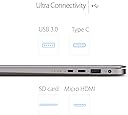
I bought this computer 9 months ago when I started my PhD. It has been great so far! -The battery life is exceptional - if I'm not running any games or any other intense software, it can run all day at work without needing a charger. This has gone down slightly since I bought it though. -Super slim and light. I carry it with me almost everywhere and it takes up barely any room in my backpack. I can carry it by itself easily as well. -Screen is matte, not glossy. I like this because it means I don't get a bunch of glare when I'm outside. -I can run jobs in RStudio pretty easily on this without needing to connect to an external server. -I can play a few games on this laptop, mostly The Sims and Stardew Valley. The graphics aren't exceptional by any means but I'm able to run these games without lag. -The only downside is the lack of ports - which comes with the slim profile. It only has 2 USB, 1 USB-C, one micro-HDMI, and one SD slot, so I've had to buy a lot of adapters and can't have them all in at the same time. -The fingerprint reader is convenient but sometimes it doesn't work for no apparent reason. Overall, for the price I think this is a great buy, if you don't need a machine that runs intense games or fancy software. Highly recommend for college students or anyone who needs to take their laptops on the go.
C**S
Good Value
Pros: For the money, it has great performance. It runs applications fast and can do basic audio and photo editing much quicker than my last computer. The keyboard is nice and backlit, and it is light, thin, and easy to throw into a backpack. Battery life is great (maybe 8hrs on average?) and it charges very quickly, even while in use. Cons: It has some annoying technical issues. The trackpad is a little flimsy, and will sometimes decide it doesn't want to autoscroll. Also the screen sometimes just decides to darken a little even while plugged in, and in general even the highest brightness setting is not that great. The screen also doesn't open too wide (maybe 110ยฐ)
J**L
Excellent Value(8th Gen), Perfect for Students and Those on a Budget
The ASUS Zenbook ux330ua(8th gen) is an excellent value. As a CS graduate student, I needed something that could handle a heavy coding workload while still being portable enough to bring to class and not break the bank. This fit the bill perfectly, and I highly recommend it to students or anyone who wants a premium ultrabook experience at a budget-friendly price. Display 5/5: This is one the best displays you will find on a device under $1000. 100% sRGB coverage is a must have for me. As someone who does a moderate amount of graphics coding and web design, I need to know the colors on my screen are accurate. For those who don't use this device for content creation, you will still enjoy the vivid colors, respectable black levels, and sharp 1080p resolution. The matte display also prevents distracting reflections. Note: There was no noticable backlight bleeding on my unit. It's there if you look for it, but you would be hard pressed to notice it in any real use case scenario. This is not a fault of ASUS as this is typical for IPS displays in general. I also did not have any dead pixels. Keyboard 4/5: The keyboard is respectable if not remarkable. The keys have good travel but are slightly mushy. My unit will sometimes fail to detect when keys are pressed near their corners. The layout is fine, and the half height arrow keys are surprisingly very usable. This keyboard will not remind you of a ThinkPad, but it will get the job done and has held up well to my coding sessions. Audio 5/5: The audio is excellent for a an ultrabook in this price range. It probably won't fill a large conference room, but the built-in speakers are perfect for online lecture videos or the occasional Amazon Prime video. Build Quality 4/5: This device can't quite hold up to the industry leaders like the Surface Laptop, MacBook, ThinkPad, or XPS products. However, those devices are in other price category entirely. At the current price, it certainly outshines the competition, namely the Acer Swift. The chassis is lightweight, and the spun aluminum finish is a beautiful touch. There is a small amount of flex around the keyboard and screen areas. However, I wouldn't consider it to be durability concern. Battery Life 5/5: The battery life was a major selling pont for me. I am getting 8-10 hours depending on usage. As a student on the go, being able to work all day on one charge is a game changer and should be industry standard by now. Performance 5/5: The quad core Intel i5 8250u processor has excellent performance and represents a huge jump from the previous generation's dual core. Pairing this CPU with 8GB of ram and a 256GB SSD, this device will remain a solid performer for years to come. I can easily run a Linux VM to do any work I can't do on Windows. and the performance is superb. The graphics processor is an integrated Intel UHD 620. While this won't be suitable for any heavy gaming, it is perfectly suited for light graphics work, video watching, and displaying to external monitors. You can even play some older or less demanding video games at respectable settings(CounterStrike: GO, Half-Life 2, etc.). Overall 5/5: This is an excellent ultrabook for those on a budget. If you are still reading at this point, there is a good chance you should go ahead and buy this product. You won't be disappointed. For those with a bit more wiggle room in their budget, take a look at the Zenbook ux410 and ux430. Those devices manage to fit a 14" screen in the same chassis by using smaller bezels around the display. Additional Comments: This device is highly compatable with Linux. I have had no issues with any distro I have tried. I can confirm it works flawlessly with Ubuntu 16.04, Ubuntu 18.04, and with elementaryOS 0.4.
T**T
Update after 10 weeks in ASUS repair system
11/21 update. They don't have parts to repair, are looking for a refurbished replacement, and won't offer even a discount on a new replacement laptop OK, completely failed after 33 months, not what I consider a normal life cycle. Key board failed. Laptop just kept opening and closing itself every ten seconds. Asus service accepted delivery 9/15. They have not started on repair on 10/8. CEO office says they have it, moved it from one facility to another to "provide better service", but repair tracking says it has not arrived. No meaningful communication from Asus. No, I don't recommend this product or Asus. So sorry if you bought it based on my earlier review. OK I love it. NIne month update. Lightning fast. 8th gen i5 and 256 SSD. I love the keyboard . Don't understand the complaint that the feel is too light. No problem with shutdown/restart that some people have reported. Still learning Windows 10, up from Windows 7 on old p.c. Would have liked a third USB port since I use a mouse (old school). Speaking of old school, I don't have a screen bleed problem with gaming or watching videos because, well, I don't do that. (Nine Month Update, YouTube videos play great and streaming from Prime and Netflix is sharp and clear). No ghosting. No buttons popping off keyboard. I have not yet accidentally turned it off because of the location of the power button where the delete button usually is. I am satisfied with the battery life though it is not 12 hours. But I bet I could get there if I spent some time checking what apps run at startup. recharges fast. It's quiet. It is not hot. So far, I have not had any of the problems recorded by the folks who scored this a 1. So take the chance. It's a really fast, very light, easy to use Zenbook if you simply want a good computer. Six Month Update: I still love it. NONE of the problems some folks reported. My sister has a new Mac. We just compared features and benefits. They were SO similar, until we compared price. She was amazed at the features for so little Money. This is a great buy. Go for it. Model: ASUS ZenBook Ultra-Slim Laptop, 13.3-inch Full HD, 8th gen Intel i5-8250U Processor, 8GB RAM, 256GB SSD, Backlit keyboard, Fingerprint Reader, Anti-Glare, Windows 10, Grey, UX330UA-AH55
J**S
A great and affordable mid-range laptop.
I have had this laptop for a little over a month now and am really happy with it. It is a good middle of the road laptop. It is light and slim which makes it great for traveling and working online. Pros: - Very light and portable but doesn't feel chintzy. It seems to be constructed well. -The i5 does pretty well. The onboard graphics will bottleneck in certain situations, though, I have only encountered this when gaming. -As just mentioned this will handle light gaming. I play Skyrim with medium settings and have good framerate any more than that and it will bog down. I was able to play overwatch as well but had to do a lot of fiddling with the graphics to get it to run smooth. -This is my first computer with an SSD and I love them. From the time you push power, you can be opening your web browser in 15 seconds. It also helps with the dreaded windows update. It takes SIGNIFICANTLY less time to update. -The harman/kardon speakers are great they have a good sound quality for a laptop speaker and are plenty loud. -The battery life is very good. It will stay charged for 5 or 6 hours while gaming while connected to the internet and full brightness. Essentially, you will have 5 to 6 hours of battery at the least. You can get at least 12 hours with light use. -A common complaint about this laptop is a loud fan. I haven't experienced this at all. Mine is very quiet and works well. - I use it for photo editing via lightroom and it does well. Cons: -The screen doesn't have a wide range of motion. It probably only goes to 100 degrees or so. -As I said you can do light gaming with this but if you a really into gaming and want to play with high settings this isn't for you. Overall this laptop is great for work a little above your typical internet streaming and word processing. This is probably the best value you will find before moving into the Ultrabook tier.
O**A
Exceptional device. Tips about screen calibration!
Exceptional laptop. With that 8th gen Core i5, it's such a pleasure to use this for anything (heck, I was playing a freaking 8K video and a 4K video at the same time and it still wouldn't drop frames), all while battery life is absolutely great. The chassis is sturdy yet very light weight. Really not much to complain about. If you want a lightweight, premium, top performance ultrabook, this is the one to get. My only gripe was that the display seemed to have a bit of green tint, very noticeable when compared to my phone's calibrated display or the Samsung Chromebook Pro I tried for a while, but lowering the Green contrast to 46 from 50 in Intel Graphics settings solved it. I also bumped the saturation just +5, and the screen looks gorgeous nowโvery similar to my small Pixel 2 which is very well calibrated. Only tip is to uninstall ASUS Splendid Video Enhancement Utility as it doesn't allow Intel Graphics Settings to stay after sleep or reboot for some reason, probably because both have calibration options and conflict with each other. With the display fixed, this thing is 10/10. Fan noise is actually very low or non existent in most tasks. Only when I put it under heavy load (like syncing 12,000 files on Google Backup & Sync) do you hear it and even then it's not annoying. And the touchpad does accidentally trigger 'double tap and drag' when you don't want to a few times, but honestly I usually disable 'double tap to drag' because I rarely drag and when I do, it's more natural to click and drag instead of double tapping. This is a great buy that will last you for a long time given the sturdy chassis and future-proof specs.
B**R
Great machine-Great Price point
This is really my backup/travel computer. I have a high-end model that I do not like to take on the road. I purchased this model to fill in that gap. It has virtually everything I need. Backlit. Light. Good graphics. I don't game with it, so I can't speak to gaming. I only gave it 4 stars for a couple of reasons. 1) The on-off key is located on the upper right of the keyboard, right next to the DELETE key. I can't say how many times I've gone to delete something and accidentally turned off the machine. 2) The ARROW keys are in a funky arrangement, and they are inappropriately sized. Update: May 2019. It's been two years since the purchase. I actually dropped the laptop about 4 feet, onto a concrete surface, twice. Once in 2018 and then two days ago. In the same place, separated by one year in time. The laptop still functions quite well. I have to say, I am impressed with it's durability and robustness. All in all though, I like the machine. Since I keep everything on a cloud anyway, I'm not too concerned if this dies. But it's been very reliable. It starts incredibly fast. Some features are much better than my Yoga. No touch-screen though. But that would have added some serious $$ to the price.
R**J
One year later, haven't regretted this purchase once.
One year update. I bought this to replace my dinosaur Asus N53SV on a budget. After 5 years, it was still playing the latest demanding games without complaining, and the only problem being a dead battery, I decided to stick with Asus and see if their Zenbooks held up just as well. Long story short, yes. Expectations exceeded. The first thing I noticed out of the box was the quality. The aluminum body is sleek and beautiful and just puts the Macbook Air to shame, IMO. It's incredibly light and just the right size to fit on your lap. And even considering that, it's surprisingly durable. This thing has taken two or three major falls (including one where it was dropped 4 feet onto tile, hit in the corner hard enough to totally bend the metal) and keeps on going like nothing happened. The keyboard is a huge improvement over the one on my old Asus laptop; it takes little effort to type and has a satisfying click. The adjustable backlight is a great bonus. The touchpad, on the other hand, is another story. This is one of the few criticisms I can even make about it, but it can make the laptop a little frustrating to use at first. It took me months to understand just where to touch to use the right-click function, and spent some time annoyed when I'd try to open a link in a new window just to end up clicking on it instead. Once I adjusted to this, it was fine, but it took longer than it should have. My only other gripe is the screen. The matte finish is lovely and the wide viewing angle has come in handy far more often than I thought it would. However, the subtleties in darker tones tend to get lost...pictures of my black cat look more like a silhouette. It's not bad in most situations if I turn the brightness all the way up, but it can make editing pictures a little less accurate. Where this laptop really impressed me is performance. My old Asus was a quad-core i7 with a good dedicated graphics card, and the UX330 slaps the crap out of it (until you really push it with graphics). I can go from opening the laptop to being on the desktop and ready to go within 10 seconds. It's responsive like a sports car and doesn't hesitate to do what you ask. It multitasks like a champ. I was worried that the integrated graphics meant no more games for me, but it hardly even stutters when playing The Sims 3 on a huge open world. Honestly, my only regret is not saving a little more so I could buy an even better Zenbook. But for $750, I almost feel like I stole this laptop.
L**Y
Great, especially for the price
UPDATED REVIEW: So I've owned this laptop for about a year now, and I'd like to add a few more details about my experience with it after so long, as most reviews are given after a few days or weeks and I thought this would be helpful. Specifically I want to talk about a couple of cons I've come across. The two biggest issues I've had with the machine so far have just been Windows 10 breaking down and not due to the Zenbook's actual hardware, so I won't go into detail about that. However, I've still had some more minor issues with the laptop itself. The first thing I noticed was that the bezel's ever-so-slight separation and overlap of the screen sometimes traps tufts of things, at the bottom near the Asus logo. This isn't something that's worsened over time, it's just part of the build like most laptops. But it's just separated enough that it sometimes catches pieces of hair or lint that are visible and hard to pull out. You can get your fingernail in or jam a credit card in between the screen and aluminum if you wanted (wouldn't recommend). The next thing is the track pad. It works just fine 95% of the time, but if you try to two-finger scroll too fast it'll just stop working, although the other functions are still intact. The pad starts working normally if you give it a ten-second break or so and do your scrolling at a medium to slow speed. And the location of the power button on the keyboard isn't ideal. I've accidentally hit it while aiming for the backspace button a few times. Not fun. And as some other reviewers have mentioned, when the fans start going on this laptop you can sometimes hear this little clicking, like the fan is rattling something. It's not present frequently enough for it to be a deal-breaker issue for me, though. I'm still pretty happy with my purchase overall, although as time has gone on I've regretted not getting something with a touchscreen. I intend to upgrade to another laptop in the coming months and selling this one. Would still recommend this laptop for its price range. ORIGINAL REVIEW: Let me start by saying that I love this laptop, especially for the price. Maybe I'm overly impressed considering my last one was, while sturdy, about as functional as a plastic toaster from the early 2000s, but I digress. I'm giving this Asus five stars within the context of its price range, and having owned it for five months, so settle yourselves in for a chunky review. This laptop is hella thin. It's about the size of one of those expensive, medium-sized sketchbooks with only twenty pages in it, and it weighs almost nothing. It's super portable, and quiet in my experience though other reviewers have said otherwise, and the battery life is pretty good. It claims twelve hours and while it's never lasted that long yet, I've gotten to ten thus far. The display is pretty nice too, with an impressively crisp resolution, bold colours, and it has a matte finish which makes it easier on the eyes and doesn't reflect what's behind you (which I find most laptops I've seen do). It has three different USB ports which have all served me fine, and a headphone jack. I don't usually use the speakers so I can't say whether they're better or worse than anything else on the market. The keys are easy to spend lots of time typing on without ever becoming uncomfortable or clunky. I'm really happy it has a fingerprint reader as well, which I first thought was gimmicky but I use it almost exclusively now. There is no CD player for those who still use CDs on their laptop, but I am not one of those people. The contender against this Zenbook was the Macbook Air. I chose this one over it because it had the newer core processor, bigger storage, and could be opened up at the bottom without a technician if any issues were to arise โ all for less money. Not to diss Apple, but every Macbook I've seen has that ultra-glossy screen and matte body which both seem to get really filthy, and this laptop has so far been easy to keep clean. The spun-metal aluminum of the Zenbook's exterior is also a finish I happen to enjoy. I wish I could brag about how fast this laptop's internet connection is, but I can't because the internet signal by default is absolute crap where I live in ye rural Canada. It's otherwise pretty fast to respond, and has faster internet compared to what I had prior. It boots up in just a few seconds which I appreciate. I have experienced only one issue with the laptop where the fingerprint scanner stopped working after a Windows 10 update. The computer seemed to have forgotten it had a fingerprint reader altogether, and I was unable to find a solution to fix this. Thankfully, a week or two later another Windows update came by and the problem disappeared. The only other small nitpick I have would be when the laptop is charging โ the little orange light on the side will turn green when the battery is full, but the desktop itself when turned on will often still say 99% or one minute to full charge remaining. All in all, this Asus blows my previous five-hundred bucker wonderbread laptop out of the water. I guess this one is technically still an โeconomy levelโ computer being only $1000, but I personally think it was well worth what I paid. Would recommend.
P**K
Light, fast and easy on the eyes
I recently purchased this laptop to replace an ASUS 302 Flip Chromebook. While the quality and features of the Flip were fine I just got fed up trying to connect a small portable Canon printer and I found the home page font hard to read. Nothing wrong with the Chrome Browser really - I just got tired of squinting at the screen while in a hurry on the road. With this model of Zenbook I plugged in several printers and they worked immediately and I have found the screen clear and crisp. I had already experienced a DEll laptop with Windows 10 so I was up and running in no time. I also wanted a fast, light unit for air, train and auto travel and it has performed flawlessly now for months. The previous write up by Lily of August 2018 is accurate and informative and I would only be repeating everything so I refer readers to this report. The advertised "newer" model as of this date would be fine but why spend so much more if your needs are simply for travel on the go?
J**.
Second times the charm!
I have received my first unit however it does not power on. Asus support advised me to exchange it so I am currently in the process of doing so. The notebook had also clearly been used or at least opened previously as the box was packaged very sloppy and there were smears on the display. Will update once I get a unit that works. UPDATE: Since I originally wrote this review I have been in touch with amazon and it is believed that whoever returned the unit I got the first time did not flag it as defective so the defective unit was sent to me, Luckily amazon has some pretty great customer service and we were able to return my first unit and get the new one with in a week. I have been using the notebook for a few days now and have been enjoying pretty much everything I was looking for in a laptop. However it does lose one star as the fan is rather load even when doing some fairly basic tasks, but I was aware of this before I purchased and I think it is still well worth it, this is the cheapest ultrabook you can find thats below 1000 CAD. I would still highly recommend this if your looking for a thin, light, and well built notebook..
K**E
Slick traveller
Good all-round business/home machine. There is enough speed and power for my usage and it's easy to carry on business trips. I wish it was touch screen but the back-lit keyboard was a bigger priority. I understand what people mean with the soggy touch pad as it gets a bit of getting used to. Lets hope the screen hinge lasts longer than my last ASUS did which crapped out on me at about 18 months - but I was admittedly hard on it.
A**R
Disappointed, trouble started upon opening it
So far I cannot give higher than 1 star, because I have just bought this product for my daughter's birthday. We opened it, charged and the laptop doesn't recognize any kind of internet connections, therefore it is unable to join the WiFi, therefore we couldn't even register the Microsoft Office, so we cannot use the whole computer. I know there is warranty and what not, but instead of using it, I need to send it back for repair...or take it to a local computer repair service provider. It's a very expensive, supposedly good quality laptop to go through this trouble from the get go. .
Trustpilot
3 days ago
2 weeks ago