Desertcart purchases this item on your behalf and handles shipping, customs, and support to Croatia.
๐ Elevate your AV game with flawless 4K reach and smart powerโbecause your setup deserves the best.
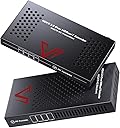
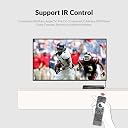
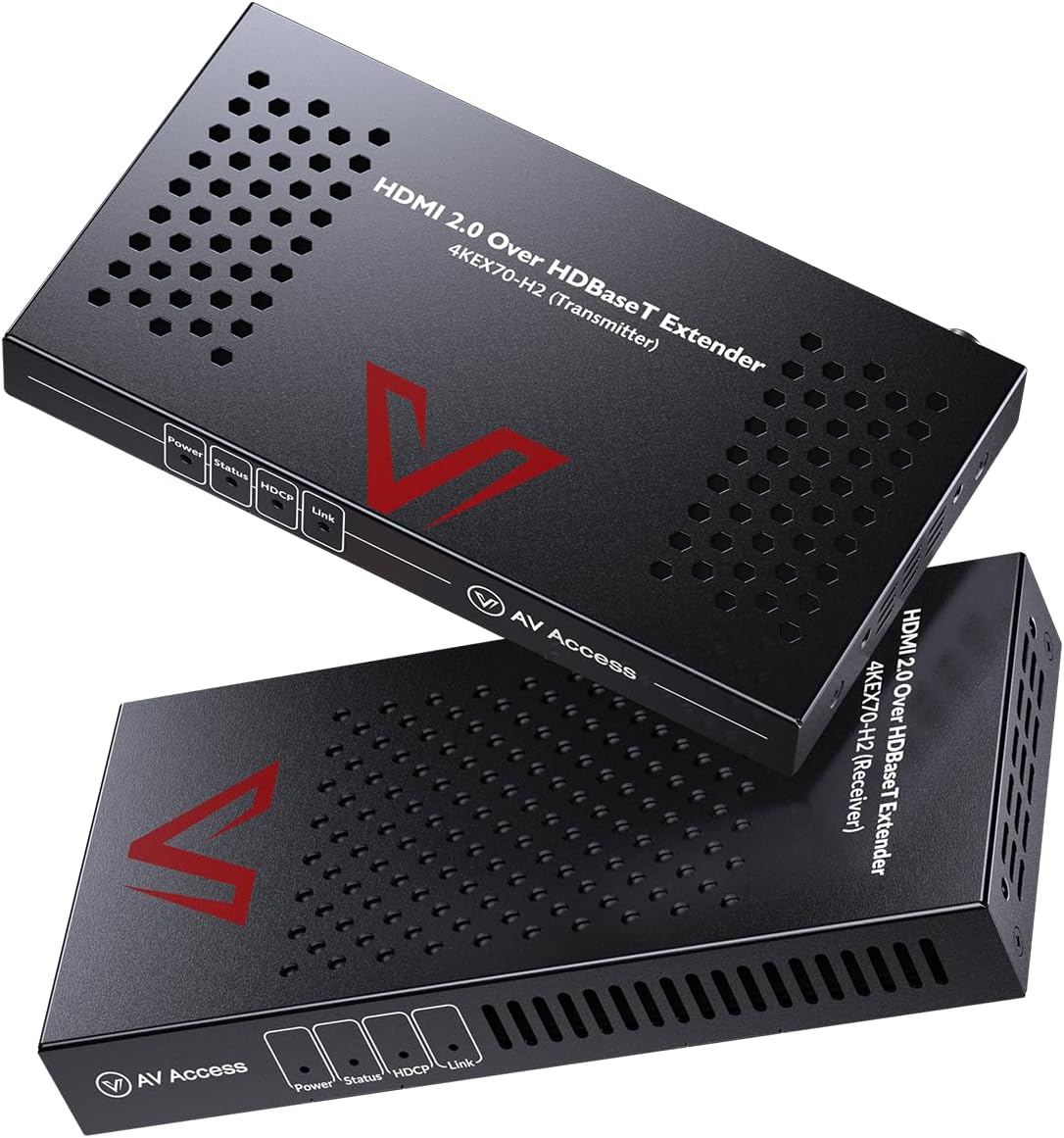
The AV Access 4KEX70-H2 HDMI Extender leverages HDBaseT technology to deliver true 4K@60Hz 4:4:4 HDR video up to 230ft over a single Cat6a/7 cable. Featuring bi-directional Power over Ethernet, IR and RS232 pass-through, and compatibility with multiple cable types, it ensures stable, lag-free transmission and remote control integration. Its compact design and complete installation kit make it ideal for professional AV setups, home theaters, and multi-room environments.


| ASIN | B073QL6YT3 |
| Best Sellers Rank | #45,581 in Electronics ( See Top 100 in Electronics ) #13,044 in Home Theater Accessories |
| Brand | v AV Access |
| Color | Black |
| Compatible Devices | Television, Set Top Box, Stereo System, Television, VCR, Home Theater |
| Connector Type | Plug In |
| Current Rating | 3 A |
| Customer Reviews | 4.4 out of 5 stars 146 Reviews |
| Finish | Hdmi |
| Input Voltage | 18 volts |
| Item Dimensions | 5.39 x 2.93 x 0.61 inches |
| Item Type Name | hdmi extender over ethernet |
| Item Weight | 0.48 kg |
| Item dimensions L x W x H | 5.39 x 2.93 x 0.61 inches |
| Manufacturer | AV Access |
| Mfr Part Number | 4KEX70-H2 |
| Model Number | 4KEX70-H2 |
| Number of Items | 1 |
| Number of Ports | 2 |
| Package Quantity | 1 |
| Power Plug Type | Type A - 2 pin (North American) |
| Specific Uses For Product | Apple TV 4K, Roku, XBOX, DVD, PC |
| UPC | 761312776563 711338358304 |
| Unit Count | 1 Count |
| Warranty Description | 1-Year-Warranty for all customers and 3-Year-Warranty for business customers |
| Warranty Type | Limited |
D**R
Long distance 4K/60 Hz HDR signal is no problem with the 4KEX70-H2
This review is for the AV Access 4KEX70-H2, HDMI 2.0 Over HDBaseT Extender. The packaging was excellent, with everything packed well to protect against any kind of shipping damage. The H2 comes with a transmitter, a receiver, a single 18VDC power supply, an IR transmitter, and IR receiver, two Phoenix male connectors for RS232 passthrough, and a user manual. Setup is very easy. Connect the transmitter and receiver with a suitable Ethernet cable, connect your HDMI source to the transmitter, connect your TV via HDMI to the receiver, connect the power supply to either the transmitter or receiver (Power over Ethernet is bi-directional so it doesnโt matter which unit has it), and then plug in the power supply. The units power up quickly, with both showing a steady power light almost immediately. There will be a slight delay as the transmitter and receiver negotiate the connection, but in all of my uses that is only a few seconds. Once the connection is stable the power and link LED lights will be on steady, the status LED will blink, and the HDCP LED will either be on or off depending on the signal having HDCP or not. I have an Onkyo TX-NR676 4K/60 Hz HDR receiver that has HDCP 2.2, a Shield TV, a PS4, and a Vizio M55-E0 4K/60 Hz HDR TV, and everything works exactly as it should. I use a 26ft CAT-7 cable run in-wall, with CAT-6 keystone passthrough jacks on each end, and CAT-7 patch cables that connect to each of the H2 units. I went with CAT-7 just to allow for future expansion, but I tested the setup with a standard 20ft CAT-5e cable and I had no issues at all, which supports the manufacturer recommendations for cable type and length. Iโve had no connection issues, no intermittent signal issues, and no signal quality issues. The receiver does get very warm to the touch, but since this is passively cooled and it uses the metal case to aid in cooling, Iโm not concerned with it. As long as there is adequate ventilation I donโt expect any problems at all. Iโve had these powered up for over 8 hours and havenโt had a single issue due to the heat. I do have a UPS configured with my receiver as a master, so the H2 units are powered off when the receiver is turned off/goes into standby, so I donโt have any experience with heat when the devices arenโt being used โ although I did read other reviews that stated the receiver is still warm even if there is no input signal being transmitted. Overall, Iโm very happy with the 4KEX70-H2 in my home theater setup and I recommend using them if you have a long (25ft+) distance between your TV and your input devices.
S**H
Actually works!
i tested 5 different brands/models of 4k hdmi extenders before these and all had their issues except this one. My use case is video from Nvidia Shield TV to Denon Receiver into HDMI Extender over can6a about 30 feet to an Epson projector. Picture shows up even past the splash screen (most of the other models didn't make it past the splash screen) and in 4k (that was another brands issue) and CEC works for the most part. The off command on the Nvidia Shield turns off the projector, unfortunately waking the Shield TV with the Shield Remote does not consistently wake the projector. Sometimes it doesn't work, sometimes it does (though it often takes up to a minute), but to be fair i really can't place the blame on the extender, it could be any of the devices in the chain (I actually suspect the projector) and it worked as well or better than any other unit i tested. A quick note of advice. After doing some rack work (I shortened the cat6a cable going out of the unit) when I plugged the Extender in, the power button flashed red and no other lights lit up and there was no picture on the screen. It turns out I wired the cat6a cable exactly backwards and obviously it didn't work. Just a word of advice if you have no picture and a flashing red power light: check your cable termination.
G**N
Simple to set up, works awesome.
I decided to move all of my gear (network, AppleTV, Xbox, audio amp, etc) to a closet rather than have all of it and the mess of wires under the TV. Since it's unrealistic to make custom length HDMI cables at home, I found this "BALUN" device that can carry HDMI over a standard ethernet cable. AV Access HDMI 2.0 has been the easiest to get wired and running. Simple beyond expectations. You only need to power one end. The other is automatically powered over the ethernet cable. The's no additional latency as far as I can tell, so gaming consoles work fine. I've had video conversion hardware in the past where the latency (the time between your controller input and the result appearing on the TV) was a huge problem and made gaming impossible (think dodging an opponent and your character doesn't actually dodge until a half second or more later), so I was a bit concerned. No problems like that whatsoever with this box. There was a minor issue with one of the IR cables. I sent them a note through Amazon. AV Access customer service replied the same day, and within a couple of days after that I had a replacement set of cables at no cost and more importantly -- no hassle.
S**R
Great product that resolves bandwidth issue over long distance with HDMI, fantastic customer support
TLDR: Cost effective way to push 4k HDR content over a decent distance in home theater room. First off a few details about my setup. I have a 13' x 18' theater room in my home with a 110" screen, JVC x570R projector, Onkyo TX-NR676 receiver, Xbox One S, and Dish Hopper 3. The Dish and Xbox are connected to the receiver with 6' HDMI 2.0 cables and had the receiver connected to the projector with a 35' Active HDMI 2.0 cable. I was able to get 4k HDR content to play using physical UHD BR discs in the Xbox, but could not get any 4k content from any streaming services through either the Xbox or the Hopper 3. Any time I would try the projector wouldn't identify any input data, however there was still audio. I am pretty sure I was running into a HDCP 2.2 issue where the HDCP data wasn't making it to the projector. Anyway after testing each component I ruled it down to the 35' cable and decided I needed some way to push more data over the distance. I began looking into HD Base T products, but there isn't much out there that supports 4k @60 4:4:4. I had read some reviews on other AV access extenders, but not had the 4:4:4 chroma, until I read a review on another of their products where they responded to the reviewer indicating the 4KEX70-H2. I checked it out on their site and it sounded like exactly what I needed, but I could not find it being sold anywhere. So I emailed AV Access and Ryan responded indicating they were currently out of stock and they would let me know once they became available again.A few days later I got the email stating they were available and ordered one that night. Shipping was pretty normal for Amazon, I got it quickly. Hooked it up and was able to get video content on everything I was having issues with before. After a few hours of watching 4k content however I started to notice there were some things that were off. There was a constant subtle snow across the display that was pretty evident when the screen was dark or shadowy, and there were occasional splashes of green artifacting that would pop up very briefly. I reached out to Ryan from AV Access and explained the issues I was having. He was very helpful and requested I perform some specific testing and provide details so they could try to simulate the issue in their labs. After I provided the data from my tests and they were unable to reproduce they requested I send the unit back and they would send another as they believed it to be a hardware error. I got the new unit last week, hooked it up and all previous issues are gone. I get a crisp clear image with no snow or artifacting. I am very pleased with the product as there are other ways to resolve the distance issue with 4k @60 4:4:4, however they are much more expensive. Pros: cost ease of setup responsiveness of customer support Cons: NONE
J**M
Works well, set-up was a bit challenging
[UPDATE: Ryan got back to me to apologize for not being responsive on support, which I appreciate. He was extremely apologetic.] I'm using this with a Windows 10 PC with 4K support and an Epson 5040 UB projector. The cable run is about 25 feet. The old in-wall HDMI cable didn't work for 4K, but I happened to have ethernet (cat6) running in the wall already. Nice to not have to tear the wall up to get this new projector to work. The resolution being transmitted between PC and projector is 4K (3840x2160)@60 hz. I don't know how to confirm all the other technical specs like 4:4:4 color. I'm also not sure about latency, as I don't play games, but it seems reasonable. Image quality is very good, once everthing was set up and working. It is easy to use, just plug it in and turn everything on. Set up was a bit challenging (see cons below). But one set up was correct, I haven't had any problems since. I'm generally satisfied with it at this point. I'll update this review later if that changes. It does run quite warm (primarily on the receiving side) as has been noted, but I have it in a place with plenty of ventilation and it does not seem to be running too warm, I'm not overly concerned about it. But I would want to run it in a place with plenty of air. I'm using only HDMI/HDCP, not IR, TCP/IP or controlling any devices from the projector. Just simple "display the image' features. Pros: Works fine so far, image is good, has been reliable (1 week, about 20 hours). POE is very convenient. Solved my problem, and seems to be a workable long-term solution. Cons: The device was failing (crashing had to be restarted) initially when HDCP was turning off after being on. I eventually figured out that in my case PC resolution has to be set correctly for this device to work (failed at 1080p, works at 4K). Support from the vendor was not particularly helpful. Email responses were slow and they were not able to solve the problem over about a week. Only persistence and technical fooling around on my part got it figured out. If I had not been able to solve the problem, I would have returned it. Also, it runs warm even when the projector and PC are both turned off. I will use the DC trigger from the projector to a triggered AC outlet to turn this on and off, which is a minor extra bother I hadn't planned on. Overall, seems to be good and solved my problem. Time will tell how reliable it remains. Because this device was on the expensive side, it will need to be reliable for quite a while to be worth the cost. But fingers crossed, so far it seems to work as I had hoped.
T**I
Works good at first, but durability/longevity is questionable
I purchased in May of 2019 and it worked good. Now it is getting sporadic in working. It will go out from time to time and not broadcast to my TV for a few seconds every few hours. Pretty annoying and looking for a replacement from a quality manufacturer.
B**N
Very unique PC gaming solution - 4k@60Hz (YUV 4:4:4) [4KEX70-H2]
Amazing HDMI extender with 4k@60Hz (YUV 4:4:4). The YUV is very important to maintain clarity at high resolution! This extender solved one of the biggest technical limitations I've ever encountered. I'm a PC gamer and until now I have been stuck in my office on the desktop PC. I wanted a solution where I could be in the living room with my wife while gaming on the computer. I didn't want to spend $2,000 on a gaming laptop that would be obsolete in 2-3 years and I didn't want to relocate my desktop PC as its needed in the office for my work. With this extender I was able to setup a mobile gaming station in the living room and still maintain high resolution 4k@60hz video. I ran a 100ft CAT7 Ethernet cable and an active USB extender cable down through the floor, across the basement ceiling and back up through the floor into the living room. I setup a small table with a 4k monitor, USB hub, mouse, keyboard, bluetooth speaker and this HDMI Extender [4KEX70-H2]. The results were amazing with a flawless video quality with no lag, pixelation or distortion. I can now chill on the couch in the living room while gaming on my desktop PC. Well worth it!
R**H
Saved My Home Theater (and My Sanity!)
I built my home theater a few years ago and ran HDMI through the walls into a separate equipment room so the theater would stay quiet and distraction-free. It worked greatโฆ until the HDMI run turned out to be just a little too long. Cue the dreaded signal dropouts. Tearing into drywall to re-run cables was the last thing I wanted to do. Thankfully, I had also pulled CAT-6 during the install. Enter this AV Access HDMI Extender โ absolute lifesaver! Setup: Plug-and-play simple. No headaches, no weird settings. Performance: Rock-solid signal, 4K looks flawless, HDR10+ pops beautifully. Zero dropouts. Peace of Mind: Instead of destroying drywall and re-wiring, I fixed the problem in minutes. If youโre building (or rescuing) a theater setup, do yourself a favor: run a spare Cat-6 in the walls. Then, if you ever run into HDMI distance issues, this little box will save you big time. Highly recommended.
J**K
Works great, with one small problem
The packaging was simple and nice. Instructions was simple and straight forward. Exactly what I wanted. Ive searched around for something that has similar specification but the price just does not come close to this. Good bang for buck. I got everything along with this unit brand new, new receiver, new HDMI cables, new TV etc etc. I did, however, ran into a small issue that would drive some users mad. I have CAT5e running inside the walls as I just finished renovating the basement. At first, the green LINK status light does not appear, which caused some nervousness as I thought the cable was faulty inside the wall. So I pushed my Rack over to the TV so i can run a ethernet cable just to test if it works. Green lights appear, but it intermittently, goes away, and starts blinking. But it will also stay light. Very inconsistent. I did not get a picture once on the TV, it just kept trying to retrieve the signal, yet never found. I noticed my Receiver kept clicking on and off, as if it doesn't detect any input. I tried all the HDMI cables, new and old, same issue. Changed to my old receiver. Same issue. Finally, found out the Transmitter extender could not hold the AC power steady. I put the AC power onto the receiver extender and now it works fine. Green light stays lit, and I have picture. Other than that small yet frustrating issue. The unit works fantastic, picture is great and steady, HDR wors, 4K works. I advise anyone with a similar problem to try switching the power to the corresponding unit or try a different wall outlet just in case (maybe it was my surge bar, who knows). The unit is smaller than I initially imagined. It does heat up a bit so I would advise people to give it some ventilation just in case. These are electronis, don't expect to be absolutely perfect. No electronics are perfect. Take extra precaution and set up everything correctly and well ventilated. **UPDATE. After using the unit for over a month now. I still run into problems where it loses signal. It quickly retrieves it but loses it again. Since the rx is behind the tv and secured onto the wall mount and its the one with the ac power. I just disconnect the TX ethernet where it gets POE. And plug it back in after a minute. It work just fine. This happend twice since i started using the unit
M**.
Works well, but heat is definitely concerning (UPDATE: yup, it baked itself to death.)
I just set this up to replace an older Monoprice extender that stopped working. The Monoprice extender required two ethernet cables for a 1080P signal, so having one cable for 4K is a definite improvement! I don't actually have a 4K device (yet), but it's working well for my 1080P projector, using a 75ft CAT6 cable. No noticeable lag, noise, or artifacting. Like other reviewers, I'm finding that the receiving box gets quite warm (almost what I would call "hot"). This is definitely concerning, not only for the potential lifespan of the electronics, but also for the amount of electricity it's probably using to generate all the heat. Hopefully it still manages to function properly in the summer when my living room gets warmer; I will update my review if I experience any problems down the road. UPDATE: After about 1 year and 9 months, the transmitter fried itself. It was plugged into a UPS, so I know the power wasn't an issue. Unfortunately AV Access only provides 1 year of warranty unless you're registered as a "partner", so I guess my transmitter (and receiver, since they don't sell them separately) are destined for the landfill. Avoid.
Y**L
Worth the money good customer service
I rec. this product and knowing that most products like these that support 4K are usually much more expensive I decided to take a chance on this. I'm glad I did as the product delivers 4k HDR from my basement to my main LG OLED with ease. I even use the IR to blast volume commands from the basement harmony up up to the living room external onkyo sound. I did have one hiccup with the original power supply failing after a few months of use but the seller stood behind the product and provided a replacement indicating there is a 12 month warranty with this product. Very happy and would buy again if I needed one. I do however second the comment made by others with the device running hot. I would also recommend a well ventilated area for the device to operate.
A**!
Waste of money (update 2)
I bought this to run a 4k signal to my projector which is about a 40' run. The specs show that it should easily be able to handle this distance and yet, I could not get it to work with anything above 1080p. After a day or two, I wasn't even able to get the 1080p signal back! I used a Monoprice 'Premium certified' 6' HDMI cable on either end of the connection (AV receiver to transmitter, receiver to projector) which is rated for 4k60 4/4/4. For the network cable, I first tried some cat5e cable I had and I freshly crimped on new connectors. When it wasn't working, I bought a 40' cat7 cable and it still didn't work. In the end, I returned this product and bought a (cheaper) fibre-optic HDMI cable which is working perfectly! (with those same Monoprice HDMI cables running from source to receiver - ie. those cables weren't the issue) I'm actually glad this didn't work out because the fibre-optic HDMI cable is probably less likely to fail over time and it saved me some money. *** Update *** The company reached out to me to make it right, as you can see below. I contacted them twice and they have not replied to me. Perhaps they just wanted to look like a company that takes customer service seriously? At any rate, I would say AVOID the product and AVOID this company. *** Update 2 *** They reached out to me again and it seems they had missed my email. They have not sent a replacement which I haven't gotten around to testing, yet. I will update this post when I get a chance to. Upgrading review based on seller trying to make it right.
M**Q
Great Device - 4k, HDR, 60FPS, PoE with CAT7
Crystal clear 4k picture WITH HDR, pinned at 60 frames per second. This product delivers as advertised. My install is between two rooms with a single CAT7 cable between endpoints. I have had zero problems. I have not tested the IR throughput yet. Using Power Over Ethernet (PoE) to power both endpoints with one AC adapter is a very convenient feature. The send and receive units are even smaller and thinner than expected. They have metal cases and seem well built. That said, (and as others have pointed out) these devices get hot to the touch when they are on. It seems as though the entire metal case is acting as a heat sync. I've looked into it and this appears to be normal. Consider using standoffs if you plan to mount the send/receive units. So far, I'm extremely pleased and wouldn't hesitate to try other AV Access products.
Trustpilot
1 month ago
2 months ago