๐ Connect with Confidence!
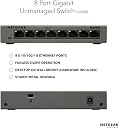
The NETGEAR 8-Port Gigabit Ethernet Unmanaged Switch (GS308) offers a robust solution for seamless networking with 8 high-speed ports, a fanless design for silent operation, and versatile mounting options, all backed by a 3-year warranty for peace of mind.


| Platform | Windows |
| Case material type | Metal |
| Number of layers | 1 |
| Interface type | RJ45 |
| Data transfer rate | 1000 Megabits Per Second |
| Global Trade Identification Number | 00606449090468 |
| Manufacturer | Netgear |
| UPC | 606449090468 |
| Product Dimensions | 10.2 x 15.8 x 2.7 cm; 400 g |
| Item model number | GS308-100UKS |
| Wattage | 3.84 watts |
| Hardware Platform | PC |
| Are Batteries Included | No |
| Item Weight | 400 g |
| Guaranteed software updates until | unknown |
B**E
Great little switch!
Excellent non-blocking 8-port Gigabit switch (7 ports usable as one will plug in to a LAN port on your router)non-blocking means it will allow any traffic through it and the traffic monitoring, priority and port forwarding will be determined by the router.This switch is easy to set up and simply requires plugging in to a mains socket and switching on from a little switch on the back of the switch. Lastly simply plug it in to any LAN port on your router.This switch is also in metal casing so it is very sturdy and looks professional for the money you pay for it.This switch is also wall mountable however you need to provide your own fixings and templates in order to mount it. Because the switch has little grooves that the screws sit in to you will need to be precise with measurements and you cannot use countersunk screws.The easiest way to wall mount if you are a competent user is to remove the top cover of the switch, remove the little mainboard and you will find 2 plastic covers, these are just stuck down with sticky. Remove these, screw the switch in to the wall and assemble everything back up (This ensures a more snug fit than just sliding the switch on to screw in the wall or if you have plaster walls, risk tearing the plaster trying to align and clip in the switch)All in all, fantastic, simple product.
W**E
Nice piece of kit
Used powerline to extend Ethernet to the loft space, then into this hub.Runs well, simple to use. Hang around four PCs off it.Reliable.
S**F
8 port Metal Switch - Great bit of kit.
Let's start by saying that at this price you can't go wrong. I paid ยฃ15 during the Black Friday sales for the 8 port metal switch and that's a great price for a brilliant bit of kit.I bought the switch for 2 reasons. The first was that I was running out of network ports on my router and the second was that my 1 year old is getting to that point where she wants to play with everything, especially if it has colourful lights on it. Unfortunately that is a perfect description of my router, so it was time to move the router and the telephone up to a shelf that is out of reach of small hands. I've now moved my router onto a shelf that's 6 foot off the ground in the hall rather than on a table in the living room (which has had the added advantage of improving my WIFI sgnal across the house... apparently height is a good thing in this respect as well as a more central location).Moving my router also left me in the position that none of my ethernet cables were long enough to reach the routers new home. I did some costing and it was more cost effective to buy the switch and one long CAT6 cable than it was to buy 5 long CAT5e or CAT6 cables, so the answer was simple. I now have this switch mounted to the back of a book case next to where the router used to live and the old cables didn't need moving or replacing, they simply plug into the switch which then feeds back to the router.Setup was simple. You plug a cable into the router at one end and the switch at the other (it doesn't even matter which port you plug into as the switch is intelligent enough to work out which one the router is on) and then plug your other devices into the other ports. Plug in the power and away you go. No setup on the switch, no need to change anything on the router, you just plug it in and it works. Magic!I've got a Windows PC, Xbox, Sky box, printer and Linux box plugged into the switch all working away at the same time with no loss of performance. I'm not an overly heavy user, but I've had the Sky box downloading at the same time as the PC being used and the Xbox playing on-line and it performed brilliantly. I've not even noticed it getting particularly warm.There is only one possible issue that you might have and that's that the network cables plug in on one side of the switch and the power goes in the other. If you're planning on putting this on a table that might be an issue, but if you're mounting it to the back of a bookcase, under a desk or on the wall then it's not an issue. Even on a table you could get around it by looping the cable under or over the switch.Overall a great bit of kit that I can't recommend highly enough.
I**N
Works well, good solid case, but would be good if it indicated link speed
Bought this as the 8 ports on my TP-Link switch had filled up and I needed some more. I have this and the TP link both hanging off my Airport Extreme 1Gb ports and both switches also operate at the full advertise 1Gb speed.Works out of the box without any setup, in fact there's no setup you can do other than plug it in. My only minor complaint about this is that the link lights don't tell you what speed a device is connected at. With the TP-Link the light is amber at 100Mbps and green at 1000Mbps, while this one just has a link light which doesn't indicate speed. It may sound like a minor thing but it can make troubleshooting a lot easier when you want to see why things aren't quite transferring as fast as they should be, a glance at the switch immediately eliminates the possibility of devices operating at the lower speed.
K**R
Great little 10/1000 switch
Can't fault this network switch , simple plug and play , works flawlessly straight out of the box , have this connected up to my mobile SIM router ,so my computers are all hard wired up , and works perfectly.
C**M
This Box Just Works Out Of It Superbly
I received this yesterday Sunday 29th November, which luckily I live in an Apartment block, as it was left outside my door. I plugged it in got out my Ethernet cable, to run from Router to to this, then to Netgear port connected my devices to it via Ethernet Cables and I'm pleased with it. You get a on and off switch, for one thing and once you switch on your individual devices, it lights up green on the Port. I have mine set up on top of my Netgear Router, the only problem is, that it does sit backwards as there is no indicator lights on the back, like you get with a standard router, but hey ho it works and at this time I am using it to write this review.Yesterday I watched some films and series through my Raspberry Pi Open Source Media Centre and pleased to say the streaming never cuts out, apart from sometimes on Kodi when there has not been enough watched media and you spend ages sifting through available streams that are strong enough and that stream properly without buffering. I can honestly say though that at the moment things are running smoothly. You cannot go wrong with Netgear products and this is metal, solid casing and small too. If you are like me and have a lot of devices and your WI-FI is not up to par, then get one of these, it won't disappoint. I have given this 5 stars as it is brilliantly designed and just works out of the box.
Trustpilot
1 month ago
5 days ago