Buy anything from 5,000+ international stores. One checkout price. No surprise fees. Join 2M+ shoppers on Desertcart.
Desertcart purchases this item on your behalf and handles shipping, customs, and support to Croatia.
🚀 Power up your home network with effortless speed and coverage!
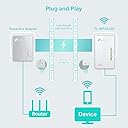
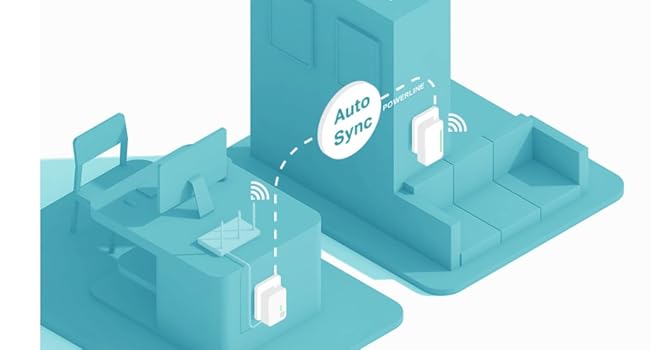
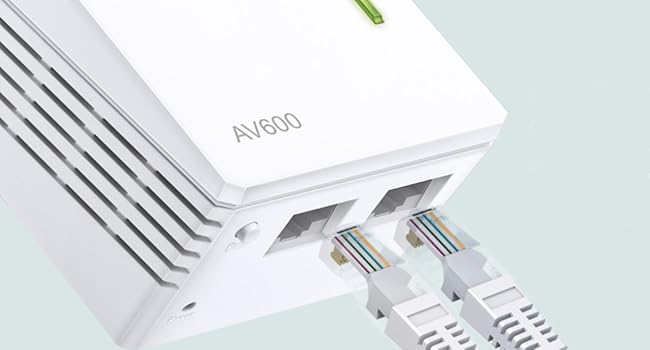
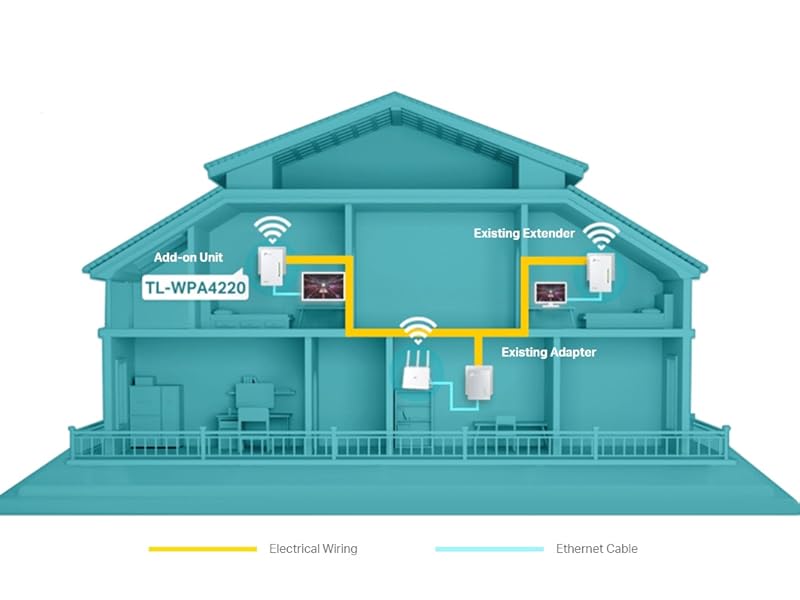
The TP-Link TL-WPA4220 AV600 Add-On Powerline Adapter delivers up to 600Mbps wired speeds and extends WiFi coverage up to 300Mbps using your home’s electrical wiring. Featuring two Ethernet ports and one-touch WiFi cloning, it creates a seamless, unified network ideal for UHD streaming, gaming, and smart home devices. Easy app management and plug-and-play setup make it a top choice for expanding reliable internet access in hard-to-reach areas.


| ASIN | B00DEYDF8I |
| Best Sellers Rank | 1,471 in Computers & Accessories ( See Top 100 in Computers & Accessories ) 10 in Powerline Network Adapters 19 in PlayStation Legacy Systems |
| Box Contents | Powerline Adapter |
| Brand | TP-Link |
| Brand Name | TP-Link |
| Color | White |
| Colour | White |
| Compatible Devices | Compatible with all HomePlug AV & AV2 standard powerline adapters |
| Compatible Operating System Family | Windows |
| Compatible devices | Compatible with all HomePlug AV & AV2 standard powerline adapters |
| Country of Origin | China |
| Customer Reviews | 4.4 out of 5 stars 4,736 Reviews |
| Data Link Protocol | Ethernet |
| Data Transfer Rate | 300 Megabits Per Second |
| Data link protocol | Ethernet |
| Hardware Interface | Ethernet |
| Hardware interface | Ethernet |
| Item Dimensions L x W x H | 5.4L x 4W x 9.4H centimetres |
| Item Weight | 4.94 Ounces |
| Manufacturer | TP-Link |
| Manufacturer Part Number | TL-WPA4220 |
| Model Number | TL-WPA4220 |
| Product Warranty | 3 year Manufacturer |
| Product dimensions | 5.4L x 4W x 9.4H centimetres |
| Unit Count | 1.0 count |
A**O
A Solid Choice for Extending Your Home Network
I have been using the TP-Link TL-WPA4220 2-Port Add-On Powerline Adapter for over four years. Initially, I used it to extend the connection to my PS4, which was situated in a completely different room. It did the job perfectly, extending my wired connection speeds down to a different room. I was able to use this to game at a very stable rate. However, once I moved the PS4 into a different room, the speeds dropped intensely. I did some research, and it seems that on certain circuits, these powerline adapters can have better speeds and lower speeds depending on interference. Despite this, I am still happy with the TP-Link TL-WPA4220. I use it to connect my smart TV and other devices to the internet, and it works well. I would recommend it to others, but I would caution them to be aware that the speeds may vary depending on the circuit it is plugged into. One of the things I like most about the TP-Link TL-WPA4220 is that it is backwards compatible with older TP-Link powerline adapters. This means that I was able to use my previous TP-Link powerline adapter in conjunction with the TL-WPA4220 to create a more extensive powerline network. This saved me from having to buy two new powerline adapters.
L**Y
Simple to set up
I have a Virginmedia Superhub. Fantastic speeds when hard-wired but the wireless could be better ( for my house anyway). My sons room is at the opposite side of the house and the wifi reception was very poor. About a year ago we set up a powerline network which kept my gaming son very happy. Wifi reception upstairs was poor (my wife complaining about her ipad dropping connectivity) As the powerline setup was using s TP-Link adapter I decided to purchase this to improve the wifi around the house. I ran the software provided straight from the disc then plugged the booster into a power socket next to the PC. I pressed the pair button on the bottom for a second then ran the scan feature on the software. It picked up the booster instantly. Pressed the connect button onscreen (username & password is admin for both fields). Renamed the wireless network and gave it the same passkey as the virgin wifi but added _wifi to the end for identification purposes. I was then instructed to reboot the adapter ( via the screen button). After a few seconds it was up and running. I then unplugged the booster and took it to the other end of the house and plugged it in. Worked perfectly. Full wifi strength all over the house now. Superb. Whole process took 5 mins. Half the time it took me to type this!! lol
G**A
Easy networking
The limiting factor for the speed of your internet access is the router to the internet not the connections inside your home. TP-Link powerline adaptors utilise the mains wiring as a form of built-in network cable so that you don't need any additional cabling to be installed. The has the advantage of only requiring two or more devices to be plugged in to bring networking throughout your property, however, the devices must all be on the same part of the ring main or they will not communicate. It's important NOT to plug in the powerline unit via a surge-protected socket as that will block most of the data signal that they need to function. This particular unit is an extension unit for an existing powerline configuration. It has two wired ethernet ports and also has w-ifi – but only in the 2.4GHz band and does not use the most recent fast wi-fi protocols. It is still adequate for most domestic uses apart from 4k (ie UHD) streaming. Sometimes electrically noisy devices, such as electric drills or motors on washing machines or tumble dryers, will cause interference on the mains wiring, compromising the capabilities of powerline units. The worse interference comes from devices that are on the same ring-main but interference may also come from other nearby sources such as in neighbouring properties. Surge-protectors used on electrically 'noisy' devices can reduce how much interference the latter produce. The powerline units can be set up quickly and easily if you follow the instructions – however if you want to have a secure powerline network then you will need to use TP-Link's application to configure the security. Older and newer generations of units seem to be able to communicate with each other, which gives one the option of adding more advanced units at another time. Powerline adaptors are a predecessor to the more modern MESH systems, which give better network area coverage.
R**N
Works ok via two different distributions boards
I bought an extra power line adapter to help Wi-Fi within my living room, my router is in another part of my house which is actually 2 houses into 1 both with separate distribution boards but served by 1 meter, the new adapter paired readily with the original and is working via the other side of the house, the Wi-Fi signal is more consistent and gives me a full blown signal.
P**P
If You Have WIFI Black Spots - Buy This Product
If you have WIFI black spots in your home, buy this product it is the best WIFI extender I have used and that is after having numerous other failed attempts using other expensive products which promised the same but did not deliver. This product is so easy to install you will not believe it, other products I have tried you needed a degree in quantum physics to install them and at the end of the failed attempts you felt you had gone 12 rounds with Mike Tyson and your head was about to explode. This product is an extension to my already existing TP link, therfore you would need to buy the TP-Link 500MBPS twin WIFI extender Powerline set first. The twin set allows you to connect the TP link system to your home modem/router, once this link is established you can then add the reviewed product to your already established TP link network. It is as simple as plugging the extender in to an existing socket in the room where there is no WIFI coverage, the extender will then automatically clone your SSID (Modem/Router name) and password and provide full WIFI coverage in your WIFI black spot area. If you are a fan of online gaming then this WiFi Extender Powerline is perfect, it has an impressive high-speed transfer rate of 500Mbps and is ideal for watching SMART TV in HD or 3D and for lag free gaming. It is not a cheap product but believe me in this case you get what you pay for.
P**S
Wonderful WHEN they work (2 didn't, one did) - but remote wi-fi complicated to set up
Edit: 3 years later... Of the two that worked, one died almost completely after a couple of years (it transmits a wi-fi signal, but without data, and I can't get it connect, no matter what I try) and the other one appeared to do much the same a year or so later - although I did eventually get that one to work, but only with its original ID and password. So, somewhat reluctantly, I bought another one (I really wanted something more reliable, but was unable to find out if different manufacturer's ones would work with the original base unit that plugs into the router and transmits the signal over the mains - that, at least, is still working! I could NOT get this one to work. I tried everything but could not get it to pair - so it was returned. I gave them one last chance and asked for a replacement - and, to my surprise (and relief!) this one worked! Although it didn't pair itself automatically, but then I guess you can't have everything... The intructions for changing the ID and password have changed completely over the years, but are, if anything, even more confusing (the new app is an absolute nightmare - and even worse on a PC). And I failed completely to get them to work (the previous instructions were bad, but I did at least - after many days - finally suss them out). So, now I have a working internet/wi-fi network, covering both house and garden (with an old router in the garden shed running off one of the extenders). The routers and extenders/repeaters all have different addresses and passwords (!!!), but, once you've got them working, this doesn't matter too much - the transfer between transmitters as you move around the house and garden is hardly seamless, but then it wasn't much better when they all had the same name and password. So, you pays your money and you takes your choice. These thing DO work (mostly) and some of them keep working. The installation varies between impossible and fairly easy (just hope you're lucky!), and, even if you can't get it set up properly, it's still workable (although possibly not very easy to explain to your wife!). It's up to you - other products might work better. If I were starting from scratch, I wouldn't use this brand again, but at least I DO now have a working network - at least for now... ---------------------------------------------------------------------------------------------------------------- Original review (written 3 years ago): This does two things: it extends your internet connection over your house mains wiring (which it does very well and is dead easy to set up), and it extends your wi-fi (which it does in two different ways - one very easy to set up, but of limited use, and one much more useful, but a bugger to set up). As an internet extender, it's a wondeful product - mine works perfectly in the shed at the bottom of a 50m garden, with God knows how many connections/sockets/plugs inbetween the two ends. So, if you want to take the laptop down to the shed (or upstairs to the back bedroom) and plug it in to the extender with a bit of ethernet cable, it's a superb solution. However, if you want to use your laptop over wi-fi, the picture is more complicated. You can configure these adaptors as wi-fi repeaters, which is very simple (just press a button on you router and another on the extender). But this only gives you a decent signal if your extender plug is close enough to the router to pick up decent signal itself. So, great for the next room, but not so good for the back bedroom - and my shed remains wi-fi free. To get wi-fi from the extender plug itself, you have to configure it as a mini-router, and this is complicated (don't bother with the - very confusing - instructions, there is an excellent video on Youtube - the url of which Amazon won't let me give you!!). But it works - and wi-fi in your shed 70m away is yours for the having. So far, so good (except for the rubbish instructions). But then you have to deal with the quality of the product itself. And here the picture is far from rosy. I was so impressed with the original extender (which came with the base plug), that I ordered a second one. However, this wouldn't work, so was sent back. Its replacement worked OK, so for a few weeks I had wifi in my shed, whilst my daughter could do her homework in her bedroom. (It very cleverly uses the same address and password as your router, so devices can switch from one to the other fairly seamlessly.) But then both (BOTH!) units started playing up - providing intermitent wi-fi, or none at all. I reset both and followed the wonderful Youtube video once again - one came back to life, the other was fine with paired internet, but refused to do wi-fi. So now it's the daughter's homework or me listening to Radio Caroline in the garden. You can guess who won that one... It's taken me a while to get round to sorting this out, so I'm beyond a reasonable time limit for returning the faulty unit (without a lot of fuss), and I don't know if it's worth trying a fourth one. Or maybe I should get a cheap router and plug it in the shed? (edit - this is what I did in the end) Such a pity these are so unreliable, because, with better quality control (and much better instructions!) this would be a really ecellent product. But as things stand, all I can say is try it and see - but be ready to send it back if it doesn't work (and don't expect too much from the replacement). Good luck.
T**R
Great product
One thing to watch out for here is that this device has a default IP of 192.168.1.1, which is the same as my router so caused a few headaches when first setting it up (I just switched my router off and then changed the IP of this device to something else, then switched my router back on) The WPS function worked flawlessly. I originally tried setting it up with the same settings as my main wireless network, but must have missed a setting as I got authentication errors whenever I tried to connect. I just logged on to my router and selected WPS (push button option, not code entry) and then pressed the bottom LED on this device for a second and it grabbed the correct network settings then. Apart from that I only had to change the default password and set it to channel 13. The device came with the latest firmware already installed (1.2.8 Build 140401 Rel.49960n), so no need to touch that. After 10 minutes spent setting it up I now have full signal strength in the top bedroom of my house, and the option to add two wired devices should I want to... The only negatives I can think of is that it's a little bulky when compared to the other powerline devices I bought (PA411), and the aforementioned IP conflict issue... I also can't comment on long-term stability, as this always gets switched off when not in use, so the reports of flaky connections after it's been running for a few days didn't really put me off buying.
A**R
Not quite perfect but probably the best.
Due to very dense brickwork I have one of these so I can get a signal in the other half of the house . TPLink has IMO the best software for these mains ethernet adapters with a utility that allows you to see which units are connected, what speed they are running and even reset them from the PC, this is handy because I have cronky old wiring and they occasionally freeze up. You do have to enter the password for each device to allow this so make a note of these before you plug them in the other end of the house. The passwords are only maintained on your PC so if you want to do it from anothe rdevice then you have to enter them all over again or be clever and work out where they are stored on the PC. The utility crashes every time it closes but does no harm so it's just an irritation. The unit is easy to pair with other units just by pushing a button at each end and the link is then encrypted but as far as I can tell if you set them up like that you can't reset them from the utility so I follow the instructions to remove them from any network and then just plug them in with the default network name set and they all seem to pick each other up, this also allows me to mix them with othe manufacturer's adapters. The wifi is not noticeably faster than the AV200 mpbs TPLink version I had before, but then Wireless N only goes up to 300 mbps anyway. The utility shows it running at about 175 even though one end is on an extension. The two wired connections are useful for TV and media box where you do notice a faster speed. There's a separate utility specific to this device to find it on the network and an on-board website so you can set the IP address , Wifi encryption channel etc. from your browser. I use a different name (SSID) from the main router's network because I like to know which one I am connected to, especially because windows is too stupid to connect to the best signal. A good tip is to make sure that the signal channel band on this and your main router are as far apart as possible e.g. set your router channel to 1 and this unit to 11 or 13 if you can, otherwise the signals interfere and you get lesser performance. If you are really keen get a copy of inSSIDer home and check that you are not clashing with a neighbour's wifi as well
C**N
bon produit
fonctionne, mais je n'arrive pas a "étendre " le WIFI existant. Il y a donc un deuxieme réseau avec ses propres caractéristiques
C**O
Gutes WLAN-Signal
Die Installation ist sehr einfach. 1. Möglichkeit:Wenn schon ein Powerline Adapter in der Steckdose steckt und mit dem Router verbunden ist, braucht man nur dieses Gerät in eine andere Steckdose im der Wohnung oder dem Haus zu stecken und nach knapp einer Minute hat man eine neues WLAN-Signal. Der WLAN-Schlüssel für dieses Signal ist auf dem Gerät notiert. 2. Möglichkeit: Man steckt den Extender im Raum mit dem Router in eine Steckdose, drückt am Router die WPS-Taste und innerhalb von 2 Minuten am Extender die kleine unter den Lichtern befindliche Taste, übernimmt der Extender den WLAN-Schlüssel des Routers. Jetzt kann man wie zuvor den Extender in irgendeine Steckdose im Haus oder der Wohnung stecken und man hat ein neues WLAN-Signal mit demselben Schlüssel wie der Router. Den auf dem Extender notierten Schlüssel braucht man nicht. Beides sehr gut und einfach und bisher, seit ein paar Wochen, funktioniert es zuverlässig.
A**L
Deputamadre 💪😀
Lo tengo conectado con un alargador a cincuenta metros de mi casa. Funciona como dios. Además, tiene su propia contraseña, independiente de la que trae el propio router, con lo que da mas posibilidades para compartir Wi-Fi. Yo ya tenía un conjunto de emisor receptor y ahora añadí otro receptor. Tenía miedo de que no fuera compatible, pero no hubo problema.
A**O
ok
tutto ok
R**U
Sempre valido, facile e funzionale
Configurato in meno di un minuto, messo in opera insieme ad altri due apparati. Ottimo segnale ( potenza ) del WiFi e nessuna perdita rilevante di banda ( UP/DOWN ) internet. Validissimo.
Trustpilot
3 weeks ago
3 weeks ago