🚀 Elevate your workflow—work smarter, anywhere, anytime.
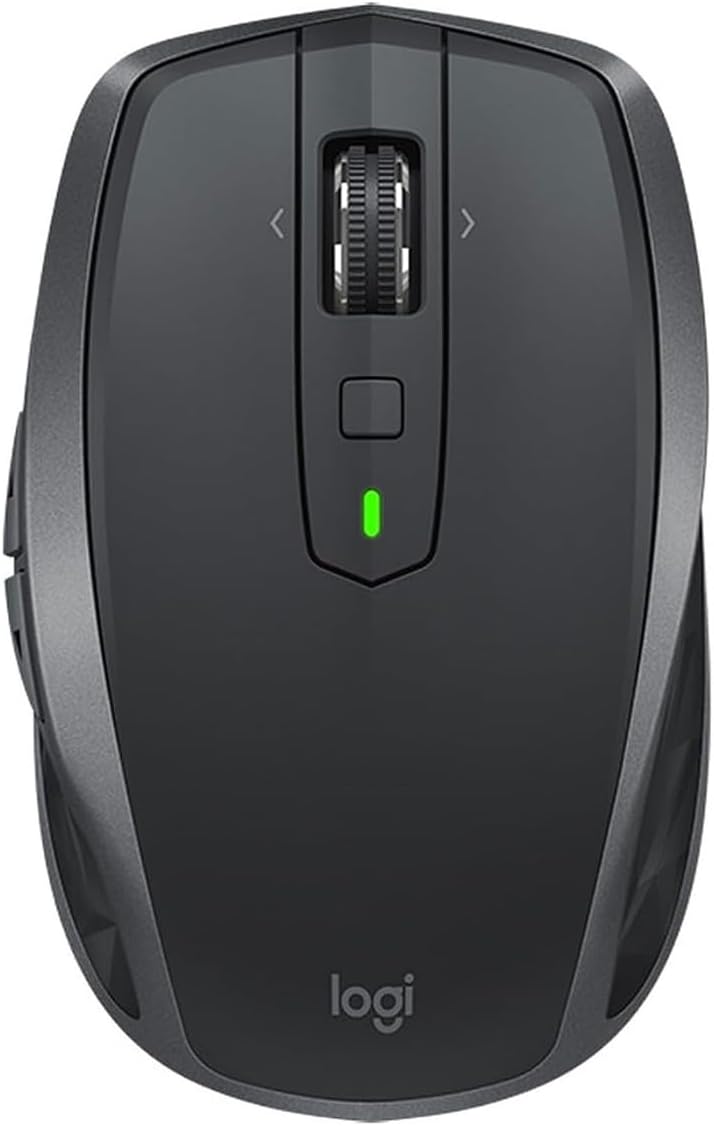
The Logitech MX Anywhere 2S is a compact, wireless mouse designed for professionals who demand flexibility and precision. Featuring an impressive 70+ day battery life, Darkfield tracking technology for use on any surface including glass, and seamless multi-device control via Logitech Flow, it empowers users to switch effortlessly between devices. With customizable buttons and a versatile scroll wheel, it’s engineered to enhance productivity whether at the office, home, or on the go.


| ASIN | B072BG9Z8W |
| Are Batteries Included | Yes |
| Average Battery Life (in hours) | 1680 Hours |
| Batteries | 1 Lithium Polymer batteries required. (included) |
| Best Sellers Rank | 35,031 in Computers & Accessories ( See Top 100 in Computers & Accessories ) 768 in Mice 1,053 in PlayStation Legacy Systems |
| Brand | Logitech |
| Colour | Black |
| Computer Memory Type | DDR3L-1600 SDRAM |
| Customer Reviews | 4.5 4.5 out of 5 stars (811) |
| Date First Available | 1 Jun. 2017 |
| Delivery information | We cannot deliver certain products outside mainland UK ( Details ). We will only be able to confirm if this product can be delivered to your chosen address when you enter your delivery address at checkout. |
| Guaranteed software updates until | unknown |
| Hardware Platform | [OMIT] |
| Item Weight | 106 g |
| Item model number | 910-005153 |
| Lithium Battery Energy Content | 500 Watt Hours |
| Lithium Battery Packaging | Batteries contained in equipment |
| Lithium Battery Voltage | 1 Volts |
| Lithium Battery Weight | 13 Grams |
| Manufacturer | Logitech |
| Number Of Lithium Ion Cells | 1 |
| Number of USB 2.0 Ports | 1 |
| Operating System | Microsoft Windows, Apple Mac OS X |
| Power Source | Battery Powered |
| Product Dimensions | 10.08 x 6.21 x 3.49 cm; 106 g |
| Series | MX Anywhere 2S |
| Wireless Type | 802.11a |
B**Y
Great Mouse!
Firstly ill talk about the thing I always consider first with wireless and that is battery life. I actually think the battery life in this is understated. It goes months without needing to charge and I really don't charge it for long. The computer is in use all day every day and I only set the mouse to sleep when I go to sleep but even when I don't the battery life seems to last a long time. It needs you to install the logitech wireless app to program the buttons but even if you dont want to do that you should download it because it fixes some issues with drivers and although was a little strange at first has worked perfectly since. My computer also stands a good 6 feet from where I use it so the range on the bluetooth is impressive. It has plenty of programmable buttons but is not overboard, it is light but not weightless and feels good in my hands personally. The only issue is a little wear and tear on the grip rubber but it is not a big deal at all.
M**M
The best mouse I have ever owned
Whilst I didn't get the product off Amazon in the end, I thought i'd do a quick review for this mouse. I owned the old MX anywhere 1 mouse and it was stellar. It was comfortable and compact and lived off AA batteries. When I knew Logitech made a second generation, i knew I had to bite. Darkfield technology was what made the first generation so good - you could track the mouse on clear glass and it would still work (not like the oldschool mice of the past generation). These things, stand out. The MX Anywhere recharges using its own in built battery, and as such if you ran out of juice, you'd have to plug it in. fortunately you can find a cable and you can charge it whilst in use so there is no issue with break in usage. I have found the battery life to be above average for a mouse of its size. It connects well using the unifying receiver and you have to make sure you connect the two before use. The scroll wheel can be switched from smooth to notched, a great feature of the mouse to help with speedy or accurate scrolling. I use this with both my mac (connected via bluetooth) and my work laptop (connected via unifying receiver). Both work just as well. It has a button on the bottom that allows you to switch between the two laptops, which is super handy. I have also been able to customise what all the side and top buttons do. This is very handy when you want to change it to and from mac commands like launchpad and also being able to scroll back on a website to a prior page. A super mouse that will last for years, i'd give it more stars if i could. Fantastic product.
R**.
Confortable and slick mouse
Overview I bought this mouse for my partner as she constantly switches between the work laptop and the personal one. She needed a solution to operate 2 computers at the same time. Fortunately, the Mx Anywhere 2s turned out to be a great product (Much better than my https://www.amazon.co.uk/Logitech-Optical-3-Button-Wireless-Windows/dp/B00MWR5IVA/ref=sr_1_1?ie=UTF8&qid=1537822591&sr=8-1&keywords=m280) Packaging & Contents The item came in a nice box (instructions & specs written on it). The box contains: - the mouse - usb cable for charging - dongle In Action The mouse is really comfortable, it has 2 buttons on the side and the scroll wheel can move in 4 directions. Under the scroll wheel you have another button which can be programmed to do a variety of functions. In fact, the Logitech Flow software allows you to assign any action to these buttons. Somebody asked about closing the tabs in the browser with the scroll button. I can confirm that it's quite hard to push on the scroll wheel, hence the reason why that action is already assigned on the button below it. The scroll wheel is actually very easy to spin (Hyper-fast scrolling technology). You can use the mouse on one computer via blue-tooth and have the other computer connected via the dongle or you can use blue-tooth on all of them. The pros You can program any button. Battery seems to last well. Software is not intrusive and it's easy to use. The cons Battery is built in (I'm a little bit old school and I would have preferred an AA battery solution). Scroll wheel maybe a little too easy to spin Conclusion I would totally recommend this mouse to anyone that travels and needs a portable solution for multiple devices. UPDATE: after using the mouse for a couple more days I discovered that once you push the scroll wheel, it enables a free spin mode where you basically spin once and the bearing of the wheel continues to spin for ages. This mush be great for scrolling though long pages.
Trustpilot
2 months ago
2 weeks ago