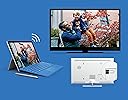
📺 Elevate your screen game—go wireless, go limitless!
The Microsoft Wireless Display V2 Adapter lets professionals effortlessly mirror or extend their Windows 10 device screens onto HDTVs or monitors using Wi-Fi certified Miracast technology. With a reliable 23-foot wireless range, plug-and-play HDMI and USB connectivity, and broad compatibility across Surface devices and other Miracast-enabled hardware, it’s designed to modernize presentations, meetings, and media streaming with minimal lag and maximum convenience.


| ASIN | B01C9YTI9S |
| Best Sellers Rank | 32,583 in Computers & Accessories ( See Top 100 in Computers & Accessories ) 284 in USB Computer Network Adapters |
| Brand | Microsoft |
| Brand Name | Microsoft |
| Colour | Black |
| Compatible Devices | Monitors, Televisions, Projectors, Set-top Box, TV Stick |
| Compatible devices | Monitors, Televisions, Projectors, Set-top Box, TV Stick |
| Connector Type | HDMI |
| Connector type | HDMI |
| Current Rating | 2 Amps |
| Customer Reviews | 4.3 out of 5 stars 4,030 Reviews |
| External Testing Certification | Não aplicável |
| Global Trade Identification Number | 00889842003192, 04058154049778 |
| Item Dimensions | 10.3 x 2.2 x 1.1 centimetres |
| Item Weight | 33.1 Grams |
| Item dimensions L x W x H | 10.3 x 2.2 x 1.1 centimetres |
| Manufacturer | Microsoft |
| Manufacturer Part Number | P3Q-00003 |
| Model Number | P3Q-00003 |
| Number of Items | 1 |
| Number of Ports | 2 |
| Package Quantity | 1 |
| Power Plug Type | Type A - 2 pin (North American) |
| Product Finish Type | Matte |
| Product Warranty | 1 year manufacturer warranty |
| Smart Home Compatibility | Not Smart Home Compatible |
| Specific Uses For Product | Phone, Mobile Phone, PC, Projector, Monitor |
| Specific uses for product | Phone, Mobile Phone, PC, Projector, Monitor |
| UPC | 889842003192 |
| Unit Count | 1.0 count |
| Warranty Type | Limited |
V**S
Good one, but broke shortly after purchase
UPDATE: Replacement arrived quickly and item works as expected, no crashes or anything. First, it is expensive for what it does. Bought one because our smart TV, despite having Miracast and chromecast buil-in, would not work well with one of our PCs, but did fine with others. Was really happy with the item: build quality good, but not premium, it would allow to watch video in good quality, without dropouts or disconnections, with fluent picture experience. Some lag was present, so definately the adapter would not do well for gamers. Setup was really easy, and connection from a Windows 10 PC would take some 5 to 10 seconds. However, after two days of limited use it broke. Simply it would not broadcast over wi-fi, and the only thing on display one would see was a broken Microsoft startup logo on white background. Resetting the device did not help. Ordered a replacement, and if it does not break, I will give it a 5 star rating instead of 1.
D**S
Absolutely excellent product.....absolutely
Just arrived. Bought to enable me to teach physics to my students using my Surface Pro 4. Have just ran several tests using power point presentations and associated linked videos from a variety of online video sites (youtube, vimeo etc)...All faultless, straight out of box. Audio automatically routes to the wireless display adaptor (in playback devices it is labelled as Digital Output: MSDisplayAdaptor). I bought a MPOW Bluetooth audio receiver to enable me to free roam with the SP4 and play video from anywhere in the class. I can route the audio from video on the SP4 to the main speaker input in the room (using the Bluetooth audio receiver), or play it from the SP4 speakers easily (using volume control: Playback Devices). Downloaded the display adaptor app from the store, and altered the adaptor name, and upgraded the firmware to latest release...took around 60 seconds to restart. VERY slight time lag, I could game on the SP4 with minimal issues. I can draw using the Surface pen without looking at the SP4 screen as lag is minimal, so ideal for visual artists wanting to work wirelessly on a larger monitor/projector. After typing this I no longer notice the time lag....:) almost instant response.
M**N
Great device, some issues with certain laptops.
This device is very useful and we use it to extend my desktop from our computer to the big screen TV in our office, this allows us to show presentations and watch netflix on the big screen. We bought two of these one for the house another for the office. Setup in the office was extremely easy, plug in to USB and HDMI on TV, then go off and find the device in Windows 10, it was instant, zero lag and did not drop and still has not dropped once. This operates at a range of 2 meters. Setup in the home was a different experience entirely. We did all the same things, but this time we had multiple errors only after upgrading the firmware as the device asked us, before upgrading the firmware it worked fine but dropped out every 10 minutes or so. So we upgraded the firmware, we could then not connect at all, we looked online for fixes and followed everything for around 2 days. We updated our graphics card, wireless adapter drivers, everything and still it failed to connect. In the end we re-installed Windows 10 on the laptop and this then fixed the issue, extreme I know, but we had no personal data on the laptop so we just went ahead and did it, it drops out a bit more at a range of 2-3 meters. We are still not sure what caused the issue or whether the previous Windows version was at fault. Issues was with a HP Stream 11 laptop.
A**T
Works well - easy and so far reliable
Excellent product but check your computer/laptop is able to output Miracast signals! it might be that your running windows which has the "connect App" but that doesn't mean the computer has the circuity to send a WiFi Miracast signal. I bought this Receiver along with an Anycast Receiver to compare them. The image quality is better on the Microsoft device than the Anycast device although the Anycast device does also link Apply products, this Doesn't. IF your screen or projector doesn't have a USB socket (needed to provide power) then you will also need a USB PSU and a Male-Female extension lead (1m or 2m) as the cable on this device, even with the 25mm extension is only about 150mm Long. The system is easy to set up, there is a small time lag between moving the mouse and seeing the movement on the remote screen but nothing to problematic. So far I've only used these for PowerPoint Presentation, I've not tried to send video but the Audio link works fine. So far I've not pushed to see how far this link will work but I've had a reliable connection greater than 30ft, with a Wifi Route in the same space. Jan 2017 - Alan
C**N
Reliable and simple to use
Bought this to replace my Netgear Miracst device, which was awesome, but sadly the USB connection was becoming a little dodgy through heavy use. This Microsoft Wireless adapter is the perfect replacement, exceeding all expectations. I guess it should work well as I use it with my Microsoft Surface Pro 4, and thus both being Microsoft should work well together. I have also used it with a Samsung phone and also worked well. Video is almost perfect with rarely any stutter and for normal presentation work, nigh on perfect. It is also neat and compact and simple to set up. Unlike a number of similar devices it does not require to be connected to your wireless network, so is completely transportable, enabling me to connect to any TV or projector via an HDMI slot and powering off any available USB slot or via an adapter. Sadly the only time it wont work is through a HDMI cat5/6 Video sender, but I can live with that. After all I don't always need to project wirelessly, just like the freedom it gives me when doing presentations, and it looks very professional when I do. I highly recommend this device.
P**O
Bought to replace Amazon Firestick because of TV mirror cast problems
This Microsoft display adaptor was bought to mirror cast my Amazon Kindle Fire HDX 7 to a widescreen TV. My Kindle HDX 7 tablet stopped mirror casting after Amazon updated the software on my Firestick TV Dongle. I investigated that Amazon in their wisdom, tweak their own version of mirror casting ( Miracast) technology. Microsoft use the industry standard Miracast and it shows, flawless transfer, straight forward connections, just as it should be. Problem solved, my Amazon Kindle Fire HDX 7 tablet now mirror casts to TV, trouble free - via the Microsoft Wireless Display Adaptor V2 . Conclusion: The Microsoft wireless adaptor V2 works as it should, it does as stated on the box, easy to set up and use. I bought the V2 on recommendations in other reviews, apparently the performance is improved over the V1 and the size is smaller. If you need Miracast cast, then this display adaptor is proven, stable technology. For use with all Miracastt enabled devices.
P**K
Might be a good product but the manufaturer is absolute rubbish
10" Acer Windows tablet connected easily. Slight time lag in mouse movements but good picture and great for viewing photos, videos etc. 24" Lenovo all-in-one could not connect to it. Phoned Microsoft support. They told me that I should install the app. I informed them that the app is not necessary. No argument from them which tells me that they were just trying to get rid of me. Then they said that the computer must have miracast!! After 45 minutes of talking rubbish, putting me on hold, transferring me to others etc the tech person said that the Lenovo is not compatible with this product. Sounds like to bull to me but hey if the manufacturer can't be bothered then I'm not going to waste my time trying to find the answer. Sent it back for refund. Mr Gates, there is no point employing a bunch of monkeys to answer your phones. Either provide some proper support or non at all. Non at all seems to be the Microsoft way if you have any complaint hence this here moan. Very disappointed.
C**P
Does what it says on the tin, but not extremely well.
I brought this to extend my laptop display to my monitor to save me using a hdmi cable, and this device doesn't work very well for that purpose. To begin with I was surprised how easy it was to set up and get connected to. It's pretty much plug and play, just stick the hdmi in the display, and plug the USB in (I used an external adapter as the minister lacks usb ports). Once connected to the laptop I found the picture quality good enough, but not perfect with the occasional artifact and only slight input lag with the mouse. But after using it for a while I noticed two major problems that makes the device no good for what I want to use it for. Firstly on my laptop I use a Bluetooth mouse, and I found the connection to the display works perfectly fine if you move the mouse around slowly, but if you start being slightly erratic with the mouse it caused the image on the wireless display to have connection problems and jitter. This itself is slightly annoying, but can be worked around. This second problem is that deal breaker for me though. Using the wireless display caused the CPU usage on my laptop to be way higher than it would be if I just used a hdmi cable. Just watching a YouTube video on the second screen with the adapter had my CPU usage at around 50%, which is way higher than the normal 10% and less you get when using hdmi in the same situation. This means that using the display my laptop would both get hotter than it needs to (not good during the summer months), and also drain the battery way quicker than normal. Because of these two problem I've very quickly given up on using the device in the way I intended to use it. Thankfully though it works well at mirroring my phone display, so I can use it or doing that. So in short; not good for extending a PC display, good enough for watching videos on a larger screen without any multitasking.
R**V
muy práctico
muy práctico
A**S
Kabellose BildschirmĂĽbertragung leicht gemacht.
Ich habe den Microsoft Wireless Display Adapter (2. Version) gekauft, um meinen Laptop kabellos mit meinem Fernseher zu verbinden und Inhalte bequem auf einem größeren Bildschirm wiederzugeben. Nach ausgiebigem Testen kann ich sagen: Dieses Gerät ist eine hervorragende Lösung für alle, die eine unkomplizierte und zuverlässige Möglichkeit zur drahtlosen Bildschirmübertragung suchen! Einfache Einrichtung & sofort einsatzbereit Die Einrichtung war kinderleicht: Den Adapter einfach per HDMI und USB am Fernseher oder Monitor anschließen, kurz warten, bis das Gerät erkannt wird, und anschließend über Miracast verbinden – fertig! Kein zusätzlicher Treiber oder Software-Installation nötig. Das hat mich besonders beeindruckt, da ich sofort loslegen konnte, ohne erst lange Anleitungen studieren zu müssen. Stabile Verbindung & geringe Latenz Die Verbindung zwischen Laptop und TV war durchgehend stabil, ohne Verbindungsabbrüche oder Verzögerungen. Besonders wichtig war mir die geringe Latenz, und hier hat der Microsoft Wireless Display Adapter wirklich überzeugt: Videos, Präsentationen und selbst Gaming-Inhalte werden flüssig und nahezu verzögerungsfrei übertragen. Dadurch eignet sich das Gerät nicht nur für Filme oder Serien, sondern auch für produktive Anwendungen oder Live-Präsentationen. Hohe Bildqualität & flüssige Übertragung Die Bildqualität ist exzellent – scharfe Darstellung, kräftige Farben und eine flüssige Wiedergabe. Selbst bei Streaming-Diensten oder hochauflösenden Videos kam es nicht zu störenden Verzögerungen oder Rucklern. Auch die Tonübertragung funktionierte einwandfrei und war perfekt synchron zum Bild. Vielseitige Nutzungsmöglichkeiten Der Adapter ist vielseitig einsetzbar: Egal ob für Präsentationen im Büro, zum Streamen von Videos oder für gelegentliches Gaming auf einem größeren Bildschirm – er macht in jeder Situation eine super Figur. Da er so kompakt und leicht ist, kann man ihn problemlos mitnehmen und auch unterwegs nutzen, z. B. in Hotels oder bei Kundenpräsentationen. Fazit: Der Microsoft Wireless Display Adapter (2. Version) ist für mich eine perfekte Lösung zur kabellosen Bildschirmübertragung. Einfache Einrichtung, stabile Verbindung, geringe Latenz und eine ausgezeichnete Bildqualität – all das macht dieses Gerät zu einer absoluten Empfehlung für alle, die eine zuverlässige Alternative zu Kabelverbindungen suchen. Klare Kaufempfehlung!
J**N
Works as intended
Had to update the adapter on a different computer to get it working. Dont know why.
C**N
Excellent product and support from Microsoft! Using it now with the latest Windows 10 1803 update
I would highly recommend this product, for hooking up a flat-screen TV that has HDMI ports, to your Windows computer . I use it with my Surface Pro 4 (i7 Processor, 16gb RAM & 256gb SSD), under Windows 10 Pro. Nice out of box experience. In fact, before I got the Wireless Display Adapter V2, my Surface Pro docking station was not able to use more than 2 speakers, connected to my Receiver (which has 5 speakers) through the HDMI physical cable). While my MacBook Pro running Windows 10 Pro, was able to use all 5 speakers, for TV sound through the HDMI cable. Even Microsoft's easily accessible phone support was not able to help me utilize all 5 speakers, before I got the Wireless Adapter. But once I got the Wireless Adapter, the 3 other speakers (including the woofer), started working like magic! I installed the Windows 10 1803 update two days ago and I was worried, because it seemed like it was taking too long for the flat-screen TV to connect. I immediately called Microsoft Tech Support (almost no wait time) and the TV started working about one minute before I got hold of the Tech Support Rep. With my approval, the Tech Rep took a look -remotely-and it looked fine. The Tech Rep noticed a problem with one of my docking station's USB ports in Device Manager (a problem unrelated to this Wireless Display Adapter) and after about one minute and a reboot, the USB problem was fixed. I would highly recommend this product and thank Microsoft for their excellent and easily accessible Tech Support!
Y**N
Impeccable
Correspond tout-à -fait à mes attentes. Permets l'utilisation du mode Continuum ou la duplication de l'écran de son smartphone Windows sur un écran (TV, vidéo projecteur), permets de dupliquer son écran d'ordinateur portable sur un écran TV ou un vidéo projecteur distant via "projeter/dupliquer". La mise à jour du micrologiciel fonctionne très bien grâce à l'application "affichage sans fil" du Windows Store (application disponible uniquement pour les ordinateurs, pas pour les smartphones sous Windows 10 mobile). Ce dispositif prend peu de place. C'est un pois plume. L'adaptateur qui permet de réunir les deux cotés est pratique. Dispositif qui peut être très utile pour les professionnels (ou autres) itinérants. une source de courant USB proche doit être disponible. Dans le cas contraire, il faut avoir à disposition un prolongateur USB.
Trustpilot
1 week ago
5 days ago