


Desertcart purchases this item on your behalf and handles shipping, customs, and support to Croatia.
🎧 Elevate your game audio to pro-level precision and clarity!
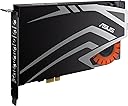
The ASUS Strix Soar 7.1 is a high-performance PCI Express sound card featuring a 116dB signal-to-noise ratio and an audiophile-grade DAC for crystal-clear 7.1 surround sound. Equipped with Sonic Radar Pro, it enhances in-game audio cues for competitive advantage, while a 600Ω headphone amplifier ensures rich, detailed sound. Its intuitive Sonic Studio utility offers full control over sound settings, making it a must-have for serious gamers and audio enthusiasts seeking immersive, precise audio performance.

| ASIN | B0160X3V2Y |
| Audio Output Mode | 7.1 |
| Audio output mode | 7.1 |
| Best Sellers Rank | 114,720 in Computers & Accessories ( See Top 100 in Computers & Accessories ) 20 in Internal Sound Cards |
| Box Contents | S/PDIF |
| Brand | ASUS |
| Brand Name | ASUS |
| Compatible Devices | Computer |
| Compatible devices | Computer |
| Country of Origin | China |
| Customer Reviews | 3.5 out of 5 stars 272 Reviews |
| Global Trade Identification Number | 04712900005974 |
| Hardware Connectivity | PCI Express x4 |
| Hardware Platform | Personal Computer |
| Hardware interface | PCI Express x4 |
| Hardware platform | Personal Computer |
| Item Type Name | Asus Strix Soar 7.1 sound card, internal PCIe external headphone connections |
| Item Weight | 500 Grams |
| Manufacturer | ASUS |
| Manufacturer Part Number | FBA_SOAR_WOWGAMEBUNDLE |
| Maximum Sample Rate | 48 KHz |
| Model Name | STRIX SOAR |
| Model Number | 90YB00J0-M1UA00 |
| Number of Items | 1 |
| Platform | Windows 8 |
| Product Warranty | 3 Years Manufacturer |
| Signal-to-Noise Ratio | 116 dB |
| Surround Sound Channel Configuration | 7.1 |
| Unit Count | 1.0 count |
C**S
Supreme audio quality for an incredible price
I've had this card for around two weeks now to ensure that my review is reliable and fair. To begin, the sound quality on this card quite immense, you can quite easily put the volume at 100% and hear no noise from the audio - only that of the recording. The 192000Hz sample rate and the 24bit accuracy is simply incredible. Additionally, once the drivers are installed, you can manipulate settings on the card such as EQ and surround sound. The drivers offer the ability to clarify voices, boost bass and even add a compressor. However, I have found that the bass boost and the voice clarifier appears just to be a preset EQ function. At this point, the rest of the functions become gimmicks. The driver, for someone who simply wants clean audio, is just a fancy display to control what could be done through the Windows control panel. I could only find one downside with this card. It claims to power 600ohm headphones but it just manages to produce anything loud with my 50ohm headphones. I sit most of the time with the volume at 50 to 60% but when I want to really indulge in the experience of listening, I have to crank the volume up to 100% to get something only moderately loud. Don't get me wrong, this card can drive some good headphones with some incredible dynamics. But relative to what you might be used to, it's probably lacking a bit. This, though, really is only a minor disadvantage to a truly great sound card.
L**T
ASUS Strix Sound Card — Works… Until You Realise It Isn’t
I spent several days trying to diagnose strange audio problems with this card, and I want to share what actually happened because the failure mode is extremely misleading. When I first installed the Strix, it seemed to work. Windows detected it, audio played, and nothing looked obviously wrong. But the longer I used it, the more issues appeared: missing channels, weak output, inconsistent behaviour, and features that simply didn’t work as advertised. I assumed it was a driver problem, a configuration issue, or something in my setup. After hours of reinstalling drivers, swapping PCIe slots, checking cables, and even reinstalling Windows, I eventually discovered the real cause: the card was stuck in USB fallback mode. This is a hidden “safe mode” the Strix uses when the PCIe controller fails to initialise. It still outputs audio, which is why it fooled me for so long, but it bypasses the proper DAC, headphone amp, and most of the hardware you’re actually paying for. In other words, the card was technically “working,” but only in a crippled emergency mode. The PCIe side — the part that gives the Strix its performance — had failed completely. This design makes troubleshooting incredibly difficult. Because the fallback mode still produces sound, you don’t get any error messages or warnings. You just get a card that behaves strangely, inconsistently, and never reaches the performance it’s supposed to deliver. I only discovered the issue by chance, and most users would never know why their audio sounds wrong. After replacing the Strix with a Xonar AE, everything immediately worked as expected. No hybrid modes, no fallback behaviour, no mystery failures — just clean, stable audio. Final thoughts: The Strix has an interesting design on paper, but the hybrid USB/PCIe architecture means that when something goes wrong, it fails silently and deceptively. If your card ever gets stuck in USB fallback mode, you’ll spend days chasing problems that aren’t your fault. Based on my experience, I can’t recommend it. There are simpler, more reliable options that don’t hide hardware failures behind “just enough” functionality.
P**S
Sounds good - Drivers are very poor
I purchased this for my DAW, as I needed an integrated DAC for some applications. It uses an ESS 9006A Sabre DAC, which is capable of DSD and 384KHz sampling but not with the ASUS drivers. I am using an AMD 7950 and it took me months to stablise the platform. The drivers are out of date and not updated - they interact with the motherboard which is also an ASUS. It appears that ASUS like to introduce a new product, then forget it; shame on you ASUS.
J**.
Great sound card, does everything I want it to do
Not sure on why there's a lot of hate for this card. I unboxed, installed and setup the drivers right away there was no problems at all everything installed how it should do. One cool feature is the ability to have a sound sonar so in games you can track which direction sound such as gunfire is coming from.
A**.
Very good, but can be disrupted by external devices and excessive processor load.
After a couple of days getting to grips with the Asus Strix Soar; It's not a bad card, just flawed. Pros: Crystal clear audio Surprisingly accurate surround emulation Jack sensing Clean & Easy to use Control Panel Cons; Drivers are sensitive to DPC latency - Anything that causes too much Processor load will cause pops and crackles and the drivers struggle to keep up Very sensitive to external devices - Further interference was caused originally by a Headphone Amplifier I was using before, it seems anything that feeds power back into the card will cause noise. Asus Driver Support is slow, at best. Not everyone will have an available PCI-E 6-Pin connector, and the card does not include a Molex to 6-pin conversion cable. I purchased this card to replace my previous Asus Xonar DX, which was on it's way out, thinking i'd be getting much of the same, indeed, the Specification of the Strix was near identical to that of the Xonar DX, but after spending some time with the card in a variety of using scenarios; I can honestly say it's better. Having run a wide variety of music through it both over SPDIF to my Speakers and to my HD518 headphones: The sound is very clear, giving a nice wide range, but staying fairly neutral without any enhancements applied, Bass is clearer and more defined than with the Xonar DX and Left/Right channel separation is better, giving a better listening experience, notably; songs that use Binaural audio sound even better on the Strix Soar than they did on the DX it replaced. In games, arguably the area where Asus is aiming the Strix, it definitely excels, while the emulated surround system is a little tricker to setup than the Dolby Surround emulation on the DX: The end result is much better, footsteps and positional audio is very clear and precise, and it's a lot more tweakable to suit how you prefer your audio, rather than the generic "DH1/DH2/DH3" settings on the DX. The only issue I had (Beyond fishing out an extra cable to run it) was the noise being introduced, which I ultimately resolved, but it still seems that anything that hits DPC latency too much, or simply loads the processor too heavily, will cause audio issues. Of note to people who can't figure out how to get the card to output in desired SPDIF formats; Those are found in Windows Sound Options / Recording Devices / Strix SPDIF Out - Right click on that, hit Properties and find the "Supported Formats" tab, in there you can state which audio formats and sample rates the connected device can manage. (Giving you the option of outputting Dolby Digital, DTS Audio & Windows WMA Pro Audio alongside the default PCM output, with Sample Rates ranging from 44.1khz through to 192 khz) On the whole; Now that I've figured out what makes the card tick and had some time to customise the audio settings to my preference; It's an exceptional card, I can't give it a caveat free recommendation due to the little issues with Noise in system intensive moments, but it's a great card and it does exactly what it needs to, and definitely learns from the mistakes of previous products Asus have released.
G**L
windows 10 friendly
windows 10 recognises and keeps the settings for this card and its awesome sound quality means its an ideal choice for people building a system or having issues with the likes of creative labs cards.
J**J
Disappointing performance
Glitchy.. Would only work 50 percent of start ups. Would rarely work from a cold start. Maybe mine was faulty. But I've seen people declaring similar fault on forums Tried on 2 motherboards and 2 psu's I didn't try it for gaming when it did work it was great for the price. Great user interface. Had to return it though
O**D
Nice design, bad sound card.
Do not buy this card, worked foe an hour and then packed up on me, thought the reviews were just people who didn't have a clue but they are right, this card looks nice and have a nice driver interface but the drivers are bad, they don't work and have many problems and the card makes clicking noises all the time when switching from speakers to headphones, absolute garbage, stay away. Asus have severely disappointed me. Go creative instead.
T**N
Awesome sound!
I bought this internationally from EU. I was worried that the components would be different because of its original part number being different than the US model. It works great! I bet these are built better purely because of USA capitalism. Not getting political, this is about profits.
C**N
Tip-top
Super produit mais il faut bien s'assurer d'avoir la place sur la carte mère vu que c'est du PCIe si vous avez comme moi une grosse carte graphique les ports serons inaccessible sur certaines carte mère donc vous serez obligé de la mettre dans le port crossfire seulement faut pas qu'il soit déjà utilisé x) sinon produit ultra TOP je le conseil si vous avez de BONNES enceintes
M**O
Scheda audio dedicata>>>>>>>scheda audio integrata
Ho collegato un datato sistema 5.1 Creative P580 e cuffie Superlux HD681, rispetto alla scheda audio integrata alla scheda madre è di un altro pianeta. Non serve avere un orecchio "professionista" per sentire la differenza. Il software presenta numerose impostazioni e profili predefiniti ma tutto è completamente personalizzabile. Per passare da cuffie a casse basta un clic. Il 7.1 virtuale in cuffia è, secondo me, ben fatto e nei giochi va benissimo. L'unica pecca è il software che per avviarsi ci mette una vita (ma penso sia colpa del mio pc, proverò più avanti se una formattazione migliorerà la situazione). Dopo aver cambiato Hard Disk e conseguente formattazione il software si avvia molto più velocemente.
M**A
La voy a devolver!!! Opina un deficiente auditivo!
Espero esto ayude a alguien sobre todo gente con problemas auditivos porque hay poquísima información y no hay comunidad ni nada. Por 2 motivos la voy a devolver , te explico antes porque... Soy sordo de un oído de nacimiento del oído izquierdo solo (gracias aun me queda el derecho) y que supone esto? Pues que eres capaz de escuchar ruido y puedes predecir si es cerca o lejos pero ni de coña puedes saber si te viene por la izquierda , por la espalda o localizar el ruido hasta confirmar visualmente .. Tanto en la vida real te grite un amigo por la calle , como en un videojuego oirás un ruido y empezaras a hacer la peonza buscando la fuente del ruido como un pardillo... En la calle se reirán viendo como das vueltas mientras gritan tu nombre... Y en un videojuego será un tío que te encontrara mirando para otro lado y te quitara tu loot como un caramelo a un niño y tu después de todas las horas que te has pegado te mueres de la forma mas injusta y da igual seas el mejor controlando el recoil o piqueando, tendrás que asumir la desventaja nunca podrás ser competitivo así ..Total frustración !! Un día que estoy ya desesperado buscando información veo que Asus saca este radar visual y la gente discutiendo si es trampa o no , señores siempre habrá quien se beneficie de las cosas como esta, a mi solo que me confirme si lo que oigo esta a mi derecha o izquierda eso es la vida!!! Motivo 1 : El radar visual que se superpone en el juego NO FUNCIONA , si tienes 2 monitores puedes ver uno de reojo mientras juegas , que prefiero tener eso que nada , pero no!! O sea la gran compañía ASUS no es capaz de hacer una p..a esfera con las salidas de audio que se sobreponga en la pantalla de un videojuego?? Pues no , windows actualizado con la versión 22h2 no funciona así que te recomiendan actualizar windows 11 y al igual si te funciona.. claro mi pc no cumple requisitos para el 11 ... Omg... Motivo 2 : Te lo compras para jugar con el radar pues que sepas que esta no debes comprar , si no la Raid, porque? porque esta le enchufas tus auriculares estereo que son 2 salidas de audio asi que el radar solo funcionara 180 hacia delante o sea que tendrás ruido a tu espalda y el radar no te lo marca porque no tienes los rear (traseros) conectados como si tuvieras un equipo 7.1 conectado. Así que si quieres radar 360 tienes que pillarte el box con el control de volumen que no venden por separado que es la placa de 200 pavos. Asi que si tienes una deficiencia auditiva puedes agradecer a títulos como Fornite que hacen en su propio juego sonido visual para que los sordos puedan jugar,,, genial ! pero te penalizan quitándote el sonido , los jugadores normales usan ese modo para ponerse musiquita , los sordos pues así están bien y tu que no oyes bien pues juegas asi en mute te j..es como dijo Herodes... LO bueno de la tarjeta!! No me voy a despedir sin decirte que es un pepino de tarjeta la instale ayer un juego que tengo 3500h resulta que nunca lo había oído como toca o sea calidad de sonido brutal (con los mismos cascos de siempre) Tiene un modo como de mejora de escucha que puedes oír super lejos , eso si como pegues un tiro te van a pitar los oídos por días, impresionante se de players que se gastan miles en audio para tener ventaja, porque oír bien es una clara ventaja en juegos así (mas en la vida pero estamos hablando de juegos ya por mejorar mi oido no se puede hacer nada) Pero en 2 semanas te veo buscando programas para ver audio en la pantalla porque te habrás quedado mas sordo que yo aun me pita el oído sano .. Bueno ojala Asus le pegue un repasito al software que no tiene que ser tan difícil superponer la dichosa esferita ... Pero de nuevo mi gozo en un pozo ya pensaba que habia descubierto la panacea y poder ser tan competitivo como uno que escucha bien solo queda un walhack pa arreglar esto... PD: lo del wall es coña per se me ha pasado por la cabeza y todo...
M**A
Gamer-Soundkarte mit hervorragendem Sound.
Modell: Asus Strix Soar Ich muss zugeben, dass ich wegen der vielen hier aufgeführten negativen Rezensionen skeptisch war diese Soundkarte zu kaufen. Ich wurde aber in keinster Weise enttäuscht. Vorab: Probleme wie rauschen auf einem Hörer oder knackende Geräusche des Mikros kann ich nicht feststellen. Ich benutze den neusten Treiber (Beta 1.1.2) für Windows 10 64bit. Zudem wird auf der Herstellerseite angegeben bei AMD Grafikkarten den neusten Treiber zu installieren. (benutze die Version 16.1.1 für meine R9 390) Mainboard: Asus Rog Maximus VIII Headset: Sennheiser G4me One Zur Verpackung: Wie gewohnt sehr schön verpackt, inkl. Treiber CD. Ich persönlich brauche diese CDs nicht, da ich mir sofort den neusten Treiber von der Herstellerseite hole. Zum Sound: Der Unterschied zum Onboardsound ist immens. In Games (BF4, CS:GO): Die Ortung der Karte bzw. der Virtual Surround ist großartig. In jeder Situation kann ich Schritte genau orten. Sogar kleine Details wie Waffen klicken werden ohne Probleme wiedergeben. Nach jedem kleinsten Geräusch weiß ich direkt, wo sich mein Gegner befindet. Da stellt sich mir die Frage? Wie konnte ich all die Jahre nur ohne eine vernünftige Soundkarte spielen. Ich hatte vorher die X-Fi Fatality Pro. Gamer, welche in allen Belangen dieser Karte unterlegen ist. Da mein neues Mainboard keine PCI-Karten unterstützt musste eine neue her. Musik: Ich kann nur mein pers. Empfinden wiedergeben, da ich kein Experte bin. Der große Unterschied zum Onboardsound ist auch hier. Der Sound ist klar, die Bässe sind stark, so muss Musik klingen. Software: Besonders der EQ spricht mich an, da Veränderungen im EQ wirklich etwas ausmachen. Surround Sound: Wie oben schon erläutert funktioniert dieser wirklich gut. Impedanz einstellbar in 3 Stufen. So wird der Kopfhörer richtig laut. (Kopfhörerverstärker) Allgemein gibt es sehr viele Einstellungen wie Sonic Radar, Raid Modus usw. - Sound klingt leicht hallend im Teamspeak wenn die Einstellung Reverb an ist. Mikrofon: Die Stimme wird klar wiedergegeben ohne Störgeräusche. Im Teamspeak gibt es bei mir auch keine Probleme. - Kleiner Minuspunkt: Perfect Voice verzerrt die Stimme im Teamspeak. Ausgeschaltet jedoch nicht. Fazit: Wer eine gute und preiswerte Soundkarte sucht um seine Ortung in Games zu verbessern und gleichzeitig eine gute Musikwiedergabe haben möchte, macht nichts falsch. Vorausgesetzt, ihr habt keine Probleme wie ich.
Trustpilot
5 days ago
1 month ago
