Desertcart purchases this item on your behalf and handles shipping, customs, and support to Croatia.
💡 Light up your Raspberry Pi Pico projects with clarity and confidence!
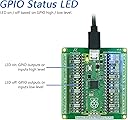
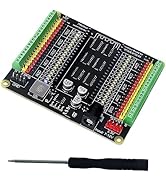
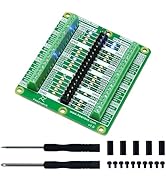
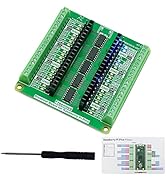
The Freenove Breakout Board is a premium accessory designed for all Raspberry Pi Pico models, providing full GPIO access with independent LED indicators for real-time pin status monitoring. Featuring secure screw terminals and clear pin labeling, it streamlines prototyping and debugging. Supported by comprehensive online tutorials and a dedicated support team, this breakout board is a must-have for professionals and makers aiming to elevate their Pico projects with efficiency and precision.


| ASIN | B0BFB53Y2N |
| Best Sellers Rank | #58,888 in Industrial & Scientific ( See Top 100 in Industrial & Scientific ) #93 in Prototyping Boards & Accessories |
| Brand | FREENOVE |
| Built-In Media | Breakout Board for Raspberry Pi Pico, Pinout Card, Slotted Screwdriver |
| CPU Model | None |
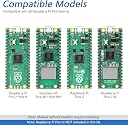
| Compatible Devices | Raspberry Pi Pico / Pico H / Pico W |
| Connectivity Technology | GPIO |
| Customer Reviews | 4.6 out of 5 stars 536 Reviews |
| External Testing Certification | Não aplicável |
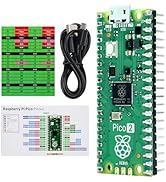
| Included Components | Breakout Board for Raspberry Pi Pico, Pinout Card, Slotted Screwdriver |
| Manufacturer | Freenove |
| Model Name | FNK0081 |
| Model Number | FNK0081 |
| Number of Items | 1 |
| Operating System | Debian |
| Processor Brand | freenove |
| Processor Count | 1 |
| RAM Memory Installed | 1 GB |
| Ram Memory Installed Size | 1 GB |
| Warranty Description | 1 year |
N**N
Good quality, convenient features
This is a well-designed and easy-to-use breakout board. The LED indicators for each GPIO are incredibly useful for debugging without needing to connect external LEDs or use a multimeter. For example, if a GPIO is mistakenly left floating (instead of enabling an internal pull-up), you can immediately see the LED flashing erratically, making it easy to identify the issue. Similarly, when testing outputs, you can confirm that they are functioning as expected in your code without having to connect additional components. When you're ready to hook up components, the screw terminals are high quality and provide a secure connection. I do recommend using silicone-insulated stranded wire, as it provides the most secure and reliable connection for 2.54mm screw terminals. While I haven’t tested larger AWG wire on this board, past experience suggests silicone stranded wire offers the best durability. While this isn't the cheapest breakout board available, the time saved in debugging and setup makes it worth the cost. Another great feature is that the LED indicators are isolated, meaning they don’t interfere with the normal behavior of the GPIOs, which is a big plus. The Pins are clearly labeled which as well is nice. Overall, if you're working with the Raspberry Pi Pico and want a breakout board that simplifies prototyping and debugging, this is a good choice.
H**W
Exceptional Breakout Board for Raspberry Pi Pico W!
Rating: ⭐⭐⭐⭐⭐ (5 out of 5 stars) WOW! The Freenove Breakout Board for the Raspberry Pi Pico W is absolutely fantastic! This board has exceeded all my expectations in terms of quality and functionality. It seamlessly extends the capabilities of the Raspberry Pi Pico W, making every pin accessible and clearly labeled, which is a dream for both beginners and experienced makers. The build quality of the breakout board is top-notch, ensuring stable connections and a reliable foundation for a multitude of projects. I cannot recommend this breakout board enough. It's a perfect companion for the Raspberry Pi Pico W, enhancing its usability without complicating its innate simplicity. If you're diving into projects that require extensive I/O with the Pico W, this breakout board is a must-have.
S**H
Great product
I really love this breakout board. The little LEDs on each IO pin let you instantly see the state of that pin, high or low. I have bought several for my projects.
J**Y
Super to check/verify GPIO function
This board has LEDs to see when a GPIO is hi or lo and screw terminals to connect externals to power and GPIOs. It is great for viewing my project in development and aiding connection to sensors and devices. So handy (and mountable), I left it connected to the I/O for easy change, removed the Pico-w and just ordered another Breakout Board for my next project. Also handy for checking functionality of pico GPIO by cycling through them with this simple script /* RW and blink test Write then Read each GPIO pin and blink the LED on the Freenove break-out board at the same time. (which is failing, the Pico or my IO?) For Newbies (would have helped me a few years ago) it goes something like: Setup is for things you only do once, first, so, setting it up. It reads: For GPIO pins starting at GPIO0 and going as long as GPIO is less than 29; OH! If GPIO is not 23 or 24 or 25; (not for our use) Set the GPIO pin mode to output (to write it, You can still read it, as input). The loop runs over and over let's call it looping: Again for i (GPIO number) is 0 to 28 omitting 23. 24. and 25: and let's do this all twice; First write the pin high {or on, or 1, or true): then check if it's there (it's there boolean wise if it's not 0, off, false, low) if as written, print that to the serial monitor else if it isn't there, as written, print that. Then set it low, off, 0, false and check and report result as above Rince and repeat go to the next GPIO and the next ... */ int i, repeat = 0; //i stands for itteration, you can pick any name you like // we will use these variables to count below in our "for loops" void setup() { Serial.begin(9600); // Sets you serial monitor to 9600 baud for (i = 0; i < 29; i ++){ // ++ increments i by one if (!(i == 23 || i == 24 || i == 25)){ // they are not available for your IO use pinMode(i, OUTPUT); } } } void loop() { for ( i = 0; i < 29; i ++){ if (!(i == 23 || i == 24 || i == 25)){ // ! means logical not , || means logical or for (repeat = 1; repeat <= 2; repeat ++){ digitalWrite(i, HIGH); // turn the LED voltage and logic HIGH, on, 1, true if (digitalRead(i)){ // if GPIO number i is not 0 Serial.println("GPIO " + String(i) + " reads high"); } else{Serial.println("GPIO " + String(i) + " didn't read high");} delay(500); // wait half a second digitalWrite(i, LOW); // turn the LED off by making the voltage LOW if (!digitalRead(i)){ Serial.println("GPIO " + String(i) + " reads low"); } else{Serial.println("GPIO " + String(i) + " didn't read low");} delay(500); } } } }
L**H
perfectly adequate
you probably won't be disappointed with this board. works as described, although the power leds are obscenely bright. you will know when the board has power and when you have power on vsys, vbus, and 3v3. your neighbors might also know. hex inverters are used to drive the leds. i did not test the terminal block connections, but they at least look less likely to be trash than connectwell branded ones (OK, this bar is extremely low).
B**Z
Very handy, great for beginners and experts alike!
The thing I hate the most about the raspberry pi pico is that the labels for the pins are only on the backside. It's very convienient to just look at this and see the GPIO numbers and leds that tell you if the GPIO is high or low. The little refrence card is handy as well as it doesn't just tell you the GPIO numbering, but also tells you which pins are for power, ground, i2c, SPI, UART and ADC.
E**T
Handy but needs to be a bit higher quality
Love the idea that I can reused the Pico on different projects without the breadboard. The little leds make it nice to see whats registering. However, I'm not totally sold on the accuracy of these things. Sometimes there would be LED's on where nothing is connected and no LED's where things were connected and intermittently worked. I would like to see a little higher quality. Granted you can make your own, this might just be a quick intermediate solution.
S**K
Perfect breakout board with indicators
For twelve bux you can't beat this thing with a stick. Every GPIO pin has an indicator, as evidenced by the attached video cap showing a full-device chaser. Each pin has a header pin next to it, and all the GPIOs are brought out to screw terminals on .1-inch centers so that a pin header will plug right into them. Never again will I build a breakout with indicators when I can just buy something like this OTS. Highly recommended.
N**O
Lovely unoppinionated board
Mainly got this as came with the ridiculously tiny screw driver I needed while pushing price above prime delivery threshold. Well, I would buy again and maybe multiple, as this was an instant little mvp, helping debug my code and fix a circuit had I spent a couple days faffing about with. Low profile board that does not demand to be built around, but rather is happy to slot in to your project. Great backpack for robot or breadboard breakout. One of my favorite breakouts to date. Also came with a nice pin out card out.
A**O
Muy util para prueba de programas.
Muy util para prueba deprogramas, recomendable Ademasenla pagina web hay cursos de programacion en Pytho y arduino
C**M
You need one
It’s high quality with small LEDs and (2.54) screw in terminals. Nice and compact ) with clear labels. Highly recommended while developing: Wiring up other expansion boards, testing software, sensors or circuits ; regardless if you use as is or design a pcb.
G**E
Good
Very good
R**.
Praktische Erweiterungsplatine für den Raspberry Pico – ideal zum Prototyping
Das Freenove-Board ist eine echte Erleichterung beim Arbeiten mit dem Raspberry Pico. Endlich kein ständiges Gefummel mit Dupont-Kabeln oder direktes Löten am Board – alles ist sauber beschriftet, übersichtlich angeordnet und stabil montiert. Besonders gut gefallen mir die klaren Pin-Beschriftungen und die LEDs direkt auf der Platine. Dadurch spart man sich das dauernde Nachschlagen der Belegung. Außerdem ist das Board mit allen Raspberry-Pico-Modellen kompatibel und die Anschlussleisten wirken stabil und hochwertig. Nichts wackelt oder rutscht heraus. Für Prototyping, Lernprojekte und Experimente mit Sensoren, LEDs oder Motorsteuerungen ist die Platine wirklich ideal geeignet. Ich nutze sie regelmäßig für kleine Elektronikprojekte und Testaufbauten und habe mir damit bereits einiges an Zeit und Nerven gespart. Fazit: Kleine, aber äußerst praktische Erweiterungsplatine für den Raspberry Pico. Saubere Verarbeitung, gute Übersicht und deutlich angenehmeres Arbeiten – klare Empfehlung für Bastler, Maker und Einsteiger.
Trustpilot
2 weeks ago
1 month ago