Buy anything from 5,000+ international stores. One checkout price. No surprise fees. Join 2M+ shoppers on Desertcart.
Desertcart purchases this item on your behalf and handles shipping, customs, and support to Croatia.
🚀 Elevate your build with ASUS Prime Z790-A — where power meets precision!
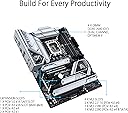
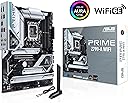
The ASUS Prime Z790-A WiFi 6E motherboard is engineered for Intel 12th, 13th, and 14th Gen processors, featuring a robust 16+1 DrMOS power design, DDR5 and PCIe 5.0 support, and comprehensive cooling solutions. It offers next-gen connectivity with WiFi 6E, 2.5 Gb LAN, Thunderbolt 4, and multiple USB Type-C ports, making it a future-ready, high-performance foundation for professional and enthusiast PC builds.


| ASIN | B0BG6NVPVG |
| Best Sellers Rank | #60 in Computer Motherboards |
| Brand | ASUS |
| CPU Model | Core i7 |
| CPU Socket | LGA 1700 |
| Chipset Type | Intel Z790 |
| Compatible Devices | Personal Computer |
| Compatible Processors | Intel |
| Customer Reviews | 4.4 out of 5 stars 510 Reviews |
| Graphics Card Interface | PCI Express |
| Item Dimensions L x W x H | 9.6"L x 2"W x 12"H |
| Item Type Name | Gaming Desktop Motherboard |
| Item Weight | 3.7 Pounds |
| Main Power Connector Type | 24-Pin |
| Manufacturer | ASUS |
| Memory Clock Speed | 7000 MHz |
| Memory Slots Available | 1 |
| Memory Storage Capacity | 128 GB |
| Mfr Part Number | PRIMEZ790-AWIFI |
| Model Name | PRIME Z790-A WIFI |
| Model Number | PRIME Z790-A WIFI |
| Number of Ethernet Ports | 1 |
| Number of Ports | 8 |
| Platform | PlayStation 5 |
| Processor Socket | LGA 1700 |
| RAM Memory Technology | DDR5 |
| Ram Memory Maximum Size | 128 GB |
| S/PDIF Connector Type | Optical |
| System Bus Standard Supported | Serial ATA/600 |
| Total Number of HDMI Ports | 1 |
| Total PCIe Ports | 5 |
| Total SATA Ports | 4 |
| Total Usb Ports | 8 |
| UPC | 195553939324 |
| USB 2.0 | 11 |
| Warranty Description | 3 year |
S**.
An In-Depth Review: The ASUS Prime Z790-A WiFi 6E LGA 1700 ATX Motherboard
After a less-than-ideal experience with the Ryzen 7900x3D CPU and Gigabyte motherboard, I made the strategic decision to change course and try the ASUS Prime Z790-A WiFi 6E LGA 1700 ATX Motherboard, coupled with the Intel i7 14700k CPU. This combo has proven to be nothing short of a revelation, setting a new standard in performance, stability, and ease-of-use. The need for a dependable system prompted the switch from Ryzen to Intel, and the Intel i7 14700k CPU, in conjunction with the ASUS Prime Z790-A motherboard, has exceeded all expectations. The stability and performance offered by this combination are unparalleled, a stark contrast to the issues I faced with the previous setup. The ASUS Prime Z790-A motherboard stands out with its advanced design and rich feature set, which includes support for the latest Intel 14th, 13th, and 12th generation CPUs, robust power delivery via 16+1 DrMOS power stages, and DDR5 and PCIe 5.0 compatibility. The motherboard's forward-thinking design ensures preparedness for future upgrades, offering a level of flexibility that was absent in the Gigabyte motherboard. When it comes to overclocking, the ASUS Prime Z790-A motherboard shines with its stability, allowing me to push the Intel CPU to its limits without any system instability or overheating. This has been a breath of fresh air, especially compared to the Gigabyte board that struggled to maintain stability during overclocking. A significant advantage of the ASUS Prime Z790-A motherboard is its user-friendly setup process. It features clear boot indications and debugging lights, which make troubleshooting straightforward, ensuring any potential issues can be quickly identified and resolved. This is a considerable improvement over the Gigabyte board, which lacked these useful features. The ASUS motherboard comes with a detailed, comprehensive manual that makes the installation process a breeze. The clarity of instructions and the overall user-friendliness of the BIOS setup was a refreshing change from the unclear and ambiguous instructions that accompanied the Gigabyte motherboard. Connectivity is another area where the ASUS Prime Z790-A excels. With built-in WiFi 6E, a 2.5 Gb LAN port, and multiple USB 3.2 Gen 2 ports including a front panel Type-C, it caters to all connectivity requirements. The inclusion of Thunderbolt 4/USB4 and DP ports further adds to its versatility, ensuring a broad range of devices can be connected with ease. The motherboard also supports future-ready technologies like DDR5 and PCIe 5.0, and features four M.2 slots for storage expansion. This allows for a clean, clutter-free build, a significant upgrade from the SATA-dependent Gigabyte board. In conclusion, the ASUS Prime Z790-A WiFi 6E LGA 1700 ATX Motherboard, when paired with the Intel i7 14700k CPU, offers a transformative upgrade to any PC build. This combination outshines the Ryzen 7900x3D CPU and Gigabyte motherboard in terms of performance, stability, ease of setup, and user-friendly features. If you're seeking an unrivalled computing experience, this CPU and motherboard combo comes highly recommended.
L**R
Worth the money and works well
Built my first pc with this beast of a mother board ive had no issues its great
T**R
Examine carefully for damage
I returned the first 2 due to damage to the cpu connector. I ‘think’ someone had ordered them, accidentally damaged the area, and then returned them. Then, they were sent to me. The third one was in new condition. But something that I was not aware of, these Z760 mobo’s will not recognize nor boot a regular hard drive. They use the M.2 SSD’s.
V**S
Poor quality control!
I've been building my personal gaming computers since the early 90's. For the past 20 years or so, I've been an ASUS fanboy, buying both motherboards and GPU's from them. For my latest build, while I *did* get my GPU from another mfg, I went with this motherboard. My first one arrived DOA. Couldn't believe it, so took it to a local shop where they have diag tools I don't. Confirmed it was DOA. I was in my return window, so sent it back and ordered another. This one worked just long enough to get out of the return window, so I have had to work with ASUS support. When the second one died, I went back to my local shop to confirm that it was dead. The LED's light up, but no POST, no video, nada. Shut it down one night and the next morning it just wouldn't power up. They tested all of the components and confirmed it was the mobo again. I gave ASUS support the test info and they felt it was adequate to give me an RMA. Once they receive it, they will test it, confirm it's dead, and send another replacement. I like the look of the mobo, its features, and the price was comparable to the competition. I've liked the ASUS overclock tool in the past, although I have not used it with this mobo (don't usually overclock until I've run the PC for a year or two). But ASUS reliability in my past systems has had me as a consistent customer. If this one dies anytime in the next 2 years, I won't replace with ASUS even though it would be covered by warranty. I bought and built this computer to USE, not be a diagnostic bench subject. Don't know if it's just this particular model, the chipset in general, or what. But buyer beware! ****UPDATE**** Just received a response from ASUS. They say that the board has damage (CPU socket) that is not covered by warranty. To repair they want over $350USD!! More than the cost of a new board!! As noted earlier, the board suddenly stopped working one morning (case hadn't been opened in 3 months), so if said damage was actually done to the returned board, it wasn't the cause of the failure and either occurred in shipping or at their facility. Needless to say, ASUS will not get another dime of my money. I'm ordering a new board from another company today. Avoid this company until they get their act together!!
T**R
Looks good in a white build
Paired this board with a 13600k,white vetro 360 AIO, 32gb corsair vengeance white and it looks pretty sharp. The bios is super easy to use and overclocking is a breeze (make sure to flip your jumper before installing GPU) although i cant get my 6000mhz ram above rated at all without instability but its probably the sticks. Wifi works great, Ethernet obviously works great.Plenty off USB, plenty of storage expansion. The Prime line is probably ASUS best middle ground at the moment of course the TUF series is pretty on par with this one as well. AURA sync is a pain as usual and never links correctly with corsair ram but the board itself is great.
T**S
Looks and works great good for high end budget builds, but initial BIOs and OS setup was loathsome
This motherboard works and looks great—an excellent choice for a tech-savvy person’s first PC build, like myself. It offers plenty of features to support a robust gaming and workstation setup, with long-term stability for future upgrades. With the right components and care, this board can definitely support high-end 4K gaming for at least the next 5–10 years from 2025. Build Experience & Usability: The motherboard is labeled clearly enough that assembling and connecting everything was fairly intuitive, aside from my own inexperience. However, the RAM slots were tighter than expected, requiring more force than I was comfortable with. While they worked fine in the end, I feel the quality control in this area could be improved. Here’s a learning-from-others moment: When I powered up the system for the first time, I didn’t get a BIOS post on my monitor. I initially worried something was wrong, but I had made a simple mistake—I plugged my HDMI cable into the motherboard instead of the GPU. Since my CPU doesn’t have integrated graphics, there was no signal. If you're in a similar situation, check if your processor has integrated graphics. If not, always plug your display cable into your GPU, not the motherboard. BIOS, Drivers & Windows Setup: A BIOS update was required before I could get everything working, so be prepared for that, have a 32 gig USB stick handy that you wouldn't mind reformating. Also access to a second PC or Laptop is an absolute must for this motherboard initials set up. Driver setup took longer than expected, especially since the motherboard doesn’t include Wi-Fi drivers embedded in the BIOS. You’ll need to download the ASUS Wi-Fi drivers for this model ahead of time, which I only found via reddit post (thanks reddit) Windows 11 installation was a bit annoying. Initially, it claimed that TPM 2.0 wasn’t enabled and wouldn't let me install it, even though it was. Some simple troubleshooting (disabling and re-enabling TPM settings in BIOS) eventually resolved it. Not a show stopper, but definitely caused me anxiety about the purchase. Windows 11 Compatibility: This board is primarily optimized for Windows 11. If you’re planning to use Windows 10, you won’t get the full feature set of the motherboard. My reason for upgrading originally was that my previous setup couldn’t support Windows 11, so this wasn’t an issue for me—but if you want to stick with Windows 10, it’s something to consider. Final Thoughts Overall, this motherboard looks sleek, performs well, and was relatively easy to put together (aside from the concerningly tight RAM & GPU slots). It’s a great option for those looking for future-proofing and long-term upgradability. Just be ready to spend more time on BIOS updates and drivers than on the actual hardware assembly. With the right parts, this motherboard should hold up well for years to come. Would I recommend it? Yes, but only if you’re running Windows 11 and don’t mind a bit of extra setup work. And you absolutely have access to a second computer available.
B**S
Great quality
I recently installed the ASUS Prime Z790-A WiFi 6E LGA 1700 motherboard and it’s been excellent—easy to set up, packed with features, and rock-solid in performance. The built-in WiFi 6E is fast and reliable, the BIOS is straightforward to navigate, and the overall design feels premium with plenty of connectivity for future upgrades. It’s a dependable choice that makes building and daily use smooth and hassle-free
S**O
reliable and fast
It works flawlessly with 12-th gen. Intel. It's been a year, and I had no issues.
S**R
Cant go wrong with Asus!
This board has all i needed in a sleek design, nice basic RGB, all the fan headers and RGB too. Has nice expansion, ddr5 and pcie gen5 and blows away the boot time with my samsung Pro990 2TB drive.
O**M
Ottima!
Il marchio è una garanzia. Processore I9-14900KF, Tutto funziona alla perfezione. I quattro slot per SSD M2 sono una cosa ottima. Consigliata.
R**O
Caro mas bem completo
Sobre o produto em si, é uma placa mae bem completa. vem com wifi e bluetooth integrado, que ja compensa parte do custo a mais. E ja eh DDR5 e o chipset é o mais avançado pro socket lga1700 atualmente. Veio funcionando tudo certinho, estou usando com um i5 14600k e está tudo certo, nem precisei atualizar a bios para funcionar o intel da 14th gen. Falta atualizar a bios e fazer um undervolt pra ver se fica estável. O preço é alto mas entrega bastante também.
M**U
M.2 slots are PCIE G4
M.2 slots are PCIE G4. Forget about a G5 NVNE SSD.
L**L
Publicité non valide pour se tarif voir la description de l article
Ce produit et mal détaillé, mal expliqué Surtout de mettre les mots juste pour cette article bien dessus pour se tarif
Trustpilot
2 weeks ago
1 month ago