Buy anything from 5,000+ international stores. One checkout price. No surprise fees. Join 2M+ shoppers on Desertcart.
Desertcart purchases this item on your behalf and handles shipping, customs, and support to Croatia.
๐ Stay connected, stay aheadโyour ultimate 4G Wi-Fi hub!
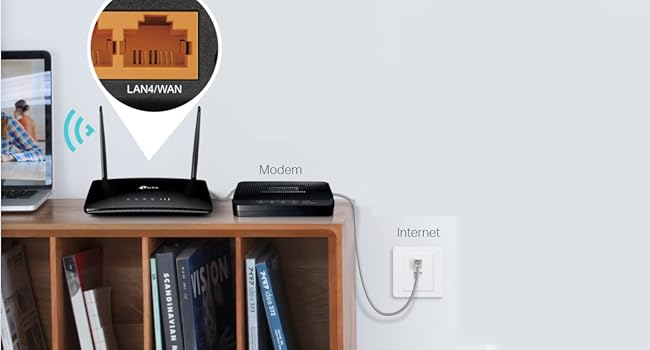
The TP-Link AC750 Archer MR200 is a sleek, black dual-band 4G LTE router designed for professionals on the move. Featuring a SIM slot unlocked for global use, it delivers up to 150 Mbps on 4G LTE and combined Wi-Fi speeds of 733 Mbps across 2.4 GHz and 5 GHz bands. With removable antennas and a WAN/LAN port, it offers flexible, stable connectivity without any configuration hassleโperfect for seamless remote work or smart home setups.


| ASIN | B0161ACBE0 |
| Antenna Location | Home |
| Antenna Type | Fixed |
| Best Sellers Rank | 1,467 in Computers & Accessories ( See Top 100 in Computers & Accessories ) 24 in Whole Home & Mesh Wi-Fi Systems |
| Box Contents | AC750 Wireless Dual Band 4G LTE Router Archer MR200|RJ45 Ethernet Cable|Power Adapter|Quick Installation Guide |
| Brand | TP-Link |
| Brand Name | TP-Link |
| Colour | Black |
| Compatible Devices | Laptop, Personal Computer, Smart Television, Smartphone, Tablet |
| Compatible devices | Laptop, Personal Computer, Smart Television, Smartphone, Tablet |
| Connectivity Protocol | Wi-Fi, Ethernet |
| Connectivity Technology | Ethernet |
| Control Method | App |
| Country of Origin | China |
| Coverage | Typical for router size and type |
| Customer Reviews | 4.4 out of 5 stars 1,585 Reviews |
| Data Transfer Rate | 150 Megabits Per Second |
| Frequency | 5 GHz |
| Frequency Band Class | Dual-Band |
| Frequency band class | Dual-Band |
| Has Internet Connectivity | Yes |
| Is Modem Compatible | Yes |
| Item Dimensions L x W x H | 30.5L x 22.5W x 7H centimetres |
| Item Weight | 9.52 Ounces |
| LAN Port Bandwidth | 733 Mbps |
| Manufacturer | TP-Link |
| Manufacturer Part Number | Archer MR200 |
| Maximum Upstream Data Transfer Rate | 50 Megabits Per Second |
| Model Name | TP-link AC750 |
| Model Number | Archer MR200 |
| Model name | TP-link AC750 |
| Number of Ports | 2 |
| Operating System | Linux, Mac OS, Windows Vista |
| Other Special Features of the Product | Easy Setup, 4G SIM Support, WAN/LAN Port, Removable Antennas, Wide 4G Network Compatibility |
| Product Warranty | 3 year manufacturer |
| Router Network Type | wireless |
| Security Protocol | WPS |
| Special feature | Easy Setup, 4G SIM Support, WAN/LAN Port, Removable Antennas, Wide 4G Network Compatibility |
| Unit Count | 1.0 count |
| Wi-Fi Generation | Wi-Fi 5 |
| Wireless Compability | 802.11b, 802.11g, 802.11n |
| Wireless communication standard | 802.11b, 802.11g, 802.11n |
P**E
Superb alternative to landline. Some tips and observations...
Purchased as an emergency router to cover for loss of home broadband (TalkTalk, again, and there's a 3 week wait for an engineer). Some tips and observations: The house in question (my other half's) is also in a mobile not-spot, so you might be wondering if this was a good idea. Well despite no reception at all (not even 2g, for texts or calls) downstairs, we found one corner of one room that had 4G. Fancy that! Turns out it's more or less in line of sight with the distant cellphone tower some miles away. Also 4G in one corner of the loft. We quickly tired of taking turns to stand in the corner on our phones, so I looked into mobile 4G options. Initially looking at small Mifi units which work the same and are portable, but actually, what we wanted was wifi around the house and the same features as our landline router. Some reviews of the small Mifi units say they have limited wifi range - great for in a car, caravan or around a table - but not for a whole house. And they don't have ethernet out connectors (critical if you want to extend wifi with powerline adapters for example, or connect a wired network item like a printer or camera). So that led me to purchase this unit, as for all intents and purposes, it's just like your normal landline router, but takes a sim card. I decided to stick with the network that works up to 4G on my phone which in this case is GiffGaff. Some reviews and some Q&A state this takes a smaller SIM card, it does not, it takes a FULL sized SIM card. But don't worry because assuming you're ordering a SIM card for this from your preferred network, most are full sized with easy snap outs for the smaller sizes, so all eventualities are covered. Now one tip... I suggest you set this up somewhere where reception is guaranteed, I did mine at home in the city where 4G is full power and full speed. It just makes it easier to get started, then install where it's needed and if it doesn't work well you know it's the reception. Installation was easy. Quick start guide included. Note that for GiffGaff it didn't automatically work, you need to connect to the router (in my case I just did it via wireless and typed in the router URL as shown in the quickstart guide) to go through the wizard, GiffGaff was selectable from the drop down menu. Once selected it then magically connected. Once done, just power off then power back up where you want it - no more setting up needed, it just connects by itself, like your phone would. Second tip.. ignore the coverage maps. The place this is installed is not in a 4G area according to the GiffGaff/O2 maps but works in one corner of one room. Initially 2 bars of 4G then 3 bars when I rotated it 90 degrees!! You can either order free SIMs from the various networks and try them or see where your phone gets coverage and stick with the same provider. The speed... wow... I mean you don't expect 4G internet in a rural "not spot" to be faster than the landline and yes we are lucky to get it from one location upstairs, but 13Mb to 14Mb download and 1.5Mb upload and 35ms ping... TalkTalk landline is 12Mb tops. That's measured, by the way, over wireless on an old 2010 Macbook downstairs in the kitchen so I am sure the actual speed is higher (I will speedtest on ethernet at some point to check). The range of the Wifi is really good. Fast connection downstairs under the router, and fast one room either side downstairs. Patchy in the lounge which is downstairs and two rooms across on the 2010 Macbook, but fine on my Moto phone there and the iPad (assume they have newer and better wifi chips built in). Fast enough to handle two people surfing. Little in the way of drop outs etc but that would be quite network dependent anyway. But data usage... OMG. My final tip. If you have been offline for a while and are using a limited data package (say up to 2Gb a month), PLEASE disable auto updates on your devices and PC and iPads etc. Because when they finally connect they will slurp updates and that can be 1Gb gone. One phone alone used 200mb updating. You will need to educate the household about NOT playing video. Or explore a 20-30GB plan so you don't need to worry. One downside of this sort of internet connection... you WILL get irritated when surfing because every freaking advert and auto play video will cost you money. An adblocker is a must with a 4G router. I never thought I'd say it, but this is a viable alternative to landline mobile in terms of speed and uptime, on all aspects apart from ongoing cost of the data. And it's a pretty useful backup to have if internet is critical to you and your landline provider is flakey.
P**W
Very good 4G LTE Router
The TP-Link AC750 Dual Band 4G LTE Router is a solid choice for anyone in need of a reliable and fast internet connection on the go. I recently purchased this router for a road trip and found it to be a great investment. First off, the setup was a breeze. The router comes with a SIM card slot and is compatible with most major 4G LTE networks. Once I inserted my SIM card and plugged in the router, I was up and running within minutes. The router also comes with an intuitive web interface, which made it easy to customize settings and manage my network. The speed and reliability of the connection were also impressive. The AC750 Dual Band router utilizes dual-band Wi-Fi technology, which allows for faster speeds and better range than traditional routers. This proved to be especially useful when traveling in rural areas with spotty cell service, as the router was able to pick up a stronger signal and provide a more stable connection. Overall, I was very impressed with the TP-Link AC750 Dual Band 4G LTE Router. It offers fast and reliable internet connectivity on the go and is easy to set up and use. While it may be on the pricier side compared to other routers, the portability and speed make it worth the investment for anyone who needs a reliable internet connection while traveling.
A**M
External antennae no longer removable
I bought this to replace a fixed line broadband that was appallingly slow and unreliable. Out of the box the Archer worked well. Despite being in a poor 4G signal area it picked up 50% signal and gave me download speeds of around 8Mbps. I knew I could get a better signal with an external antenna and bought this as the spec says the external antennae are removable. However, they are not. I had a long conversation with TP-Link tech support who were puzzled as they said they were removable, but they arrived attached and are no longer removable. I notice that their other routers are also now non-removable. I'm still trying to confirm with TP-Link in China, but for the moment sadly have to return this item and find an alternative. Great device if you don't need the external connection. Easy to use mobile phone and browser interface. Good performance.
J**Z
Fantastic router.
What a device. It's totally saved my online life. I've moved to the back of the Shropshire beyond and the wired speed was set to be 3mb. 3mb! There was a chance of a sniff of a 5g signal so I took a chance. I get about 2 bars and it's flying. 90-150 Mbps. Awesome. And the router controls are excellent allowing total control. Simple, effective, fantastic. Very pleased.
P**F
Goodbye BT Broadband. 4G wireless broadband a must for rural living.
Update Jan '24 ---------------- Well, this TP router worked well for three years....until recently. My mums 4g router went on the blink, it would drop out every half an hour or so and became more and more frequent. No use when you're trying to get tasks done online. I troubleshooted all the usual things; reboot, reset, firmware updates, tweaking settings, others experiences online....nothing worked, whatever I tried. Strangely, I have the exact same make and model of router but 'with less miles on the clock'. I swapped the routers over at my mums, yet the problem still exists, it kept dropping out. Maybe it was the SIM? Nope, it worked fine in my phone. Ultimately I never got to the bottom of the problem. Other users echoed similar problems but with different models of the 4g routers....I got frustrated and fed up, bought a Huawei 4g router and haven't looked back. Such a shame. TP Link I thought had high standards, but this device fell low of my expectation. 3 years and it goes wonky. Not good enough. Update 3 Jan 2021 ----------------- -Only one minor problem that my mum has reported with the router; it does slow down after a few weeks and therefore a reboot of the router is required. After a reboot, everything is back up to speed. Otherwise, no problems. Original Review - Oct 2020 ----------------- I recently purchased this for my aging parents who live rurally. As most people know, landline broadband out in the sticks is as much use as a chocolate teapot. Before purchasing this 4g router, my parents were subscribed to BT for their broadband, and it was expensive, slow, unreliable, kept dropping out, and there was a 'fault' somewhere along the lines that - with countless engineers visits - failed to resolve their internet issues. I had enough of it and purchased them this 4G router. All I can say that this 4G router is BRILLIANT! A complete 180 from before! It has totally changed my parents experience of accessing the internet now. They can now watch HD films and YT videos without constant loading and buffering, and pages load super quick now. It's incredible! They can fill in forms and do their shopping online more reliably now than ever, and video call family which is essential for these Covid restricted times we live in. I bought them a GiffGaff SIM to pop in, let them choose what they want from it and they were good to go. 4G worked flawlessly from the get-go! __________ A few pointers to be mindful of though: Even though the product description says 'just plug in and play', I don't find that *entirely* true. There is an element of some quick setting up to be done before you can surf. - Stating the obvious, you have to buy a SIM card. And depending on who you decide to go with, you may well have to activate the SIM before you can use it. I bought a GiffGaff SIM from a supermarket, activated it online and then popped it into the router when it arrived. It worked perfectly. - When you set up your router for the first time, you have to go to the routers settings 192.168.1.1 and do some quick set up stuff before you get going. It only takes 5 minutes if that, then you're online - but if you're a total geek, you can rummage through all the other advance settings and set up the router to your liking. ___________ In short, this router is A MUST for those of us who live out in the countryside and have lousy landline internet. Also, in the long run, I very much suspect that this will save my parents ยฃยฃยฃ from going into BT's coffers, which was very costly and wholly unreliable service. This 4G router has blown them right out of the water. Touchwood, so far so good. I hope to update my review in the coming months and see what my parents think of it too. So far 10/10. Happy bunny indeed.
M**.
Great router, wrong plug type for UK.
Great router but comes with a 2-pin plug, luckily we had a shaver adapter we could use but still inconvenient. Why no UK plug! Contacted TP-Link support and they advised that I return it to Amazon.
M**S
A brilliant router
Arrived very quickly bought as refurbished but only the packaging was slightly marked the contents were fine. Very easy to set up, the instructions were easy to follow and the app was good. Good broadband speed (better than through the landline) add a data SIM and you get fast broadband at great value
E**R
Works well for mobile broadband on holidays
Works really well in the hills of Tuscany, Italy. Checked which provider had a tower closest to the holiday home, bought a PAYG sim from vodafone plugged it in checked it worked in the UK then powered up the unit in Italy where it automatically picked up the correct profile. The only gotcha is you need to manually tick roaming enabled [Advanced | Internet | Network then enable Data Roaming). Got full bars for the data signal without any additional aerials the wireless has a working range of about 75 ft From experience from using these kind devices in Spain you may need to add new profiles for roaming on other providers networks with the specific APN they use. Most tend to have blank usernames and passwords but some have specific default usernames and passwords that you need google. I've found a lot of the PAYG sims you get in the UK have pretty limited data when roaming in Europe for example Vodafone give you a max of 15GB currently which you can whistle through in several days if a family are using the connection. With Three they offer all can you eat data but the Europe they give you a maximum of 12GB. If you shop around in Italy I've seen 50 GB sims for around 20 Euros so you might be better off buying these at your destination if you can navigate the lingo with the shop assistants. The performance of the unit is impressive I'm getting 23 Mb/s download speed and 9.4 Mb/s upload speed in the back and beyond in the hills of Tuscany. With my Three sim on my mobile phone I've never had a signal all holiday unless I walk up the hill where I get 2 bars if I'm lucky. I've been able to RDP to remote servers in the UK to my home systems and using VPN on company systems without any issues as if I'm working from home in the UK. Impressive performance plus because the unit is mains powered it runs 24/7 every day never dropping out.
B**K
Simple and easy to use. Quality of wifi signal is very good
J**O
Plug and plug what a joke ๐
Don't waste your money says plug and play ๐๐๐๐๐ You would need bill Gates to get this piece of scrap going, says no configuration joke I sent mine back possibly faulty.
J**L
Arrived with a UK electrical plug instead of an Australia plug
The modem works well but arrived with a UK plug instead of an Australian plug. Has to be used with a travel adapter to work. Because I need the modem to be portable if I had known before delivery I would have purchased a different modem.
P**E
Ottimo
Davvero ottimo, con una scheda Iliad ho risolto problema di connessione internet in tutta la casa. Facile da installare; costa un po' ma la qualitร รจ buona
T**.
Performance
Very good and stable router for home internet.
Trustpilot
1 month ago
2 months ago