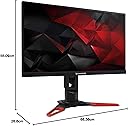
🎯 Dominate your screen, own your game.
The Acer Predator XB271HUbmiprz is a 27-inch WQHD IPS gaming monitor featuring a 2560x1440 resolution, NVIDIA G-Sync support, and an overclockable 165 Hz refresh rate. Designed for pro gamers and multitaskers alike, it offers ultra-smooth visuals, customizable gaming profiles, and eye-care technologies to enhance performance and comfort during extended use.


| ASIN | B017DG09WM |
| Adaptive Sync | G-Sync |
| Aspect Ratio | 16:9 |
| Aspect ratio | 16:9 |
| Box Contents | Predator XB271HU Widescreen LCD Monitor 1 x Displayport Cable 1 x HDMI Cable Power Cord 1 x USB 3.0 Cable |
| Brand | Acer |
| Brand Name | Acer |
| Colour | Black/Red |
| Contrast Ratio | 1000:138 |
| Customer Reviews | 4.5 out of 5 stars 1,490 Reviews |
| Display Technology | LED |
| Display Type | LED |
| Global Trade Identification Number | 04713392260216, 05054629982617 |
| Hardware Connectivity | HDMI, USB 3.0 |
| Has Color Screen | No |
| Image Brightness | ANSI lumens |
| Image contrast ratio | 1000:138 |
| Is Electric | Yes |
| Item Dimensions D x W x H | 55.1D x 61.2W x 26.8H centimetres |
| Item Type Name | Monitor |
| Item Weight | 8 Kilograms |
| Manufacturer | Acer |
| Maximum Display Resolution | 2560 x 1440 |
| Model Name | zip |
| Model Number | UM.HX1EE.005 |
| Mounting Type | Wall Mount |
| Native Resolution | 2560x1440 |
| Network Connectivity Technology | HDMI + DP + USB 3.0 Hub(1up 4down) |
| Picture Quality Enhancement Technology | NVIDIA G-SYNC |
| Product Features | Built-In Speakers, On/off switch, Standard decoder:Working distance:Blade Type:viewing angle, vertical:MP3 bit rates:Keystone correction, vertical:Automatic shutdown:Ambient light metering modes: Flash metering modes: fan diameter:178°, Swivel Adjustment, Tilt Adjustment |
| Product Warranty | 12 months |
| Refresh Rate | 144 Hz |
| Resolution | 2560 x 1440 WQHD |
| Response Time | 4 Milliseconds |
| Screen Finish Type | Flat |
| Screen Size | 27 Inches |
| Screen size | 27 Inches |
| Screen surface description | Flat |
| Shape | rectangular prism |
| Specific Uses For Product | Gaming |
| Total HDMI Port | 2 |
| Total USB 3.0 Ports | 2 |
| Total USB Ports | 5 |
| Total Video Out Ports | 2 |
| Viewing Angle | 170 Degrees |
M**W
A great no compromises gaming monitor - let down by Amazon Warehouse deals.
For the first half of the review I will be talking about my experience with the new monitor I ordered from Amazon directly brand new. For the second half I'll be talking about the first monitor I ordered in 'like new' condition from Amazon Warehouse deals. My first photo is of the warehouse deals monitor, the other's are of the brand new one. First Half Great monitor. I did expect some back-light bleed or a few dead pixels this monitor is pretty much flawless. While there is a bigger amount of IPS glow in the bottom right corner than the rest of the monitor it's not bad at all, I wouldn't even consider it backlight bleed. Whether or not there has been some sort of update in quality control since it's release I don't know but this is the first brand new model I have ordered (March 2018 manufacture date) but I would say it's flawless. Upgrading from a 23" 60hz 1080p IPS monitor is a major jump, and I would say it was worth the investment, since I plan to keep this monitor for a long time. The screen real estate gained by the larger monitor size as well as 1440p is great for productivity, not to mention a better gaming experience (the main reason this monitor was purchased. To anyone considering the upgrade, I would recommend this at its current price of £530 compared to equivalent monitors from other manufacturers, since it is the cheapest monitor with these specs. I'd also recommend if you're looking for a no compromises monitor. G-SYNC makes such a difference since I currently have a GTX 1060 6GB some games aren't able to hit the stock refresh rate of 144hz, but screen tearing is non-existent - a great plus if you have an under powered card but don't want to compromise graphics in certain games where you don't mind a lower refresh rate. I don't actually have any memory of using a TN panel to compare, but since my previous monitor was IPS I didn't really want to switch to arguably a 'worse' panel for colour reproduction and viewing angles. Overall for anyone looking at a monitor of this spec and coming from 1080p, 60hz or no g-sync its defiantly worth the investment. Second Half Now I'm not going to change my 5 stars as that's based only on the monitor itself. However if I could publicly rate my experience with Amazon Warehouse deals the first time around it would be a completely different story. I chose a 'like new' model in the hopes it simply was a return, and not someone who had sent it back for bad QC by Acer, as well as the reduction in price being around £90. For the cost I was expecting a few marks or something, even though it's description said there was simply damage to the packaging. Upon receiving the monitor there was damage to the box and it had been resealed, but all items were in the box and on first inspection there was no damage to the actual panel itself. However properly looking there was dust over the top of the bezels and the area that sticks out on the back of the monitor. Okay, so either someone's house is pretty dusty or they had it for a few months and amazon still let them return it, that's fine it looks good. There was a very tiny chip along the top bezel towards the left corner but that's fine too. However once I've set up the monitor I was treated to a half cracked display, spanning from the small chip along the entire top half of the monitor, which I was certainly not pleased about. Now, I get how this could have happened because the crack isn't visible without powering the monitor on. What I don't understand is why Warehouse Deals seems to have a policy that a monitor that they are reselling with the rating of 'like new' isn't even checked to see if it power's on. The damage definitely wasn't in transit as it was all packaged correctly, with the box damage being only cosmetic, I can only imagine someone damaged their monitor and returned it to them within a year for a 'manufacturing issue' and got away with it. This is further backed up since the warehouse deals monitor had a manufacture date of December 2016, so it's clearly a fair bit old. I'm sure it's not the person who checked the items fault either - they probably have a quota of items to check per hour and without powering it on I would have given it a similar rating. But when you invest this kind of money I would expect better quality control and it's what made me just cough up the cash for a warranty with Acer and consumer law rights for buying new. I just couldn't take getting a second lemon considering the first was so bad. If you do plan to use warehouse deals, even though this is the first time I've used them I have heard great things about them. But I would recommend considering what it is you're buying and if the saving is really worth the possibility of returning it (amazon customer service was great, refunded me immediately to my Amazon account so I could re-order and get a new one ASAP) and possibly receiving an item that someone has used for an unknown amount of time, with a simple 1 Year warranty from amazon (confirmed to be by a chat before I purchased, although not listed on their site). I'll probably use them again, but not on large or time-critical purchases.
N**N
One of the best monitors in my opinion
After using this after a month after upgrading from my old 21.5 inch, 60hz, 1080p, non G-sync monitor, I can say that this was an amazing purchase. The extra size and resolution allow for roughly the same Pixels Per Inch (PPI) as my old display, with this monitor having a PPI of 109, meaning that the extra size and resolution combined offer an increased screen size at no cost to image quality. The colors are more accurate and vibrant on this display when compared to my old monitor, particularly giving more vibrant reds. The high refresh rate makes playing games, provided I can reach the monitors refresh rate, can allow for buttery smooth gameplay, increasing the immersion and making the experience far better. G-Sync successfully eliminates dreaded screen tearing, so that won't distract you anymore, if you even notice it. The sleek, gamer oriented stand and the thin bezels make the monitor an attractive site to behold. There is one problem which I encountered with this monitor: dead and stuck pixels. Approximately five dead pixels are located just to the left of the bottom center of the monitor, as well as four stuck pink pixels in the top left area (this is enough to allow me to return the monitor due to the pixel defects, but the hassle and chance of the next monitor being the same or worse makes me reluctant to send it back). While I generally don't notice it when gaming or watching videos, it can become especially especially apparent and visible when against a light background, such as many websites, and leaves me feeling slightly disappointed with my particular model, unfortunately I did not win the silicon lottery this time. On the bright side, IPS glow isn't noticed unless against a black background (I only notice it on the Windows start up screen). Overall I am very satisfied with this monitor, with it's vibrant colors, high refresh rate and lack of screen tearing, even with the pixel defects, I still think it is worth giving it a five star rating, even though Acer's quality control team let many defects slide in the pursuit of money. Either way, it is still a great monitor, and I am sure if you decide to buy it, you will be happy to have done so (unless you end up with defects like me).
G**S
Superb better than Asus pg279q.
I am really pleased with this , I just returned the Asus rog swift pg279q because of unacceptable levels of backlight bleed . This arrived today and there is no backlight bleed whatsoever it's amazing , the edges of the panel feel more sturdy and a better fit around the screen with no gaps unlike the Asus. It's also easier to adjust the height and swivel than the Asus. The stand is sturdy and looks cool , it doesn't light up like the Asus but give me screen quality anyday over flashy led lighting. It beats the Asus pg279q hands down in picture uniformity because they have managed to eliminate back light bleed. Asus Rog swift still has problems that let it down with back light bleed this doesn't , some people prefer the menu system of the Rog swift with the little joy stick but to be honest it's not a deal breaker the menu system on the Acer is perfectly intuitive and the physical buttons in my view give it a premium feel . don't hesitate to buy this it's the best gsync IPS monitors you can buy.
A**N
Exactly what i expected.
This monitor is exceptionally great. the IPS panel guarantees that colors stand out and are bright and as advertised it operates at 144hz with 165 OC. the bezells are minimum and everything is crisp and clear. The monitor arrived in a pristine box with a handle making it easy to transport. the monitor itself was easy to set up with the screen and stand in two parts that attach to each other very easily while still being secure. As soon as I had it set up and connected the display port cable that was provided it worked seamlessly and with a few options tweaked, it was perfect. Games have no tearing thanks to the addition of G-sync and with the monitor being 27-inch means that is especially great for watching movies too. Overall this monitor is great and i would recommend it.
M**T
Amazing on paper but has some setbacks
In terms of specs this is one of the best gaming monitors currently; playing games at QHD resolution and 165hz is awesome, but make sure you have a capable computer to push all those pixels. I've bought 3 in total, 2 from the Amazon Warehouse and 1 from Amazon. (The Amazon Warehouse stocks returned items and then sells them at a discount). I bought the 2 from the Amazon Warehouse for around £415 each. They were in perfect condition, just the packaging had obviously been opened once before by the previous customer. I expected them to have pretty bad backlight bleed because I assumed that was the most common reason for people returning this monitor judging from the reviews. However, while there was some around the edges it definitely wasn't a huge amount. It's especially unnoticeable as I use the monitors at around 30 brightness (default 80) which makes it far less visible. The only downside of buying from the Warehouse is that the item doesn't come with any warranty, so it can be a bit risky. Unfortunately, the one that I bought new from Amazon directly (for £499.99) had pretty severe backlight bleed in the corners and edges, so I decided to request a replacement. I then had to request another one after this because the replacement also had severe backlight bleed. In the end I just decided to keep the original one I bought and send back the 2 replacements as it had the least backlight bleed (although it was still pretty terrible). The display port cable that came with this monitor also seemed to be defective (caused flickering), so I used one of my own display port cables and it worked fine. The ZeroFrame borders are incredibly nice. Around the top and sides, the panel border and case border are 5mm and 2mm respectively. The bottom border is 22mm wide which in my opinion is unnecessarily large and looks slightly ugly but it's not a big deal. One thing to note is that the bottom bezel actually sticks out to either side of the monitor by barely 1mm however it's enough that it means you can't put multiple of the monitors right next to each other and have to leave a small (but noticeable) gap between them. I feel like this was a bit of an oversight in the physical design of this monitor. The feet of the stand are surprisingly big and can take up a lot of room on your desk so I'm going to wall mount my monitors when I get around to it as I like to have an uncluttered desk. G-Sync makes a surprisingly noticeable difference in the smoothness of the visuals of your game, I didn't expect much of an improvement but it was definitely worth it. Also, for the people who care about response times, I couldn't notice a difference between my old 1ms monitor and this 4ms (+plus any input lag from G-sync) monitor, so I think unless you're a very competitive gamer, sacrificing a 1ms TN panel for a 4ms IPS panel is 100% worth it. Overall, definitely worth the purchase(s), only reason for the 4 stars is the backlight bleed problems (this isn't Acer specific, it's been a prominent issue with the Asus PG279Q as well) and the other minor complaints I've mentioned. P.S. Make sure to wait until this monitor goes on offer to at least <£500 before buying as it seems to do so quite often so no point spending £600 on it.
S**6
Perfect monitor for high end graphics cards.
Read all sorts on monitors to make sure got right one (mainly due to cost of high end gaming monitors). Really happy with! Good size, easy to acccess ports, simple height adjustment. Feels lit sturdier than the other 27” monitor I had which rattled on the stand whenever desk moved. Picture quality is brilliant. May take bit of tinkering with settings and make sure you have graphics card to utilise the frame rates on games. I have GTX 1080ti so everything maxed. Running 144hz 144 frames per second static on games like Battlefield 1, fifa 19, Forza 4 etc. Looks really smooth and crisp. Didn’t go for 4K as visually better but frames locked down to 60. Prefer the smoother game play and gsync helps keep graphics card locked to monitor frames so no judder or frame drops.
S**E
The psychology if immersion in video games: quest fulfilled.
I bought this to play CSGO. Previously I had a BenQ ZOWIE XL2411P which I tried hard to like, but found I struggled to find the least worst setting. Anyway... I bought the Acer Predator XB271HU with some doubts about the 4ms grey to grey response time (compared to the 1ms GTG of the BenQ XL2411P) and struggling against the gaming hyp of the BenQ. The Acer XB271HU is massivley superior to the BenQ XL2411P in my opinion. With the BenQ the colours are so washed out even after calibration according to some serious monitor specialist websites, opponents can hide just by standing against a wall and blending in. As for the 4ms v 1ms GTG response time, I cannot notice any difference, at all. PC specs: Mobo: Asus Prime Z270-P CPU: Intel i7 seventh generation 4.2 Ghz GPU: Nvidia GeForce 1070 Intel Optane 16GB <-- changes everything -for the better With all CSGO video settings maxed out I am getting consistently well in excess of 144 frames per second and usually in the 200 plus fps region. The colour depth and range of the Acer XB271HU is pretty fabulous, especially coming from the BenQ washed out experience. The only thing I recommend doing to further improve the XB271HU colour scheme is to downoad an ICC configuration file for the XB271HU and load it into Windows. I did that, and the colours went from really good to amazingly good. If you don't know about monitor calibration try searching online for "using ICC profiles" and "Acer XB271HU 120_nits_25_percent_brightness.icm" and you will start learning. If you want maximum performance as well as maximum game immersion I recommend ignoring all the 1ms GTG hyp and TN panel washed out colours that go with it, and give the Acer XB271HU a try. I got mine from Amazon Warehouse deals and saved around £140 on the retail price. CSGO fans: make sure you haven't got fps_max in your autoexec.cfg file. I had "fps_max 120" set from an old 60Hz monitor to cap framerates, forgot and wondered why I was getting below 144 fps. Also, I love the design of the XB271HU, makes you feel like you have a small robot sitting on the desktop :-)
S**E
Minor backlight bleed/IPS glow
I received this monitor on the 22nd of March. For most part, I am happy with the monitor. I'm going to start with what you, I and everyone else was worried about when purchasing this - Quality Control: I did the dead pixel test first which found zero dead pixels. I also did the backlight bleed test with mixed results. There is minimal backlight bleed, however, there is noticeable IPS glow in the bottom right and even less noticeable in the bottom left. Is it a problem? Time will tell. I feel it's worth noting that it's only noticeable where the bottom right corner is completely black on screen. Colour Calibration: Some colours, to me, appear washed out at times. White is VERY bright (maybe I need to lower brightness). Although when full screen in a game, the colours appear about right. I think I'll have to give colour calibration another shot so if you buy this monitor, be prepared to mess around with the settings until you get it right. Build Quality: The Panel - Backlight bleed and IPS glow present. The monitor itself and stand - Good build quality, the stand feels sturdy. A note about the backlight bleed/IPS glow: It's worse when you first turn the monitor on, after a short while, it lessons albeit still annoyingly there. A few personal side notes that aren't about the monitor itself but more the specifications: 27 inches is 27 inches, if you're short sighted like me, you may have to have it closer than someone with better vision, so the 27 inches sometimes feels a big at times. 1440p: Pixel Density is 109 ppi. A quick comparison below. 27" 1440p: 109 ppi 24" 1080p: 92 ppi 27" 1080p: 82 ppi One issue I have with 1440p is that watching Twitch streams, it's stretched a lot more than usual so quality suffers. Movies in 1080p are the same but you have 2 options: Full screen with 1080p movies and quality suffers, full screen but without it stretching full screen (2 black bars above and below), less noticeable quality loss. Gaming is perfect. 144 hz: The monitor is defaulted to 60 hz so make sure you set it to 144 hz, or 165 hz if you choose to overclock it which is an option in the monitor settings, very easy to do. I left mine at 144 hz. I personally haven't noticed a difference between 60 hz and 144 hz, maybe I would if I went back to 60 hz or put them side by side I don't know. G-Sync: Fantastic. I've been playing an unoptimised game where fps goes from 20 to 90 and G-Sync makes it more bearable. If you have any questions, you're more than welcome to ask them and I'll get back to you. EDIT: Changed from 4 stars to 3. A monitor of this price really shouldn't have issues with backlight bleed or IPS glow.
I**O
Inmejorable
Lo he comprado de 2º mano (envío y gestión a través de amazon) y la verdad es que ha sido un enorme acierto, al final me ha salido casi casi a la mitad de los 422€ que vale nuevo. Ventajas: - Montaje muy sencillo, que aporta una gran cantidad de movimiento y posibilidades en ángulo y altura a la pantalla. - 144Hz reales que hacen que notes una fluidez extrema en tus videojuegos favoritos. (OJO, con esto notas FLUIDEZ, nada más) - Respuesta de 1ms que es lo que realmente se nota cuando juegas un FPS multijugador (AQUI ESTA LA CLAVE, NO EN LOS 144Hz) y es que tras 3-4 horas jugando a Battlefield1 he podido comprobar, que cada vez que me cruzaba a un rival en una situación de 1vs1, el primero en disparar en el 90% o más de las ocasiones, era yo. Ojo, esto no te hace mejor jugador, tu puntería va a seguir siendo tan ruinosa como siempre, pero disparar primero te va a ayudar a salir airoso en la mayoría de estas situaciones. Y lo digo porque de todas las partidas que he jugado desde que tengo este monitor, mi KDR (Kill/Death Ratio) en Battlefield1 ha mejorado notoriamente, y desde luego, no me he vuelto mejor jugador en 1 día. - G-Sync que nos elimina completamente el tearing, dándonos imágenes perfectas, nítidas y con una calidad desbordante, este monitor hace maravillas si dispones de una gráfica potente de NVIDIA (Recordemos que el GSync es para tarjetas Nvidia, si tienes una AMD busca un monitor que sea Freesync) Desventajas: - La configuración para poder disponer de los 144Hz no es nada intuitiva, y es que según instalas el monitor e inicias tu pc, este te indica que su tasa de refresco máxima es de 60Hz, lo cual te hace pensar que te acaban de pegar el timo del siglo. Pero nada más lejos, el monitor trabaja a 60 Hz cuando estás en el escritorio o navegando por internet, cuando inicias un juego, sigue funcionando a 60Hz (Y por esta razón creo que el primer comprador devolvió el monitor). Si te da por probar cosas, te terminas dando cuenta que es dentro del propio juego, en las opciones de video donde tienes que configurar el juego para que aproveche la tasa de refresco del monitor, y una vez configurado, puedes ver como el contador de FPS del propio monitor sube hasta 144 o hasta lo que sea capaz de renderizar tu tarjeta gráfica. Opiniones personales: - La estética del monitor es una pasada, y su tamaño, sobradísimo, para mí 24" serían el tope para un monitor que vas a tener a 1 metro de distancia, más pulgadas serían demasiado. - Su nota en eficiencia energética, que es una C, la segunda peor, aunque me parece entendible dado que ofrece el doble e incluso puede llegar al triple de fotogramas por segundo que la mayoría de pantallas, al fin y al cabo, eso tiene que repercutir en el consumo, no se puede pedir un Ferrari que consuma poca gasolina... Las quejas que leo sobre que no es IPS... a ver, los paneles IPS que he visto yo, con GSync, son fácilmente 200-300€ más caros, y tienen una respuesta 4 veces más lenta (4ms el más rápido que he visto vs 1ms de éste). Teniendo en cuenta que este ordenador está enfocado a GAMING y no a edición fotográfica ni diseño, me parece una absurdez pedir que sea IPS, pero bueno. Vale que un IPS se verán mejor los colores, pero puedo asegurar que en este se ve todo de lujo, no veo la necesidad de pagar ese sobreprecio teniendo en cuenta lo caro que es ya de por sí este monitor. Entendamos que 400€ solo te los dejas en un monitor si eres un jugador con recursos y que le dedica muchas horas al gaming.
M**G
super écran G-SYNC
Avant cette écran j'avais un Asus VG248 qui m'a plusieurs fois laisser sur le carreau avec des pixels mort et un DP hs, bref j'ai décidé de changer de marque en prenant ce modèle Acer même si j'étais un peut méfiant de la technologie G-SYNC, pensant que c'étais encore un simple gadget, et bien pas du tout, le G-SYNC change complètement le confort visuel que nous voyons dans nos jeux, finie le tearing, le stuttering et autres déchirement d'image dès qu'il y'a une perte de fps, en clair le G-SYNC remplace le scaller de votre écran(module installer dans votre écran et qui gère la fréquence de votre rafraîchissement et une partie de votre affichage) pour stabiliser l'image et lui donner un meilleur rendue, tant celle ci ne soit pas en dessous des 30 fps. Sur une dizaine de jeux tester, seul 2 jeux ne fonctionner pas avec le G-SYNC, le reste était royale En dehors de ça, les réglages sont simples comme la plupart des écran d'aujourd'hui, comme c'est un écran avec une dalle TN, le temps de réponse de 1ms se vois vraiment et ça avec n'importe quel jeux, du coup aucune rémanence, ni effet de ghost. Par contre comme il fallait s'en douter un peut, pour la photos et la vidéo le rendu est asser médiocre, c'est un écran orienté gamer, donc c'est normal et je finirais avec son trépied en forme de V, mais trop large, il me prend presque la moitié de ma table. Voilà malgré ces petit s défaut ça reste un bon écran 1080p et surtout pas très chère avec du G-SYNC embarqué.
S**O
excelent!
Got the XB271HU a day ago. Coming from an old Dell SX2210 with 21.5", 1080p, 60hz, TN experience, 2ms pixel response time (GtG) and never saw gsync/freesync in action. This monitor is excellent, reasons being: - 2560x1440@27": I use it at 1m distance. love the inmersive experience. Image is very sharp. - GSync/144hz/4ms (GtG?): Couldn't get my GTX680 to get to 144hz (Low Pixel Clock speed for this card. But 120Hz is enough for me. Tested unreal tournament 2016 pre-alpha: awesome, it shatters 60hz aiming completely. Amazing. No tearing. Very smooth experience. I've noticed ghosting using a youtube test ( youtube watch code: gmHaa5pvpVc ); wasn't noticeable in game-play (was caused by pixel response time overdrive). - IPS (AHVA?) Panel: I'm not 100% if it's AHVA, but I guess most vendors are using this type of panel now, instead of IPS. Awesome. YES: there is a _VERY NOTICEABLE_ amount of IPS Glow going on; it isn't bothering me though as I don't game in the dark (bad for eyesight/headache). But that's to be expected with this IPS (AHVA?) kind of panel. The trade off is obvious (speed and response time). Picture quality out of the box was good. Improved after changing a couple of settings. Still need to calibrate to improve even further. Very bright: can play with window open behind the monitor (lots of sunshine). Letters look sharp. Viewing angles are IPS quality. - Price: Well it was in my budget. Is it in yours? It was cheaper and available for delivery (i live outside Germany), the Asus alternatives where not; so that prompted me to get this one. - Build quality is above average - Almost no bezels (1cm) - Looks gorgeous - Easy to set up - OSD is a bit tricky at first but once you get the hang of it its not an issue anymore - It does wobble a little (I've got a real sturdy wooden desk). Easy fix: get a sturdier VESA mount. Not needed in my case. Pros: - Looks gorgeous (image quality and monitors aesthetics) - Not too price (still is). - Fast. Like in BLAZING fast. - Easy assembly installation. Cons: (*) - Stupid speakers. Will never use (@ACER: Remove them lower the price, make it thinner)!! - Minor wobble and it's difficult to horizontally align the panel due to sub-par rotation mechanism which doesn't lock properly. - OSD is meh, and needs some getting used to (weird menu organization and front buttons hard to use). (*) Cons get heavily outweighed by Pros. Srsly, this is a beautiful display. Final thoughts: This product is a beautiful blend for the FPS oriented PC gamer/hardware enthusiast (yes you will need some serious GPU muscle to power this beast in games). It's a done deal if you are coming from an older TN, 1080p, 60hz panel. It may be a difficult choice if you have a tight budget or already own something similar (like 1080p@+120hz panel with GSync or IPS 2560x1440@60hz). My gtx680 does not fare well at that high of a resolution (will have to upgrade). If you are NOT going to use GSync and +120hz it makes no sense to buy this monitor PERIOD; that is, if you are a console gamer or use you computer for other than gaming purposes. This is a niche Monitor. There are plenty of other monitors out there for non-gaming uses (and cheaper). But that being said, even in windows (or linux in my case) desktop, the high refresh rate is superb. You just can't go back to 60hz. Let me put it this way: the change from 60 to 120 is like the change from 30 to 60, perception wise. You perceive it A LOT. Cursor movements on screen are ridiculously fluid. I also feel like there is less input lag (very subjective, can't add it to PRO's). Colors are very vivid and I love the sharpness with which characters are displayed on the screen (have some eyesight problems so this helps a LOT). Finally, I wouldn't worry much about IPS Glow; just don't play in the dark, add some lighting too your room (some might hate on this remark, but whatever).
F**O
Monitor perfetto per le mie esigenze
Dopo tanto tempo ho deciso di acquistare un PC "serio" per tornare un po' a giocare su questa piattaforma e ovviamente il tutto non avrebbe senso se la macchina non fosse accoppiata ad un monitor altrettanto serio. Dopo un po' di indecisione tra ASUS e Acer ho optato per questo Predator. In ambito Acer ho deciso per un monitor 2K, perché come qualcun altro ha già scritto nella propria recensione, ho optato per i refresh alti piuttosto che i 60 Hz del 4K, considerando anche che per giocare seriamente a 4K forse c'è da aspettare ancora un po' per tecnologie ancora più potenti delle attuali. Il monitor è arrivato perfetto e non presenta alcun problema. Spedizione Prime immediata. Mi piace lo stand (anche se un po' fantascientifico), la regolazione è facile ed efficacie, il bordo sottilissimo. Il sistema di menu all'inizio può sembrare ostico, ma a dire il vero io li trovo tutti un po' macchinosi e questo non fa eccezione. Apprezzo molto l'hub con 4 porte USB 3, perché quelle del PC finiscono alla svelta quando si usano parecchie periferiche aggiuntive (tipo joystick, cuffie USB, TrackIR, ecc.). L'audio c'è ma va bene solo per sentire le notifiche di Windows, nel senso che la qualità è bassa e quindi è praticamente trascurabile. Compratevi un paio di buone cuffie e il problema è risolto. I 144 Hz del monitor sono sicuramente il punto di forza, ma, dato che io stesso ho avuto qualche problema di stabilità e ho dovuto cercare in lungo e in largo sui forum per avere risposte, sottolineo l'importanza CRUCIALE del cavo display port per avere il refresh stabile a 144 Hz. Non potendo usare il cavo incluso, perché l'uscita della mia scheda video è una Mini-DP, ho dovuto acquistare 4 cavi DP-MiniDP prima di trovare quello giusto che funzioni perfettamente. Per evitare ad altri il mio strazio (non per fare pubblicità) segnalo che il cavo Startech (tra l'altro marca certificata da DisplayPort.org) è l'unico che fa funzionare tutto perfettamente nel mio caso. Cavi sbagliati possono farvi vedere solo 85 Hz come refresh massimo nelle proprietà video o ancor peggio non farvi risvegliare il monitor dallo sleep. Devo segnalare che anche il cavo Accell, più costoso degli altri e super certificato, a me non dava prestazioni stabili, con qualche flicker e il massimo referesh a 85 Hz qualche volta dopo il riavvio del PC. Per riassumere: gran monitor, ma per godere dei 144 Hz attenzione al cavo. Do per scontato che il cavo incluso DP-DP funzioni a dovere. Se avete strani problemi verificate 10 volte il cavo prima di dire che il monitor ha problemi. Quando tutto funziona a dovere il monitor in game è fantastico, nulla da eccepire. Consigliato ovviamente per chi ha una nVidia, dato che il monitor ha incluso il modulo GSync che vi fanno pagare anche caro :-)
A**R
Excellent 24" monitor for both PC and console, with very low latency.
I bought this monitor because I had chosen an NVidia G-Sync compatible GPU for my new computer, and the HDMI input contributed to my buying decision, because I wanted to see if a low latency monitor would make a difference when gaming with a PS4 (I had been using an 23" Acer Full-HD monitor with 5ms latency prior to this, S230 I think is the exact model, a good small budget monitor if you're looking for one, by the way). The XB241H may be a bit on the expensive side, and I was a bit hesitant to order one of these because of the price. I have been gaming with it for approximately 3 weeks now (mostly on PC, a little on console) and I couldn't be happier, it really was worth it paying that extra for G-Sync and low latency. I was very sceptical of feeling/seeing any difference in the latency when compared to my old screen, but it really can be felt in games. I could immediately feel a difference when trying out Destiny on the new monitor (I have some 1600 hours logged in Destiny, so I'm most familiar with how different screens affect my controls when playing Destiny). Snappier headshots than ever before! The build is rock-solid, it looks bad-ass,and there's enough tweakable options to satisfy the gamer in me. It's also ventilated better than usual, it never feels too hot even after a long day of gaming (which is good because you can even overclock this monitor up to a refresh rate of 180hz). Maybe don't get this monitor for Photoshop, video color grading or graphic design though, but I'm sure you wouldn't anyway, as this is primarily a gaming monitor. There's a little light bleed from the backlight on the edges of the screen, but this does not bother me. I'm more concerned with the screen enabling me to play games with as little latency as possible, and this monitor really shines there. Some may scoff at the image quality of the TN panel, but unless you'd rather look at your monitor than game on it, I wouldn't get a monitor with an IPS panel, at least not before they get the latency down on those things. The image is very sharp mind you, and the colors vibrant (Overwatch looks a-m-a-z-i-n-g). This gets a solid 5/5 from me!
Trustpilot
2 months ago
2 weeks ago