


⌨️ Elevate your desk game with comfort, security, and style!
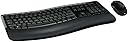
The Microsoft Wireless Comfort Desktop 5050 UK QWERTY Keyboard combo features a sleek, ergonomic curved keyboard designed to reduce wrist strain, paired with a slim wireless mouse for enhanced mobility. It offers advanced 128-bit AES encryption for secure wireless communication, five customizable shortcut keys, and dedicated Microsoft app buttons to boost productivity. Powered by included alkaline batteries, this combo supports Windows 10 and Mac OS, making it a versatile and stylish choice for professionals seeking comfort and security in their workspace.


| ASIN | B018Z8TVVM |
| Are Batteries Included | Yes |
| Batteries | 4 AA batteries required. (included) |
| Battery description | Alkaline |
| Best Sellers Rank | 60,104 in Computers & Accessories ( See Top 100 in Computers & Accessories ) 437 in Computer Keyboard & Mouse Combos |
| Brand | Microsoft |
| Colour | Black |
| Computer Memory Type | DDR3L-1600 SDRAM |
| Customer Reviews | 4.2 4.2 out of 5 stars (738) |
| Date First Available | 5 Dec. 2015 |
| Form Factor | Standard |
| Guaranteed software updates until | unknown |
| Item Weight | 2.07 g |
| Item model number | PP4-00006 |
| Manufacturer | Microsoft |
| Operating System | Mac Os,Windows 10 |
| Power Source | Battery Powered |
| Product Dimensions | 8.58 x 1.89 x 21.57 cm; 2.07 g |
| Series | PP4-00006 |
S**Y
Great Keyboard.
I bought this keyboard as I had used a curved keyboard a few years ago and found it much easier on the wrists than an ordinary one. I was not mistaken in my choice. I have only used it for about a week, but so far I am very impressed with it. The keys are nicely spread and my only complaint is that the left hand shift key is smaller than I am used to. However I am getting used to this and have no real problems at all. The wrist rest is made of hard plastic but has a grid pattern on it and offers good support. There are a whole series of buttons to allow the opening of e mail, browser, document folder, picture folder etc along the top as well as 5 buttons that you can customise for your favourite things. I also find the mouse very good at the minute. It is larger than my previous mouse and I find the scroll very smooth and it fits very nicely in my hand. There are the usual two buttons on top and two smaller switches on the side to allow forward and backward movements through browser pages. As I say, I have only used the keyboard for a week so far, but I thoroughly recommend it at the minute. I spend a lot of time sat at the keyboard and have found no problems as yet.
G**S
Great Keyboard, espically if your using Windows 10
This keyboard is great for Windows 10 - it has many short cuts to open key Microsoft software (including calculator, outlook and volume etc) and 5 x further programmable keys. The keys feel good and are nicely laid out when typing. The palm rest is solid, built into the keyboard but has a soft feeling surface to it, but no padding. The two stands at the back of the keyboard (to raise the back of the keyboard), you simply click into the relevant recesses, are finally solid - so they wont suddenly collapse if you knock the keyboard or when cleaning. Haven't used the mouse, as I'm already using a Logitech mouse. This model PP4-00006 - is the UK Keyboard layout. A superb keyboard, very pleased.
T**7
Not as good as the 5000, and Win 11 users beware
I first purchased a Microsoft 5000 Keyboard and Mouse set in 2009 during a sale at a long gone "brick and mortar" store. I found it to be perfect to my needs and I've since purchased a replacement set from Amazon every 2-3 years - a quite reasonable life span given that I probably use it 100+ hours a week for both work and personal tasks. However I have found the updated 5050 model to be disappointing. A particular problem is that the rubber on the mouse scroll wheel now perishes after about a year's use, and I have to substitute a third party mouse. Despite knowing this, in Jan 2022 I purchased another set with the assumption that I would get at least a year's use out of the mouse. However after attaching the set to my PC running Windows 11 I quickly discovered that the mouse had serious lag and jerk issues, particularly when using the scroll wheel. I used a USB extension lead to relocate the USB wireless fob to beside the mouse - no better. I even spent an evening doing a clean Windows 11 re-install on my PC - again no better. I was about to return as faulty when on impulse I tried to use the mouse and keyboard with a PC running Windows 10, and rather annoyingly both seemed fine! I can only conclude that Microsoft need to update the drivers.
M**N
Great improvement on my old Logitech, but still some annoyances
Much more comfortable and has way more features than my previous logitech. my ONE gripe though - when you have Caps Lock or Num Lock on, there is no indication light to show whether its on or not....so i have to check whether i have caps lock on by typing....bit annoying. otherwise, very comfortable and has improved my typing posture and the mouse is a good size - bigger than logitech or these fashionable small mouse things which leave you feeling like your hand is an arthritic eagle claw trying to garnish a small vole as a meal. Mouse wheel feels a bit weird to me because its smooth scroll and my other one had a ratchet feel to it (clicks gently as you scroll it around, like the wheel of fortune) Also the mouse has 'browser forward and back' buttons, but i never use them. Occasionally my clumsy fingers touch them and wild things happen on my screen, but they're quite easily avoided for the more ham fisted of us out there. overall, very comfy and does what i needed - tonnes of functionality and assignable keys including; Calculator Web buttons such as Home (brings up new browser window), Mail (default mail client), Webcam, five assignable function keys (ive not worked out how to assign them yet...) media keys (prev track, play/pause, next track) music button, volume mute and volume buttons....then it's got all the usual F-Keys below that with a bunch of other functions which honestly i dont know how to use but if you're a keyboard warrior with plenty of experience you should be happy with it.
A**R
What a pity
I unfortunately had to send this back due to the mouse having a mind of its own. The keyboard was very comfortable and easy to use and when I spoke to Amazon I asked if I could keep it and send the mouse back but I had to send them together. The mouse was switching itself off or would change the page it was as if someone else was controlling it. I would have been happy with a replacement but I couldn’t have one until May which was to late for me.
E**O
OK keyboard, poor mouse. 2.5 years later, keyboard/Bluetooth failing.
Update August 2023 - Bluetooth connection has been pretty bad over the last six months - you would be typing away and only about a third of the letters would actually be typed out. It's now got to the point I have to buy a new one. *** Original review (3 stars)*** So, coupled with a Jelly Comb vertical mouse and a lower desk, it is really helping keeping early carpal tunnel symptoms at bay. It's not quite super comfortable to type though, mainly for the very small shift key (as others have said), which is a bit of a problem as it is a very commonly used key. The mouse that comes with this keyboard is however pretty bad. It's not uncomfortable as such but it is heavy and the scroll wheel is a joke. It's completely slick, so there is no grip, which makes scrolling is unbelievably frustrating.
W**Y
I have used these keyboards since they first came out but when I looked at the image on your website, it looked exactly the same even though it had UK in the description. I didn't realise that some keys are in different places and others are smaller than the normal ones. I am slowly getting used to them but does take a while when I use AUS one all day and come home to the UK one at night. Apart from that I am grateful that I could get them.
G**R
The keyboard and mouse are perfect and just what was wanted but … the what is shown on the keys is not what is printed … very confusing and frustrating - can you somehow fix this. I.e. the #2 key has above it “ but prints @ also #3 key show above it £ but prints as # Also on the middle line the keyboard shows # but prints as \ and next line down the keyboard shows @ but prints “. This does not work for me, and I don’t know if any of the other keys may be wrong but haven’t found them yet.
Trustpilot
3 weeks ago
2 days ago