🚀 Elevate your storage game with speed, safety, and style!
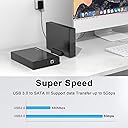
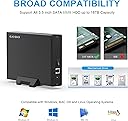
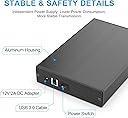
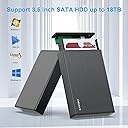
The GODO USB 3.0 to 3.5" SATA Hard Drive Enclosure delivers ultra-fast 5Gbps data transfer speeds with UASP support, powered by a dedicated 12V/2A supply for stable and secure operation. Crafted from durable aluminum, it ensures excellent heat dissipation and static protection. Compatible with SATA I/II/III drives up to 18TB, it supports Windows, Mac, and Linux systems. Its removable vertical stand and included DIY installation kit make it a versatile, professional-grade solution for managing large external storage with confidence.


| ASIN | B0B9MVWFRG |
| Best Sellers Rank | #17 in Enclosures |
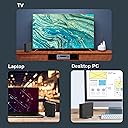
| Compatible Devices | Desktop PC, Laptop, Television |
| Customer Reviews | 4.4 4.4 out of 5 stars (1,489) |
| Data Transfer Rate | 5 Gigabits Per Second |
| Date First Available | August 15, 2022 |
| Hard Disk Form Factor | 3.5 Inches |
| Item Weight | 1.28 pounds |
| Item model number | 3.5" SATA Enclosure-Black |
| Manufacturer | GODO |
| Material | Metal |
| Max Number of Supported Devices | 1 |
| Memory Storage Capacity | 18 TB |
| Product Dimensions | 7.32 x 4.6 x 1.26 inches |
L**R
Excellent quality—highly recommend
This is an excellent enclosure. I have purchased many different brands of HDD enclosures over the last 30 years and this is one of the very best. It is sturdy (aluminum, not plastic), easy to mount the drive in, and attractive. They even enclose a screw driver along with the screws needed to attach the drive. It worked perfectly with my old 1TB Seagate HDD and I am getting the expected transfer speed. It comes with a power supply (cable) and a USB 3.0 cable to connect to your computer. Highly recommend.
R**Y
Good value and quality for 3.5" spinning drives
This is an affordable quality product that works great for housing a 3.5" spinning hard drive. I wouldn't recommend it for 2.5" form factor drives (spinning or SSD) since there is no way to secure a drive that size inside the case.
W**S
Great option for adding external Hard Disk Drives to PC that can't house them internally.
Enclosure is well made. It is easy to install hard disk drives ( up to 2 ). Disk drive(s) work best when connected to a high speed USB port. Enclosure can get a bit warm.
G**U
Revive Your Old SATA drives with the USB 3.0 HDD Enclosure that is Plug & Play
Godo USB 3.0 External HDD Enclosure arrived in secure, well-cushioned packaging. Constructed from aluminum alloy, it offers improved heat dissipation but also provides a sleek, minimalistic design that's easy to handle—even for first-time users. Installation: 1) Attach the two plastic side rails to your 3.5" SATA HDD. 2) Remove the rear panel of the enclosure, slide the drive in carefully, aligning the SATA interface with the enclosure’s PCB. 3) Pull the drive forward until the connectors are snugly seated, then reattach the front panel. 4) Secure both ends with the included screws for a firm, rattle-free fit. The enclosure includes both a 12V power adapter and a USB 3.0 Type-A to Type-B high-speed data cable, ensuring stable power delivery and fast transfer under optimal conditions. To access your files: Connect the USB cable and power on the enclosure. Your system should detect the full drive capacity immediately. If you're seeing only partial capacity (common with drives over 2TB): a) Log in as an Administrator. b) Open Disk Management. c) Right-click the drive's label (left-side column), and select "Convert to GPT" (GUID Partition Table). d) Once converted, the full capacity will be recognized and accessible. Overall this enclosure is a cost-effective, efficient way to repurpose high-capacity SATA drives (2TB and above). Whether you're backing up data, transferring large files, or bringing an old drive back to life,this USB 3.0 enclosure delivers reliable performance and exceptional value.
T**D
Excellent enclosure. Well made and attractive on the desktop.
This enclosure (the one pictured) works very well. I use it for an external 1TB disk for daily backups and it's always connected. I like the activity LED which lets me know when scheduled backups are active. One thing I noticed, however. I have it plugged into a USB3 hub with individual switches to enable/disable the ports. The switches work to disable OS access on every device I've tried EXCEPT this one. The device is recognized and is useful to the OS whether or not the port is enabled. I assume it has something to do with the fact that the enclosure is separately powered. Something to keep in mind.
D**G
Works Great for Both of my Backup HDD
UPDATE: This is my second GODO 3.5 enclosure. It works as well as my previous purchase. I read where several reviewers stated that their enclosure stopped working after several months, I just hope this doesn't happen to me. Currently, the enclosure works just like a normal harddrive or flash drive; however, I also formated both external HDDs listed in the pictures . I did not want multiple operating systems interfering with normal Windows boot up/startup, which can confuse non-Geek computer users on why the enclosure is not working properly. OLD write up: Installation takes less than two minutes if you view the video in the sales description. This enclosure is built for an internal 3.5" HDD from a desktop computer and not a 2.5" internal HDD from a laptop or notebook. There is no play when properly installed. My Seagate HDD is a SATA 3.5" 1TB HDD taken from a discarded HP desktop. My second enclosure is from a WD HDD purchase and used like a "My Passport" backup would be used. Once connected, it was plug and play (turn it on). My desktop quickly recognized the HDDs and partitions. Once installed it will work on either a laptop computer or desktop using the USB cord (included). It took less than 30 minutes to transfer 500GB to one of the partitioned drives. I leave it connected to my desktop computer as a backup. It powers up when needed. As many reviewers have stated, the controls are in the back of the enclosure, but it does not interfere with my day to day productivity. I just hope these enclosure do not stop working in several months as many have said because I have built them into my daily routines. I do recommend these enclosures for anyone discarding an old computer.
B**D
Speed of transfer excellent
R**M
رائع مثل الوصف ، مستخدم الماك يحتاج USB-C to USB-A Adapter
R**N
I had trouble to create RAID1 setup on Linux and Windows 10.
A**D
Cet appareil surchauffe. Le ventilateur, si il y en a un est complètement non performant! J’ai retourné 2 appareils de suite.
Trustpilot
1 month ago
1 week ago