Buy anything from 5,000+ international stores. One checkout price. No surprise fees. Join 2M+ shoppers on Desertcart.
Desertcart purchases this item on your behalf and handles shipping, customs, and support to Croatia.
🚀 Unlock lightning-fast computing without breaking the bank!
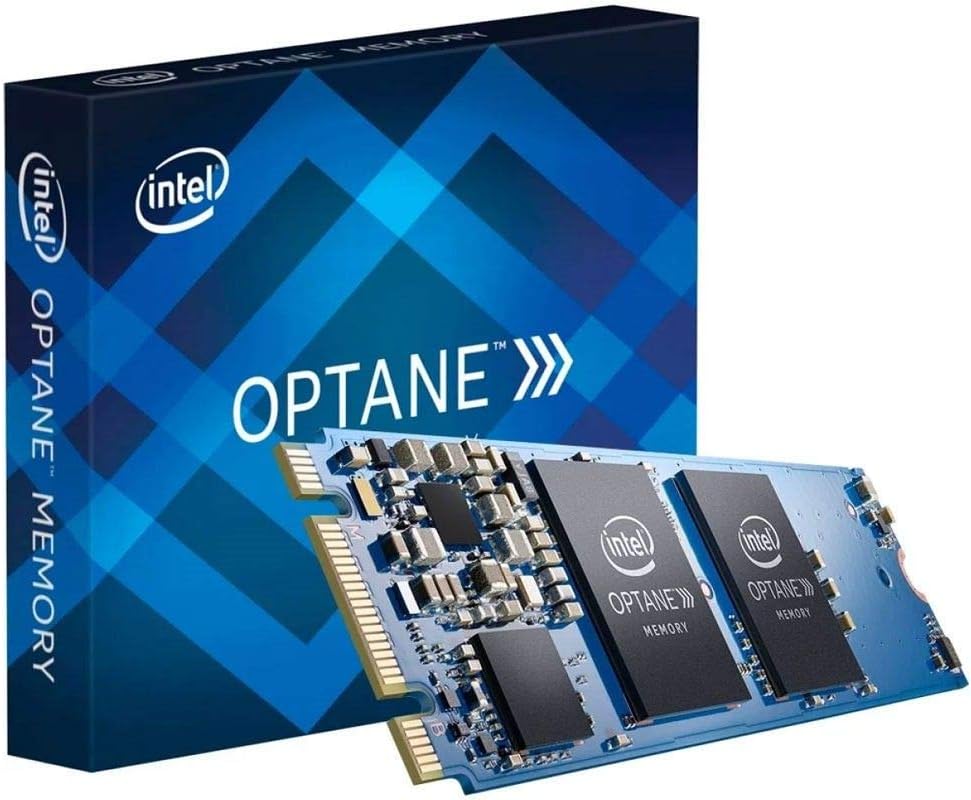
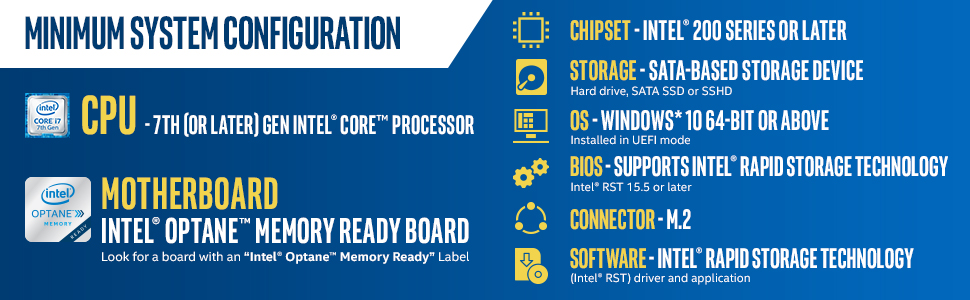
Intel Optane Memory M10 Series 32GB M.2 80mm module accelerates traditional SATA HDDs by intelligently caching frequently used data, delivering up to 1969 MB/s transfer speeds. Designed for 7th Gen Intel Core and newer systems, it dramatically reduces boot and app load times while preserving large storage capacity. Compact, reliable, and backed by a 5-year warranty, it’s the savvy upgrade for professionals seeking a responsive, cost-effective computing boost.


| ASIN | B06XSXX3NS |
| Box Contents | Manual, PCIe M.2 Memory Module |
| Brand | Intel |
| Brand Name | Intel |
| Compatible Devices | Desktop |
| Compatible devices | Desktop |
| Computer memory size | 32 GB |
| Customer Reviews | 4.2 out of 5 stars 1,527 Reviews |
| Data Transfer Rate | 1969 Megabytes Per Second |
| Form Factor | M 2 |
| Global Trade Identification Number | 00735858349390 |
| Item Type Name | Optane Memory Module 32 GB PCIe M.2 80mm |
| Item Weight | 0.04 Kilograms |
| Manufacturer | Intel |
| Manufacturer Part Number | MEMPEK1W032GAXT |
| Memory Speed | 1350 MT/s |
| Memory speed | 1350 MT/s |
| Model Name | MEMPEK1W032GAXT |
| Model Number | MEMPEK1W032GAXT |
| Number of Pins | 81 |
| Product Features | Portable |
| Product Warranty | 5 years |
| RAM Memory Technology | DRAM |
| RAM Size | 32 GB |
| RAM memory technology | DRAM |
| Special feature | Portable |
| UPC | 735858349390 |
C**C
Works great on AMD Ryzen based systems using StoreMI as a disk cache.
I'd been meaning to give AMD's StoreMI software a try and wanted to play with a cheap Optane module in order to do so. I ordered the 16GB model to pair with my 120GB KingDian SSD on my Gigabyte Aorus X470 Ultra Gaming motherboard, popped it in the NVME slot and set up StoreMi in Windows 10 Professional. At this point, both drives were fused into a single C: drive in Windows and I left StoreMI software to learn my application launch habits to enhance my most used applications. You can see the increase in read speeds on the CrystalDiskMark screenshots throughout vs the SATA drive on its own but, some of the write speeds were lower due to the lesser write speeds of the Optane unit vs the KingDian. On top of the enhanced reads of the Optane unit alone, you can also allocate 2GB of your system RAM to further increase performance which is shown on the third screenshot. Overall, boot times are quicker, application load times are even faster and the system seems as fluid and responsive as ever. Pleased with the result and no regrets in experimenting. I can imagine things are even better when an Optane unit is paired with a standard hard drive. For those who want to utlilise an unused NVME slot and to speed up an existing drive, this is worth considering.
A**X
Fast, reliable but specific requirements
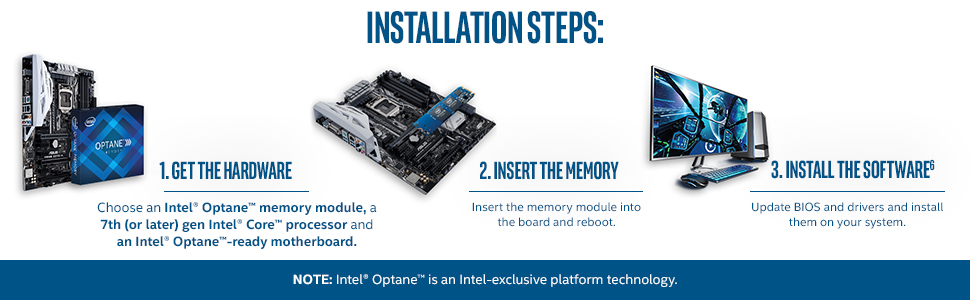
I installed this SSD into my Dell inspiron 15 5570, which uses an i5 8250u and a 2tb hard drive. The processor is important, as you can only use these intel optane accelerators with a 7th gen intel core processor onwards. Fortunately, mine is an 8th gen processor and the laptop had a spare m.2 port, this is not something to expect on all laptops however. After taking apart and installing the SSD (the hardest part, required spudgers/old credit cards to pop open the plastic shell) the SSD required installing the intel optane memory user interface, so as to enable it, otherwise it cannot be used to its full extent. Upon installing the software, the computer required several restarts to enable the SSD,but once it was working, it reduced boot times considerably, and made browsing and launching programs considerably quicker. It went from a few minutes to be booted up, logged in and opened chrome, to around a minute maximum. I would heavily recommend this for anyone who has a laptop or PC that can support it and doesn't want to buy an expensive NVME SSD and wants lots of storage space that you get with a mechanical hard drive.
F**E
Great for speeding up a HDD
This was installed in my spare M.2 slot on my motherboard very easily. On first installation I suspected it was this wee card that was making my machine crash every now and then. So I left it out for a few weeks, until I noticed that there were reports on the NET that the drivers could cause stability issues. However, there were also reports that the drivers on the BIOS of my ASUS ROG Maximus 10 could also cause stability issues. So I deduced that maybe the BIOS did not like the drivers for the OPTANE drive. So I updated the BIOS and the INTEL drivers at the same time and I have never experienced another crash since. Is this card worth the expense? Well I am not connecting to the OS HD and I suspect that people would notice a big speed improvment if it was. I am actually conecting it to a 8TB HDD, and if you play the same game, the OPTANE drive certainly speeds up the load time. I.e Elite dangerous to the menus screen in 15 seconds without the OPTANE and 9 seconds with it on. UPDATE: It turns out that the instability of my machine started again. After about three days of analysis I found the cause. First the symptoms: I have a water cooled loop in my computer, and usually the temperature of the CPU was always within 5 to 8 degrees C above the water. But suddenly this jumped between 12 and 15. I eventually found that Windows explorer was using 10 to 20 percent CPU, hence using circa double the watts on idle which then led to the temps going up. It took me ages to find out why, but here it is. Intel OPTANE Memory PINNING for Windows! Ironically, this is only useful when accelerating an HDD OS drive with OPTANE, and I am not. So why the hell is it running as a service, severely impeding my new build when I am not even needing it. C'mon Intel, this is very sloppy! Since the excessive Windows Explorer CPU problem seems to be very common on the net, probably caused by many factors, how many machines are affected with the OPTANE specific problem, with all the frustration that goes with it I wonder. I did not find any other mention of the OPTANE memory Pinning issue on the NET for this. So uninstalling 'Intel OPTANE Memory PINNING for Window's and BINGO! All is back to normal.
B**T
Finally doing what it should
This was very close to being a 1-star review, in fact I'd started writing it a couple of days ago. Intel didn't advertise that the module would only speed up the boot drive of a system, rendering it pretty useless to a large proportion of potential users. The normal use case for such a device would be in a system with a small SSD boot drive and a large mechanical secondary drive which could do with the acceleration. But as of today they finally released v16 of the Optane/RST drives enabling secondary drive acceleration. In my particular build, it makes quite a bit of difference. Whilst the write speed is pretty much as it was, the read speed has increased from 120MB/s to around 900MB/s. Games load almost instantly (after they've made it into the cache). Be aware though that this semi-permanently pairs with one of your drives and if either the device or drive goes, you lose your data. I don't foresee this being a particular problem though as the device montiors itself for issues and will warn if anything untoward is happening, giving you a chance to disable it. Overall, a very nice bit of kit.
M**D
Not yet perfect
I have come to realise that an Optane accelerated system is similar to running RAID 0 - it increases the chances for something to go wrong. 98% of the time it is great. Its a cheap way to dramatically accelerate your system. However Optane has failed me twice now. Once after a power-cut my PC would not reboot because Optane got corrupted when the power went down. Windows Recovery disk was no help with Optane and I had to reinstall Windows from scratch. The other time, the Optane software stopped working after a Windows feature update, I had to disable WIn Fast Boot, then disable and re-enable Optane (this is not a quick thing to do). I expect this software reliability will get better if Optane popularity increases, but right now I would not recommend it to someone not technically confident - an SSD may be a better, if more expensive option.
S**E
Intel Optane supercharges SSHD.
Intel Optane made my PC lightning fast. I have Windows 10 (64 bit) installed on an SSHD hybrid drive. Because the hybrid drives are faster than ordinary hard drives I didn't expect much improvement with Optane. However, I am truly surprised at how fast Windows 10 now boots, it's almost instant. Also other startup programs now load at boot time almost instantly too. Only down side was that I had a dual boot system with Ubuntu on a second hard drive. After installing Optane, Ubuntu disappeared. To be fair Intel do warn about adverse side effects of installing Optane on a dual boot system. Apart from the dual boot OS factor, Optane is a real performance boost for the whole system, and a lot cheaper than buying an SSD. It's easy to install the Optane card too. Intel have anOptane card video install how-to on their site, which I found the easiest to follow (much easier than wading through the pdf written install how-to). Just make sure your PC meets all the minimum requirements for Optane (also listed on Intel's site), and follow the instructions to the letter. Remember to backup any data on any additional OS you have installed (in a dual boot system) before installing Optane.
R**B
Speed
Installation hardware wise is a pinch but software wise is a NIGHTMARE , I personally think it’s worth it providing you have a SSHD,HDD. If you only use SSDs this is not worth your time. It’s a great product that speeds up things considerably even in already speedy systems.
I**Y
Inferior to a SSD
Having used the 32GB module for a while and I have to say I'm not impressed. Because the cache is so small (27GB of usable cache) it fills up very quickly so the benefit of the cache is very limited, the OS frequently is slow to boot up. SSDs have tumbled in price making Optane an even less attractive option. I have just switched to a Crucial P1 500GB SSD and what a big improvement it is. For Optane to consistently boot up the OS and applications it would need to have a much bigger capacity but that would make it ridiculously expensive. It's far better to use a SSD so a can't recommend this product.
S**A
Best from the rest
Best from the rest I paired it with my 250 Samsung evo and believe me my PC is flying. Super fast boot and usage very easy to setup and use. And it was delivered within 2 weeks form the US. Thanks Amazon and Intel
M**A
Excelente produto.
Excelente produto qualidade Intel. Não consegui configurar tive de levar em uma assistência! Mas ficou melhor , mais rápido apesar de que já tenho SSD INSTALADO. RECOMENDO.
C**O
Excelente
Fiquei muito satisfeito com o desempenho do computador após colocar esse módulo Optane. Meio chato de configurar mas ficou excelente.
S**M
Efficace mais pas simple à configurer
Je ne regrette pas de l'avoir acheté (32 euro) en reconditionner à l'époque couplé avec un 2 TO, la vitesse est impressionnante. J'ai mis mes jeux dessus, c'est bête que cette technologie a été abandonné, si vous avez de la chance essayé d'en trouver un à pas cher.
P**O
Impresionante
Literalmente, ha convertido mi hdd de 1tb en un ssd de 1tb. No hay mucho más que explicar, simplemente funciona y lo hace muy bien, el ordenador inicia en 10-15 segundos (antes me tardaba un par de minutos en cargar todo el escritorio) y los programas cargan enseguida. Lo único en mi caso fue que tuve que actualizar bios y activar el modulo de memoria desde la bios, pero depende de cada caso y además no es dificil de hacer.
Trustpilot
3 weeks ago
2 months ago