


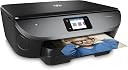


HP Envy Photo 6230 All-in-One Printer
Product ID: 49612381
🎨1200 x 1200 dpi
📱Smartphone control
🖨️11 ppm speed
📸 Capture Moments, Print Memories!
The HP Envy Photo 6230 is an all-in-one Wi-Fi photo printer that combines speed, quality, and convenience. With the ability to print directly from your smartphone and a sleek design, it’s perfect for modern living. Plus, enjoy 4 months of Instant Ink to keep your printing hassle-free.





| ASIN | B0751B37D8 |
| Additional Printer Functions | All In One |
| B&W Pages per Minute | 14 ppm |
| Best Sellers Rank | 58,568 in Computers & Accessories ( See Top 100 in Computers & Accessories ) 125 in All-In-One Printers |
| Box Contents | 2 |
| Brand | HP |
| Brand Name | HP |
| Color Pages per Minute | 9 ppm |
| Colour | Black |
| Compatible Cartridge | HP 950XL/951XL, HP 962XL |
| Compatible Devices | Tablets |
| Connectivity technology | USB, Wi-Fi |
| Control Method | App |
| Controller Type | Control4 |
| Customer Reviews | 3.9 out of 5 stars 289 Reviews |
| Display Type | LCD |
| Dual-sided printing | Yes |
| Duplex | Automatic |
| Global Trade Identification Number | 00190781429388, 05032037108782 |
| Hardware Interface | USB 2.0 |
| Ink Colour | Black |
| Item Dimensions D x W x H | 45.4D x 50.4W x 15.9H centimetres |
| Item Type Name | AiO Printer |
| Item Weight | 6.7 Kilograms |
| Manufacturer | HP |
| Maximum Copy Resolution Black and White | 1200 dpi |
| Maximum Copy Resolution Color | 4800 x 1200 dpi |
| Maximum Copy Speed Black and White | 13 ppm |
| Maximum Print Resolution Black and White | 1200 x 1200 dpi |
| Maximum Sheet Capacity | 125 |
| Maximum Supported Paper Size | 13 x 19 inch |
| Maximum print Resolution Color | 4800 x 1200 dpi |
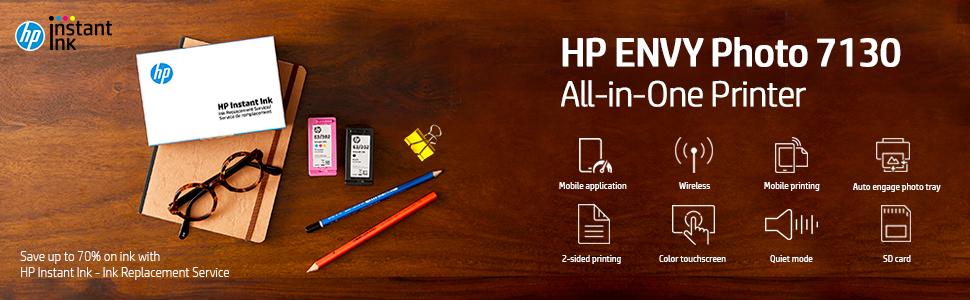
| Model Name | ENVY Photo 7130 |
| Model Number | 7130 |
| Model Series | ENVY |
| Model name | ENVY Photo 7130 |
| Network Connectivity Technology | USB, Wi-Fi |
| Number of Trays | 1 |
| Other Special Features of the Product | Touch Screen |
| Output sheet capacity | 25 |
| Paper Size | A4 |
| Print media | Paper (plain) |
| Printer Output Type | Monochrome |
| Printer Type | Inkjet |
| Printing technology | Inkjet |
| Processor Count | 1 |
| Product Warranty | One-year limited hardware warranty; 24-hour, 7 days a week limited phonesupport |
| Resolution | 2K DCI 1080p |
| Scanner Type | Photo |
| Special feature | Touch Screen |
| Specific Uses For Product | Home, School, Travel |
| Total USB 2.0 Ports | 1 |
| Total USB Ports | 1 |
| UPC | 190781429388 190781429371 |
| Warranty Type | limited warranty |
| Wattage | 95 |
G**9
Amazing
Loving this printer so far. I was reluctant to get it at first but wanted one that would print pictures instead of having to find a working machine at a store. Easy to set up but you do need a smart phone to set the device up. You get a free app and link the printer to the phone. This lets you operate the printer so much easier. Couldn’t figure out how to scan a document as it kept giving me the option to use a computer, memory device or email. If you go on the app on your phone you can scan different things from there. Then you can chose to print it and tweak the setting of how you want it printed (size, colour or crop the sides and so on). I bought £80 printer which I love so far. The touch screen is a bit irritating as you do need to double tap to scroll down but it’s a getting use to it sorta thing. IN THE BOX!! in the box you do get photo paper!! Normal 4x6 size like a regular photo. You get 5 sheets of that. You also get ink black and coloured. Don’t think they will last to long as Iv printed one picture 4x6 size and the line on the ink status has already gone down (see image Iv posted). Of course you get the printer, a power cable and loads of papaer that frankly no one reads let’s be honest. If you want a printer for photos I do reccomend this one. Must think about photo quality, images from phones are gonna be a bit fuzzy so you would have to think about what you want to take the picture on. No problems so far but Iv been messing around for only a couple of hours.
J**S
Awesome Printer!
Love everything about this printer. I upgraded from previous model and the print quality of photos on the 7130 is remarkable. The HP app makes printing photos from my phone a doddle, loads more functionality in there too like printing direct from my Facebook feed. Great quality with an emphasis on keeping everything really simple. Top marks HP.
T**E
A Saint and a Sinner. Amended to SINNER on 27th January 2018
I wrote this review on about 21st January. However, after a complete and total screw up by HP I have decided to rewrite part of it so, read the end part of this review. I have given this printer 5 stars for its ease of installation and print quality but, I wouldn't give the Support function any stars at all. Here is why. The printer itself was the easiest job of printer installation that I have ever had and I was elated. For the various different types of printing that I perform this printer is so easy to set up for the best results. Print quality is superb, even for quickly produced reports printing at 300 dpi the print is crisp and clear. The printer arrived on Saturday 20th January and I had a very important document to print. Typical of all printer manufacturers, the ink cartridges supplied in the box were under filled and as a result I ran out. However, I had signed up for the "Instant Ink" scheme at £7.99/month so, although it was very inconvenient the printer itself would order more ink for me automatically. And so, I signed on at the HP site for my "Instant Ink" details and was informed that No Instant Ink had been installed and to do so immediately. I didn't have any ink to continue my important job and the Support Site, apart from being as clear and a bottle of chips, was of absolutely no Support whatsoever. By this time, much as I loved the HP 7130 printer, I was beginning deeply regretted ordering one. The next step came today, January 22nd 2018 when I signed on to HP's Support site YET AGAIN. More total confusion followed as I tried to make headway, but to no avail. For the second time this weekend I tried to use their "Virtual Agent". I posed the question and, after both attempts, received an answer to a completely irrelevant question followed by an electronic admission of error. By now I was ready to thrown the darned printer out of the window but gave it one more try. Eureka!!!! I had found the Telephone Number for Support. I have to say that each time I changed page on the Support Site I had to sign in again, and sometimes my details would be completely ignored by HP leaving me really, really ANGRY! But, I did manage to get through to a chap called Michael who unfortunately became the focus of my utter frustration with HP. I became even more angry with HP when he informed me that it was 10 working days before I would get my 1st batch of "Instant Inks" which were the Welcome Pack. It appeared to me that the use of the word "Instant" as a description of their service was about as poor a descriptive choice as one could get and I told Michael that had I known that this so-called "Instant Ink" was better described as "Snail Speed Ink" I would not have bought the HP 7130. Michael did a good job within the constraints set him and he offered to send me out a set of inks as soon as their bureaucracy allowed - 7 days. I was unfair to Michael in that he had to take my wrath on the chin, in the place of HP but this was a ridiculous position. However, I accepted and I apologised to Michael for my incredulity. To put all this another way; if you are looking for a printer that is exceptionally easy to install and one which provides among the best quality print I have seen and, you are not looking to print 200+ pages once it is all connected up then, the HP Envy Photo 7130 printer is just the job for you. However, if like me, one printer has just died and you have a large print job to complete then don't even think of this printer because if you run out of ink on the first day, as I did, it may well be 10 working days before your "Instant Ink" welcome pack arrives. One other mention of how "Instant Ink" works, perhaps "works" is another poor choice of word, is that the ink cartridges are monitored and when one or both gets down to 15% capacity the printer automatically contacts HP and orders more ink over the Internet. This order will arrive at your door within I think 7 working days. Provided you are not printing massive amounts on a daily basis you should not run out of ink. I am 72 years of age, have arthritis in most of my joints and so cannot cross my fingers for very long, if at all. I shall put my fairness hat on now; I feel sure that this initial problem will quickly fade over time and I think I will be even more delighted with the quality of print. One thing I forgot to mention; this printer prefers to work with wi-fi and it sets this up automatically and with great easy on your part. This is my rewritten review of 27th January 2018. I have been waiting desperately to get ink for this printer via the so-called "Instant Ink" service. It arrived today after a week of waiting and then, after unpacking it, I found that HP in the crass stupidity had sent me completely the wrong ink cartridge. In addition, I was expecting 2 cartridges as the under-filled cartridge was probably not far off emptying. How in H*LL can HP call this travesty of a service "Instant Ink" when, by their own Support guys admission it takes up to 10 days for ink to reach the customer. This crass stupidity has caused me a great deal of difficulty, never mind the disappointment and so I asked Amazon for a return which happily they granted. The support one gets at Amazon must be the best in the industry and HP could learn a lot from them. I also tried getting support on HP's website again and this was about as successful as shoveling hydrogen gas. HP asked me if I would like to leave them feedback on my "experience" today and boy, did I tell them what I thought of them, and all without the use of foul or abusive language. I might also mention that 3 years ago I bought an HP 8100 printer which was replaced three times before I finally gave up. My Laptop is an HP Envy which I am soon to replace, but not with another HP product, no way will I ever use HP again. Finally, my advice if you require anything in the computer field is to avoid HP.
T**A
Excellent printing and the good quality you expect from HP
The photo print quality is very impressive, as with all the HP printers I have purchased. Printing and copying is fast but scanning to pdf is rather slow and if you have a multi page document you can easily get timed out and have to start scanning to pdf again to capture all pages. I preferred the previous version where you confirmed when you were 'done'. The instruction booklet is far too brief and didn't reflect the process I was led through via the HP App. Set up was not entirely seamless and even though I received confirmation that set up was complete when I came to printing a document I received a message that the printer was not connected to my laptop. However, this was easily resolved by deleting the printer from laptop and then adding again. I really don't like the very small touch screen on the printer and the scrolling process is rather random. The printer is very quiet in it's original setting and there is a quiet mode but I have not had to use this yet. The printer feels robust. This is a brilliant printer/scanner/copier and was excellent value for money through Amazon. I would happily recommend.
A**O
Very user friendly
Used both for home printing and photos. Performed well in both. A good idea to set up HP Ink supply on their user contract. Excellent value.
M**K
Excellent home printer!!!
Excellent print quality especially for photos. Remote access and a well thought-out app coupled with HP instant ink on demand adds a nice level of convenience to managing printing needs.
R**S
HPs definition of simple does not seem to equate to mine!
My previous printer, the HP Photosmart 5520 e-All-in-One Printer , worked reasonably (I find HP printers tend to have a poor roller action and mistakenly indicate there's no paper) for just over 4 years but recently something went wrong with the WiFi component meaning it would only print if connected with a cable. After an eye-glazingly boring day spent trying to work out what to replace it with, I finally opted for this 7130. Unpacking was straight forward and what little instructions there are stated it was going to be simple: just log on to a supplied website address and do as you're told. HPs definition of simple does not seem to equate to mine! Perhaps the mistake was mine as I chose to try doing the set-up with my iPad as it meant I could stand beside the printer to check any instructions displayed on the small printer screen? It took a while for me to work out that you change from your WiFi router to the Direct Envy setting, let it load then revert back to your normal WiFi. OK, got that bit going then had to try and connect the PC. It keeps asking for my printer PIN! Check everywhere on the printer and all the documentation, no sign of a PIN; tried the WiFi PIN but it spat that back at me too. Finally, I tried searches on the internet to see if I could get a clue as to where this mysterious PIN was located. Loads of hits and 'experts' generally erroneously informing people how to find their WiFi PIN with responses to that varying from outraged to unrepeatable. The correct PIN can be found (eventually) on the printer screen by scrolling down on the WiFi settings. Sorted? Well, no, not quite as there is yet another hurdle! Once you've managed to type the printer PIN in on the PC, you have to rush back to the printer as a verification code will be displayed but be warned, the code is only effective for 90 seconds! Anyway, after much frustration, the printer was finally connected to the iPad and the PC. Confident that Apple products are usually very good and make installing new hardware easy and, convinced that as I'd finally got it set-up with the PC, this was going to be simple, I then attempted to add the Envy to my iMac. After literally hours of downloading the 'HP Easy Start' - I have a very slow internet connection so can't really blame them for that - there it was, I could see the printer installed. Tried printing something but the iMac couldn't connect to the printer! Eventually I worked out that whenever you want to print something from the Mac, you have to change the network connection to the 'Direct ENVY' connection, which you don't have to do on the PC. Once you get it set-up, it does seem to make a decent job of printing, scanning etc; it's reasonably quiet; speed is acceptable and quality adequate for my purposes. I'm hesitant about the cartridges as they are small and all colours except black are in one cartridge so will likely need to be replaced frequently. Marking this as 3-stars as it took me the best part of a day until I could eventually get it set-up; clearer instructions with at least some detail would have been helpful!
E**A
Loverly photos
The wifi facility works well and the printer was fairly easy to install. I initially hit a problem but found that if I went to "Advanced" on the printer's screen I was able to enter my router password and all worked seamlessly thereafter. Printing from my iPad is very simple and increases the range of usefulness of my Pencil without having to resort to emailing, copying and pasting. The only downside is that it has a fairly large footprint. It even comes with a couple of sheets of photo paper to get you started.
H**I
Super Drucker
Dieser Drucker ist und arbeitet hervorragend, wir haben keinerlei Probleme, er macht auch hervorragende Fotodrucke, ist sehr leicht einzurichten, haben bisher bereits 30 Seiten gedruckt und mehrmals gescannt. Alles Spitze nicht zu vergleichen mit dem vorigen Drucker (anderes Modell) den Amazone sofort getauscht hatte. Sehr empfehlenswert.
R**I
Perfecta calidad fotográfica
He probado diferentes tipos de cartulinas hasta 180 gramos, imprimiendo a dos caras sin ningún problema. También hojas fotográficas de HP (300 gramos) sin ningún tipo de problemas. En impresión normal puedes activar el modo silencioso que te permite imprimir por la noche sin molestar a nadie, en calidad fotográfica no lo permite, pero no hace tanto ruido como los anteriores modelos de Photosmart. La velocidad de impresión normal no la he probado apenas, pero en calidad fotográfica es bastante rápido (contando que tiene que esperar a que se seque la tinta si es una impresión a dos caras). Para gestionarla se puede desde su pantalla, desde la web que publica, instalando una app en tu PC o desde una app móvil por bluetooth, he probado todas y me quedo con la web, su pantalla es poco intuitiva y las apps son algo lentas. Sin duda, una gran compra.
A**S
Eccellente stampante
Eccellente, fuziona perfettamente e la risoluzione ' fantastica. Vediamo che succede con il loro programma di Instant Link. Al momento siamo sotto le 100 pagine al mense... ma di poco.
A**T
imprimante
Très bonne imprimante plus le service encre
O**E
Rápida, silenciosa y con calidad
Rápida, en pocos segundos te imprime la página, color o b/n. Comparada con las Canon y Epson, es más rápida. Silenciosa, tampoco es que haya una gran diferencia con las otras dos marcas que he tenido, pero algo se nota. Calidad, me ha sorprendido lo bien que imprime, tanto en modo estándar como photo. Quizás lo que menos me gusta es el pequeño tamaño de los cartuchos, con solo dos cartuchos, negro y CMY. Esto se suple con el increíble servicio Instant Ink de HP, que me ha sorprendido gratamente por servicio como por precio. La propia impresora pide los cartuchos y te los envían. Eso si, previo contrato y darte de alta en el servicio.
Trustpilot
2 months ago
1 month ago