Desertcart purchases this item on your behalf and handles shipping, customs, and support to Croatia.
🚀 Upgrade your speed, save your power, and secure your data like a pro!
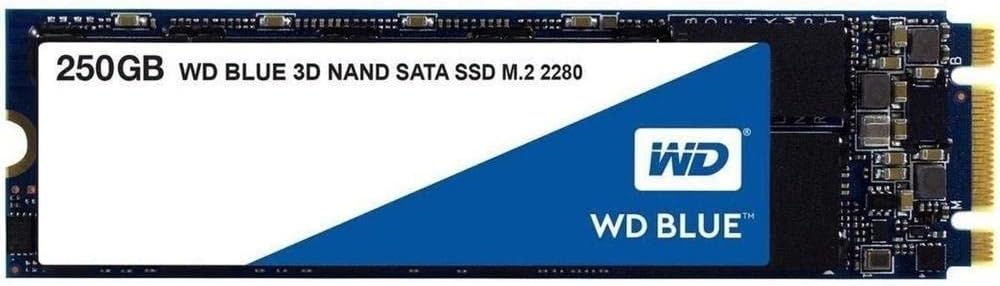
The Western Digital WD Blue 3D NAND M.2 SATA SSD (250GB) combines cutting-edge 3D NAND technology with impressive sequential read/write speeds up to 560/530MB/s. Designed for professionals and gamers seeking reliable, power-efficient storage, it offers enhanced endurance with 1.75 million hours MTTF and 600 TBW. Its compact M.2 form factor ensures easy installation, while the WD SSD Dashboard provides intuitive drive monitoring and management. Ideal for boosting OS performance and accelerating high-end computing tasks.


| ASIN | B073SBV3XX |
| Best Sellers Rank | 30,027 in Computers & Accessories ( See Top 100 in Computers & Accessories ) 161 in Internal Solid State Drives |
| Box Contents | WD WDS250G2B0B 250GB Blue 3D M.2 2280 SATA III SSD |
| Brand | Western Digital |
| Brand Name | Western Digital |
| Cache Memory Installed Size | 250 |
| Color | Blue - High Performance |
| Compatible Devices | Desktop |
| Compatible Video Game Console Models | Sony PlayStation 5 |
| Connectivity technology | USB |
| Customer Package Type | Standard Packaging |
| Customer Reviews | 4.6 out of 5 stars 3,185 Reviews |
| Data Transfer Rate | 750 Megabits Per Second |
| Digital Storage Capacity | 250 GB |
| Digital storage capacity | 250 GB |
| Enclosure Material | 3D Nand |
| Form Factor | Form factor M.2 2280 |
| Global Trade Identification Number | 00718037856292, 10718037856299 |
| Hard Disk Description | Solid State Hard Drive |
| Hard Disk Form Factor | 2.5 Inches |
| Hard Disk Interface | Serial ATA |
| Hard Disk Rotational Speed | 1 RPM |
| Hard disk form factor | 2.5 Inches |
| Hard disk interface | Serial ATA |
| Hard-Drive Size | 250 GB |
| Hardware Connectivity | SATA 6.0 Gb/s |
| Hardware Platform | PC |
| Installation Type | Internal Hard Drive |
| Item Type Name | Blue 3D NAND SATA SSD, 250GB |
| Item Weight | 0.01 Kilograms |
| Manufacturer | Western Digital |
| Manufacturer Part Number | WDS250G2B0B |
| Media Speed | 525MB/s |
| Model Name | WDS250G2B0B WD BLUE 3D NAND SATA SSD |
| Model Number | WDS250G2B0B |
| Network Connectivity Technology | USB |
| Number of Items | 1 |
| Product Features | Portable |
| Product Warranty | 3 year limited warranty |
| Read Speed | 550 Megabytes Per Second |
| Special feature | Portable |
| Specific Uses For Product | Gaming |
| UPC | 718037856292 |
E**Q
Perfect for OS - Great for Gaming - Decent Speed
Super simple to install. Swapped over my OS (Windows 10) on my laptop to this SSD and never looked back. Huge difference from using a HDD for my OS. My laptop used to start in around 3 minutes but since switching to this, my laptop can be off to on youtube video in less than 30 seconds. Even with the SATA speed limit on this drive of around 500MB/s when comparing to my younger brothers NVMe drive which can do around 3500MB/s. It’s still quite snappy. I have the 250GB storage capacity so obviously you’d need to juggle a few files to fit things to this drive. My recommendation is to use this solely for the OS and smaller files. I do install some games on this drive however as the load times get a huge boost. I never have any overheating issues or anything. Works fine
J**W
Easy to install
This drive is a fantastic addition to my new build, having used mechanical drives for many years and the length of time it takes to set them up, this was a breeze. The drive is basically a small circuit board with a connection on one end you insert into the M2 socket and a semi circular cut out at the other that the screw goes through. Easy installation into MSI x370 Carbon motherboard (with Ryzen 1600X + 16gb DDR 4 ram). Installed windows 10 with usb 3 flash drive and was ready to go within 5 mins. Once fully set up, Windows now boots to login screen in less than 20 seconds. The drive is fast and responsive, however as this drive is 250gb (Windows 10 comes in at around 25gb), I have installed all my software on to this SSD and set up shortcuts to libraries for each user on to an internal SATA drive to save on space. A simple to navigate dashboard console can be downloaded from manufacturers site, this displays all the details about the drive & updates can be initiated through the software. My only regret is (on a very tight budget ) I couldn't afford a larger capacity, but would not hesitate to purchase one of these WD drives again.
S**0
Good SSD
Amazing SSD, but it doesn't come with an mounting screws, which need to be ordered separately. Really sped up my PC!
T**.
Good speed and good value or money!!!
I bought the 250GB WD Blue 3D NAND to install it in a LincPlus P1 laptop and works perfectly! 20 seconds to login to Windows 10. I used Macrium Reflect to copy the original partitions onto the new disk and worked very nice. It took 5 minutes for the cloning process. Be sure to fully updates your windows and install any programs you want to use, before you clone the partitions. The read/write speed is very good for SATA.
S**T
basic M2 SSD, it works as intended
this is a standard M2 type SSD, efficient but not mind blistering speeds. I got this as a 2nd SSD for my PC (already having an M2 NVME installed) the speed from this are nowhere near as fast as my main SSD, but I knew this when buying. but for cost/speed/storage comparison it is a good buy.
M**C
SSD died after 2 months
Wasn't happy with 240gb version of this SSD since the first day i bought it. It was connected to Gigabyte B450 mobo and i always had problem with low read/write speeds which could be outperformed by any other better hard drive. At first i thought it's because it's being connected via SATA only M.2 slot on motherboard but same thing happened when in enclosure and connected to external USB. Tested on three computer and was getting similar speeds on all of them. Don't buy it. It is just annoyingly slow disk. And as cherry on top, it died on me today after less then 6 months of use and I was not using computer a lot, approx. 4-5 hours per day. Suggestion: Avoid green or blue WD SSDs ecpecially M.2 format ones
I**V
Fast and Compact
In combination with Neoteck Aluminum USB 3.0 to NGFF M.2 Hard Disk Box SSD External Enclosure Case Converter Adapter for Windows XP Vista Windows7 8 8.1 MAC Linux-Black , this makes a really nice external drive, easy to put together, very fast and very compact. I formatted it as exFAT so that I could read and write on Mac's and PC's - it works perfectly on both.
A**N
Use this if your motherboard has an m.2 slot but the cpu/motherboard combo doesn't support nvme
Whew! I finally figured this out. I have an ASUS motherboard with an m.2 slot and an Athlon processor, and when I put in an nvme type ssd, the bios said the m2 slot is 'empty.' Turns out there are TWO TYPES of ssd that can go in an m.2 slot. There is the nvme type and the Sata type. They look identical so one should not get confused with a sata ssd. It is an m.2 ssd but the internal electronics is sata type. That is what this product is, and after I returned the identical-looking nvme product and got this, I have a new SSD and it initialized using windows disk managmenet without needing to do anything in the bios.
J**A
Excelente aquisição!
A tendeu minhas expectativas, defato tive uma melhoria em 1000% no desempenho do meu notebook. Recomendo demais!
E**C
Everything is 1000% faster!
I purchased two SSDs in the M.2 version. I bought one for my laptop and another for my desktop gamer PC. I bought a WD hard drive for my first PC build and it worked flawlessly so I decided to trust WD again for two SSDs and I think I made the right choice. The installation is fairly simple. You remove a screw from the M.2 SSD slot, you plug the M.2 SSD in the correct slot and then you secure it with the screw you just took out. IMPORTANT OBSERVATION: I have read several reviews and posts from people here and in other forums saying that their motherboard DID NOT come with the required screw so they had to purchase this separately. I purchased a kit that came with a screwdriver and screws for an ASUS motherboard (the brand I had on my desktop PC) just in case this happened but I didn't use it because my motherboard had the screw and the screwdriver I planned on using worked as intended. Once installed, I decided to move everything from my hard drive to an external hard drive and then did a clean install of Windows 10 onto the SSD and I formatted my hard drive. The difference is INSANE!!! Both my laptop and PC boot in under 20 seconds! Everything I click opens instantly, I really have no words for how impressive the difference is. I can't believe the amount of time I have been wasting before I decided to purchase an SSD. ANYONE who can spare $50 should purchase one RIGHT NOW! You owe it to yourself to use a PC or a laptop that is fast and responds exactly how you want it to respond. Final thoughts: I think this isn't the fastest Sata SSD in the market but I honestly don't care. The boot up time is amazing, opening web browsers and programs is a breeze and the machine feels even better than when I bought it! I will continue purchasing SSDs from WD and I recommend that everyone gets an SSD as soon as possible! Please experience this for yourself, you won't regret it! This is the laptop that I am using to write this review and the one that I installed the SSD to: https://www.amazon.com/Acer-E5-575-33BM-15-6-Inch-Notebook-Generation/dp/B01K1IO3QW/ref=sr_1_4?keywords=Acer+E5-575-33BM&qid=1579978908&sr=8-4 This is my gaming PC motherboard and where I installed the second SSD: https://www.amazon.com/gp/product/B00K2R69PQ/ref=ppx_yo_dt_b_asin_title_o00_s01?ie=UTF8&psc=1 If you have any kind of questions, feel free to ask and I'll answer as best as I can.
H**M
Nice
Good
|**|
Blazing Fast. Amazing Experience.
It is very fast, with just 8GB RAM, I can run 4 browsers and other applications together. It delivers its promise on speed. It is extremely fast and will change your experience with your laptops forever. Problem is: after using an SSD, any computer without one will seem very slow to you! You should absolutely buy this product. I have been using it for almost a year without any problems. The speed is fantastic and the experience is superb. And I also trust Western Digital for my storage needs everywhere. Note: If you are installing this yourself, remember to slide the SSD to the slot in 30° angle. NOT in a straight manner. A tip: store only your OS, frequently used applications and games in this drive. Don't use it for mass storage of other files. That way you get to use your laptop and applications in a very fast manner, not wasting the expensive space for mass storage. Ideally you should have a 1 TB/ 2 TB mechanical hard drive to use for mass storage with the SSD. You shoudl definitely buy the product. It is really good.
G**A
Eccellente!
Il prodotto arriva in un imballo che ne protegge bene il contenuto, installarlo su scheda madre adeguata e attrezzata dell'apposito slot è molto semplice, il riconoscimento del disco è immediato, io personalmente, attraverso specifico software, ho clonato l'intero sistema operativo dal mio vecchio hard disk meccanico a questo SSD e tutto è andato molto bene, l'utilizzo di questo SSD ha radicalmente, per via evidentemente della velocità di accesso in lettura/scrittura offerta dal prodotto, cambiato il funzionamento del mio PC (PC già adeguatamente "attrezzato" in quanto assemblato per gaming...) la velocità in scrittura e soprattutto in lettura è veramente molto soddisfacente e sopratutto il caricamento di Windows 10 risulta "fulmineo" rispetto a prima, anche a me come ad altri recensori, capita che si sia prima caricato Windows e POI si accenda il monitor............ questo mi lascia molto soddisfatto dell'acquisto e lo consiglio vivamente a chiunque ci stia facendo un pensiero, sopratutto se acquistato in promozione.
Trustpilot
2 weeks ago
1 week ago