🔥 Dominate 4K gaming with power and style!
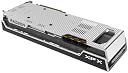
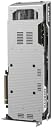
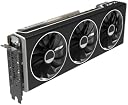
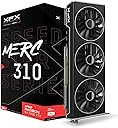
The XFX Speedster MERC310 AMD Radeon RX 7900XTX is a powerhouse graphics card featuring AMD's latest RDNA 3 architecture, a blazing 2615 MHz boost clock, and a massive 24GB GDDR6 memory. Its triple-fan cooling system ensures optimal thermals and quiet operation, making it ideal for professional-grade 4K gaming and demanding creative workflows. Designed for high-end desktop builds, it supports the latest display standards including DisplayPort 2.1 and HDMI 2.1, delivering stunning visuals and smooth frame rates.


| ASIN | B0BNLSW23M |
| Antenna Location | Gaming |
| Best Sellers Rank | #9 in Computer Graphics Cards |
| Brand | XFX |
| Built-In Media | Graphics Card, Z Bar |
| Compatible Devices | Desktop |
| Customer Reviews | 4.3 4.3 out of 5 stars (1,461) |
| Display Resolution Maximum | 3840x2160 |
| Global Trade Identification Number | 00840191500640 |
| Graphics Card Interface | PCI Express |
| Graphics Card Ram | 24 GB |
| Graphics Coprocessor | AMD Radeon RX 7900 XTX |
| Graphics Description | High-performance AMD Radeon RX 7900 XTX graphics card with 24 GB GDDR6 memory, 384-bit memory interface, and a boost clock speed of up to 2615 MHz, featuring AMD's RDNA 3 architecture and supporting DisplayPort 2.1 and HDMI 2.1. |
| Graphics Ram Type | GDDR6 |
| Item Dimensions L x W | 13.5"L x 5"W |
| Item Weight | 2.6 Kilograms |
| Manufacturer | XFX |
| Memory Clock Speed | 20 GHz |
| Model Name | AMD RX 7900 XTX |
| Number of Fans | 3 |
| UPC | 840191500640 |
| Video Output Interface | DisplayPort, HDMI |
| Video Processor | XFX |
| Warranty Description | 3 Year Manufacturer |
S**2
A fantastic graphics card (that I got at $799.99!) that I expect will last years
So, I am an avid VR player. I love playing VRchat with friends, going to events with 60+ people there, and to say it's GPU intensive is an understatement. My NVIDIA 3060 Ti could not keep up, not with it's 8GB of VRAM, and the only option was either accept hindered visuals and not being able to see everyone's avatar at once...or upgrade. I chose upgrade. It was Black Friday, so all the sales were going on. The question was "Do I wait for the 5000 series by NVIDIA, buy a 4070 Ti Super which is being scalped right now, or do I decide to buy from AMD and take a leap of faith?" I chose to take the leap. AMD has a rough reputation with GPU's, driver issues galore, and they used to be very fickle about working properly. But in the day and age where to get 4080~4090 performance, you need to shell out $1,500 or more, right when a new chipset is also around the corner, there's a reason to look at the competition rather than the "name brand". AMD is not the off-brand parts component supplier it used to be, it is a fighting force, and it has product that rivals NVIDIA at lower prices. The Radeon 7900XTX with 24GB of GDDR6 VRAM absolutely blew my expectations. I need to preface, I did have issues initially. My build is older. I'll give a spec sheet at the end of this, but long story short, I can't overclock my GPU without Blue screening. That's more likely due to my system specs than anything else. But that first night, despite PC crashes, I was capable of loading all 80 players with very poor optimization that VRchat has, while also using Full Body Tracking which also taxes GPU's, and it still had more fight in it. My 3060Ti would have been incapable of even running at 10 FPS, where it was running smoothly at 27~35 FPS with everything I could possibly throw at it to hinder my FPS, and just going to any room with less people instantly got me right back up to 45+ FPS. While it may not seem impressive, with my build, it shows this is putting in incredible work. It never even was using more than 60% of the GPU's utilization, which is either due to my build bottlenecking it, or the game itself. The incredible part of this GPU is that with that much VRAM, you can throw so much at games graphically, that you almost don't even need to worry about it. Almost no games currently run you so close to the limit of your VRAM capacity, unlike with the 3060Ti with only 8GB's of VRAM, where it was a constant limiting factor. Still functional, still can handle VR even, but with hinderances. I feel unhindered with this GPU, and with the black friday sale getting it down to $799.99? It was a steal. Expensive, most expensive computer component I've ever spent, but it was worth every penny. I will go ahead and say, if you have been running small(er) graphics cards like the 3060, you may find you cant fit this GPU in your case. You should double check it can fit before you put it in. Even with my current case I bought, it has enough room, but it's a closer fit. It's big. It's monstrous what it can do. I'm limited by everything else, and I think when I upgrade more, I'll see just how much it's capable of. If you can't or don't want to afford an NVIDIA GPU equivalent between a 4080 and 4090, this is a great card to get. Powerful, enough VRAM that games will take time to catch up with this much VRAM being normal in most computers for years, and I see no reason this GPU won't last me another 3 years easily if not longer. If it's on a substantial sale, or in a year or two you can buy one second hand working well, it's a great option. Even for VR. Drivers aren't bad, they aren't NVIDIA, but they are still responsive about getting them out. AMD is truly a competitor and worth looking into even their GPU's, which for years couldn't be trusted. If anything, while they have that reputation, you should capitalize on the bargain if Intel's new budget offering isn't to your liking. Spec Sheet: MSI Tomahawk B350 AMD Ryzen 7 5800X AMD Radeon 7900XTX EVGA GQ Gold 1000 Watt PSU 32GB DDR4 RAM (Sorry I don't remember specifics on the RAM sticks.) It performs well despite an older CPU and even older Motherboard, and seen 2 different upgrades. Ryzen 5 3600 and NVIDIA 2070 Super to the Ryzen 7 5800X and 3060 Ti, to my current. It performs well for all VR tasks, with nearly if any issues. I run nearly every game on highest settings at 1440p, and desktop games run at stable 60+ FPS, usually higher almost always. It's a fantastic setup that really, I expect can coast me by for a good few years, I may invest more in the motherboard and CPU, go up to DDR5, but really, I'm not hindered by much with my system for my applications I play. This GPU has made a substantial difference, the previous was good, this is another ballpark. This was and is the first PC component I bought and felt excited to see installed, and am still so enthralled with it. I have some deep pride for my AMD 7900XTX.
S**2
This card is a beast. I'll leave it at that...
As the title says. This card is a beast in every which way possible. I upgraded from the EVGA [RIP :< ] NVIDIA 1080Ti, which lasted me a good five years and was still pretty competent in running modern games, but was definitely starting to show its age with a 4K monitor and today's (poorly optimized) games. I decided to go AMD this time around, as the price/dollar ratio with AMD right now seems far better... especially with the 4080 costing on average $300 more, and the 4090 being off into space at double to above double the cost. That's not really cool when this card trades blows with NVIDIA's flagships in raster performance, and the focus of RTX/Radeon is for gaming, not for AI/Compute work. Not that AMD can't do those to be clear... ROCm is a thing, but just needs more developer support for it, and AMD still has some work to do in their drivers to unlock the full potential of these chips. The card itself is quite big, as shown in my photos, but it fits snug with my system configuration, the color scheme matches my system quite nicely, and the anti-sag retention bar is a nice addition to have with the card given its size and weight. Cooling-wise, the card operates at 60C when gaming under full load, with a 75C-80C Hot Spot Temperature, with the fans operating at about 30% duty cycle. The card power draw under full load is approximately 390 Watts. Gaming performance wise, I'm satisfied. Games such as Battlefield 2042 at 4K Native, 100% Render Resolution, Ultra Settings, HDR and Ray Tracing Enabled, push 70-100FPS. BattleBit Remastered does well north of 180FPS. Counter-Strike 2 runs at 170FPS+ at 4K Native, HDR and Max settings. Halo Infinite at 4K Native, HDR, Max settings, pushes approximately 90FPS. Overwatch 2, similar settings, similar frame rates. That's pretty much it. The card performs consistently well, and has the VRAM to handle demanding gaming loads (Halo Infinite for some reason needs 18GB of VRAM?!). I could get higher frame rates with AMD FSR3 or by turning off some settings like Ray Tracing, but, hey... these frames are already a huge upgrade from the 1080Ti, and can only get better in time. Video Performance Wise: Compared to NVIDIA, AMD does have a weaker video engine. This was something which worried me at first based on my past experience with AMD GPUs (The Vega 8 in my laptop, and the previous Radeon HD 5770 I used to have which would downclock the VRAM every time video accelerated content was played). However, it has not affected my day to day. 8K60 YouTube is handled and plays back with the AV1 Codec. VP9, H.264, AVC1, and H.265 decoding are similarly capable of smooth playback, and day to day use I notice no difference between the 1080Ti's NVDEC chip and AMD's VCE in terms of performance. Encoding wise, Handbrake was able to transcode VC-1 video (This AMD GPU does NOT support VC-1 Decoding in the Video engines, so some software limitations are at play!) to H.265 10-Bit with exceptional quality at 130+FPS, and did so without impacting the rest of the card's performance. AV1 Encoding performance is similarly quick, and for live streaming, is phenomenal, with a crisp picture produced at 14Mbps to YouTube at 1440p. The video engine seems to multi-task reasonably well, and I have yet to encounter any artificial limits imposed in the driver, unlike NVIDIA which limits encode/decode streams on their consumer GPUs... a limit I have bumped heads with many times when working with VEGAS Pro, and which has been responsible for NVIDIA's driver crashing. Driver wise: AMD does tend to release more frequent updates to drivers than NVIDIA. This tends to be due to AMD's Driver QA and refinement being less robust than NVIDIA's. I have certainly noticed a few more odd glitches in games like flickering hair or invisible vehicles. Some of these could be game engine bugs. None of these bugs have resulted in games being unplayable. CS2 for example had a stutter bug which specifically affected the 7900XTX and was fixed quickly by AMD, but I really didn't notice this personally. Battlefield 2042 occasionally has a colorful hair issue on some characters, but only at the end-of-game recap. Driver crashes have been extremely minimal - I've experienced one crash which was due to a bug AMD has since fixed with CS2, but that's not to say things have been exceptionally smooth for me. There are definitely some resource scheduling issues to work out in the drivers. When the GPU is under heavy (100%) load, you may find that stuttering occurs in other programs like web browsers and in the mouse when Alt-Tabbing at times. This hasn't resulted in the system being unusable. It's just annoying and is intermittent. I did not encounter mouse stuttering with NVIDIA, so they seem to do a better job with scheduling in that regard, but other programs (hardware accelerated Chromium apps) definitely took their time doing any sort of action with the NVIDIA card under full load. Things with this AMD card remain snappy even with the occasional stutters. The AMD Software suite is overall pretty good. Unlike NVIDIA, AMD includes automatic driver updates, game optimizations, game performance statistics, game streaming (AMD Link), live streaming, game clipping and background recording, performance monitoring as well as overclocking features directly in AMD Software, WITHOUT AN ACCOUNT BEING REQUIRED! That is on top of the usual GPU settings for Display color/resolution, software profiles, and global 3D settings. You just install the software and everything is right there in one control panel. Some settings like monitor arrangement and color calibration, AMD Software will defer to the Windows Control panel, and this seems to be only where Windows will do a better job. I have noticed my system no longer has this strange 3-4 second freeze on boot-up when the driver package loads like I did with NVIDIA when GeForce Experience was loading in, so that's a plus. Now for the fun bits. When I initially installed the GPU, everything was pretty smooth. Run DDU, shut down the system, pull out the old GPU, install the new GPU. Everything worked on the first go. Install the AMD Drivers, Reboot, and all is fine and dandy! Within a few hours however, I started noticing some odd behavior while running games. If I had a game running on my main monitor (a 4K 144Hz HDR display), everything would be fine... until I Alt+Tabbed to use an application on my secondary monitors (two 1080p 144Hz SDR displays), or touched any application based on Chromium (Steam, Discord, Google Chrome...) while a game was running. The driver would hang for a few seconds and then recover, but not hang in the sense that my game or any applications would crash out. My primary web browser, Firefox, didn't cause any sort of problem with the driver. Thinking this was the infamous "Chromium Hardware Acceleration" bugs that seem to plague AMD, I considered disabling hardware acceleration in Chrome, until I considered the fact that Windows itself is not exactly behaving right. My next troubleshooting steps involved disabling Resizable BAR (AMD Smart Access Memory), which was enabled on my Motherboard (ASUS PRIME X370 Pro) as this has been known to cause issues with NVIDIA RTX 3000 series cards, as well as the AMD RX 6000 series GPUs. Also, since I am using a Ryzen 7 5800X3D on an X370 board, it's very possible there's a strange board problem going on causing the driver to hang. So great! I turn off Resizable BAR, and the problems disappear... for about 12 hours. The problems then return with a vengeance! Simple actions like running VLC in Full Screen, full screening YouTube videos, trying to run games, basically anything an average person might do, would cause the driver to hang... and sometimes crash hard. Even more silly - mousing over the display in AMD Software was enough to hang it. To make matters worse, the system got so unstable to the point where simply loading color calibration profiles for my monitor would cause the entire video driver to hang hard just by logging into the PC! As part of troubleshooting with Windows becoming unusable, I continued to mess around in the BIOS by disabling IOMMU, SR-IOV, Resizable BAR at a Chipset level (rather than in AMD Software), and toggled between the two BIOSs available on this GPU using the BIOS toggle switch found towards the PCI Bracket. Nothing! But by chance, I happened across the solution. While troubleshooting, I discovered that the center DisplayPort port was misbehaving. It could detect AND sync my 4K display at HDR, RGB 4:4:4, 144Hz without an issue... as if nothing was wrong. But when I connected my 1080p displays to this same port, the monitors would detect but wouldn't sync (output video). Neither one of my external monitors would sync on this port. ONLY the 4K display. The other thing I noticed is, when I didn't use the center DisplayPort port... the GPU wouldn't hang! Windows would log in! Everything worked! My setup now avoids the use of the center DisplayPort port, with one 1080p monitor connected to the HDMI port, and the remaining two monitors connected to the left-most and right-most DisplayPort port. All of the monitors are being fully driven, and my GPU is now 100% stable... even with Resizable BAR (AMD Smart Access Memory) enabled, IO-SRV, IOMMU, you name it enabled. I don't know at this point if the problem is going to require me to RMA the GPU with XFX, but given the number of complaints I've seen online regarding "a particular port" (like the USB-C port) on other 7900XTX GPUs from other brands, it's sounding more like an AMD Driver bug. Some people were able to temporarily resolve their hanging/freezing problems with "a particular port" by using DDU only to have it crop up a day later. That sounds pretty similar, doesn't it? Since figuring out the initial stability headache, the GPU has been enjoyable to use, and I do not regret the move from NVIDIA (I have been a long time NVIDIA customer FWIW - RIVA 128ZX, GeForce 4400MX, GeForce 8800GT, GeForce GTX770, GeForce 1080Ti) to AMD. The only time the driver has crashed was when I was playing CS2 on launch day, while streaming the game via Discord. I chalked that up to Discord being the problem, as I also experienced similar driver crashes on NVIDIA when game streaming in Discord. Turns out that was an AMD bug which they fixed a week later... Overall, if you're switching from NVIDIA, or are unsure about this purchase, I recommend this card. If you encounter the instability issues I first encountered... definitely think outside of the box. It's rewarding at the end.
P**E
Not cheap, but if you're running 4K and not going to fork out for a 4090... it kicks ass for Cyberpunk 2077 and other games. The latest AFMF frame generation works well to smooth things out even more. So happy now with this and my 4K OLED to make my games beautiful. Gets my FPS up to make 4K playable maxed out. Without RT on, but I don't noticed a huge difference with it on, and of so not enough for the FPS hit. QUIET. Even at 100%, this is quiet. My 6700xt used to have the fans blasting, but this thing even drawing almost 400W is quiet. Warm. I recommend a good case with good airflow. This does put out a ton of heat. It's long, make sure you do your measurements. But the brace it comes with helps to support it and is easy to install.
Z**N
This is my second time ordering an xfx card from here. The price is very good. Reliable store, fast delivery and unopened package, which is one of the most important things. I will definitely order from here again, although I don't usually order video cards every month, but when the time comes I will definitely order from here again. The xfx 7900xtx is a monster, a significant improvement over the 6900xt. It runs without any problems in Battlefield 6 on overkill settings. There is plenty of power reserve due to the 24 Gb of memory.
T**L
Compared to team green, good performance for the price. With monitor 2560x1440: Cyberpunk 2077, Medium quality - avg 96 fps Satisfactory, High quality - avg 111 fps Rainbow Six Siege, High quality - avg 133 fps
M**N
Es una excelente tarjeta. Es grande (40 cm con su soporte que ya viene en la caja). Genera mucho calor al trabajar al 100% (80°C en la unión) y, al mismo tiempo, consume gran cantidad de energía (casi llegando casi a los 400w según AMD Adrenalin). Recomendado un monitor 4K@120Hz mínimo y un gabinete muy bien ventilado. Ademas, tendrás función extra de calefactor para climas fríos. He llegado a 8K@60Hz sin problema +60fps sin utilizar tecnologías de escalado, todo al máximo/ultra, incluyendo el mayor Anti-Aliasing, con RT activado y con juegos de mundo abierto. (R7 5800X, 32GB@3200MHz). No quieras ahorrarte unas monedas y consigue el PSU mínimo recomendado, lo vale. Ya lo dice el dicho: "Si vas por un buen platillo, lo acompañas con un buen maridaje".
A**.
Kortet kom fram på förväntat datum, splitternytt och efter extensiva tester så kan jag säga att det är ett genuint kort, även om jag fick det till på ganska suspekt bra rea. Allt som allt skulle jag säga att det här var ett bra köp, och en bra säljare. Kortet kommer inte med spelkod från AMD, vet inte om jag kan få den om jag pratar med säljaren och jag tror inte jag bryr mig nog om avatarspelet för att orka prova. Enda lilla klagomålet är att grafikkortets låda inte har något runt sig i fraktkartongen så den fick lite repor på sig (se bild 2), och kunde möjligen riskerat fraktskada. Så jag skulle rekommendera att de packar i lite störra kartong i framtiden med bubbelplast eller dylikt. Allt som allt så blev det fint i vilket fall.
Trustpilot
1 month ago
4 days ago