Desertcart purchases this item on your behalf and handles shipping, customs, and support to Croatia.
🚀 Elevate your storage game with speed and security that keeps you ahead of the pack!
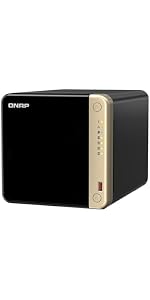
The QNAP TS-464-8G-US is a robust 4-bay desktop NAS featuring a quad-core Intel Celeron processor with 8GB DDR4 RAM, dual 2.5GbE ports for ultra-fast networking, and dual M.2 NVMe SSD slots for cache acceleration. Designed for professionals and media enthusiasts, it offers secure, scalable storage with hot-swappable bays and multiple USB 3.2 Gen 2 ports, making it an ideal solution for centralized, high-performance data management.


| ASIN | B0BQ5TWCL8 |
| Additional Features | Hot Swappable |
| Best Sellers Rank | #26 in Network Attached Storage (NAS) Devices |
| Brand | QNAP |
| Built-In Media | QNAP TS-464-8G 4-Bay NAS Enclosure, Diskless |
| Color | Not Available |
| Compatible Devices | Desktop, Laptop, Smartphone, Tablet |
| Connectivity Technology | Ethernet |
| Customer Reviews | 4.4 out of 5 stars 249 Reviews |
| Data Transfer Rate | 2.5 gigabits_per_second |
| Digital Storage Capacity | 308 TB |
| Enclosure Material | Metal |
| Form Factor | Desktop |
| Hard Disk Description | SATA 6 Gb/s drives |
| Hard Disk Form Factor | 3.5 inches |
| Hard Disk Interface | Serial ATA |
| Hard Disk Rotational Speed | 7200 rpm |
| Hardware Connectivity | Ethernet |
| Hardware Platform | Mac, PC |
| Installation Type | Internal Hard Drive |
| Item Weight | 2.26 kg |
| Manufacturer | QNAP |
| Mfr Part Number | TS-464-8G-US |
| Model Name | TS-464-8G-US |
| Model Number | TS-464-8G-US |
| Number of Items | 1 |
| Special Feature | Hot Swappable |
| Specific Uses For Product | Personal, Backup, Cloud Storage |
| UPC | 885022024674 |
| Unit Count | 1 Count |
| Warranty Description | 3 year warranty |
A**P
Great Budget-Friendly Media Server with Solid Storage Capabilities
I picked up this server to use as a dedicated media server, and overall, I’ve been really impressed with its quality and performance for the price. The build feels solid, it runs reliably, and for my needs, it’s been a great way to centralize my growing media library. That said, one important detail to be aware of is the processor. While it handles basic tasks without issue, it does struggle with transcoding in most scenarios. If you’re planning on streaming a lot of high-bitrate content or serving multiple devices at once, you’ll likely hit its limitations pretty quickly. In my case, I’ve found that it can handle a single 1080p stream fairly well. Direct play works perfectly, and it manages light transcoding if needed, but anything beyond that starts to push it too far. My ultimate plan is to pair this with a small, dedicated mini PC that can handle transcoding duties while letting this server focus exclusively on storage. Even with this limitation, I still think it’s a fantastic value, especially if you primarily direct play your media or are looking for a reliable storage solution. For anyone building a home media setup on a budget, this server offers a lot of flexibility and stability. As long as you understand its limitations and plan around them, it’s a highly recommended option for consolidating and managing your media library.
O**R
Great Product for Price
The QNAP TS-464-8G-US is a remarkable addition to my home network setup. As an upgrade from my reliable QNAP TS 453A, which has been running smoothly for nearly a decade, this new model has exceeded my expectations. Installation and Setup: The installation process was straightforward, thanks to the clear instructions and web support provided. The user-friendly interface will make setting up the NAS a breeze, even for someone with moderate technical knowledge. Performance and Features: This NAS stands out with its high-performance Intel Celeron Quad-core Processor, ensuring smooth and efficient operations. The M.2 PCIe slots are a fantastic addition, allowing for seamless expansion and enhanced performance. I opted for Seagate drives this time, hoping they prove to be as durable as the Toshiba drives I used previously. So far, they have performed exceptionally well. Network Connectivity: The dual 2.5GbE network connectivity is a game-changer, providing faster data transfer speeds and improved network performance. This feature has significantly enhanced my workflow and data management efficiency. Reliability: As someone who prioritizes data security and reliability, the TS-464 has not disappointed. It has seamlessly taken over as my primary NAS, while my trusted TS 453A now serves as a backup. This setup gives me peace of mind, knowing my data is well-protected. Conclusion: In summary, the QNAP TS-464-8G-US is an excellent investment for anyone seeking a high-performance, reliable, and feature-rich NAS. Its robust performance, user-friendly setup, and advanced features make it a standout choice. I highly recommend this NAS for both personal and professional use.
D**M
Works great but vibrates and buzzes sometimes
This is a very nice NAS box and is very fast with lots of detailed features that can be customized. The only thing I noticed that can be annoying is the front plastic cover vibrates and is kindof noisy.
J**G
Emergency Upgrade success story
Upgraded from my 2009 TS-453 mini after the backplane went out. In the 35 years of IT work, I've rarely seen an emergency migration go as smoothly as this did. Not only did the new device immediately start reading my drives (2 pools both in RAID 1), It actually took on the identity of the previous device with such accuracy, that my virtual stack did not require any tinkering to get it recognized. I simply moved the drives over, and turned it on for the first time. It came up with the old device's IP, same login/pass, and I was able to verify my data was correct. System was also very graceful about requesting to update missing firmware. It let me do some of my checks to validate the data, then I upgraded the firmware. It could not have been any easier to setup. Solid piece of equipment. Secure door, easy to open panels for M.2 slot. Quiet while running idle. Some noise on large data transfers. Great value for offering 4-bays + 2-M.2 slots, with HDMI output and 2-nics.
E**8
QNAP TS-464-8G-US 4 Bay High-Performance Desktop NAS
Updated: Contrary to the specs my new TS-464 has two RAM slots, one of which is populated with an 8GB DDR4-3200 SO-DIMM. It recognizes up to 32GB although Intel ARK specifies 16GB max. I was also able to update the NIC with a generic Intel-based X710-DA2 10Gb SFP+. The PCIe slot cover is flat (see QNAP's photos) and does not fit with a regular LP bracket, so I had to create one myself. ______________________________________________________________________________________ The TS-464 is a decent little NAS suitable for home users. If you are familiar with other QNAPs it uses the same software (firmware) and will run either QuTS or the QuTS Hero. The latter is desirable for the ZFS high integrity file system, which is unusual in this class. It was easy to update the FW from QuTS to the latest QuTS Hero. I populated it with WD drives on the compatibility list, but it should work with most drives. The CPU is the Celeron N5095. The NAS is about as compact and lightweight as is practical for a 4-bay NAS and even includes a low profile PCIe 3.0 x2 slot. There are 7 LEDs to show status of the NAS. There are a few caveats that are related to the low cost and market segment of the x64 series. 1. Power is via a bulky 12v/7.5A power brick rather than having an AC cord and built in power supply. 2. The front panel blocks airflow. When it is removed the drives under writes are about 5 degrees C cooler than when in place at auto fan speeds. It might be necessary to turn up the fan a little. 3. The current US model is claimed to be the -8G-US, which contains 8GB non-upgradable RAM. The hardware info shows 8/0GB but I have not taken it apart to see if there is another slot. RAM size is especially important to ARC in ZFS so I'd prefer 16GB.
J**N
Simple installation.
It was simple to set up. I’ve had it for a few months now and no issues.
W**K
Keep researching; Keep looking
Two major problems, and after researching, I've learned I'm far from alone on either. The noise. This unit is loud enough that I can't keep it in the room where I work. I assumed mine was defective until I found QNAP forum users describing the stock fans on this series as having a "really annoying buzzing sound all the time" — to the point that they replace them with aftermarket Noctua fans just to make it tolerable. Even professional reviewers note this series runs noisier in operation than comparable Synology 4-bay units. A consumer NAS marketed for home use shouldn't require fan surgery to live in a home. QNAP NAS Community ForumNAS Compares Windows can't see it. My Windows 10 Pro machine simply does not detect this NAS in File Explorer's Network view. I enabled network discovery, checked SMB and firewall settings — nothing. Again, this turns out to be a long-running, widely reported problem: users on QNAP's own forum describe enabling WS-Discovery, turning on SMB 1.0 client and server, confirming network discovery is on for private networks, passing ping tests — and the NAS still won't appear in the Network view. Others on Microsoft's support forums report the same disappearing-NAS issue persisting even after hours with Microsoft support and a fresh user profile. There are threads about this going back years, including cases where the same QNAP shows up fine on an older Windows machine but not Windows 10. QNAP's answer is essentially "use Qfinder Pro," but a NAS the network's primary PC can't natively see is failing at its one job. QNAP NAS Community Forum + 2 The hardware specs look good on paper, but between the constant fan drone and discovery issues that QNAP has known about for years without a reliable fix, I can't recommend this. Buy something quieter that Windows actually recognizes out of the box.
L**.
Cut your cloud storage with a home solution
A beast of a machine and OS is nice to use. Can finally ditch expensive cloud storage
熱**構
初心者でも扱いやすい
細部まで保護フィルムが貼られており製品品質も良し。セットアップから運用までスムーズにおこなえる。起動中の音もほぼ気にならないくらい静音と言える。
C**U
Excelente NAS
Lo adquiri para instalar mi Media Server Plex y muy satisfecto, funciona muy bien.
A**R
Easy installation and no issues
HDD installation was super easy and setup was simple. Performance is vastly better than my old ARM-based QNAP NAS. It was unclear reading the documentation whether I could upgrade the RAM on this model or not. QNAP's documentation said no, but I saw reviews saying they had changed the design to allow it. I did not open the NAS enclosure to determine whether that is true or not.
K**R
Perfect
Works great with plex, Phone gallery backup while charging. Adding individual users with custom privilege, No need of a PC for downloading from internet. 8 local surveillance cameras can be added for recording, but none of the supported cameras are not that cheap and are not available in Saudi market 😟 Overall it’s a Great product 👍
J**T
Très versatile
Serveur photo avec implementation future de DDNS, toujours en cours car je n’ai pas encore terminé sa configuration. Pour mon installation, j’ai réussi à installer Ubuntu, qui devient le système d’exploitation de base, et l’interface graphique est visible si on connecte un écran, un clavier et une souris directement au NAS. J’aime cette solution, et je recommande fortement d’avoir un écran, un clavier et une souris dédiés connectés au NAS pour une meilleure gestion. Il faut d’abord se connecter via Qfinder Pro depuis un autre ordinateur pour finaliser l’installation d’Ubuntu. Une fois sous Ubuntu, je n’ai eu aucun problème pour installer MariaDB et Piwigo. Ubuntu et le QTS de QNAP ont chacun des adresses IP indépendantes, ce qui facilite la gestion. Je recommande également d’activer SSH/SFTP sur les deux environnements. Le problème avec le fait de rester sur QTS en utilisant leur MariaDB et PHP, c’est le support pour Piwigo et autres logiciels. Après beaucoup d’efforts, je ne recommande pas d’utiliser de logiciels tiers directement sur QTS. Pour bien tout gérer, Ubuntu est beaucoup mieux à mon stade d’adaptation. Mais je ne regrette rien. Je pense qu’il est important d’apprendre, car le plug-and-play ne fonctionne pas pour moi ici. Honnêtement, ChatGPT m’a beaucoup aidé, ainsi que les blogs et le service d’assistance de QNAP. Je n’ai pas encore fini, mais je suis très content ! :)
Trustpilot
2 days ago
2 months ago