Elevate Your Workspace! 🚀
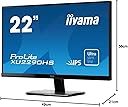
The iiyama XU2290HS-B1 is a 22-inch ProLite IPS HD Slim LCD Monitor that delivers exceptional image quality with a Full HD resolution of 1920 x 1080. Featuring advanced IPS technology for superior viewing angles, a rapid 5ms response time, and built-in stereo speakers, this monitor is perfect for both professional and entertainment use. With its sleek design and versatile connectivity options, it’s the ideal choice for any modern workspace.
| ASIN | B00HY77URI |
| Aspect Ratio | 16:9 |
| Aspect ratio | 16:9 |
| Best Sellers Rank | 397,495 in Computers & Accessories ( See Top 100 in Computers & Accessories ) 5,896 in Monitors |
| Box Contents | Monitor |
| Brand | COMPUTER MOUSE |
| Brand Name | COMPUTER MOUSE |
| Colour | Black |
| Customer Reviews | 4.2 out of 5 stars 525 Reviews |
| Display Technology | LCD |
| Display Type | Hd,Ips,Lcd,Led |
| Display resolution maximum | 1920 x 1080 |
| Hardware Connectivity | DisplayPort, HDMI, USB 2.0, VGA |
| Has Color Screen | No |
| Image Brightness | 1 |
| Is Electric | Yes |
| Item Type Name | PC Monitor |
| Item Weight | 3.7 Kilograms |
| Manufacturer | Iiyama |
| Maximum Display Resolution | 1920 x 1080 |
| Model Name | XU2290HS-B1 |
| Model Number | XU2290HS-B1 |
| Mounting Type | VESA MOUNTING:100 x 100mm |
| Native Resolution | 1920x1080 |
| Network Connectivity Technology | DVI-D, HDMI, VGA |
| Processor Count | 1 |
| Product Features | Built-In Speakers, High Dynamic Range |
| Product Warranty | 1 year |
| Resolution | HD |
| Screen Finish Type | Matte |
| Screen Size | 22 Inches |
| Screen size | 22 Inches |
| Screen surface description | Matte |
| Specific Uses For Product | Business, Education, Gaming, Photo Editing, Programming, Video Editing |
| Total HDMI Port | 2 |
| Total USB Ports | 1 |
| Total Video Out Ports | 1 |
| Viewing Angle | 178 Degrees |
| Voltage | 220 Volts |
O**E
Good replacement for an aging 17" flat screen CRT at a good price
The power switch on my old 17" flat screen CRT was working less and less often. With no more CRTs around anymore, I've finally had to change to a flat panel display. I went with this one due to its impressive range of compatibility (from Windows 8 all the way back to Windows 95) along with its analogue VGA, DVI-D and HDMI interfaces (for future expandability). Also, (after downloading and reading the manual) it supported automatic aspect ratio switching for all inputs so that I could use older 4:3 graphics modes without them being force stretched to widescreen. Finally, it came with the latest in IPS LED technology for good colour and contrast, looked sleek and modern in black, wasn't beige (like my old CRT was) and at a price that's right (just £124.99 from Amazon at the time of purchase). Like my Samsung UE26EH4510-W flat panel Smart TV, it did need a fair bit of adjustment to get it to look right for me, but with a wide range of settings available, once set up, it provides a very good looking image at native resolution (1920x1080 @ 60Hz) through the analogue VGA interface of my Belkin KVM(A) hooked up to two desktops. (Set ECO mode to -15% to reduce the brightness of the backlight a bit, before bringing the display contrast up to around 60% to improve the overall display brightness, followed by Colour Temp to 'Normal' for cooler colour and Overdrive to +1 for movies for example). It also handles older 4:3 graphics modes well on VGA analogue with auto aspect ratio switching too, after choosing a resolution from the desktop such as 1152x768, changing Aspect Ratio from 'Full' to 'Aspect', before changing the resolution back again to 1920x1080. There are just a few niggles with it though. Firstly, the auto input setting on VGA analogue doesn't always work fast enough to handle the multiple display resolutions my main desktop computer goes through while booting up, so I've had to change it from Auto to D-SUB so that it can keep up. Secondly, whenever it comes out of standby while the computer is on, the input the monitor is currently using briefly flashes on the screen, which is a bit annoying. Finally, for pure MS-DOS text modes, it doesn't auto adjust the display like it does with graphics modes. I also miss the old school scan-line effect of the CRT, where every resolution it did was like native resolution on a modern flat panel. Overall though, it's a good purchase for a quality display. It may not have some of the more advanced features of other (more expensive) displays. On the other hand, most other displays don't offer everything this one does at a price close to this one. (I can't comment on the sound quality of this monitor as I brought the monitor primarily as a monitor. I'm sure my Logitech X-230 2.1 Multimedia Speaker System beats even the most expensive built in monitor speakers hollow though).
L**Z
One of the best you can buy for the price
This is a very good piece of equipment. One the best to those who are looking for 22 inch, full hd, matte screen with hdmi port. Most stylish and best looking of Iiyama monitors, which thanks to slim bezel looks bigger than its 22 inches. Very good quality, stable picture when using digital connection, great contrast. It got few flaws of course, mainly the control buttons, that are placed on the bottom which is a bit cofusing and the picture might be a bit too dark for some, but only for those who are looking for a really bright screen. Also speakers could actually sound better. But no real dissapointments so far. 5/5 especially looking at the price.
M**K
Great display, terrible speakers
The monitor display is great, but the built in speakers are absolutely terrible. They sounds like the sort of noise you'd expect from a pair of headphones held at a meter away. Don't buy these if you want to get any sounds from them.
M**O
Good quality and value monitor, just hope the midgies don't get it
I have been through about 5 monitors in as many years due to a really, really bad thunderfly/midgie/thrip problem in my home office in the summer...I needed a good but cheap 2nd monitor. Brief history of insect vs monitor [Please skip for actual review]: I had a Benq 24" HD originally which was replaced 3 times under warranty due to "insect incursion", when the warranty ran out I bought a 27" LG IPS, awesome! My 2nd monitor an old Sony 17" eventually succumbed to midgies and my friend gave me a 24" Samsung 1920x1600 Syncmaster that was nearly as big as the LG. This year the midgies killed that this year, 5 of them stuck in the middle! Worse they even managed to sneak one into my LG which I removed but damaged the panel doing do! So...I probably needed a UV "insectecutor" but I wanted another monitor. I couldn't afford another 27" IPS to match my LG and I was worried about it being ruined but I didn't want a 24" so this 25" seemed like the obvious compromise and came in at the right price too. Iiyama used to be THE monitor to have back when everyone was rocking CRTs and I wondered if their LED panels were as good? When I first got it out it seemed sleek and well made but too small. I mount mine using the VESA mounts on swing arms and had no problems doing that with this. When I switched it on and lined it up beside my LG, it looked even smaller. I noticed although it has a very small bezel there is a border on the INSIDE of the bezel so...The thin bezel is kind of pointless as its not borderless for dual/triple monitor setups. I felt cheated and decided to measure the panel (excluding the border), and compare it against my LG and my original Samsung 24...Although it has an odd aspect ratio, actually the viewable area IS more than the Samsung it replaced and I realised it was quite respectable. I used my monitor mainly for working at home (software development), and a bit of gaming so I tested it for both. I actually swapped the LG and Iiyama onto different sides as this made for a better fit with the extra wide 25". I was initially disappointed but decided to give it a day or two before deciding if to keep it. NOW it is actually my main monitor! I quickly realised the IPS panel is easily as good as the LG and for some reason, it actually seems to work better for text. Its a very bright, very clear monitor, and I had to turn the brightness down for prolonged use. Even for gaming it works really well with no discernable refresh rate issues. It also starts up very quickly, just over a second from pressing the button to seeing the image, my LG is actually much slower in that respect. The controls and menu are fairly are easy to use but not clearly labelled, this is not a problem once you get used them and usually you only set it up once or twice. The only niggle is I notice more of a LCD "polarisation" effect from different viewing angles than I do with the LG, that said its not a serious issue. All in all considering what I paid for it, and the fact its now my main monitor I think it was a good buy
P**D
Full HD for my old laptop
It's very tempting to go for a bigger screen but when you've only got a small desk this size is probably more appropriate. QHD or 4K monitors are still relatively expensive for occasional use so a bigger screen on my budget wouldn't get me any more pixels. I broke the screen/lid on my old laptop and have decided to get a monitor and use it more like a desktop/keyboard. After a few months I am really pleased with this sharp screen. I wouldn't be concerned about the small border around the screen. Only if you have two screens side by side and you need the screens to be continuous will it bother anyone in use. Some reviewers complain about the speakers but I'd rather have these small speakers than none at all. I've attached it to a gas sprung monitor arm which is great and really frees up my desk too....
A**H
An absolutely stunning Monitor.
I have had the iiyama ProLite XU2590HS now just short of four weeks at time of writing this review. I bought just one to see how good or bad they are from another seller as it was cheaper from them at that time, but I didn’t like the way they sent it out, only in its display box with a label stuck on it, which got damaged, so I have bought two more since from Amazon, who do package things better. I have known of iiyama for years, and have always liked the idea of owning one, except for their price, they were always in the high end range of monitors, so seeing them at the price they are/were and needing to upgrade my system, I just had to try, the monitors are brilliant, the angle of view is simply incredible, with no colour or brightness changes as you view from different angles, and the screen has a constant brightness right into the corners with no drop off at all, so if you are thinking of buying, then don’t hesitate, they are a stunning monitor. Really pleased with them.
M**H
A Great Monitor .. Good Value
A great monitor. Good picture .. has built in speakers (but poor spund). I havnt used for gaming but gave that 5 stars as didn't want to mark down what I havnt used it for. I would recommend.
A**R
Excellent Picture but Poor Audio
I returned a previous monitor as it did not have speakers so ordered this iiyama. The picture quality is excellent but the audio is very tinny and so quite at full volume that I would still need powered external speakers which I do not want and defeats the reason for buying a monitor with built-in speakers..
A**N
Bon produit
Cet écran est excellent, je l'utilise principalement pour faire de la photo. Que du bonheur après qualibration via ma sonde. N'hésitez pas.
C**N
Una bestia, davvero spettacolare!
Io ci lavoro con tutto il pacchetto office, programmo in excel e cose simili. Premesso questo... Il monitor è un iiyama e non della linea economica, che peraltro non consiglio, ma davvero vale tutti i suoi soldi. Fantastico. Colori nitidi e molto ampio, possibilità di regolare l'inclinazione (importantissimo), cornice pressochè inesistente. Lo uso da qualche mese... Perfetto. A casa ho un iiyama da 5 anni e mi trovo benissimo!
ら**ん
品質満足&丁寧な対応
ばっちり満足です。 新品と言われても信じてしまうくらい品質がよかったです。 一人で対応されているのか、発送まで間があっても、キャンセルしないようにしましょう。 私がマーケットプレイスに慣れてないこともあり、キャンセルしようとしちゃいました。 すぐ電話が来て状況を教えていただいたので、キャンセルをキャンセルしました。 結果、大満足です。 ありがとうございました。
D**R
Sehr guter Full HD Monitor in der 25 Zoll Klasse
Ich habe einen Monitor mit der Full HD Auflößung (1920x1080) und IPS Display gesucht, der größer als mein alter 22" Monitor sein sollte. Wenn man sich auf dem Markt umschaut, merkt man schnell das es in dieser Auflößung sehr viel Angebote gibt, aber entweder nur in 24" was aber eigentlich in der Praxis immer 23,8" sind oder dann schon wieder in 27". Letztere habe ich mir von diversen Herstellen angeschaut und teilweise auch zu Hause getestet, aber mich hat bei dieser Größe immer gestört das bei Webseiten die Schriften sehr oft unscharf wirkten. Das liegt an dem Pixelabstand, der offensichtlich bei dieser Diagonale eine kritische Größe überschritten hat. Mag sein das es manchen Menschen nicht auffällt oder bei Spielen ist das auch egal, aber ein PC erfüllt nun mal mehrere Funktionen. Ein scharfes Bild ist nun aber mal eine Grundvorraussetzung und mich hat das extrem gestört. Man kann über die Software des Monitors noch eine Menge ausgleichen, aber das Ergebnis hat mich nie überzeugt. Mein Fazit dazu ist also das 27" und Full HD (1920x1080) nicht richtig zusammenpasst. Dann würde ich doch immer zu einem Monitor mit der WQHD (2650x1440) Aufößung raten. Zumindest wenn der Abstand zum Mönitor ähnlich ist wie bei mir und ich sitze ca 60 cm vom Monitor weg. Meine Vorgabe war aber Full HD und größer als die zahlreich angebotenen 24" Monitore. Leider ist der Markt hier aber sehr überschaubar und wenn es dann noch ein IPS Display sein soll und das Ganze bezahlbar, dann bleibt nicht viel übrig. Ich habe den Kauf bisher überhaupt nicht bereut, denn das Display ist wirklich sehr gut, farbstark, gleichmäßig ausgeleuchtet und ordentlich entspiegelt. Ich konnte keinen einzigen Pixelfehler feststellen. Ich finde jedenfalls die 25" sind der perfekte Kompromiss wenn man Full HD als Auflößung und maximal mögliche Größe haben möchte. Das einzige was man vielleicht bemängeln könnte ist die Tatsache das der Monitor recht tief ist und sich wegen der fehlenden Höhenverstellung nicht nachjustieren lässt. Aber ich bin der Meinung das weiß man vorher unddeswegen sollte das auch nicht zu eine Abwertung des Monitors führen. Ich habe das Problem bei mir mit einem Monitorarm gelößt, was dank der VESA Aufnahme kein Problem ist, nun kann ich den Monitor in jeder gewünschten Höhe einstellen. Das der beiliegende Monitorständer recht wackelig ist, stimmt auch stellt aber im Alltag auch kein Problem dar, denn das merkt man nur wenn man etwas an den Knöpfen der Monitors verstellt. Passiert eigentlich auch nur einmal und nie wieder. Manche Rezensenten haben den Monitor wegen der schlechten Lautsprecher abgewertet, naja ich habe noch nie einen Monitor mit vernünftigen Lautsprechern gesehen. Mich interessiert das auch nicht denn ich habe externe Lautsprecher am Rechner. Ich bin jedenfalls rundherum mit dem Monitor zufrieden und das fast Rahmenlose Design gefällt mir auch sehr gut. Er ist der perfekte Kompromiss für diese Auflößung und Größe. Letztendlich muß man dann auch noch den Preis mit betrachten und da ist der iiyama ungeschlagen, denn die wenigen anderen 25" Modelle sind erheblich teurer und bei manchen scheint es auch mit der Zuverlässigkeit zu hapern.
P**T
グレアから非グレアに買い替えです
5年ほど使っていたグレア(光沢)タイプのディスプレイから買い換えました。 某価格比較サイトの売り上げランキング2位、iiyamaの新製品ということで間違いないだろうと思い購入したのですが、最初に映像を見たときに画像が暗すぎてショックを受けました。返品したい、やはりフィリップスの方が良かったかという思いが交錯する中、初期不良も疑い店舗に同型機を見に行ったほどですが、原因は目がグレアタイプの液晶に慣れすぎていただけでした。2,3時間も使っていると明るさや色合いを感じられるようになり、このディスプレイの良さが分かるようになってきました。今では気に入って使っています。 手ごろな価格と発色の良い画質も評価できますが、このディスプレイはデザインが優れていると思います。段差のないベゼルはまるで液晶パネルの一部であるかのようにデザインされていてとても格好が良く、所有する喜びさえ感じます。 ●外見 すっきりしていて良いデザインだと思います。正面は視覚の妨げとなるようなものが排されていて、映像に集中できるように設計されています。 スイッチ類は上に向かって押すようになっていて正面からは見えません。正面右下には各ボタンの機能が表記されていますが、近づいて見ないと分からないデザインです。電源ランプも下向きについていて正面からは見えませんね。背面は大きなiiyamaのロゴがあり、ボディ全体がヘアライン加工されていてとても凝っています。 ●映像 この価格でこの画質なら十分満足です。明るくて視野角も十分、グレア液晶のように映り込みもありませんのでとても見やすいです。 基本の色温度はウォームというやや緑がかった白です。他に黄色系、青系などがプリセットされていますが、ADV(コントラスト比を高める機能)のような機能を使う場合はウォームに強制的に変更されます。 ※色温度はユーザ定義も可能です。 ●操作性 ボタンを上向きに押すようになっていて、各ボタンの機能も視認し辛いので操作性が良いとは言えませんが、映像を表示する機械ですから正面に余計なものが無いこのデザインが正解だと思います。 ボタンは軽く押しやすいのですが、電源スイッチも同じように並んでいるので間違って押してしまいます。ボタンの表記を確認しながら操作すれば間違いはないとは思います。 特に気になったのはリセットが働きやすいということです。リセット機能がメニューの選びやすい位置にあるので間違って良く押してしまいます。リセットしやすいように設計しているのかもしれませんが、もう少し考えてほしい気がしました。 ●スピーカ 音質は期待しないほうが良いでしょう。一般的な液晶モニタ内臓スピ−カ程度の音質です。PCの効果音を鳴らす程度ならこれで十分かもしれませんが、ビデオや音楽の再生には適しません。 *** 2014/5/23 追記 *** 購入して1月半が経ちましたが、画面の明るさは全く気にならなくなりました。最初になぜあんなに暗く感じたのか不思議です。慣れなんでしょうね。今はエコモードを最大(−35%)で使っていますが、これで十分と感じますし、夜中などはこれでも明るすぎると感じることもあるほどです。 ●グレアより見やすい 非グレアの方が見やすく、目にやさしいと感じます。グレアのモニタを使っていた頃は、真っ黒い背景のサイトなどはまぶしすぎて見るのも辛かったのですが、こちらの非グレアのモニタにしてからは大丈夫ですし、目の負担がかなり減ったと感じます。
Trustpilot
2 weeks ago
1 week ago