๐ Label Like a Boss: Connect, Customize, Conquer!
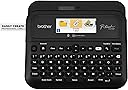
The Brother P-Touch PT-D610BTVP is a professional-grade label maker designed for busy retail, warehouse, and business environments. Featuring Bluetooth and USB connectivity, a vibrant full-color LCD preview screen, and high-resolution printing on durable Brother TZe tapes up to 1 inch wide, it empowers teams to create custom, high-impact labels quickly and collaboratively. With advanced design tools, extensive font and symbol options, and a built-in automatic cutter, it streamlines inventory management, asset tracking, and product merchandising with style and efficiency.
| ASIN | B0B1KV3LSX |
| Additional Printer Functions | Print Only |
| B&W Pages per Minute | 20 |
| Best Sellers Rank | #80,221 in Office Products ( See Top 100 in Office Products ) #370 in Label Makers |
| Brand | Brother |
| Built-In Media | PTD610BTVP Label Maker |
| Color | Black |
| Color Depth | 1 bpp |
| Colour | Black |
| Compatible Devices | iOSยฎ or Android device via Bluetoothยฎ |
| Connectivity technology | USB |
| Control Method | App |
| Controller Type | iOS |
| Customer Reviews | 4.7 out of 5 stars 376 Reviews |
| Display Type | LCD |
| Dual-sided printing | Yes |
| Duplex | No (not supported) |
| Hardware Interface | USB |
| Initial Page Print Time | 30 seconds |
| Ink Color | Black |
| Item Dimensions D x W x H | 36.1D x 33.8W x 15.2H centimeters |
| Item Type Name | Inkjet Printer |
| Item Weight | 6.64 Pounds |
| Manufacturer | Brother Printer |
| Maximum Copy Resolution Black and White | 300 dpi |
| Maximum Copy Speed Black and White | 20 ppm |
| Maximum Media Size | 24 mm |
| Maximum Print Resolution Black and White | 300 dpi |
| Maximum Sheet Capacity | 1 |
| Model Name | PTD610BTVP with Carry Case |
| Model Number | PTD610BTVP |
| Model Series | PTD610BTVP |
| Model name | PTD610BTVP with Carry Case |
| Number of Trays | 1 |
| Other Special Features of the Product | Bluetooth Connectivity |
| Output sheet capacity | 1.0 |
| Paper Size | 1 inches |
| Print media | Labels |
| Printer Connectivity Type | USB |
| Printer Output Type | Monochrome |
| Printer Type | Solid Ink |
| Printing technology | Solid Ink |
| Resolution | 600 x 600 |
| Scanner Type | Sheetfed |
| Series Number | 610 |
| Specific Uses For Product | Professional/Business environments, Inventory management, Asset tracking, Identification purposes |
| Total Usb Ports | 1 |
| UPC | 012502669593 |
| Unit Count | 1 Count |
C**R
A nice labeling machine
This unit has lots of features. I can control it from the unit itself, my cell phone or my PC. There are many different types of styles and formats to choose from and some of them you can use your own images. I use mine all the time from labeling my parts bins to marking pipes at work. The 2 sizes of tape available and multiple colors are nice to help mark things and keep them color coded. Whether you are writing labels for wires, envelops, spines of binders, file cabinets or any other thing you can imagine, this labeler will work just great. It runs off 6 AA batteries or the included power adapter. I am not sorry I bought this and would recommend this to anyone needing a labeler.
J**Z
Muy buena etiquetadora
La calidad del producto es buena
N**A
Good for permanent tagging.
Expensive.. But nice if you need permanent tagging.
J**A
Awesome Label Maker!
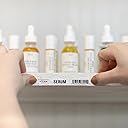
I love this printer! The labels come out clear and the lettering is smooth. The tape reels it takes are easy to change out. It will fit a few different size tapes too, meaning you can make labels of various sizes. It has numerous symbols / emojis built into the machine along with a full keyboard making label creation super simple. The phone app is also easy to use. The build quality is nice and the keyboard is easy to use. I hooked it up to my phone via Bluetooth easily and have had no issues with using that. I just finished using it to make labels for my coffee/cocoa/tea room toppings. They all came out great!
R**W
Good printer and software, but tape wastage is annoying
The printer is decent and does what is mentioned in the features. The software is very good and intuitive, and I was able to set it up and start printing labels without needing much help or tutorials. The only problem I have noticed is the tape wastage. If I need to print just one small label, around an inch of tape seems to get wasted as margin each time. Because of this, I usually combine several labels and print them together in one long batch to reduce wastage. Apart from this issue, I am quite happy with the printer. If anyone knows a way to reduce or avoid this extra margin while printing single labels, please share.
Trustpilot
2 months ago
1 week ago