Desertcart purchases this item on your behalf and handles shipping, customs, and support to Croatia.
🚀 Triple your screens, triple your productivity!
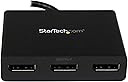
The StarTech.com 3-Port Multi Monitor Adapter is a DisplayPort 1.2 MST hub designed exclusively for Windows PCs, enabling users to connect up to three DisplayPort monitors simultaneously. It supports dual 4K displays at 30Hz plus one 1080p display at 60Hz, delivering crisp visuals with minimal system resource usage. Featuring a driverless setup and secure latching connectors, this compact adapter is ideal for professionals seeking to expand their desktop workspace efficiently and reliably.


| ASIN | B00JLRBB8I |
| Best Sellers Rank | 39,278 in Computers & Accessories ( See Top 100 in Computers & Accessories ) 7,876 in Cables (Computers & Accessories) |
| Brand | StarTech |
| Brand Name | StarTech |
| Colour | Black |
| Compatible Devices | Monitor, Personal Computer |
| Compatible devices | Monitor, Personal Computer |
| Connector Type | DisplayPort |
| Connector type | DisplayPort |
| Customer Reviews | 4.0 out of 5 stars 1,233 Reviews |
| External Testing Certification | RoHS, CE, FCC |
| Global Trade Identification Number | 00065030851886 |
| Item Dimensions | 38.6 x 7.9 x 2 centimetres |
| Item Type Name | Signal Splitter |
| Item Weight | 100 g |
| Item dimensions L x W x H | 38.6 x 7.9 x 2 centimetres |
| Manufacturer | StarTech.com |
| Manufacturer Part Number | MSTDP123DP |
| Model Number | MSTDP123DP |
| Number of Items | 1 |
| Number of Ports | 3 |
| Package Quantity | 1 |
| Power Plug Type | No Plug |
| Product Finish Type | Matte |
| Smart Home Compatibility | Not Smart Home Compatible |
| Specific Uses For Product | PC, Monitor |
| Specific uses for product | PC, Monitor |
| UPC | 065030851886 |
| Unit Count | 1.00 count |
| Warranty Type | Limited |
I**N
instantly drive three monitors from one displayport socket
Brilliant device. Turned a single displayport connector on the back of the PC into three separate monitors. In my case two of the monitors are Full HD and a third is only 1280x720, and it all works fine. Windows immediately recognises three separate displays just as if the PC had three outputs directly on the back. I use a cheap Displayport->HDMI adaptor on one of the outputs and that works fine too. Worth mentioning that the device needs power, and it comes with a multi-country adaptor in the box for that, but you will need a spare mains socket near the PC for it - without the power none of the extra outputs work.
D**G
Phenomenal device
One of the first in-depth comments I've written about anything on Amazon because I'm that impressed. I've recently completed a house build and have been WFH using my 13" laptop in various improvised settings like the wife's make-up table, our dining table and couch. Finally, with an office to call my own I go on a spending spree and buy some LG 27" 1440p 144Hz Ultragear monitors... Both monitors have 2 * HDMI and DP. It wasn't my intention to use 144Hz for work - I knew that was a none-starter. But I wanted 60Hz minimum and I'd have 144Hz for my personal rig. Anyway, the fun then begins. I have an HP Elitebook 840 G3. It's getting on a bit, only has one DP, a VGA which I never use, and the ability to use DisplayLink using an appropriate dock on the USB A SS to drive 2 * 1080p displays - which I did when I was based in the office, however the market is littered with docks which range from random Chinese poor quality 30Hz 1440p if you're lucky all the way through to £200 powered docks which *may or may not do 60Hz 1440p*. Minefield widens - the USB C is standard, not Thunderbolt so that rules out all those docks dependent on it. Likewise, I didn't really want to drop a couple of hundred on an aging work laptop. The 840 G3 manual mentions, very briefly, and not with any sort of confidence that it supports MST over DP - the ability to drive two displays using DP 1.2. Some monitors include a second DP to act as a 'daisy-chain' over to the next monitor, however the ones I bought don't so I couldn't attempt it. There were question marks about the laptop's graphics ability to drive 2 * 1440p displays at 60Hz anyway. I was about to give up - I didn't fancy starting buying 10 different products on the off-chance one worked, so was kind of resigned to one monitor and laptop by the side. It'd be a country mile better than what I had. But, I stumbled across this. Gave it a shot. Glad I did. Out of the box, with no drivers to worry about (if like me your work laptop is limited installing stuff), instantly driving 2 * 1440p 60Hz displays. So there you go, even on relatively old hardware, if your graphics setup has a DP 1.2, you'll more than likely be able to drive 2 * 1440p @ 60Hz using this. And with no separate power source to worry about, even better. P.S. I have a daughter who insists on her coloured drawings as backgrounds. My work laptop may be neutered, but at least they let me choose a custom desktop background!
F**O
Almost perfect
I needed this as I'm currently running 5 monitors off my graphics card. I picked this one as I'd read mixed reviews on all the others. So far my experience is that it's very good but with 1 annoyingly flaw. Occasionally (maybe once every 2 weeks) it stops recognising the 3rd monitor and the only fix is to turn everything off from the mains and then turn it back on. I've tried different sockets and even at a friends house but the problem persists. Googling the problem indicated that this is one of those problems that no one reliably solved.
G**T
Does the job for my Dell precision M6800 - in ...
Does the job for my Dell precision M6800 - in which the HDMI port doesn't work - so split the DisplayPort® to 3 HD monitors
A**R
Worked …With Issues
With some help from the StarTech technical team I eventually managed to get this unit working. All 3 monitors finally worked OK. Sort of.. However, I wanted this splitter unit to perform at least as well as my now defunct old Dell splitter unit - it did not! I only required the StarTech unit to display my FSX game to stretch across the 3 screens, not 3 identical images! whatever I tried, no matter what I did it would NOT replicate this basic function.My Nvidia GForce video card is recent & well up to this.. So finally It was returned to Amazon for refund. I then purchased a Matrox splitter unit which did exactly what I asked of it - straight out of the box.
M**P
Shortcomings meant unsuitable for docking station
Looking at the meagre alternatives to the StarTech series, it seems that Displayport spanning is a technology still in its infancy. I bought this splitter / tap /adaptor to use with an HP laptop dock. The first thing I noticed was that the unit is USB powered. Nothing wrong with that, but when my laptop is undocked, it loses power, something this product really does't like. The first thing I did was to find a spare USB wall charger to power it. That should have solved the main shortcoming of this device, which is it requires a DisplayPort 'handshake' to resume working after sleep or standby (or in my case, undocking). If power to it is lost then you need to completely reboot the machine for it, and the connected screens, to be recognised. I could have lived with that except that 2-3 times per week (I am undocking it on most days once), the device is not detected, and I have to go through the process of rebooting. The customer support at Startech was helpful in confirming that this is a known issue. The workarounds they supplied were not helpful for my case (don't put the machine on standby, ever). They also advised using the single button on the unit labelled 'scan', but this made no difference. As a result it had to go back. Hopefully the technology will improve in future and I will reinvest in another Startech product.
N**A
Nice product, well designed and useful! Power control is great!
Does the job, very well, Nice that is has power buttons for each of the USB inputs. Works nicely with my keyboard, mouse and printer providing my two-port laptop with additional ports!
C**4
Plug and play
Excellent - simple instructions, plugged it in and it worked straight away.
J**A
Useless
It didn't work. Followed their instructions, called their support, eventually all they could tell me was /maybe/ different cables would work. I ended up finding another way around the problem for much less money.
M**N
Funktioniert wunderbar - auch unter Linux.
Auf einem Produktbild wird angegeben, dass dieses Gerät nicht mit Linux funktionieren soll. Zumindest für Arch Linux kann ich das Gegenteil bestätigen, aber solange die Signalquelle generell MST unterstützt fällt mir auch kein Grund ein, weshalb dieser MST Hub nicht funktionieren sollte.
D**R
Waste of money
Trying to drive 2 Asus pg279q monitors Nothing but trouble and wouldn't go more than 30hz at 2k 1440p
な**め
良い
助かりました
J**.
Funciona con Win11
Funcionó a la primera y aunque en su caja solo hace referencia a Windows 10 y 8, a mí me funcionó perfectamente en Windows 11.
Trustpilot
1 month ago
3 weeks ago