Desertcart purchases this item on your behalf and handles shipping, customs, and support to Croatia.
โก Own your speed. Cut the rental. Rule your network.
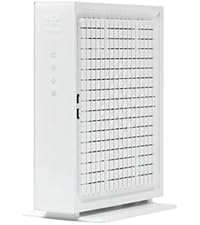
The Hitron CODA56 is a DOCSIS 3.1 cable modem designed exclusively for cable internet users seeking ultra-fast 2.5 Gbps speeds. Compatible with major providers like Xfinity, Spectrum, and Cox, it features a single 2.5 Gbps Ethernet port and requires a separate WiFi router. This modem eliminates monthly rental fees and supports the latest multi-gigabit cable standards, delivering reliable, low-latency internet with easy app-based setup and trusted Hitron support.


| ASIN | B0BKZ4DHNL |
| Best Sellers Rank | #67 in Computers & Accessories ( See Top 100 in Computers & Accessories ) #1 in Computer Networking Modems |
| Brand | Hitron |
| Built-In Media | 2.5 Gbps Ethernet Cable, Power Supply |
| Color | White DOCSIS 3.1 Modem 2.5Gbps |
| Compatible Devices | Ethernet connected devices, Router |
| Connectivity Technology | Ethernet |
| Customer Reviews | 4.2 out of 5 stars 1,371 Reviews |
| Data Transfer Rate | 2.5 gigabits_per_second |
| Internet Service Provider | Astound, Grande, RCN, Wave, Charter Spectrum, Cox Gigablast, Xfinity from Comcast, Zito Media |
| Internet service provider | Astound, Grande, RCN, Wave, Charter Spectrum, Cox Gigablast, Xfinity from Comcast, Zito Media |
| Item Dimensions L x W x H | 7"L x 1.77"W x 8.13"H |
| Item Weight | 464 g |
| Manufacturer | Hitron |
| Maximum Downstream Data Transfer Rate | 2500 megabits_per_second |
| Maximum Upstream Data Transfer Rate | 700 megabits_per_second |
| Mfr Part Number | CODA56-S12 |
| Model Number | CODA56 |
| Modem Type | Cable |
| Number of Ethernet Ports | 1 |
| Number of Items | 1 |
| Number of Ports | 1 |
| Product Dimensions | 7"L x 1.77"W x 8.13"H |
| UPC | 860004322498 |
| Unit Count | 1 Count |
| Warranty Description | See Hitron Website |
D**.
Value buy for Xfinity/Comcast and their new upload speeds
TL;DR: 1) The CODA and CODA56 seem to be the best price/value buy for Comcast/Xfinity in 2024 2) Comcast/Xfinity certified for their new improved upload speeds (100 and 200 Mbps, up to ~455Mbps) 3) Easy install via new Xfinity app (no interaction w/ CS needed (yeah!!!) 4) Shaved off 5-6 ms in ping times on my end for both wired and wireless connections with only the cable modem swapped 5) Stable! Long version: So far so good, it's been running 72h so far. I had a very stable setup with the Netgear CM1100 cable modem (excellent as well) and did not really need a new modem, but read somewhere that Comcast offers new uploads of 100 and 200 Mbps in the Bay Area if you have the Gigabit or Gigabit plus speed tier. The CM1100 does not support that. But it also depends on your exact address and if available already at your place (apparently not for us). In any case, I kept reading and figured I get us ready and get a new modem. Never heard of Hitron (Taiwan), but reviews were OK, so I gave it a shot. It works. Best ever modem install. Downloaded the new (purple) Xfinity app and deleted all the old Xfinity Connect and Account apps (discontinued). Launched the new purple app and said new equipment, entered the MAC address (via cellular Internet), connected and plugged in the new cable modem and voila. App was searching a few minutes, then downloading new firmware to cable modem, restarting, and we were live. No wasted 45min chatting with CSR as many times in the past. I have the 2x ASUS RT-86S routers running Merlin in mesh behind the modem and a set MAC for WAN there, so nothing else needed to be changed. Rebooted the AI-Mesh and the modem one more time and everything has been running fine the last 72. I have "SuperFast" speed or whatever they call it listed at 800/20, and I usually get about ~940/24 wired and wireless download depends on the device. We have mostly Apple and only the new 15pro supports 160 MHz WiFi, so I have 160 MHz actually still turned off so far. The 15pro is by far the fastest WiFi device in the house, I have seen ~940 download on WiFi now for the first time when I tested the 160 MHz shortly. I checked with Comcast, and I cannot get the 100 upload yet, but it's supposedly coming... The one thing I saw that the modem change reduced the ping times. From a regular ~15ms on wired it went to ~9ms, I even saw 8 once. And on wireless I see 12-15ms now instead of 17-20ms. I am not an online gamer and don't really care, but that is good reduction and consistent. Of note: This modem has one 2.5 Gbps Ethernet port only (downward compatible, of course), but you cannot do WAN aggregation. So, if you have the RT-AX86U/Pro with the 2.5 port and want to use that for the LAN, you cannot leverage higher WAN speeds. The CM1100 allows to combine two 1Gbps ports and the AX-86S/U allow to use 2x 1Gbps for WAN as well, and then you could use a 2.5 Gbps for LAN. If any of this concerns you, then the Netgear CM3000 modem may be your friend, albeit at a much higher price. It's also on the recommended Comcast list supporting the latest speed tiers. It has 3 ports, 1x 2.5 Gpbs, and 2x 1Gbps for link aggregation. For regular use though, from a price value perspective, the CODA or this CODA56 seems to be the way to go. The regular CODA is the cheapest of the bunch and the only difference is the 1Gbps port vs 2.5 Gbps port. Both support up to ~455 Mbps upload speed on Comcast/Xfinity as stated by Comcast.
C**5
Great modem to replace spectrum issued equipment!
I purchased this modem to replace my Motorola combo unit that Spectrum is no longer going to support due to security issues. I upgraded to the gig plan with my ISP and the provided equipment they sent me was horrible. They sent me a refurbished (or so they say) modem and separate router that looked like it fell out of the back of the truck and scraped down the highway! Also, the equipment was poor quality and wouldn't even handle the 1gbps plan that they sold me. The best I could get was a dismal 560mbps on wifi at the best speed test result. So after 1 week of losing connection to by security cameras 2-3 times per day I decided to send their stuff right back and bite the bullet to purchase my own again. I did exhausting research on spectrum approved modems and felt this Hitron CODA 56 was the best option to handle the higher speeds and the current WiFi 7 capabilities. I had to call Spectrum tech line to get this modem provisioned but it went through without any problems. I had a great tech on the other end and she made sure everything was online and up to the current firmware. Once I got this all set up I paired it with my new TP- Link Deco 7 mesh router to get my home back up and running. So far so good, and to give and example of my speed improvement I am getting 1.3gbps on the Ethernet port and over 700mbps on my wifi consistently. So this modem is definitely holding up its end of the bargain. And honestly, a lot of people talk about the ugly white design? I actually think it looks pretty good to me anyway. After all, it's a modem!
R**T
The best of the best Docsis 3.1
OK, with everything being working from home these days, online shopping and bill paying, researching, news, TV, and so on, I had a real need for speed and although my ARRIS Docsis did the job at almost 100 Mbps, it was not cutting it with seven high speed computers on routers and switches and one coaxial cable at high speed from COX. I signed up for high speed at COX but was not getting it. The issue was Docsis 3.0, cannot handle the new standards. So I did all my research from high prices to renewed, and found that the new guy on the block that seems to make only a few products, mainly the Hitron CODA56 Multi-Gigabit DOCSIS 3.1 Modem | 2.5 Gbps Max modem, seemed worth looking into. It wasn't the highest price, so I was suspect a little, but do not go by price alone. So I do reviews. The reviews were outstanding. A few reviews were a little down but I now know why. This is why I think some are having problems, not with this one, but all others as well: When you are upgrading speed, the latest standards are just not important, it is vital. If you keep the older Linksys SE1500 switches and router that runs at the 10/100 speeds, which were wicked fast for the times, you will stay at that speed. So, here's my biggest tip. Make sure all your older switches connect your scanners, printers, and peripherals that do not need that much, no need to discard the switches and buy all new GB switches and routers, just use it for peripherals. Also, with APC power containers in event of power failures, any switch lines going into it need to be taken out unless you have the newest models because, as I found out the hard way, it will limit you to the older standard. You can still use the APC without the lines or buy a new APC. Now, if I haven't scared you, it is really dead simple. Take the time to get the information, most of it is given to you along with the MAC address on the label on the box itself and call your ISP, and as long as you have done all the connections to your modem, just needs to be switched on and a competent ISP person will walk you through. Ours is COX. I know this model favors Xfinity of Comcast fame, but this model works with the most major carriers I have ever seen. That being said, most all the reviews were for Xfinity. I found you also need to use a tool and make sure the cable from the ISP is securely screwed on. Well, mine is a COX ISP, so all those that would like to know, COX is the catch up company still growing like lightning all over the country and for good reasons. They do mostly direct connects. Not all this wireless 5G do anything is all that reliable I believe. Anyway, I like direct hookup to cables for reliability. You hear all about wi-fi drilling a hole in your head. I believe it. So, I use routers and connect a TP-Link with an on/off switch, not expensive, and can connect a wireless for when I need it, even a travel wireless by ethernet or USB, but I can put it off to give my home a peaceful feel without wireless running except for when needed for laptops and kids. Shut the wireless off, shut the kids off, lol. When the router is GB and switches are GB and modem is GB, you have it made. It is as simple as that. Now it would have taken me about 30 minutes with COX to upgrade but I made all these mistakes I just mentioned here. I mentioned it in the hopes you will not make the same mistakes I made. Even with my mistakes you can learn from, it took me about 3 hours to get seven computers running. As a side note, don't fret your printers, drivers, windows, or setup. It is just upgrading your speed. You can always put your old modem back if you have to but I see it as the worse thing that can happen, or most likely, is your speed doesn't change. In that case, you will have your new modem running but using the older speed. Don't panic. There is some switches or routers that are older causing the speed not to increase. For all the new first timer setups, no problem, you will have all the newest stuff. This is just tips for us older timers, lol. Also, check your plan with your ISP. It may not be the higher plan. This is the best router I have ever seen that in this online world and it should not mean a technician will have to come to your home and pay $75 an hour or more. Buy this modem. It will pay for itself in less than a year without having to rent it from your ISP monthly charge. It works, it is brand new, and not refurbished with some renewed ones from Amazon even cost more on some of the more famous models. Always look at the number sold in a month, how RECENT the reviews are, and the product itself how many ISP's they support. I am sometimes in CT and live in RI and if I move, this modem handles so many different ISP's, that it can go with me and even for remote, I will never need 2.5 GB speed when I was getting along with just 100 Mbps. Now 1 GB modem speed is all I will ever need but nice to know if I need to download or upload a huge amount of data that I can up my speed with COX to 2.5 GB. Just like the old axiom, you are as strong as the weakest link, so remember with online website and cloud stuff, you are only as fast as the server you are on when in the cloud and, of course, assuming you have a decent speed computer. I highly recommend the Hitron CODA56 Multi-Gigabit DOCSIS 3.1 Modem | 2.5 Gbps Max modem. I took the time to write this because this Hitron company is running a huge discount right now, I think 43% at this time I bought it, cheaper than most. So, for cheap, I wasn't sure I should buy it, the you get what you pay for. In this case, this is a quality item and better than the pricier ones I believe, else I would not right this review. Mostly, it is so a few of you reading this not to make my mistakes. Upgrade your routers and switches, all should run at GB speeds first. Then call your ISP and connect your MAC address. In fact, they give you the number to call and it is the only one for any price I could see that claims it can handle 2.5 GB speed for the price. Hey, it's Amazon, don't work, can send it back. I ordered this modem last night, got it today around noon time and on a Saturday! Can't beat Amazon! Hope this helps anyone thinking of buying this model, 5 stars in my book.
C**.
Very well made device
Upgraded from an Arris Surfboard 6190. Although the Arris was a fantastic little modem, I wanted to upgrade to something that was not only Docsis 3.1 for my new gigabit plan on Optimum, but also something with an upgraded 2.5gbps internal NIC for when I eventually re-do my home network down the road. The transition from Docsis 3.0 to 3.1 is night and day. Not only do I notice faster peak download speeds, but downloading multiple small elements from complex websites is noticeably snappier. Speedtests during off hours from my old Arris to the Hitron on optimum's gigabit cable plan went from 812Mbps to 992Mbps (basically fully saturating the 1Gbps port on my home router). If you're due for a new modem or just want to switch to something you own instead of paying perpetual modem rental fees with your ISP, I can't recommend this modem enough.
P**N
Good upgrade for cable users, verify compatibility first, straightforward setup.
My Motorola modem, router, and WiFi combo had started showing its age, so I was looking for a dedicated modem that I could rely on. Since I run a small home lab and also do work from home, consistent connectivity was my priority. During Prime Day in June 2026, I decided to try this Hitron CODA56 modem and I was hoping it would improve my upload speeds(more on this later). The package included the modem, a power adapter with a barrel connector, a coaxial cable, and an orange Cat 6 Ethernet cable. I already had my own cables, so I used my existing coaxial and Ethernet connections. The modem has a plastic exterior, which feels a little basic compared with some premium networking equipment, but I like the open ventilation design. It measures approximately 7 inches deep, a little over 8 inches tall, and less than 2 inches wide at the front. The setup process with Xfinity was simple. I connected the coax cable, plugged in the power, opened the Xfinity app, went to Services, selected the option to activate additional equipment, and chose my own internet equipment. The app asked for the CM MAC address, which I was able to scan directly using my phone camera. The modem restarted a few times during provisioning and within several minutes it was online. Since this is a modem only device, I was able to connect using my a TP-Link router without making any further changes to the modem. Performance has been consistent. I have a 1.2 Gbps cable plan and was able to achieve around 1.2 Gbps download speeds and about 45 Mbps upload speeds. I chose the CODA56 with the 2.5 Gbps Ethernet port because it gives me additional flexibility for future internet upgrades instead of being limited to a standard gigabit connection. I have also been able to access my home network remotely through my WireGuard tunnel without any noticeable connection interruptions. There are a few things buyers should know before purchasing. This device is designed for cable internet only and not work with fiber services. It also does not include WiFi or telephone support, so you will need a separate router and voice equipment if needed. The modem interface is fairly limited, although most configuration is typically handled by the ISP. The plastic housing was not my favorite aspect, and I was hoping for higher upload speeds, but the limitation appears to be related to my current ISP plan rather than the modem itself. The modem runs warm during operation, but I never felt hot in my setup. The indicator lights are quite bright, especially in a dark room. Though, I have placed it behind my sofa, so I'm not bothered. Overall, the Hitron CODA56 has been a dependable replacement for my older modem and fits well for users who already have their own router and compatible cable service. Just verify your ISP compatibility and plan details before purchasing.
P**K
Great, but Cox is a pain.
This is supposed to be fast and easy but with Cox, it is anything but. If you follow the instructions, it will not find the device. They also do not allow you to remove their Panoramic manually. Here are some tips to help you save a lot of time. Install as instructed. Remove your original device in this process. Write down the brand, model number, serial number, and mac address, you will need all of them. The mac and serial are on the back of the device. Use a smartphone or Hotspot to a tablet or laptop. Go to Cox.com and login. Type in cox.com/activate. Make sure you have a combo of blue and green lights on the device, should be grn blu blu grn. Let the online thing try and look for the device, it will say there is a problem. Skip every step they give you, it does not work. Use the help chat app. Specifically state, I need to connect a new modem. It will give you access to an actual human being. Skip the troubleshooting and before they say anything, state the same again. Tell them it is on with all lights grn and blue. Of you dont they will ask a million questions, like, is it plugged in duh!! They then ask for the info you stored before. Randomly, after this, they ask who they are speaking with..They do their thing and this takes about 20min and you will see the device restet itself several times. This lets you know they are connected. Finish all their junk and then when done, manually reset it again. Not the little button reset, just unplug the power, wait 10sec and plug back in. Whoala, you are online without sharing bandwith (Panoramic modems share your net by default as a part of their neighborhood thing.) If you call and have them reboot or reset your Panoramic for various things, this feature turns itself back on by default. Every time. YmMV but after a lot of frustrating time trying to do this without their help, it simply will not be detected so you can't activate it without them. Took me 90min but I cut this down to what actually worked. Should be about 30min including plugs and whatnot. By the way, it is a wide DC plug unlike the old modem so make sure you have a spot.
A**L
Supports Xfinity 2.5GB Ultra Download Speeds
Modem supports DOCSIS 3.1 up to 2.5GB download speeds and 455MB upload speeds on Comcast's Xfinity network. This is one of the only modems that supports Xfinity's new ultra download speeds. Another is the ARRIS S34. Do not order the ARRIS S33 as that modem does not support more than 5mb upload speeds when configured for 2gb download speeds. I have had this modem installed for about a week and it has worked flawlessly on Comcast's system with the only potential issue being that it is Maxed out at 455 MB upload speeds when it's configured for 2.5gb downloads due to the number of bonded channels required for the higher bandwidth requirements. This is a modem only device with no integrated WiFi. I am using it with OPNsense and Decco Wifi 6e Access Points and it has worked perfectly so far. The modem runs warm but not hot like some of the other modems I tried. It is also listed on Comcast's supported hardware list and works with their app for auto configuration, but does not support their auto management features via their app, those features are only supported with their official gateway units. I went with this unit as it was the only way for me to get 2.5gb service in my area as Comcast currently doesn't offer their XB10 gateway devices in out area and for the price this unit had the best features and support. I also liked the fact that the base detaches so that you can wall mount it. I have it wall mounted in my upstairs HVAC equipment room where my primary Denmark location is for all my wired ethernet.
M**L
Great but...
So I decided to give the CODA56 another shot. I "upgraded" from the Netgear CAX80. Comcast app makes it easy to change the modem over to the new one. So that was painless. The modem lacks a UI unless you have a very particular setup and you know what you are doing. Otherwise you have to directly connect the modem to your computer and do some fine tweaking with it to bring up the UI. Not ideal. But thats for us nerds. Everyday user it should be A OK to use and connect to a router. It works flawlessly thus far. Now Comcast says the CODA56 is "mid-split" ready as well as my CAX80. Im very doubtful that my $450 CAX80 can work on mid-split. Why? Well the CAX80 seems to be capable of doing uploads at least to 40MBPS, I can confirm this when I was on Comcast's Gigabit Plus plan. On Comcast's 300 MBPS plan (it really is crazy that you really dont need a gigabit down unless you have literally 50 + devices online at the same time watching a 4k movie, 300 will literally work for pretty much anyone) my CAX80 caped about 22 MBPS. Now this is where the CODA56 shines. As you can see on the screenshot, I'm on the 300 MBPS Comcast plan, but I am no where near 20MBPS upload I'm in the 110's! Having a ample upload can actually impact your internet for a "faster" experience, because as much as the download is important, upload and also important because even though most of the work is being done on the download end, your devices still need to communicate out to let the server know where you are in the process. I have noticed a slight increase in webpage loading. It was almost instant before, but now its less then that. And if you do have multiple devices on at the same time this will help compensate and make your experience faster. I wonder what the upload is on the Gigabit plus plan, ill be honest, I'm happy with the 115 up. Remember this modem is only a modem and NOT a router, you will need that separately. My CAX80 was a combo Modem/Router. But my wireless interference in my area is terrible and there's no room on the 2.4 Ghz and the 5GHz to operate even close to these speeds. So I have this modem with a ZenWifi ET8 mesh. Both units are wired and all my wireless devices are 6E (except my smart thermostat, it can only 5Ghz, but its not far from the unit and it doesn't need speed to work), man I get the FULL speed of my internet on these devices. Its AWESOME! Not sure if you have "mid-split?" Just goto Comcast online and see if you can get the 2000 Mbps plan. If so you got mid-split. Heck I would even recommend just buying the modem to get the faster upload then what you are probably getting now.
Trustpilot
3 weeks ago
3 days ago