


🎥 Light up your stream, own the spotlight!
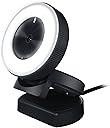
The Razer Kiyo is a professional-grade streaming webcam featuring 1080p resolution at 30 FPS and 720p at 60 FPS, enhanced by a built-in 5600K adjustable ring light for perfect illumination. Designed for gamers and content creators, it offers advanced autofocus, superior low-light performance, and a compact folding design. Compatible with major streaming platforms and equipped with a high-sensitivity microphone, it delivers crisp video and audio for flawless live broadcasts and video calls.




| ASIN | B075N1BYWB |
| Antenna Location | Streaming |
| Best Sellers Rank | #215 in Webcams |
| Brand | Razer |
| Built-In Media | Important Product Information Guide, Razer Kiyo |
| Camcorder Type | Video Camera |
| Color | Black |
| Compatible Devices | Personal Computer, Laptop |
| Connectivity Technology | USB |
| Customer Reviews | 4.2 out of 5 stars 7,711 Reviews |
| Digital Zoom | 720 x |
| Display Resolution Maximum | 2688x1520 pixels |
| Effective Still Resolution | 4 mp |
| Effective Video Resolution | 1080 pixels |
| Exposure Control Type | Automatic |
| File Format | JPEG |
| Flash Memory Speed Class | V10 |
| Flash Memory Type | Micro SD |
| Flash Memory UHS Speed Class | 1 |
| Flash Memory Video Speed Class | V10 |
| Focus Type | Auto Focus |
| Form Factor | Compact |
| Global Trade Identification Number | 00814855025046 |
| Image Aspect Ratio | 16:9 |
| Image Capture Speed | 60 frames_per_second |
| Item Dimensions D x W x H | 2.72"D x 7.87"W x 1.89"H |
| Item Type Name | Razer Kiyo - Desktop Camera for Streaming with Illumination (RZ19-02320100-R3U1) |
| Item Weight | 200 g |
| Lens Type | Zoom |
| Manufacturer | Razer Inc. |
| Maximum Aperture | 1.7 f_stop |
| Maximum Focal Length | 1 |
| Minimum Aperture | 1.7 millimeters |
| Model Name | 207-00-0623 |
| Model Number | RZ19-02320100-R3U1 |
| Number of Batteries | 1 Lithium Ion batteries required. |
| Number of Speakers | 1 |
| Operating System | Windows 7 64-bit (or higher) |
| Photo Sensor Technology | Other |
| Screen Size | 2 inches |
| Sensor Type | Other |
| Shooting Modes | webcam |
| Special Feature | Low Light |
| Style Name | Kiyo |
| Supported Audio Format | WAV (16 bit 48 kHz) |
| Supported Image Format | JPEG |
| UPC | 814855025046 |
| Unit Count | 1 Count |
| Video Capture Format | AVCHD |
| Video Capture Resolution | 1080p |
| Video Resolution | 1080p |
| Warranty Description | 1 Year |
| Water Resistance Level | Not Water Resistant |
| Zoom | Optical |
J**L
Absolutely love this camera — my streaming setup just leveled up!
This camera exceeded all my expectations — crisp, clear video quality and smooth performance make it perfect for everything from streaming to video calls. Setup was super simple; I plugged it in and it just worked. The design looks sleek on my desk and it stays steady even when I’m moving around a bit. Love how it allows me to focus on the content without worrying about video glitches. If you’re looking for a reliable, high-quality camera that doesn’t complicate things, this one’s it.
K**N
Great Camera. Great Price
Probably one of the best cameras (if not the best camera) you’ll get for this price. Great quality, love using it in video calls and the software it comes with even lets you tweak things a bit to your liking with things like contrast and brightness. The camera isn’t too small, will fit on pretty much any computer monitor or on the table and the ring light is a nice touch. I don’t know how useful it really is because it definitely gives off some light, but if you’re looking for great quality in a dimly lit setting, you’ll definitely want to get another light to add to the room or table top. The autofocus could use some work, as holding things up close won’t really trigger the autofocus much and it takes about 20/30 seconds for it to really recognize that there’s a different focal point in view, which could definitely get annoying when recording a YouTube video. I tried holding random items with labels up to the camera during a conversation with friends and it would kind of get annoying having to wait for the focus to “rework” itself when I’m trying to show somebody something in real time and keep the conversation pushing. But nonetheless, it’s a great camera and I honestly think if I got any other camera, it would be the Kiyo Pro (which hopefully comes with a better autofocus since that’s the only thing this product would need any real improvement on)
J**J
Fantastic quality for a great price
When this came back in stock for about $100, I grabbed it immediately. I haven’t bought a Razer product before, but I had heard good things about the brand. First off, the picture quality is absolutely amazing. It is by far the best quality I’ve ever had from any webcam. This looks like “streamer” quality video even at low light. I haven’t really needed the ring light as much as I thought it would, because every other webcam needed more light where I was sitting. So, low light performance is really good out of the box! Adjusting the light is very intuitive, turning the dial brightens and darkens it. I do wish I could go to just a little bit lower level of light on its lowest setting, even after using the software to change it as low as possible. The viewing angle is also great and you can make a lot of adjustments with the stand. It fits perfectly on my oddly shaped monitor. The auto focus is very quick and performs better than others I’ve used. The driver software has a lot of extra options for tweaking the image, but overall the program seems bloated as I’m sure it’s intended for people who are already in the Razer ecosystem. If you’re just using the webcam, it feels a bit excessive, and it makes it less of a plug-and-play solution as it recommends you reboot after the installation. I wish there was a lighter driver installation for just being a webcam. Windows 10 did get the drivers straight off the internet without me having to find them on their website or pop in a CD. Everything compatibility wise is there, you can use Zoom or OBS without a problem. One great thing about this is that it includes a microphone, and it works well. Unfortunately there’s no switch to turn it off. There’s also no privacy cover for the camera either. You’ll just have to unplug it to turn it completely off. But, it is easy to push it towards the ceiling when you’re done. The build quality of the camera itself also feels great. It doesn’t feel fragile or cheap at all. The position adjustments hold into place really well and don’t sink into a direction you don’t want. Really, if you think about it, a high quality web cam sensor, a ring light, and a microphone built-in all for $100 is a great deal. If you need a webcam, I would recommend this over anything else I’ve seen on the market in 2020, especially at this price point.
R**N
Great camera for the price, but I echo the lifespan concerns
I've owned two of these Kiyo webcams. Overall the quality for a 1080P/30FPS webcam is pretty good. The integrated light is nice in some circumstances if you don't already have something else. My main concern is that one of my Kiyos died after about two years of use. It just stopped working. It isn't an issue with my computer as testing on other machines had the same result of the camera not working any longer. The other is still working fine. I've never had any other webcams die on me. Even my old webcams from 20+ years ago still work fine. From other comments on the webcam that seems to be somewhat common of an issue. This is all anecdotal though, so it's hard to say how widespread of an issue this. It's something to keep in mind though. The questions of long term life of the product aside, at only about $50 now (as of writing this) the original Kiyo is a great option for a budget webcam. At it's full price of $100 or so there are a lot of other options that have better quality, so if your budget is in the $100+ range then I'd look at something else. I took a star away for one of my Kiyos dying and it being a possible common issue, otherwise for the price at $50 I'd give it five stars.
M**Y
Will Not Last
For the brief period time this worked, I enjoyed the camera quality and the ring light. However, it broke after less than two years of use. I used the camera infrequently- only when I wanted to use my personal desktop computer for virtual job interviews and telehealth appointments- and when it was not in use, it was stored safely in a drawer in my office with other electronic accessories. Today, mid telehealth call, the camera started to make a strange grinding noise, and then both the camera and microphone failed. I tried trouble shooting multiple ways, and upon searching for solutions online, I've read that many other users had the exact same experience, and no solution. Many of the other users in the help threads I consulted had their Razer Kiyo fail within 1-1.5 years. For this price point, it is absolutely unacceptable for breakdown to happen so quickly. Spend your money elsewhere. I will not be buying any other Razer products, and you shouldn't either.
G**I
A great camera with good perks for a great price!
Español & English: Honestamente, no veo cual es la queja de algunos usuarios. Si no tienes una DSLR o Mirrorless cam, una Razer Kiyo (o la Pro) son una buena opción para el bolsillo y mas económicas que las Logitech. Para videollamadas, reuniones y, para lo mas importante: Streaming a 720p a 60 fps (con un maximo de 1080p/30fps) es mas que suficiente, ofrece una muy buena resolución y nitidez, una gran profundidad de campo y un buen auto foco, sin contar con el anillo de luz que, al principio cansa pero luego te acostumbras y el 'puerto' para montarla si quieres en un trìpode. Viene con un software nativo, pero la puedes usar como viene y arreglar tus opciones directamente en OBS o Streamlabs. ¡Ademas el sticker es precioso! - Honestly, I do not see what is the complaint of some users. If you don't have a DSLR or Mirrorless cam, a Razer Kiyo (or the Pro) is a good budget option and cheaper than the Logitech. For video calls, meetings and, most importantly: Streaming at 720p/60fps is more than enough (with a maximum of 1080p/30fps), it offers a very good resolution and sharpness, a great depth of field, and good autofocus, without counting on the ring of light that, at first it's kinda annoying you but then you get used to it like with all ring lights and a 'port' to mount it if you like in a tripod. It comes with native software from Razer which is awesome, but you can use it as it comes and fix your options directly in OBS or Streamlabs. Also the packaging and sticker are beautiful!
V**E
Worth Every Dime For A Balance Between "Budget" and "Decent"
This camera is fast, clear, and well balanced. It has a great ring light and I use it in ALL of my videos. A snap to set up, windows recognized it instantly. Connection was a breeze.
A**S
Lasted about 15 months of regular use before it died in the middle of a video call
Camera had high quality image and good lighting from the builtin ring light-- but I had ongoing issues with needing to refocus the camera every time it shut off and yesterday it just died. The light stayed on but it started making a crackling noise and now no signal is going to the computer anymore, or to any other computer I hook it into. I've updated drivers, restarted the computer, changed the ports- it's now just an expensive and noisy ring light. Very disappointed.
H**Y
Smooth and high-quality video, though the light is a gimmick
It took me a while to decide between this webcam and one of the Logitech competitors, but in the end I'm very happy with my choice. The grip is very flexible, allowing you to set up flat on a surface, or to the top of just about any monitor, regardless of thickness (excluding CRTs). I downloaded the drivers from the Razer website and have had no compatibility issues. It takes minimal set-up to figure out the right colour levels, and it perfectly remembers those settings. I would recommend using an external light however, as the built-in ring light isn't very flattering. It does help in a dark room, but arguably that's irrelevant to most people.
M**G
Webcam Razer Kiyo
Webcam ist toll. Die beigelegte Software (per Download) ist allerdings sehr gewöhnungsbedürftig.
K**D
الافضل
افضل ويب كام قيد جريتها، جودة تصويرها جدا ممتازة حتى في الاضاءة الخافتة وسعرها مقابل اداءها ممتاز
K**I
Quality is as described
Delivery by Amazon was quicker than expected. Overall quality of the camera is good for its price and the small ring light helps when streaming in a darker than normal environment
F**O
otimo
camera linda, superou minhas expectativas
Trustpilot
2 weeks ago
2 months ago