🚀 Upgrade Your Network, Own the Game
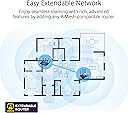
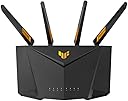
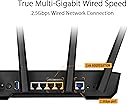
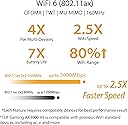
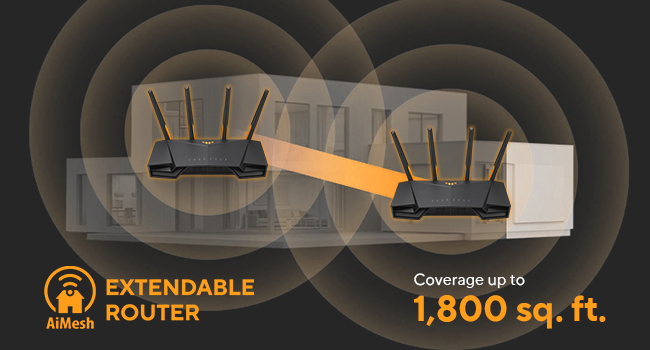
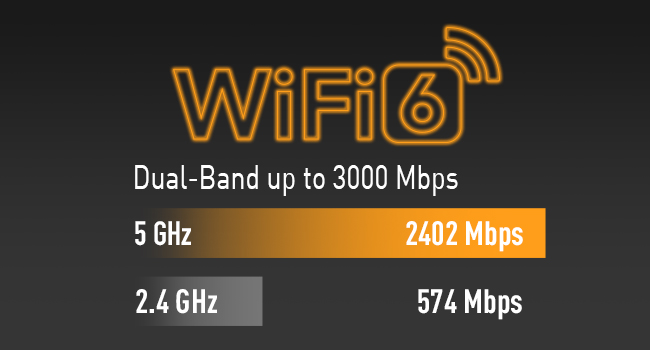
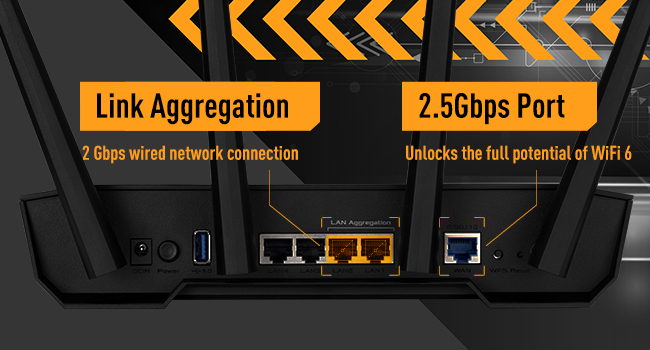
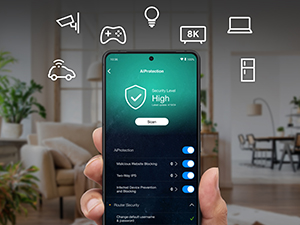
The ASUS TUF Gaming AX3000 V2 is a dual-band WiFi 6 router delivering up to 3000 Mbps wireless speeds and 2.5 Gbps wired throughput. Designed for device-dense environments, it features Mobile Game Mode for low-latency gaming, AiProtection Pro security, VPN Fusion, and ASUS AiMesh for extendable coverage. Its robust cooling and durable design ensure stable performance, making it an ideal upgrade for professionals and gamers seeking fast, secure, and reliable connectivity.


| ASIN | B0B3NCPLY2 |
| Antenna Location | Gaming |
| Antenna Type | Fixed |
| Best Sellers Rank | 14,281 in Computers & Accessories ( See Top 100 in Computers & Accessories ) 112 in Routers |
| Box Contents | AX3000 router, set up guide |
| Brand | ASUS |
| Brand Name | ASUS |
| Colour | black |
| Compatible Devices | Laptop, Personal Computer, Smart Television, Tablet |
| Compatible devices | Laptop, Personal Computer, Smart Television, Tablet |
| Connectivity Technology | Wi-Fi |
| Control Method | App |
| Controller Type | Push Button |
| Coverage | Undetermined |
| Customer Reviews | 4.2 out of 5 stars 1,260 Reviews |
| Data Transfer Rate | 3000 Megabits Per Second |
| Frequency | 160 MHz |
| Frequency Band Class | Dual-Band |
| Frequency band class | Dual-Band |
| Is Modem Compatible | No |
| Item Dimensions L x W x H | 26.5L x 17.8W x 18.6H centimetres |
| LAN Port Bandwidth | 2.5 Gbps |
| Manufacturer | ASUS |
| Maximum Upstream Data Transfer Rate | 3000 Megabits Per Second |
| Model Name | 90IG0790-MU9B00 |
| Model Number | 90IG0790-MU9B00 |
| Model name | 90IG0790-MU9B00 |
| Number of Antennas | 4 |
| Number of Ports | 4 |
| Operating System | ASUSWRT |
| Other Special Features of the Product | Internet Security, QoS |
| Security Protocol | WPS |
| Special feature | Internet Security, QoS |
| Wireless Compability | 802.11ax |
| Wireless communication standard | 802.11ax |
A**P
MADE MY VIRGIN MEDIA HUB 4 FAST
Where to begin...? This has changed everything for me. My hub 4.0 is running on a 1 gig package from Virgin Media. I was utterly shocked that it could not even transmit half of that via wireless signal. It reached 940 via ethernet however. I had 3 VM technicians out who all told me an average of 300 wirelessly was acceptable. I was gutted. I did plenty of research and now understand that the hub 4 uses WIFI 5 which limits its ability to transmit. I knew this had to be put in modem mode and a proper router (WIFI6) needed to be purchased to transmit such high speeds. That is what I did. I bought this router as it was not only reasonably priced, it offered great specs and was listed as a gaming router so I had an inclination that it would be required to preform well. After getting my router really quickly, the unboxing experience did not let me down one bit. I felt like a kid again. Gigantic box with cool militaryesque font. I wasted no time in ripping open the box faster than a 8-legged horse. The inside was fab. I loved that they gave such simple instructions on a small sheet with different options to get the router installed. They sent me a link to get a guarantee registered which I must do. The router itself is glorious. It looks like something that takes part in Robot Wars with its sleek profile and sharply styled leading edges. I spent so much time turning it over and around admiring and complementing it's design. Once I took the router out, my cat made use of the box. For some reason he loves boxes and this was certainly up his street (paws up Asus - from my cat). I set up the router after putting the dreadful hub into modem mode. When I initially launched the router, I found my speeds shockingly low. Why? Because I had not configured it properly. Here is how I configured my router to give me optimum speeds baring in mind I am using WIFI 5 devices so cannot truly unlock the potential. I knew that my laptop being WIFI5 could get around 800mbps on my network adapter so I figured that would be my benchmark for brilliance. My settings were adapted under the wireless section of the router's backend which is found at router.asus.com. I initialised two separate SSIDs for 2.4ghz and 5ghz (you will be asked at the start so don't worry). I did this because I wanted to keep the 5ghz (the faster connection) obvious and so I could manipulate just that. In the wireless tab on the left of router's backend portal I did the following: - Select 5ghz to modify the 5ghz band - Changed Wireless Mode: to N/AC/AX mixed (I did this because none of my devices will run on AX. If you have any non WIFI 6 devices, you must use my setting. Otherwise if you select AX it will disconnect devices that don't handle WIFI 6. If you do have WIFI6 devices then amazing. You can put AX only. You will literally unleash the maximum speed). - WIFI Agile Multiband: Disabled (multiband enabled will slow you down) - Target Wake Time: Disabled - Channel Bandwidth: Enable 160 MHZ then from the dropdown select 160 MHZ (this will give you the best of the best speed) - Control Channel: AUTO - Protected Management Frames: Disable (if you enable this, it will slow you down) The rest should be left as is. Please do experiment to find what is best for you. If you live in a large house, you may find my settings profile to limit the reach in which case you will likely depend on lower MHZ like 40, or just use 2.4ghz and configure as above on the 2.4 profile in the wireless tab. When you make changes and select 'Apply' it will disconnect you so do not worry about that. Just wait about 2-3 minutes for it to reconnect. If you get any trouble when you fiddle with settings, log back into the 2.4ghz and you can change whatever setting you fiddled with on the 5ghz back to how it was when working. If anyone is using mac and running bootcamp windows, please go to device manager and select your wireless card and 'roll back' the driver. The updated version you are running on makes the card slow. Anyway, enough of the technical. I feel amazing. This router has given me what I pay for: fast internet. I now average 776-810mbps on my laptop which is more or less the theoretical limit. I may not need the full speed that I get for my use, but since I am paying Virgin Media for it, I want to have that running through my house. I do not accept that their hub is acceptable when only outputting 300mbps. That is a shambles and a regular excuse they use for poor equipment. Last but not least, the design is beautiful. I love the colour changing symbol even though I don't see it! This can be modified in the router portal you open by looking for the 'aura' tab on the far right of the home screen. It's wonderful. Enjoy.
P**K
Replace your ISP's router with this!
I bought this router as I moved to a new house without openreach and either had to pay my new ISP for a router or get my own, I decided to get this one when it was on offer and it was one of my easiest installs! After plugging my ethernet cable from my Fiber box to this router and adding my PPPoE credentials, the router was connected immediately and I could browse the internet right away. It has some neat features built in, such as functioning as a file sharing server if USB's are plugged in, it can host its own VPN if you want to access it remotely or it can connect certain devices to a VPN if you want them separated, or in a different geographic region etc. The UI is response enough and the mobile application works great. I've had no issues with editing any settings or updating the router. The signal on it is great, even where my house has thick floors that usually block all signal.
M**E
Excellent router at a good price
This is my first ASUS router. I have only used Netgear routers until now (I have about 5 previous ones now unused and gathering dust. I did a lot of research (wasted days) before selecting ASUS. I understand technology very well, with decades of experience; hence have the ability to understand most technical features and aspects. ***** Summary: I like this router very much; it is better than some other brands which cost more than 2-3 times the price. I highly recommend it. I will never be going back to my previous brand mentioned above. ***** The Good: ** No marketing gimmicks; no pushy tactics to buy monthly subscription, and subscription is NOT required. ** Setup with app, or by using the web interface. ASUS does not push their mobile app like other companies; although it has a good app (as an advanced user, I do not use the app) ** Price is excellent; you get a fast CPU and hardware. Connection speeds are good. ** Signal / connectivity at 2.4Ghz and 5Ghz bands is very stable (if using just one router make sure to turn OFF the Roaming Assistant setting in options: (under Advanced Settings) Wireless --> Professional (tab on top) --> set Roaming Assistant = Disable; then you must click Apply yellow button at the bottom of page, to save your setting. Change this setting in BOTH 2.4Ghz and 5Ghz (under Band setting on top of page, and save both) ** Physical construction - very good ** Uses open source base software (a good thing) ** Comes with multiple plugs for UK and Europe (in UK) ** Has LEDs for main functions, so that you can check things at a glance ** For non-technical users, it offers very simple, quick setup ** For people who understand networking or want to learn about networking or are true experts in the inner workings of WiFi standards and TCP/IP protocols, there are an enormous number of advanced settings, far more than most domestic and even SOHO routers. ***** The Bad: I have found nothing bad. ***** Of course everything can be improved. ** Provide a detailed PDF version of the manual (although searching on Google for settings - if needed at all - will work). ** Some options for filtering outbound traffic (e.g. if you have children) should be grouped under one section - NOT separate; and for each option (e.g. URL filtering, MAC filtering, IP filtering, etc) a setting of time/day setting for each item should be offered. So, I should be able to say - e.g. block this URL(s)/IP/MAC, from Mon - Fri, from 9pm to 7am, and Sat/Sun from 10pm to 8am. (VERY important and needed by smart parents!) ** For settings where one needs to enter a MAC address, ASUS needs to offer a drop-down for MAC address, where when clicked, the drop-down must show a list of all devices currently connected, and also connected in the past (separately grouped), AND next to each MAC address it should also show Host Name and IP Address. This will make it easy for users to add filters; no need to remember/note MAC addresses. Make it more point-and-click. ** There should be a setting for DHCP - expire a specific IP/device lease. ** There should be a setting for DHCP lease period. ** In-bound traffic dropped packets should be logged with more clarity. Add more (common) details to log files. ** There should be a setting for exporting log file. ** How about option for emailing an alert message, when a rule is triggered? (e.g. errors, problems, attack detected, etc) As I mentioned, it is a great router (I of course desire options which most people will never need, but are very easy for ASUS to add; which will make the router even more attractive for advanced users who have children (that is a BIG market!) My suggestions require only the software/firmware to be enhanced.
S**I
Great WiFi6 router with lots of features
This is a great WiFi router with good range and lots of useful additional features, like Parental Controls and AIProtection (nothing to do with AI - but that seems to get bolted in to everything these days). This is provided by TrendMicro and - if you’re willing to allow some information to be shared with them - then the router will try to filter out malicious websites and other on-line dangers before they get to your devices. The range and WiFi signal on both 2.4GHz and 5GHz is very good, and - importantly for me - it seems to be able to handle a large number of devices. I have - on occasion - close to 30 devices connected, and if I plugged everything in (PCs, laptops, tablets, phones, smart switches and lights, raspberry Pis and other IoT bits and bobs) it could be well over 40. And I’ve had no drop-outs or connection problems (my old TPLink router would drop devices after about 20 connections and needed a reboot to resolve) It also has a dedicated Game port that will automatically prioritise bandwidth to anything plugged into it. You can also prioritise other specific devices and define different profiles for this prioritisation - gaming, web conferencing, web browsing etc if you want. It’s all managed through a clear and user friendly interface with good defaults, but plenty of scope for you to tweak and adjust, if that’s your thing. Best of all - unlike TPLink and Netgear, and an increasing number of other router manufacturers - this functionality comes without requiring a paid-for subscription. The equivalent TPLink router has a £50 annual subscription for the Aiprotection, parental controls etc) I got it for a bargain around Christmas / Black Friday at £90. Also, ASUS confirmed it is essentially the same router as the considerably more expensive ASUS RT-AX82U. The TUF Gaming router has two additional aerials and lacks the Space Invaders like casing of the AX82U, and the interface is very slightly different, but other than that it’s the same hardware. All in all, a great WiFi 6 router. More background for those who are bored and have nothing better to do… :) I’d had a TP-Link VR900 AC1900 WiFi modem router for a few years, which I got because the BT Homehub router I had as part of my Fibre1 package from BT kept disconnecting some of my WiFi devices. A common problem, as it turns out… The TPLink has been good - though it lacked some configurability features - but recently it started randomly dropping devices connected to the WiFi2.4GHz channels. After a several emails back and forth TPLink basically advised it couldn’t handle more than about 20 devices - even though half of mine were things like smart plugs and switches that need almost no network bandwidth. 20 devices might sound like a lot, but it really isn’t if you have smart plugs and switches etc So I looked into getting a new router and researched which ones can handle a lot of devices. Firstly, there are very few choices if you want a modem router (one that has a VDSL port that you can plug your BT broadband ‘phone line’ into.) There is an ASUS router which has the VDSL port (the DSL-AX82U), but it’s a lot more expensive (£210ish) and if you have an old modem router that you can configure in ‘modem only’ or ‘bridge’ mode, then you can use that to plug in your broadband ‘phone line’ and take one of the Ethernet cable outputs from it and plug that in to a cable router like the TUF Gaming AX5400 that I am reviewing here. The old TPLink VR900 that I was replacing had this bridge feature, so I managed - after a little research - to configure it in bridge mode. This meant I could buy the much cheaper AX5400. It also means I’m spreading the modem and routing workload across two devices rather than one
M**K
Incredibly disappointing
I actually think mine might be faulty so am trying to contact the manufacturer I bought this after reading many online reviews. Bought to replace a working fine but ageing TP-Link VR600 Mk 2. The Asus is very easy to install just using the app, which also has a lot of options to control in this unit. The standard webpage interface is of course more powerful and has more options but the app is really handy. As I have a 1Gb/s internet connection I decided to use one of the 2.5Gb sockets. It works really well and I get good speeds One of the main reasons for buying this model was the superior wi-fi coverage of the beam-forming mesh system. Unfortunately the WIFI of this product is simply unfit for purpose Regularly throughout the day my phone (and other wireless devices) report either no wi-fi or 'connected without internet'. If I turn off the wifi on the device and back again it sometimes finds it but other times can go minutes or longer with just no wi-fi available (my next door neighbours' network and the people across the roads network show just fine but not mine). Using the WiFi Analyzer app it shows no availability for the 2.5Ghz network and sometimes sees the 5Ghz network but with a signal strength less than -90dBm. I've tried different channels and settings but nothing works. This happens even if I am sat next to the router Then there is the wifi coverage which is a whole level worse than the old TP-Link model, despite being more modern more powerful and with WiFi6. The claimed 'beam forming' is just marketing junk and doesn't exist, the range is poor and the signal levels low generally The wired connection which is used by my PC, works laptop and my Smart TV all get great speeds and shows as connected, but throughout the day lose all bandwidth. If I am in a Google Meet or Teams session the audio and video breaks up and lags, web pages give error codes, my Microsoft 365 shows connection issues as does my work software. My smart TV shows no connection etc yet the modem is stable and the router logs show it is connected All in all this is a good looking router with great controls and capable of fast results - but is unreliable, inconsistent and has the worst wi-fi performance I have ever seen
M**E
Excellent, did the job and replaced a powerline adaptor.
Picked this up during the prime sale as had been having issues with the powerline adaptor going from our house to our cabin at the bottom of the garden. Instead placed this in the kitchen (about halfway between the cabin and the main router) and bam, problem sorted. Was previously getting 2mbps up/down on the powerline, now getting 40, outstanding, the streaming from the cabin now works much quicker and has upscaled the quality to fit the faster connection. Setup was very easy with the app, seems the desktop web interface and the app have slightly different options to each other in different places which is a little confusing however with a little bit of poking about I was able to get those items in the cabin to only connect to the new node. The firmware on ASUS routers is all open-source, this means anyone can look at how it all works, ruling out any information gathering that might be going on behind your back with other solutions, working in IT myself this was of utmost importance to me. Don't be put off by the gamer-ness of the routers, they're solid, easy to use, and reliable, even if they do look like somebody has chopped off a bit of a transformer and stuck a router in it.
R**Y
Best router I've owned up to now!
Cant go wrong Fantastic signal, easy setup and AiMesh has been a a breeze! I brought 2 Asus GS-AX5400 for my house house connected over AiMesh. I now get 5GHZ at the bottom of my Garden which makes Wifi calling a breeze whilst walking throughout my house or into the garden. When connecting an ethernet cable to my second router which is connected over Wifi my laptop is speed testing at over 600Mbps download and 52Mbs upload! When testing 5GHZ Wifi over my second router it is around 200-300Mbps download and 52Mbps upload So you know i have 1Gbps download and 52Mbps upload! Qos features are great i tend to stick with Asus own when im gaming i just switch in the app to prioritise the gaming appliances and they take priority over other traffic so speeds my downloads up and drops my ping slightly! Wifi 6 definitely has helped with Wifi calling on our phones we havent had any drops since i swapped and for me living in a grade 2 listed building with 1.5 meter stone wall and no landline that has been a life saver. Security is much better than your run of the mill service provider router plus all the extra features are just icing on the cake. I was that impressed with the increase in performance i brought 2 Asus GS-AX3000 For my Mother's house which due to the size probably needs 3 for a Green connection over AiMesh which is currently on orange but still just as good as my own! I also enjoy the added feature that i can remote access into her router settings in my app which saves me a drive if there ever was an issue. But since the switch over alls been perfect! All i needed to do was turn the router into modem mode run an ethernet cable between the service provider router and the Asus GS-AX5400 download the app do a quick setup and i was connected! Then tweek the settings to your liking and off you go! Mostly everything can be done over the app but going into a web browser will give you alot more options for fine tuning!
A**P
Do yourself a favor & ditch your ISP's router (Virgin)
This is my first EVER third-party Router and let me just start off by saying, if you want something reliable and with plenty of options to adapt to your network, this is for sure an option to go for. I picked this up for £89.99 back in November 2021. It dropped massively around that time and then after Christmas hit above £100? So I'd cosider myself lucky there. I moved into my new house and thought, why not treat myself to a brand new spanking network, Wi-Fi 6 capable and something to distribute 1Gbps heathily through Ethernet. Wireless is amazing but we'll touch onto that soon. Working in the industry of IT, I've always grown up loving technology and, having it ALL as such. Cut the sob stories. I want the best, the better and beastly out of all options I have, FOR the right budget. The TUF AX5400 was an impulsive buy, I pretty much just went: 'Open Amazon, typed in ASUS router' and this showed up and I thought.. HEY fancy! (RGB LGBQT logo included) Setting up my network with Virgin's Hub 4 was painless, nerve racking because you never really know what to expect.. and theennnn I hit an issue. Plugged everything in, right port, WHY IS IT NOT WORKING! Turns out, you need to set something in WAN to allow for Special ISP requirements (in pictures). This makes sense because you're essentially converting the ADSL line feed into something the ASUS Router can replicate. Once I did that, I just rebooted BOTH routers and I was connected to the InTeRwEbZ. I have 1Gbps down and 50Measilybps up via Ethernet You can see my speedtest results in around, 930Mbps Down and 50Mbps Up. Unless I'm really picky about 70Mbps, there's no issues there at all unless I'm 'that annoying human being' who complains about every little thing. I have 105MB/s down on some apps, so I really am living the life. The Wi-Fi is incredible, I recieve about 6-700 on my phone near the Router and down the hallway into the bedroom, with a little corner leading into it, I recieve about 3-500 (there is a wall and thick doors). The fact that I can recieve that through doors and what not, is pretty crazy considering I though the Virgin Hub's were doing me a favour -_- Just remember that, Wi-Fi works of frequencies similar of microwaves, and other invisible stuff that we can't see. EXPECT a drop in speed if you rely on Wireless with ANY device, it's common sense and this is why you should Ethernet where you can or at least ETHERNET any repeaters/extenders/meshing devices to get FULL throughput to those said devices. Don't expect the best performance in black spots if you don't invest your time properly into Networking around your Home. Overall, OUTSTANDING product, would HIGHLY recommend and will be Ai Meshing my network soon.. probably.. I don't need to but I want to LOL
Trustpilot
1 month ago
3 weeks ago