Buy anything from 5,000+ international stores. One checkout price. No surprise fees. Join 2M+ shoppers on Desertcart.
Desertcart purchases this item on your behalf and handles shipping, customs, and support to Croatia.
🚀 Elevate your workspace with power, speed, and clarity — don’t get left behind!
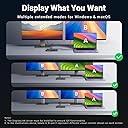
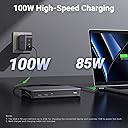
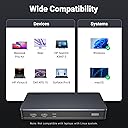
The UGREEN 9-Port Laptop Docking Station transforms your Mac or Windows laptop into a powerhouse workstation with dual 4K@60Hz display support, 100W USB-C Power Delivery charging, and ultra-fast 10Gbps USB data ports. Designed for modern professionals, it consolidates multiple connections including HDMI, DisplayPort, Ethernet, and USB into a sleek, compact hub. Perfect for seamless multitasking, rapid file transfers, and continuous productivity, this dock requires the latest DisplayLink driver for optimal performance.


| ASIN | B0BLNCNCMZ |
| Best Sellers Rank | 4,381 in Computers & Accessories ( See Top 100 in Computers & Accessories ) 35 in Docking Stations |
| Brand | UGREEN |
| Brand Name | UGREEN |
| Colour | Black |
| Compatible Devices | Card Readers, Keyboards, Laptops, Monitors, USB Flash Drives |
| Compatible devices | Card Readers, Keyboards, Laptops, Monitors, USB Flash Drives |
| Country of Origin | China |
| Customer Reviews | 4.3 out of 5 stars 849 Reviews |
| Global Trade Identification Number | 06957303899128 |
| Hardware Interface | USB 3.2 Gen 2 |
| Hardware interface | USB 3.2 Gen 2 |
| Item Dimensions L x W x H | 16.6L x 8W x 2.3H centimetres |
| Item Weight | 510 Grams |
| Manufacturer | Ugreen Group Limited |
| Number of Ports | 9 |
| Product dimensions | 16.6L x 8W x 2.3H centimetres |
| Total HDMI Port | 2 |
| Total USB Ports | 4 |
| Total USB ports | 4 |
| Wattage | 100 watts |
A**L
A really great dock for Mac users
This dock is great, it does exactly what it says it does and it works with both my work provided MacBook Air (M1) and my personal MacBook Pro (M3 Pro) and allows me to use two external monitors with the MacBook closed. I do have some issues with it though, but these aren’t big enough to stop me using the dock. The dock shows up in finder and desktop all the time as it’s for two files stored on the dock that links you to the required software for display link for Mac and windows. It’s easy to ignore, but I wish this was listed in the product page as it took me a while to recognise what this new random drive was. It also shows up as an available microphone on Microsoft teams, but it has no mic built in so not sure why this happens. Apple then being apple will keep displaying the purple screen sharing icon in the taskbar, which I’ll be honest is super annoying when I remember it’s there, but this isn’t ugreens fault, it’s apples. The dock itself doesn’t get that hot and the size of it is perfect, it’s not too big so doesn’t take up lots of room and fits perfectly at the back of my desk. Overall, compared to other docks on the market this one is great value for money, it’s a great build quality and an all round great dock.
L**P
Brilliant without a DisplayLink it works perfectly
I bought the UGREEN 9-Port Laptop Docking Station for my wife’s setup because her laptop lacked a USB-C port for video output (had one but for data only). It’s been working perfectly—smooth dual 4K@60Hz, fast 100W PD charging, and all the extra ports we need. Highly reliable and hassle-free!
B**6
No support for Samsung Dex - Disappointing for price
I purchased this dock, and it’s excellent in terms of sleek, compact design and functionality—it does exactly what it promises. However, I have two concerns. First, it doesn’t support Samsung DeX, which is disappointing considering the price. For a similar cost, I could choose a Dell dock or another brand that offers DeX compatibility. Second, it has an automatic feature that mounts a USB local disk with drivers. While this might be convenient for personal use, it’s a hassle on my work laptop, which has strict security policies that block external USB drives. The constant mounting and unmounting creates issues, and there should be an option to disable this feature.
D**8
MacOS is supported
Works as advertised! My MBP M1 13” now can run 2 large monitors on only a single USB-c port. Works great!
E**F
Best docking station I have used
I have been using this Dock for a while now. It has all the ports you need for connectivity and the monitor output at 2x4K/60Hz is fast enough for work use. I use it with my work PC and Home laptop connected to a dual monitor setup. USB2 ports for Mouse & Keyboard plus Dual HDMI or DisplayPort monitors with a USB3 (usb-c) input port for memory sticks and the like. This unit itself is a nice design and the build feels solid. It is good value for money
A**R
Works just fine.
Does what it says on the tin, no issues woth it after 6 months. So far so good.
A**R
Automatic mounting of USB volume for "driver install" is pointless and causes problems
The approach of automatically mounting a USB storage volume to facilitate Display Link driver installation is good in theory, except when it interacts with endpoint security policies which attempt to encrypt any USB volume attached to a corporate laptop - causing an endless loop of mounting and unmounting. It becomes utterly pointless when you connect the hub to another machine and find out that the "drivers" are nothing more than browser shortcuts to the Display Link website. An utterly useless over complication which could otherwise be served with a short URL or QR Code being included in the quickstart guide.
J**E
Need a driver on a MAC
I tried this product on a 16" M1 Max MacBook Pro and a 14" M3 MacBook Pro. In both cases using a single cable with power delivery to the hub from a Phillips Monitor and pass through to the Mac would not drive the screen. It did however charge the laptop. Only when I added the Drivers did this eventually work and was intermittent even then. It required the use of DisplayPort or HDMI as well as the USB C to work. No other hub device I have tried needed drivers even with Ethernet Ports. Overall not well explained and not recommended
Trustpilot
2 months ago
1 month ago