Buy anything from 5,000+ international stores. One checkout price. No surprise fees. Join 2M+ shoppers on Desertcart.
Desertcart purchases this item on your behalf and handles shipping, customs, and support to Croatia.
🎥 Elevate your home theater game—big screen brilliance, zero compromise.
The BenQ HT2060 is a 1080p HDR LED home theater projector boasting 98% Rec.709 and DCI-P3 color accuracy, 8.3ms low latency at 120Hz for smooth gaming, and built-in dual 5W speakers. With vertical lens shift, 2D keystone correction, 1.3x zoom, and dual HDMI 2.0 inputs including S/PDIF audio out, it offers flexible installation and seamless connectivity. Perfect for immersive movie nights, gaming, and streaming with vivid colors and crisp detail up to a massive 300-inch image.


| ASIN | B0BWGXHVRV |
| Additional Features | Built-In Speaker |
| Antenna Location | Business, Education, Gaming, Home Cinema |
| Best Sellers Rank | #1,080 in Video Projectors |
| Brand | BenQ |
| Brightness | 2300 Lumen |
| Built-In Media | Power Cord |
| Color | Silver/White |
| Compatible Devices | Gaming Console, Laptop, Television |
| Connectivity Technology | HDMI |
| Contrast Ratio | 500000:1 |
| Control Method | Remote |
| Controller Type | Remote Control |
| Customer Reviews | 4.6 out of 5 stars 1,640 Reviews |
| Display Resolution Maximum | 1920 x 1080 Pixels |
| Display Type | LED |
| Display resolution | 1920 x 1080 |
| Form Factor | Desktop |
| Global Trade Identification Number | 00840046047801 |
| Hardware Connectivity | HDMI |
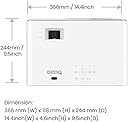
| Item Dimensions L x W x H | 14.4"L x 9.6"W x 5.2"H |
| Item Type Name | Home Theater Projectors |
| Item Weight | 7.9 Pounds |
| Lamp Wattage | 10 Watts |
| Light Source Operating Life | 30000 Hours |
| Manufacturer | BenQ |
| Maximum Image Size | 300 Inches |
| Maximum Throw Distance | 10 Feet |
| Mfr Part Number | HT2060 |
| Minimum Image Size | 30 Inches |
| Minimum Throw Distance | 8 Feet |
| Model Name | Home Cinema Series |
| Model Number | HT2060 |
| Mounting Type | Ceiling Mount |
| Native Resolution | 1920 x 1080 |
| Picture Quality Enhancement Technology | Proprietary (specific brand not mentioned) |
| Projector Maximum White Brightness | 2200 ANSI Lumens |
| Recommended Uses For Product | Business, Education, Gaming, Home Cinema |
| Special Feature | Built-In Speaker |
| UPC | 840046047801 |
| Vertical Keystone Correction | 1.3 Inches |
| Video Encoding | AVC |
| Warranty Description | 3 Year Manufacturer's Warranty |
| Wattage | 5 watts |
D**N
Just amazing for the price.
I was looking forward to a larger picture than most HDTVs for a new family room in the basement but had no idea how fantastic this light-weight, quiet-running, crystal clear powerhouse would be. I bought an In-Focus 15 years ago for my training travels for $2500. It served me well but needed a dark room and was loud when running. We used it occasionally for movie nights at home but it had a traditional format and needed better speakers hooked up to it. This unit at only $799 gives us a huge picture and vibrant colors even with a few room lights on. The sound is so good that I've been debating whether to even go out and get any fancy sound system. The great thing too is that because of having two HDMI inputs we can have our cable television hooked up to one HDMI port and Apple TV hooked up to the other HDMI port for all the download streaming we need. The manual suggests putting it in smart eco-mode to save the life of the bulb at up to 70%. When we made this change we did not notice any real difference in the picture and expect now to get up to 6000 hours from the bulb. Online we see that the bulbs right now can be purchased for around $250 but those will most likely come down. My bulbs for my old in-focus used to cost me $400. We had some in our group debating about getting a really large HDTV like 70 or 80 inches but with those costing over $2000 now everyone was silenced the first time we turned this HT2050 on and had probably a 150 inch vivid bright picture on the white wall without a real screen. When I bought a 55 inch HDTV for our living room I was not real pleased with the color and had to calibrate it from the Internet with different people suggestions which I finally did get. But when turning this BENQ on I feel no need to calibrate anything. it is perfect right out of the box. There are four picture selection such as vivid normal cinema sports and I am pleased with anyone of them. I also had researched online about home theater projectors for two days before deciding on this particular model. So save yourself some time and don't be disappointed with this great product that is priced right and delivers more than expected. Their ceiling mount is also worth purchasing since it's made specifically for their units and also looks a lot cleaner and less clunkier than a lot of the standard ceiling mounts.
C**.
Great projector!
I bought this projector for my new basement theater. I did a lot of shopping around. Originally I had my eye on an Epson. The throw ratio wasn't working out for where I needed to hang the projector. Then I found this one. And it was less than half the price. So, for the first couple months I was watching it on a grey flat painted wall. My screen hadn't arrived yet. I have it projecting at 130" diagonal from about 11'. I am pretty much maxed on the zoom out. I was concerned that this would compromise picture quality but it doesn't at all. In fact, the picture looked so good and so bright even on the dark grey drywall, I almost cancelled my plans for getting a screen. Got the screen anyway. Slight improvement on brightness. As my first projector, I really can't compare it to anything else, but man, the picture is crystal clear. HD looks amazing on it. The functions are simple, but that's all I need. It has this grid which you can turn on that projects the limits of the image onto the wall so you can align everything and make sure it's square. This was very useful. I don't think it has any keystone adjustment. If it does I didn't see it in the menu. Wouldn't need it anyway. Just make sure you center the lens where you want to project the screen. I don't really mess with any of the settings. Hooked up an HDMI cable I ran to the location before I hung the drywall. Plugged it in, centered it, and never really had to mess with anything after that. Wish it was black so it blended in with the dark ceiling but not that big of a deal. I don't ever notice the fan noise. It's hanging from an 8' ceiling just above my sofa. I hung it using one of the $50 mounts I found here on Amazon. Worked great. Low profile. I really can't think of anything negative to say about it right now. I use it almost daily. Everything from 8-bit Nintendo to PS4 games. Everything looks good. Didn't notice any latency in the game controls.
M**W
Very good picture, color, and contrast. Not commercial-theater quality but close; easy setup.
The BenQ seems clearly meant for more home theater use with connected devices such as an Amazon FireStick, Roku, etc., desktop/laptop computers, Blu-Ray players, cable or satellite TV and the like, since it has no native ability to directly view TV signals or video sources with no such devices attached. The BenQ gets the nod over most 1080p projectors I've seen however, in its ease of setup. One click of the (backlit!) remote and it was ready for ceiling mounting, and right out of the box displayed excellent color and brightness, with only minor tweaking--and some owners might say NO tweaking is needed. We ordered 3d glasses and movie discs, and are pleased with its performance while viewing 3d on our large commercial screen. UPDATE 05/20/2019 After approximately 5 months of use, we've changed our overall impression from four to FIVE stars. The HT2050A continues to impress us with its black levels and better contrast. I am convinced that if we could take measures similar to those used in a commercial theater--blackout curtains, and low wall/ceiling/floor reflectivity, as well as minimal lighting for theater entrance/egress--we might see contrast nearly as good as our local cineplex offers. Its vertical lens-shift and sturdy versatile mounting-points make it easier to mount, as long as you have it horizontally centered to the screen, so as to avoid loss of focus on either the left or right side, and of course one side being taller or narrower than the other. We continue to enjoy this device, and prefer it to our LCD TV. UPDATE--Three years later . . . We continue to enjoy watching video these days--especially since March of 2020, for obvious reasons--and despite the almost every day usage are still on the same original bulb, with a continued bright image and video quality. We might have purchased a 4k projector when we got this one, but at the time 4k projection was rather new, and it made sense to give the tech to advance a bit longer, and for prices of 4k projectors to stabilize, given the paucity of actual 4k content that was available in 2018. Whenever we have visitors they have been surprised at the sharpness and contrast of our 2050A--several guessed that it might be a 4k projector (yes, I know that's naive, but most folks watch their HDTV from too far away to see the detail in even a 1080p image, much less a 4k image!) We continue to enjoy watching our three-year-old Benq, that has had ZERO problems for the entire three years we've owned it. NOTE: The only less-than-great issue we have is not with the projector itself but with all the 4k streaming devices (Amazon FireTV, Roku 4k, etc.) that exhibit an AWFUL gray haze over the entire projected image. I suspect it is because of the HDR signal that most LCD and OLED TVs can interpret for improved contrast and dynamic range, but a 1080p projector of this vintage was not designed with the HDR feature in mind. And although I have not attempted to use one of these devices on another brand of 1080p projector (Epson, Optoma, Viewsonic, etc.) I have little doubt that all of them would experience the same issue. We first noticed this phenomenon when we connected our Amazon 4k FireTV stick to the HT2050A, and were surprised when the Roku 4k device did NOT go all gray on us when we used it. THEN Roku updated its software/firmware and now we get the same unwatchable gray picture. (For those who wonder why we would attach a 4k device to a 1080p projector, I should add that it made sense to us to "future-proof" accessories as much as possible rather than purchase a device that would have to be upgraded later. Of course a case could be made that we might have purchased a 4k capable projector! But again, in 2018 there was much less 4k content than today--and still, in August of 2022 a majority of content over-the-air/cable/satellite, continues to be in 1080p format, though streaming is catching up faster than cable/satellite. But as long as you stream or view TV from a streaming device that was not made for 4k displays, there should be no problems. However it is my hope that someone somewhere will be making the software/firmware of services and devices to adapt to the characteristics of the displays to which they are connected, so that they will disable the HDR functions, etc. for use on displays that do not have this feature.
S**Y
After a long in depth search I decided on this BenQ
I'll avoid going into some of the technical details covered by other reviewers and just tell you my story. I was looking for a projector that could be used for my daughter’s birthday party, and as one of the final pieces in my garage makeover, I decided to dive into the mind-numbing research of projectors. As someone that has never owned a projector, I really didn't need the top of the line AV line but did want 1080P with low lag and a self-powered USB outlet so I could run a streaming stick anywhere I could find power, outside our inside. It turns out the $600.00 - $1000.00 segment of projectors is quite busy with competing offers from BenQ, Optoma, Emerson etc. pitching different perks like DLP, 3D Ready, Native 3D, MHL, powered USB, Glass Lense, Aspect ratios, Brightness etc. All of these seem to be spread out over many many models, some of which classify themselves as "Home Theatre", and others that are "Office. There is also throw distance which covers short throw, long throw, and not listed which seems to be in the middle. It was a daunting new world. For me I broke it down to what I wanted. Normal throw, higher brightness, 1080P, with awesome reviews. After many, many videos on youtube and spending way too much time on AV forums I narrowed down the playing field to DLP because LCD seems to have much less vibrancy in the picture side by side with all the screenshots I had seen. This left a few players and their versions, which can be confusing because Amazon and the vendors sell older and newer versions of the same product side by side. I settled on either Ben Q, 1070, 2050, 3050 or Optoma HD141X, HD142X, HD27. The forums tried to push me higher up the chain but for my needs these were the right options. 3D, DLP, 1080P, powered USB, great picture, good battery life. Check. The BenQ versions seemed to edge out the Optoma versions at nearly every review. While some of the Optomas where less expensive in the hundred to two hundred range and had some awesome features like Native 3D, high resolutions, better specs it seemed that out of the box the BenQ has the edge with amazing quality. In the end, the price different was only negligible between the older W1070 to the HT2050 and the 3050 differences of the two didn’t wow anyone enough to recommend so I went with the 2050. Now, how did it work? Out of the box on an Elite Screens 120” It looks amazing. Even considering I am using a Roku streaming stick and the default was 720P, I was impressed, and then overjoyed when I say MLB live with the 1080P turned on. I will leave the spec-head comments to other reviewers and just say that the picture is bright and clear, responds well and is very impressive to everyone that has seen it running in my blacked out garage. No rainbows for me! Oh, you may be wondering about how light effects the picture. When sunlight hits the screen it dulls it considerably, but when I turn on the garage light I can still see a very good picture. I will say that for the best possible picture try to limit any ambient light. Also, this thing gets hot so a portable AC or fan may be needed in small places with little ventilation. If your story is like mine know that I spent quite a bit of time reviewing and weighing the benefits of many similar projectors and ended up with this one as my choice, maybe you will do the same.
N**A
Great picture even in brightly lit room, great sound.
I just received the HT2050A after weeks and weeks of deliberation over what to get, how much to spend, if a projector was the right thing for me, etc. To see if this review fits what you’re looking for, compare your Potential usage to what my usage was planned to be: My use case was not for dedicated home theatre but rather for normal day to day watching. In my apartment i didn’t want a tv on display, but I did want something to sometimes watch tv in a 50-60 inch format. A projector seemed like a good compromise but my main concerns were 1) if this was going to be quiet enough, 2) if this would be bright enough, 3) if 1080p was going to be good enough after getting spoilt by my previous 4K tv and 4) having something I can move from living room to bedroom as required, without additional sound setup and basically aiming for an all in one box I can project on to walls with probably no screen. 1) sound: when you turn it on at first hit me it’s not as whisper quiet as I imagined, and the fan had just a slight rattling sound as if it’s off centre. But the rattling was only audible if I put my ear closer to the grill. Once I started playing a video I couldn’t here the fan standing right next to it. 2) I first turned this on in a very brightly lit hotel room, with full 360 degree in ceiling lights and I was surprised how bright it was and how clean the colours were (projected onto a beige coloured patterned wall paper mind you!!!) this was projected from about 12 feet and it was amazing ! I then turned off the lights and the colours became even better. Also caveat that this was a lower quality 720p video I was playing online from fire tv stick!!! 3) the 1080p image is still great and I can suddenly imagine 4K was overhyped (my previous tv was a 55inch 4K and while test videos were amazing finding the content to stream was difficult). 4) the sound is actually great for a single speaker system! Not just passable but I can see not even using my Bluetooth external speaker with this. I did notice a slight buzzing from the case, but it could be because the plastics in my projector are not yet taken off. Over all super amazed by the projector, surpassed my expectations of picture and sound. On the fan noise I expected better but once I get home I’ll test it in real life case and see how it works. The speaker I will report back on to see if it improves with time.
E**K
Probably the most bang for your buck!
Let me start by saying I am a huge audio/video enthusiast. However, I am no means in the profession and this is my first FullHD projector purchase, so my statements have no baseline for comparison. I have a 65" UHD/HDR/DV TV so I hadn't set my hopes extremely high, and as of right now, UHD projectors aren't competitive enough vs. TVs in the respective price ranges, hence 1080p projector. with all that said... I spent several weeks researching different products as I waited to save up a bit and use some Christmas gift cards. It was a difficult decision at first, but after seeing the results I'm blown away with how clear this actually is! My setup: - "Homegear" 110" projector screen, motorized, white finish (from Amazon), with a 1.3 gain iirc. It's nothing special and honestly there's probably very little difference between Elite Screens and other brands. https://www.amazon.com/gp/product/B00J22TM7Y/ref=oh_aui_detailpage_o08_s00?ie=UTF8&psc=1 - BenQ HT2050A front-ceiling mounted about 11' from the screen if I had to guess. I did NOT want to rely on zoom or lens shift to mount it any closer and possible compromise picture quality. Unfortunately I did not take a pic of the mounted projector itself. - 25' white HDMI that I shamelessly used coax staples to mount to the ceiling as I don't have the ability to go in the ceiling or walls themselves. -had to get a 15' power cord to make the run ok, and again no ability to run a power outlet close by, etc. -The room has black out curtains and in the back of the room where you enter, it, too, has blackened panels to cut as much light out as possible. I used a Spears & Munsil calibration Blu Ray in the complete dark, Bulb set to "SmartEco" and the only setting I had to change from defaults was to lower contrast to '40' from '50' as some of the colors clipping/bled over. I do not like to use sharpness or any fake enhancers so those are set to 0, but I did turn on Fast Mode assuming that's a mode for gaming or lower response time, and it's maybe barely noticeably better. Because of the lack of need for calibration (probably due to ISF) I'm even happier with the accuracy and abilities https://www.amazon.com/Spears-Munsil-Benchmark-Calibration-Disc/dp/B00CKWI13O/ref=sr_1_1?ie=UTF8&qid=1546439424&sr=8-1&keywords=spears+and+munsil+hd+benchmark+2nd+edition I've only had this a few days, but I have now logged several hours worth of use with FullHD blu rays, streamed some Netflix (to compare framerates and quality), and played some games on Xbox One. To my knowledge I did not see any sort of typical rainbow effect that users talk about with other projectors, maybe due to the RGBRGB color wheel? Also, I did not have issues like older projectors where the center seems brighter and the edges are darker. My much older and lower resolution projector (1024x768) and a lot of rear-projection TVs had this issue. Overall, it seemed extremely well-balanced for brightness, contrast, and sharpness. I got right up to the screen and can see individual pixels in the corners, so I know it's not only pretty in the middle/main focus for content. I do have it set to -1 for both vertical and horizontal keystone, so as true of an image I could achieve for where I had this mounted. Hopefully all 3 pics and 1 video upload just fine. Maybe because the TV is backlit vs. the screen being projected on, and how the video is captured, the screen looks washed out in the video but I assure you it doesn't do proper justice to the quality.
N**V
My favorite technology purchase in at least 5 years
I'm not exaggerating when I say that this might be my favorite home technology purchase I've ever made. I live in a 1BR downtown condo and was tired of the typical 50" TV mounted on a wall arrangement. I love the look and minimalism of projectors and decided to research which one to buy. I spent weeks reading reviews and looking at different brands and ended up going with the HT2050. It's been about 7 months of daily use since I purchased and I could not be happier. My setup: Wall: In sticking with a minimalist theme I did not want to buy a screen. And if you have a large, clean, well painted white wall you likely will not need one either Mount: I bought the Vantage Point Universal Mount and hung it up over my couch. Vantage Point CGUPM12-S Universal Front Projector Mount - Silver . You need to get the positioning just right but it's easy to install overall with 2 people Size: My screen size is about 120" which can be jaw dropping to see visually particularly in a smaller living environment Outputs: I bought a multi-output HDMI adapter which I keep on the floor under my couch and just run up a single HDMI cord to the projector. Makes it really easy to rotate between Cable/Apple TV/Roku/Nintendo Pros: - Image: The colors are striking on here. I've only owned this projector so I cannot compare it with non DLP models but I actually prefer watching sports/movies through the projector now versus on a flat screen TV. I find it easier on the eyes and an overall warmer image - Multiple modes with different color schemes for different lighting: I own blackout blinds in my apartment but I rarely need them. I use this on Vivid mode during the daylight and on Game mode during the nighttime. Both come pre-set. You can create your own mode if you want but I haven't had a need to - Really impressive and loud speaker: The built in sound system is amazing. I keep it on the lowest level before mute and it still echoes throughout my living room. No need for an external system especially if you mount it right above your couch - Solid price: At under $800 I think you get a cinema quality projector without breaking the bank. You cannot find a comparably sized flat TV anywhere in that region - Vertical keystone: Do not buy a projector without one. The vertical adjustment on here is clutch when mounting the screen. Gives you added flexibility to install it where you want to Cons: - I've heard the DLP bulb is expensive to replace. This hasn't been an issue at all so far despite daily use for the past 7 months. Either way I'm happy to pay a few hundred every few years to maintain a 120" screen - No sleep timer. Would be great if I could find a way to sleep this on its own. I believe it turns off after a while of non-activity but would be nice to have an actual setting on the remote I cannot recommend this more. A great piece of hardware to liven up your home and your viewing experience.
E**.
Benq's HT2060 exceeding expectations so far.
Long time Benq Projector owner. Never thought they could improve on the HT2050a for 1080p projectors and held off making the switch to the HT2060 fearing it's LED light source wouldn't measure up to the HT2050a's brightness and sharpness. What a pleasant surprise! The image is even brighter than my HT2050a and as sharp if not sharper, and the Colors are even slightly better. Right out of the box the Living Room Setting looked extremely good, maybe just a bit cool but I think I'm going to leave it as is for a while. It fills my 200" screen in my light controlled room with plenty of brightness and even when I turn on lights in the room it's still not washed out, same as I experienced with my HT2050a. Just hoping the LED Light Engine keeps it's brightness for close to the 20000 hours it rated for as there is no replacing the lamp to renew the brightness and I was quite expert at replacing my own lamps for the past 14 years and saving costs by only using bare lamps with the original lamp housing. The only very slight issue noticed so far are Signal Lock issues but mainly only when enabling HDR and interacting between my Home Theater PC and it's Media Player. All considering I'm still pleased enough that I'm very likely going to pick up another HT2060 very shortly as I've been quite impressed. Just wished they were a bit cheaper or would go on sale.
M**R
Me encantó!
Excelente relación precio-desempeño! El mejor de su categoría y al nivel de proyectores más caros. Pensaba comprar uno 4K pero este es más que suficiente para ver películas, series y videojuegos, se ve muy bien en una pared blanca, me genera una imagen de 142”. Mucho mejor que una tele por una fracción del precio. Valió cada centavo!
A**R
BenQ projector - The perfect fit!
Finding the right projector for our needs was challenging. Needing a “ short-ish” throw. Only about 7.8 feet between the back wall (on an angle as well projection) to the 92” screen. With this HT2050A we hit the mark! Super easy to set up with its vertical and horizontal keystone correction plus lens shift. We use only at night or dark days, so Cinema mode is excellent. Colours are fantastic. The big this for my eyes are “NO RAINBOW” effect. With DLP you always run the risk of this. To my eyes (which I have been prone to with other DLP models) none exist. Way better than LCD we had tested. Great black levels in Cinema mode. Easy to use menu and a backlight remote. So nice to use. For the money I can’t imagine a better home projector. With its versatility in set up to its picture quality. Very happy with this purchase.
R**.
High-end Image Quality at budget price
I was in the market for my first Home Theatre projector, and and I wanted to find a decent budget projector with the best picture quality possible and high definition resolution. I quickly became overwhelmed with the plethora of choices out there in my price range, but with some digging through home theatre forums and sites I was able to narrow it down to a few candidates. A few interesting units were 3-chip LCD and others were singe-chip DLP. There were advantages and disadvantages to each technology, but with some research I decided based on the features that I found important, such as low fan noise, high brightness, and cinematic picture quality and durability. The thing that swung me towards ultimately choosing DLP is there chance of the LCD chips turning yellow or fogging over time and chips falling out of alignment. Conversely, DLP seemed to have the best overall longevity from what I could gather from user reports, so I chose DLP. According to my online research, the Benq HT1080 seemed to have consistently high satisfaction rates, but I found its replacement model, the HT2050 on sale on Amazon, and it was just a tad more than my budget, but not by much. Ultimately I went with the Benq HT2050 and I couldn’t be any happier. When I got it out of the box, I was very impressed when I laid eyes the shiny new contemporary design. It definitely looks a lot larger than its predecessor, but they did a fine job with the design and it should fit in with any style decor. The unit felt solid and good quality in hand, with a beautiful matte silver faceplate and polished white plastic shell. There’s a lens cap to protect the new all-glass lens for portability which is nice. All the controls are located on top, and there’s a sliding door that gives you access to the lens adjustments. On the back side there’s two HDMI ports and some older video inputs as well. There’s a 12 volt trigger for your home theatre accessories and two USB ports. Thankfully, they’ve included a nice long power cord that will reach the ceiling without issue. The well-designed remote control lights up for easy usage in the dark. The projector is a breeze to set up and use. I installed it on the ceiling, and I purchased a 100” motorized screen to project onto. An onscreen grid helped me align the image to the screen with precision, and using the manual lens adjustments, I was able to fine tune the image height by several inches with lens shift, and the zoom control makes projector placement much more flexible. Digital keystone adjustments can be made, but I avoided that by carefully installing the projector at the correct height so the picture was naturally straight. Once everything was up and running, I put the Xbox One on and was immediately blown away by the picture. Straight out of the box, this projector far exceeded my expectations. Even with some ambient light from a lamp or a window, this projector had no trouble displaying a bright, sharp image. Fiddling with the onscreen menus, I couldn’t make the picture look any better, it was just amazing as-is. With its native 1080p DLP chip and 6 segment colour wheel, image and colour quality were top notch with no colour banding or rainbow effect whatsoever. The displayed text was crisp and sharp, the blacks were inky, the whites were very white. The colours just popped off the screen. Motion was smooth and judder-free. Best of all, I couldn’t hear the fan! Even when I bumped the lamp to high, the fan was barely noticeable. Big plus here, as its predecessor was reported to be a bit on the loud side. Colour temperature was perfect and skin tones accurate. While playing some games, it was clear that this projector could handle the high frame rates and the detail was just unreal. Individual grains of asphalt were incredibly sharp and defined in racing games, and I could clearly see what was lurking in the shadows on shooters. With the preset set to game mode, I had no issue with any lag whatsoever, so this would be a great projector for gamers as well as home theatre enthusiasts. And best of all, this beamer handle sports broadcasts like a champ! I couldn’t believe the stunning clarity watching the olympics through this thing. Absolutely mind-numbingly vivid. The bulb is easily replaceable, I’ve got about 1000 hours on mine already and I haven’t noticed a decline in picture quality or brightness. But I did order an extra bare bulb online as backup. Bare bulbs are inexpensive compared to replacing the whole lamp module, and it’s easy to swap bulbs yourself if you have 15 minutes and a screwdriver. I can’t think of anything I dislike about this projector. If I had one complaint, it would probably be the underwhelming tin-can speaker included. Even at the lowest volume, it’s too loud and makes it impossible to use the projector quietly at night, with the lowest volume being what mid-volume should sound like. Or maybe the lack of horizontal keystone or lens shift. But for the price I paid I can only sing it praise, which makes the Benq HT2050 my only recommendation for anyone looking to buy their first projector. It’s the perfect mix of quality and value you need for your own personal movie theatre at home, without breaking the bank. If you’re looking for a projector with the most gorgeous picture at the best price, I highly recommend you purchase the Benq HT2050. You won’t be disappointed, guaranteed. [...]
J**A
Best Budget Home Theatre Projector
Amazing contrast. Black levels are great. For 1080p and it’s amazing as it supports HDR content. We watch tons of movies on streaming services and the quality is amazing. It is very bright as well and paired with a good screen makes it a dream like having a home theatre. I would be hesitant to buy a budget 4K projector over this one as it is that good and has the upgraded LED bulb that will last for years to come. It also has a proven track record of performing without an issue for years.
B**G
Buen producto por el precio.
Por el precio, es bastante bueno. Eh visto projectores al mismo costo pero con mucho menor calidad. Las inagenes se miran nitidas y con una reduccion del 40% de luz, se puede mirar bastante bien. Depende de donde provenga la luz pero en general bastante bien.
Trustpilot
3 weeks ago
2 months ago