Desertcart purchases this item on your behalf and handles shipping, customs, and support to Croatia.
๐ Upgrade your network, outrun the competition!
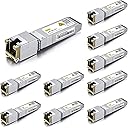
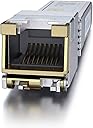
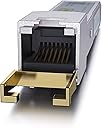
The 10Gtek 80-meter Low Power 10GBase-T SFP+ to RJ-45 Transceiver delivers blazing 10 Gigabit speeds over CAT.6a/7/8 cables with an extended reach of up to 80 meters. Compatible with a wide range of top networking brands including Cisco, Ubiquiti, and Netgear, this low-power copper module ensures reliable, high-performance connections ideal for professional-grade network setups. Sold in packs of 10, itโs the smart choice for managers scaling enterprise networks without compromise.


| Best Sellers Rank | #26 in Computer Networking Transceivers |
| Customer Reviews | 4.2 out of 5 stars 64 Reviews |
T**S
The 10Gtek ๐ด๐ฌ-๐ ๐ฒ๐๐ฒ๐ฟ ๐๐ข๐ช ๐ฃ๐ข๐ช๐๐ฅ is compatible with the Netgate XG7100
I inherited a Netgate XG7100 router/firewall and it has very particular requirements for transceivers. Specifically, that it doesn't support SFP+ to RJ45 devices. This device seems to work perfectly and came up immediately after install. I have been performing load testing and have seen no issues due to overheating or packet loss. EDIT: Since I originally wrote this, I have had one issue where I had to disable and re-enable the interface to bring up the connection. Not sure if the issue was this device or the ISP's ONT it is connected to. No errors were logged leading up to the issue or after the reset. As this listing on Amazon has multiple variants, it is important to note that I am referring to the "10Gtek ๐ด๐ฌ-๐ ๐ฒ๐๐ฒ๐ฟ ๐๐ข๐ช ๐ฃ๐ข๐ช๐๐ฅ 10GBase-T SFP+ to RJ-45 Transceiver". This is the only variant confirmed compatible with the XG7100 due to the specific chipset used in the device. The other devices use a different chipset and are most likely not compatible. This was the most cost effective and simple solution that I found to add 10gb copper to the XG7100. My other options were to get a media converter to take the handoff from the ISP, convert it back to fiber and then connect it to the router. This would have required the purchase of a media converter, two to three transceivers (depending on converter model) and a fiber cable and would be more equipment to mount on the wall. It would also require additional power. The other option would be to purchase a PCIE network adapter, which the XG7100 is also picky about. New models cost about $150, used can go for $35-$100, but it can be guessing game on whether they are reliable and will work. There still be the need to get an SFP+ to RJ45 transceiver. I found this listing referenced in the NetGate forums thread "xg7100-confirmation-if-you-can-plug-in-an-sfp-sfp-to-rj45-adapter"
G**R
Running cool and fast
The new 80-Meter 10GBase-T (ASF-10G-T80) is definitely the one to get if you don't need 2.5Gb or 5Gb. Working great in my UniFi Dream Machine Pro. A lot lower power consumption than other models means cooler running. Feels warm but not burning hot like I have heard others report with other 10GBase-T SFPs.
C**Y
Works even with unsupported Cat5e cables
I use the 80m transponders in my home for my 10G network. Both line are around 20m away from the switch. I decided to go with the 80m because itโs a Broadcom chip and it supports longer runs. It does get hot, but it hasnโt cause a problem running two side by side in an Intel x520-DA2 card.
1**T
Great 10GB adapter but gets really hot!
I needed this to connect my modem to my Ubiquiti Dream router and it works like a charm. It does deliver the superfast 10GB speed to the wife router. I did see a YT video showing that these get pretty hot. I checked with mine and it's pretty hot. To address this, I put a small fan to the adapter to cool it down. I'm not sure if the fan was necessary but I didn't want to take the chance of it damaging the adapter or the router. I guess it's to be expected since you're sending a lot of signals through the line but I'd want better heat management/
M**T
These are very good, but do not bother with the 30M ones, make sure to get at least the 80M
Have had no issues and great performance and reliability out of these, but DO NOT bother with the 30M ones. I just got rid of two of them for these 80M. The 30M ones tend to not perform well it seem of anything even beyond maybe 20ft., two new APs we just setup that will connect at 10GB would either fail to negotiate a connection at all or only negotiate at 5GB, and some other issues that have popped up seem to be related to the 30M units.
T**E
Zero support so be aware before buying
Performance wise, these are great. They are cheap and perform well. They produce much less heat than other brands that I have tried. However, the reason for the low star is zero support from their company. One of the two SFP+ adapters died during regular use. It just stopped working and stopped being recognized by my switch. I did tried several other switches and it didn't register any response so I'm pretty sure it's dead. I tried to reach them via their online website (from a link i got through amazon product support). I tried to contact them 4 times using the various options available on their website. The number of response i got is zero. So it's a good product while it's working and I have purchased a lot of products from them (fiber cable, SFP+, 10g adapters, etc.) throughout the year, but this is the first time i needed support from them. Extremely disappointed with this and I will have to think twice before buying from them again.
J**S
10GBps Over Cat 5e
This is for the 80 meter version. It was able to get me full 10GBps on cat 5e run that's about 50 feet long, and going through a patch panel. The 30 meter version got me to 5GBps on the same exact run. The 30 meter version got full 10 GBps on a shorter direct run, not going through any patch panel but still using cat5e. Great products, I get transfers from pc to QNAP at average 500 MB (Megabytes) per second. If transferring to or from an NVME that speed doubles. The QNAP is the other short direct run at 10GBps. Using this in a TP-Link Switch (TL-SG3210XHP-M2), works as expected. It was recognized instantly with no configuration needed to make it work.
L**N
Runs hot
Hot. Had 2 of these that worked both for just over a month then started dropping the connection constantly. Going with a different brand/model next time.
Trustpilot
2 weeks ago
4 days ago