Desertcart purchases this item on your behalf and handles shipping, customs, and support to Croatia.
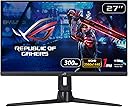
🎮 Dominate every frame with ASUS ROG Strix XG27AQMR — where speed meets stunning visuals.
The ASUS ROG Strix XG27AQMR is a 27-inch WQHD gaming monitor featuring a blazing 300Hz refresh rate and 1ms GTG response time powered by Fast IPS technology. It supports NVIDIA G-Sync and ELMB Sync for tear-free, blur-free gameplay, while DisplayHDR 600 and a wide DCI-P3 color gamut deliver vibrant, high-contrast visuals. Designed for pro gamers and enthusiasts, it offers extensive ergonomic adjustments and versatile connectivity, making it a top-tier choice for immersive, competitive gaming.


| ASIN | B0BY2WZ25C |
| Adaptive Sync | G-Sync Compatible |
| Aspect Ratio | 16:9 |
| Aspect ratio | 16:9 |
| Best Sellers Rank | 9,327 in Computers & Accessories ( See Top 100 in Computers & Accessories ) 191 in Monitors |
| Box Contents | 1 year technical support |
| Brand | ASUS |
| Brand Name | ASUS |
| Colour | Black |
| Compatible Devices | Desktop |
| Contrast Ratio | 1000:1 |
| Customer Reviews | 4.2 out of 5 stars 79 Reviews |
| Display Technology | IPS |
| Display Type | Hd,Ips |
| Hardware Connectivity | DisplayPort, HDMI |
| Has Color Screen | Yes |
| Image Brightness | 400 |
| Image contrast ratio | 1000:1 |
| Item Dimensions D x W x H | 26.4D x 61.4W x 40H centimetres |
| Item Weight | 7.31 Kilograms |
| Manufacturer | ASUS |
| Maximum Display Resolution | 2560 x 1440 Pixels |
| Model Name | ROG Strix XG27AQMR |
| Model Number | 90LM08K0-B01170 |
| Mounting Type | Wall Mount |
| Native Resolution | 2560x1440 |
| Network Connectivity Technology | HDMI, DisplayPort |
| Picture Quality Enhancement Technology | ASUS Eye Care |
| Processor Count | 1 |
| Product Features | High Dynamic Range |
| Product Warranty | 3 YEARS |
| Refresh Rate | 300 Hz |
| Resolution | QHD Wide 1440p |
| Response Time | 1 Milliseconds |
| Screen Finish Type | Glossy |
| Screen Size | 27 Inches |
| Screen size | 27 Inches |
| Screen surface description | Glossy |
| Shape | rectangular prism |
| Specific Uses For Product | Gaming |
| Total HDMI Port | 2 |
| Total Video Out Ports | 2 |
| Viewing Angle | 178 Degrees |
| Voltage | 240 Volts |
A**R
Hey, Give, Now, Please, Now. I love Asus build quality.
last year i upped to 1440p and tried a MSI 240hz monitor, it died in 10 months, two black lines at the bottom and can't go above 60fps or whole screen fails. Well, now 1 month in with Asus and it's great, build quality is great, more stable on desk than the other. I'm hoping for longevity, my GF will be ordering one also, best 1440p monitor available :)
A**R
Excellent buy
This is a very high spec monitor. Son uses it for his gaming. The build quality is excellent and high refresh frame rate capacity makes for a stunning picture. Comes with 3.5 mm jack for speaker connection
M**T
Would be 5 stars but I had to send the first monitor back
Great colours, super fast refresh rate and the build quality made my old monitor look like a toy. I did have a line of dead pixels on my first monitor, but Amazon refunded me without any issues.
S**Y
No comprimises 1440p monitor
Late adopter from 1080p. My previous main 1080p had a few quirks like brightness being lowered when using ELMB, unofficial freesync gsync compatibility. Have no complaints with this monitor, only really pushed it with Cyberpunk2077, not that I could really push 300fps but GSYNC with the variable refresh rate is 100% noticeable coming from not having it.
A**K
Dead pixles
I ordered this monitor brand new and it came on the 15th of August, I have no clue if I got a damaged product but there now is a 1 pixle horizontal line of dead pixles. Im going to have to either get my money back or a new product.
J**E
Amazing monitor but missing pixel
This monitor was amazing but it arrived with a Missing Pixel otherwise It would have been lovely but i had to return it.
T**H
bad customer service from seller
No reply from seller and no communication for the issue. A little big sad for buying this expensive product with the bad customer service from seller.
Y**Y
Monitor muy top
Este monitor es una pasada, la única pega es el HDR, que aunque sea de HDR600, yo le daria 6,5 de media al HDR, por lo de mas, lo calificaría de un 8,5 sobre 10. En lo general.
O**E
Dead pixel
Got a dead pixel after 2 months in the middle of the screen. No repair from Asus since the minimum is 3. Last time I’ll be buying asus.
P**O
ottimo monitor
molto soddisfatto di questo monitor, ha un ottimo pannello molto veloce che nei giochi fps frenetici fa la differenza, lo consiglio sopratutto per gli sparatutto online, per giochi offline tranquilli é sicuramente sprecato
D**L
Guter Monitor
Ich habe mit diesem Monitor meinen alten Asus MG279 ersetzt (ebenfalls ein IPS-Monitor, aber nur mit 144 Hz und, wenn ich mich recht erinnere, 4 oder 5 ms Reaktionszeit). Es hat eine ganze Weile gedauert, bis ich beim XG27AQMR ein wirklich gutes Bild eingestellt hatte. Anfangs waren die Farben entweder zu blass, das Bild hatte einen Grauschleier oder irgendetwas anderes hat einfach nicht gepasst. Ansonsten ein Top-Monitor: ✔️ Keine toten Pixel ✔️ Kein Backlight-Bleeding (zumindest bei meinem Modell) ✔️ Lediglich ein leichtes IPS-Glow in den Ecken, das aber wirklich nur bei komplett schwarzem Bild auffällt. Nach einigem Googeln und Herumprobieren bin ich auf folgende Einstellungen gekommen: Overdrive & Gaming-Einstellungen: Variable OD: Level 3 GameVisual: User Mode Shadow Boost: OFF (bei dunklen Spielen ggf. Level 1 oder 2) Bild-Einstellungen: Brightness: 52 (Weiße Webseiten sind damit immer noch zu hell – Amazon Darkmode, please!) Kontrast: 85 VividPixel: 100 (Ja, wirklich! Auf dem MG279 hat VividPixel schnell überscharf gewirkt, aber auf dem XG27AQMR ist 100 schwächer als 50 auf dem MG279 – damit ergibt sich ein sehr gutes, nicht überschärftes Bild.) Dynamic Dimming / ASCR: OFF Farbeinstellungen: Display Color Space: Wide Gamut Color Temp: User Mode (Dank an Igor’s Lab für die Werte!) Rot: 95/96 Grün: 100 Blau: 99 Gamma: 2.2 Saturation: 43 Mit diesen Einstellungen habe ich für mich das beste Bild aus dem Monitor herausgeholt – auch wenn es gelegentlich etwas zu hell ist. 💡 Fazit: Bildqualität ist natürlich Geschmackssache, aber die manuelle Anpassung der Farbtemperatur kann ich wirklich empfehlen! Mit diesen Werten kommt man "fast" an die perfekte Farbwiedergabe für diesen Monitor heran
M**N
💯
💯
Trustpilot
1 month ago
1 month ago