🖨️ Print smart, print fast, print green — your home office MVP!
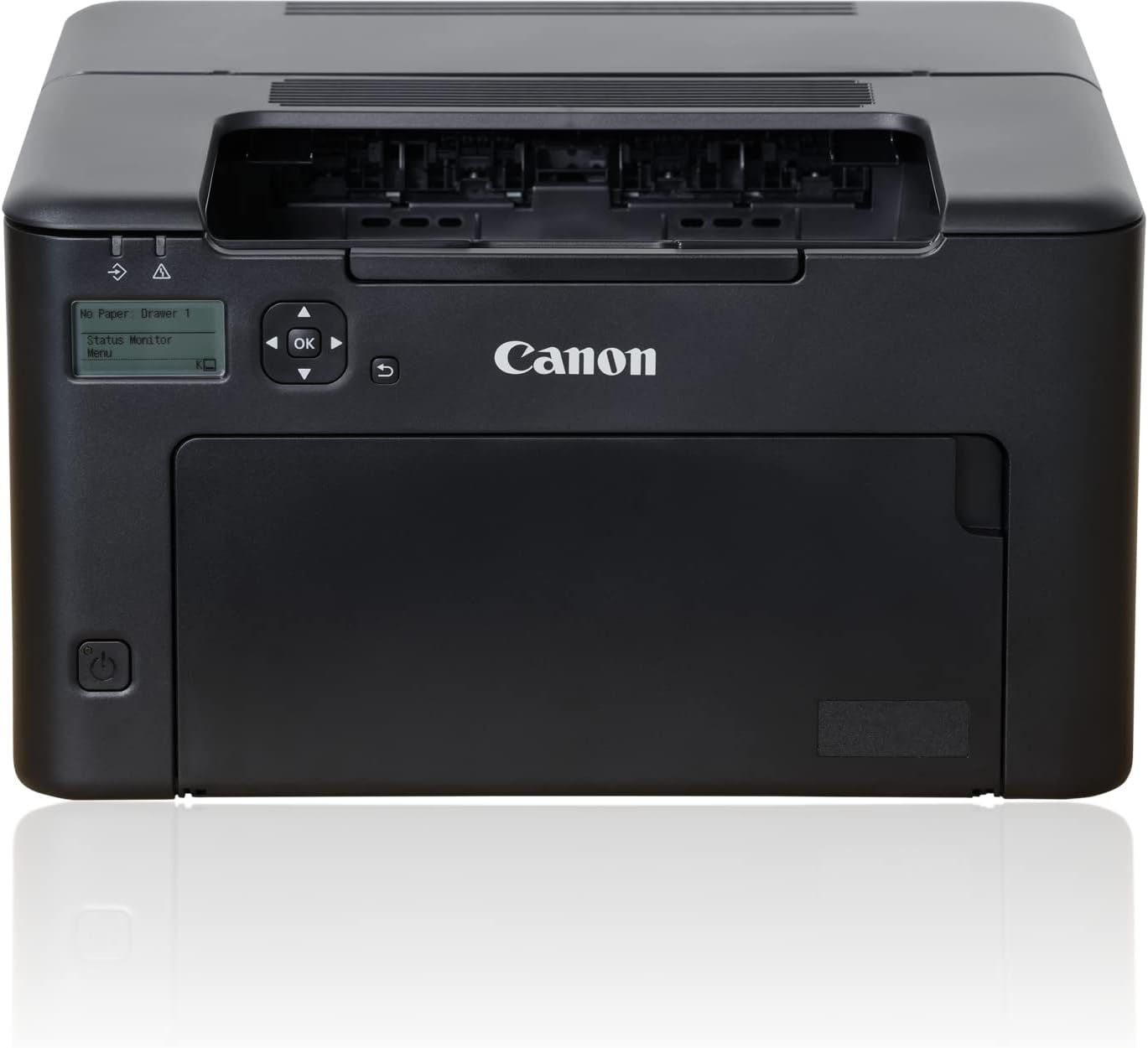
The Canon imageCLASS LBP122dw is a monochrome laser printer designed for home and home office use, delivering fast 30 PPM print speeds with crisp black-and-white output. Featuring wireless connectivity, mobile printing via Canon PRINT app, and automatic duplex printing, it combines convenience with eco-conscious ENERGY STAR and EPEAT Silver certifications. Its compact footprint and 150-sheet capacity make it ideal for personal and professional document needs, backed by Canon’s reliable 1-year warranty.


| ASIN | B0BXLYTWH3 |
| Additional Printer Functions | Print Only |
| B&W Pages per Minute | 30 |
| Best Sellers Rank | #6,624 in Office Products ( See Top 100 in Office Products ) #28 in Laser Computer Printers |
| Brand | Canon |
| Built-In Media | Cartridge 071 Black, Starter - 700 Yield, Documentation, LBP122dw Product, Power Cord |
| Color | Black |
| Color Depth | 1 bits_per_pixel |
| Compatible Cartridge | Canon GENUINE Toner 071 / 071 H |
| Compatible Devices | Smartphones |
| Connectivity Technology | USB, Wi-Fi |
| Control Method | App |
| Controller Type | Amazon Alexa |
| Customer Reviews | 4.0 out of 5 stars 1,840 Reviews |
| Display Type | LCD |
| Dual-sided printing | Yes |
| Duplex | Automatic |
| Global Trade Identification Number | 00013803354898 |
| Hardware Interface | Ethernet |
| Initial Page Print Time | 5.3 Seconds |
| Ink Color | Black |
| Item Dimensions D x W x H | 15.4"D x 14.4"W x 14.6"H |
| Item Type Name | Laser Printer |
| Item Weight | 12.4 Pounds |
| Manufacturer | Canon |
| Maximum Copies Per Run | 200 |
| Maximum Copy Resolution Black and White | 600 dpi |
| Maximum Copy Speed Black and White | 30 ppm |
| Maximum Media Size | 8.5 x 14 inch |
| Maximum Print Resolution Black and White | 2400 x 600 dpi |
| Maximum Sheet Capacity | 150 |
| Maximum print Resolution Color | 600 x 600 dpi |
| Model Name | imageCLASS LBP122dw |
| Model Number | 5620C006 |
| Model Series | LBP122 |
| Number of Ethernet Ports | 1 |
| Number of Trays | 1 |
| Other Special Features of the Product | Auto-Duplex, Display Screen, EPEAT Silver, Energy Star, Network-Ready |
| Paper Size | Min. 3" x 5" to Max. 8.5" x 14" Inches |
| Power Consumption | 1230 Watts |
| Print media | Paper (plain) |
| Printer Connectivity Type | USB, Wi-Fi |
| Printer Output Type | Monochrome |
| Printer Type | Laser |
| Printing Technology | Laser |
| Processor Count | 1 |
| Resolution | 600 x 600 |
| Series Number | 122 |
| Special Feature | Auto-Duplex , Display Screen, EPEAT Silver, Energy Star, Network-Ready |
| Specific Uses For Product | Home/Office Document Printing, Mobile Printing, Schoolwork Printing |
| Total USB 2.0 Ports | 1 |
| UPC | 013803354898 |
| Unit Count | 1.0 Count |
| Warranty Description | 1 year |
| Warranty Type | Limited |
| Wattage | 1230 watts |
A**1
Good printer for the money, not that hard to set up.
In response to the whiners that gave low marks, it really isn’t that hard to set up. Yess the little LCD 2” screen is hard to read and they should have lighted it, but for the 15 minutes it takes to set up, I just pointed a light on it and problem solved. The set up didn’t seem like it was designed by someone who wanted a good user experience. Yo set the time zone you have to down button through about a hundred places before you see central US. Setting the clock and date were stupid unnecessary steps if it is going to be connected to the internet. The thing that took the most time was enter the router password, only because it wasn’t immediately clear how you “accept” it after entering the final digit. That should have been mentioned in the user guide (which was pretty crappy, wasted most of the paper space on safety warnings and how to dispose of the unit, and only a paragraph on the set up menu, where most of the confusion lies). Once the wifi password was entered, it just worked, perfectly. On my iPhone I opened a file, hit print, it saw the printer and printed. On the MacBook, I hit printed, I just had to select this printer instead of the one I was replacing, selected the number of copies, and it printed. Zero problems and issues. Easiest and fastest printer I ever set up. Lightweight so it sat on a small shelf by the bed. Energy star so it doesn’t have much of a phantom load when not used. On/off switch on the front so you don’t have to go searching on the side or back to turn it off. Print quality is acceptable. I didn’t notice any more noise than other printers, maybe even a bit less, but my hearing is shot so it hardly matters. So, there is room for improvement, like a better manual, lit LCD screen, paper tray that can close with paper to keep out the dust, and automatic time and date recognition, but I really don’t understand all the complaining about set up. It took fifteen minutes and if they had improved the user interface it could have been done in 5, but it really wasn’t a big deal. I got it on sale and it was a bargain, especially compared to the much crappier laser printer I bought in 1997 for $1400.
O**N
Great printer/scanner combo! Dog disagrees.
I like it. It does what it's supposed to, quickly. It does warp the paper a bit but I assume that's because of the heat setting the powder. It was very easy to set up and get started with, and my computer is intelligent enough that I needed need to mess around a lot with connecting it or whether it'd be compatible. It was. On a fun and slightly related note, my dog absolutely hates it and tries to attack it when it makes any kind of sound, so I don't use it as often as I'd like to in fear of upsetting him. I've kicked him out of my bedroom to use it and he attacks and barks relentlessly at the door. I've tried exposure therapy with him and it only works if I am restraining him and able to stuff treats in his mouth which isn't a sustainable practice. Verdict? Product is absolutely fine and takes decent quality scans and prints wicked fast black and white. Does what I need it to do. My weird dog just thinks it's a demon that needs to be eradicated.
D**N
Shame on Canon
Read the negative reviews - they're 100% true. Size The picture and dimensions look like this is a nice, compact footprint. It doesn't reveal that it has a paper drawer that remains open as long as you have paper in it. So, the footprint is actually the size of the paper you have in the drawer. And because the drawer is now always open, you're suseptible to dust. So I load the paper every time I want to print and keep the printer closed. LCD Screen The screen is on the front instead of the top. I laid the device on it's back with the edge off the end of the table for the power cord so I could look down onto the printer in order to read the LCD screen. I also opened the curtains and turned my lights on. Once setup, I laid it flat again. Still, you have to interact with this screen every time you print and for every firemware upgrade. Connection Yes, the instructions suck and mine was actually missing the CD (empty case). I found the best luck was to connect the printer directly to my wi-fi and then locate the printer on my PC on the same network. My PC is directly hard-wired to my router, so not sure if that's why my PC found the printer so easily. I didn't want to connect the printer to my PC via USB since they're more than 6 feet apart. I don't use Apple products nor do I print from my Android. Printing Every single time you print something, the LCD prompts you to select a print drawer. There is only one print drawer. But, you have to scroll down and press okay on the LCD screen for the one and only print drawer before it will print. If there's a firmware upgrade available, it won't print and your job will remain in the queue until you upgrade. Firmware upgrades This is more often than I'd prefer, about as often as your PC receives updates. I've had the printer two months and have had to update the firmware 3 times. This is done through the hard to see LCD screen by scrolling down to Upgrade, pressing OK, and then scrolling one button press at a time to read through the entire agreement (smh). 50-75 or so clicks later, you will be able to proceed. Print quality I gotta say it prints shockingly fast - like 2 seconds. But that means the quality is going to match. Color docs don't translate well, but they are crisp and lightning fast and dry. Toner seems to be priced well, so replacements shouldn't be less than the old inkjet cartridges. Noise Sure, it's noisy, but I kind of expected that for the price. It sounds cheap. Overall "Buy" if you have lots of patience and just want to print text docs at a lower price point. Otherwise, treat yourself and upgrade. I feel like these printers have been sitting around for decades. They're only giving Canon a bad reputation.
E**1
Good Basic Single Print Function Laser Printer
I bought this Canon monochrome laser printer on Prime Day deal for $89 which I thought was a good bargain. I am a IT professional so it was easy for me to setup on the network quickly. I setup the printer on the network using the not so user friendly small LCD panel which by the way is hard to read so I used my iPhone flash light. I did not use the CD provided with the printer to install the print driver, instead I downloaded the driver from the Canon internet site. The download and installation was quick and easy. The toner cartridge is full unlike most other printers where the toner cartridge supplied with the unit is 1/2 full. I printed a few pages from my PC and iPhone and it prints fast with decent print quality. The printer has the option to print on both sides. This is a basic single print function Printer which is what I wanted. The size is compact and it easily fits in the space under the table. The only wire I have connected to the printer is the power cable because the printer is wireless and I am able to access it from PC, Laptop and Smartphone. I got tired of buying expensive inkjet cartridges frequently because they dry up if you don't print regularly. With laser printer you don't have to worry about this problem because the toner never dries. I will definitely recommend this printer if you are looking for a compact, basic Single Print function monochrome laser printer.
D**N
Seems to fit the bill.
This is my initial early revie, and I may later add to it or alter it. Above: The printer atop our rolltop desk. Our PC is Windows 11. We were searching for a multifnction laser printer, at first one that was also wireless. Ink jet was a nonstarter because ink is so costly and because if one does not use the printer a lot, the ik tends to dry out and then the printer won't work. We were very pleaantly surprised to see that this printer inclused a second toner cartridge, A $30+ bonus for free in the box! We wanted wireless because it is nice to be able to place the printer pretty much wherever we wanted to. But wireless would have added a lot to the cost. This printer connects via USB, and as a single computer household, we had no need for a sharable networked printer. But having to place it near our computer ade the printer 's form factor important to us. Fortunately, this printer has a small form factor; even smaller if we keep paper in the desk and keep the paper tray and output shelf closed unless we're using the printer. This printer replaces a Dell wireless laser multifunction printer that had a feeder, which the new Canon printer lacks, but we very, very seldom need to scan more than one page at a time. The Dell printer was one-side print/scan. The Dell printer would only work on slow wireless, and when we went to a 5G T-Moble gateway we had to connect the printer to the gateway using an ethernet cable. Then that stopped working and we had to connect it directly to the PC using a USB cable. Then the Dell printer bit the dust entirely, and tech support and/or repair became too costly or imposssible. Both the old and new printers also handle FAX, but we don't care about that; we never use it. Doctors' offices tend to use FAX, but will give out an e-mail address if pressed, or we can use snail mail if we must. Setup of the Canon printer was not too difficult. The pictures were a bit hard to follow, but common sense led me through. The instructions for downloading the Canon software could not account for changes in the browsers, etc., but again, common sense prevailed. Microsoft then subsumes everything and gives you its own print and scan apps. But Canon presents a special print/scan app library that we'll have to try. But a half hour after the printer arrived in a box to printing a test page and test scanning took about a half hour. I actually found this model first on the Dell web site but dealing with Dell was a nightmare. Its web site twice rejected our perfectly good credit card, and we could not reach a human being who could help. Then I found the same printer on Amazon, not only $1 cheaper, but also with 5% back on our Anazon card and shipping that got it to us in 2 days instead of a week. The next day I used the Canon device to scan a document that I needed to attach to an e-mail. It worked perfectly. I particularly liked the Canon app filing options.
A**R
easy set-up
I set the printer up using a USB connection. Printer did not come with the USB cable but I already had one. I downloaded the printer driver from the Cannon web site. Printed a test page with no problems. Printed a spreadsheet in Excel and all worked well. I did not set up as wireless as all the negative reviews were wireless setup problems. If I need to print from my phone I can always froward. I originally purchased a Brother printer which I returned. It was a nightmare to set up and never worked correctly.
A**R
NO More RAGE Against the Machine!
This is the printer I've been waiting for. It actually prints every time I ask it to, imagine that!?! I've used at least 3 printers over the past decade that run out of ink (even when there is still ink) and, most frustratingly, will never connect to my computer. I made sure to order one with a cord, and I am so glad. I've printed at least 500 pages in the last month and haven't had a single issue. Grante,d the cord is ugly, but well worth it. Buy and enjoy!
M**C
Printer is mediocre
The printer works but setup was simple AND complicated. Do not plug in the USB cable until told to do so which means you may have to access the rear of the printer twice. There are no definitions anywhere either online or in the printed manuals for what the different paper types are. What does plain paper L mean? Large? What size is large? Maybe it means Lubricated, -who knows. The printed manuals are terrible. The online chat with 'experts' seem to be a credit card scam. Software installation went smoothly and this printer software supports older operating systems which is good. The instructions seem to want all the space in an overly large envelope for installation. I guess a user must have a separate desk or table for the printer not part of a crowded desktop. Not having a dust cover over the paper supply is a real problem. Where does normal household or office dust end up? Print quality is ~OK but not great and does not resemble the page composed in your document editor. The extra print cartridge is wrapped in plastic and not in a carton for easy storage. I can only give the Canon MF3010 a mediocre rating.
Trustpilot
2 weeks ago
2 weeks ago