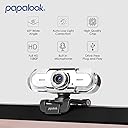
🎥 Elevate your virtual presence with papalook PA452 — where clarity meets convenience!
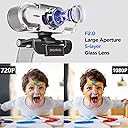
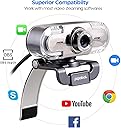
The papalook PA452 Webcam delivers crisp 1080P Full HD video and clear audio with its built-in noise-cancelling microphone. Designed for professionals and content creators, it offers a 65° wide-angle lens for well-framed video calls and effortless plug-and-play USB connectivity. Compatible with all major streaming and conferencing platforms, this lightweight webcam ensures you look and sound your best in every virtual interaction.


| ASIN | B01GYFOXK2 |
| Best Sellers Rank | #637 in Webcams |
| Customer Reviews | 4.3 4.3 out of 5 stars (6,040) |
| Date First Available | March 8, 2017 |
| Is Discontinued By Manufacturer | No |
| Item Weight | 3.52 ounces |
| Item model number | PA452 |
| Manufacturer | papalook |
| Product Dimensions | 4.33 x 3.54 x 2.36 inches |
J**E
Great Quality Webcam for Remote Work – Excellent Value for the Price
I purchased the papalook PA452 Full HD 1080P Webcam for remote work, specifically for Zoom meetings and video calls, and I’m really impressed with the performance, especially considering the price point. The video quality is solid. The 1080P Full HD resolution provides clear, sharp images, and the 65° wide-angle lens ensures that my face and background are well-framed during meetings. It delivers great clarity, and people on the other end of the call have commented on how crisp and professional my video looks. I no longer have to deal with the grainy or blurry video that can sometimes happen with lower-end webcams. One of the standout features is the built-in microphone. It captures sound clearly, which is crucial for video calls and meetings. I’ve used external microphones before, but the microphone on this webcam works perfectly for everyday calls, picking up my voice without distortion or too much background noise. It’s certainly adequate for all but the most critical audio needs, and the convenience of not needing a separate mic is a huge bonus. The plug-and-play functionality was a huge plus. Setting it up was super simple. I just plugged it into the USB port, and within seconds, it was ready to use—no additional software or drivers needed. The adjustable clip is also a great touch; it fits perfectly on top of my laptop screen, and I can adjust the angle to suit my setup, which makes a big difference during meetings. While the quality is great for the price, it’s not perfect. The 65° field of view is a bit narrow for those who want to show a larger area or need a wider angle, but for Zoom calls and virtual meetings, it’s more than sufficient. Overall, this webcam is a fantastic value for the price. If you need a reliable, easy-to-use webcam for work or personal use, the papalook PA452 offers excellent video quality, good sound, and easy setup. It’s perfect for anyone looking for a solid webcam without breaking the bank, and I’m very satisfied with my purchase.
K**R
Good camera for work related meetings.
I have three of these - one for the home and two for work. They are great. Easy to use. Plug and play. Good price, good quality, good picture. I work for an international firm, and most of my meetings are with 40+ people at a time. My image consistently looks better than most if not all others. The built-in mic works well - crisp and clear with no delay. There was no autofocus, but there was a manual one - you just set it once and forget it. I highly recommend!
N**8
Decent camera, but field of view is way too narrow (58-degrees)
Outside of using the built-in webcam on my Surface Pro laptop, it wasn't sufficient for the number of meetings I needed to participate in lately with Covid. So I bought 2 different brands from Amazon (Papalook PA452 [This review] and Amcrest AWC201-B) to try them out on my Dell Desktop, which has more computing power and 2 larger screens. After hooking up both webcams at the same time and trying them out side-by-side, I learned alot... unfortunately neither of these webcams fit my needs, so they'll both be returned and I'll continue my search. Pros of the Papalook PA452: Nicely packaged in a small box, with clear instructions inside. Overall the build quality seems good, it pivots well side-to-side, and it mounted to the top of my thin, widescreen monitor fine. It was extremely easy to install/setup, and Windows 10 plug and play recognized it immediately, allowing me to use it right away in Zoom and Google Hangouts. Plus it shipped/arrived very quickly. Cons: Although the microphone was sensitive and properly picked up all the spoken words, I found it to sound a little muffled/distant (although it was better than then other model). Maybe there's a 3rd party app/driver that could have helped with this, but out of the box, it was just ok. As for image quality, I admit I don't have the best lighting in the room, other than an overhead light built into the fan, so a big concern of mine was if the camera could compensate/color correct. Although this camera was better than the other model, in that it was clearer and adjusted for the yellow tint of the light bulb and brightened the image a little, it still wasn’t what I was hoping for in terms of auto correction. However the biggest issue and deal breaker for me, was the narrow field of view. I couldn’t find this anywhere on the website or box, but in the manual it lists it’s only 58-degrees, and I believe it. Although I don’t need it to see the entire room, this camera zooms in very close, almost like head and shoulder only. And when you turn of the “HD” option it gets even closer. Too close for my taste (the other was 70-degrees which makes a big difference). And as others had said, the On/Off button on the back doesn’t do anything. The only way to turn off the camera is to unplug the USB. And although I knew it didn’t come with a privacy cover, with the design of this camera, the lens sticks out of the body. So there’s no easy way to attach a 3rd party “stick on” cover (like a hinged toilet seat) or a piece of paper. Overall I’d say it’s decent for the money. But given the amount I’ll need to use it, and the type of calls I’ll been involved with for work, looks like I need to buy one of the more expensive models.
K**N
Works great, easy setup
This camera works great and was easy to setup. It is truly plug & play. The image quality is high def and does everything I wanted a web-cam to do. I would caution that it does continue to feed video even when the power switch in the back of the camera is in the "off" position, so you may want to unplug it from your computer when you're done using it. I had an entire meeting and only at the end of the mtg did I realize the camera was "off" (but still worked as if it was "on").
D**O
Great camera
I purchased this camera for my work Zoom calls and meetings. I was worried I should have bought one more expensive just in case. This one seemed to have good reviews and although not the cheapest, was reasonably priced. I've had this about 5 months now and I am completely satisfied. The picture and sound are great (or at least no one has complained), which is necessary because I'm not just on the Zoom meetings, but am often presenting. The picture quality and ease of setup were awesome.
A**ー
パソコン内蔵のカメラが壊れてしまったのでこちらを購入しました。かなり明るくはっきり映ります。この値段でこの性能ならコスパがよいと思います。満足しています。
K**S
This camera is excellent if it is used correctly and I have found it perfect for my purposes. The lack of a tripod fixing is my only criticism but, given the price and overall quality, I’ve not deducted a star for that, particularly as screen mounting is preferred if you want the subject to appear to be looking directly at other meeting participants, which is more convincing when the camera is set a little further away. With a little bit of care over lighting and positioning, it is capable of producing much better results than most of the ‘on-line’ interviews I see on TV. It worked immediately with an 8 year old Macbook Air and with a Windows 10 PC without the need for any driver downloads. I obtained it in order to improve on the Macbook pictures, which were very poor, and to add webcam facilities to my Windows 10 PC's and a Chromebook. I have not heard the sound from it - but it hasn't raised any adverse comments from other meeting participants - the four stars for sound is therefore based on those initial responses. The following points might help to ensure good results when using it: The ‘contrast’ issues mentioned by others can be evident under certain lighting conditions when there are extremes of bright and dark areas in the scene. This is because the camera will attempt to make best use of the available light and sometimes ‘burns out’ white areas in the process. So, if the subject is correctly lit from the front with the background in relative darkness, it may be necessary to either soften the main lighting or lift the background illumination, ideally with a suitable ‘cold’ white light source so the colour temperature and illumination matches more evenly across the scene. I use 5000k LED bulbs in plain white lampshades for illumination after dark or to balance daylight. Ceiling lights, especially spotlights, and windows or lamps behind the subject are all, of course, useless for illuminating the face correctly whatever camera is used. The lens field of view is relatively tight for a webcam which enables the subject to sit slightly further back, improving the eyeline when using a laptop (which should ideally be raised so the camera is closer to face level). The manual focus may only need to be set once for the normal subject distance. The depth of field then seems sufficient to maintain focus without the irritations caused by auto-focus ‘hunting’ or noises. If the camera is mounted on a laptop screen, then they should both be placed on a solid base to maintain a steady picture to avoid annoying vibrations and shakes.
M**S
La compré para mis clases en línea. En la tarde y mañana se ve genial, la imagen es super HD, pero para mis clases de la noche se ve super mal. Se ve como unas rayas que suben y bajan todo el tiempo. Esto debido a la luz artificial (focos). Me parece una super desventaja ya que se ve de mala calidad ,corriente y es lo suficientemente cara para que sea así. Es súper fácil de instalar, es china y literalmente la conectas y ya es todo.
W**D
Very good Product
L**U
magnifique webcam, installation des pilotes automatique sur windows 7 , j'ai rien eu à faire, livré sans cd, mais possibilité de télécharger les pilotes sur le site papalook..., je l'utilise pour skype, l'image est de très bonne qualité et le son idem ( commentaires de mes correspondants !!), elle affiche à droite et gauche des leds aux couleurs changeantes ( juste pour le fun..), pour le prix c'est juste parfait , pour ceux qui veulent du top libre à eux de mettre bien plus chère..pour moi cette webcam est parfaite, livraison ultra rapide avec Amazon , merci.....
Trustpilot
2 weeks ago
3 days ago