Buy anything from 5,000+ international stores. One checkout price. No surprise fees. Join 2M+ shoppers on Desertcart.
Desertcart purchases this item on your behalf and handles shipping, customs, and support to Croatia.
🚀 Elevate your workspace, power your hustle.
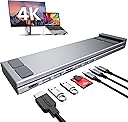
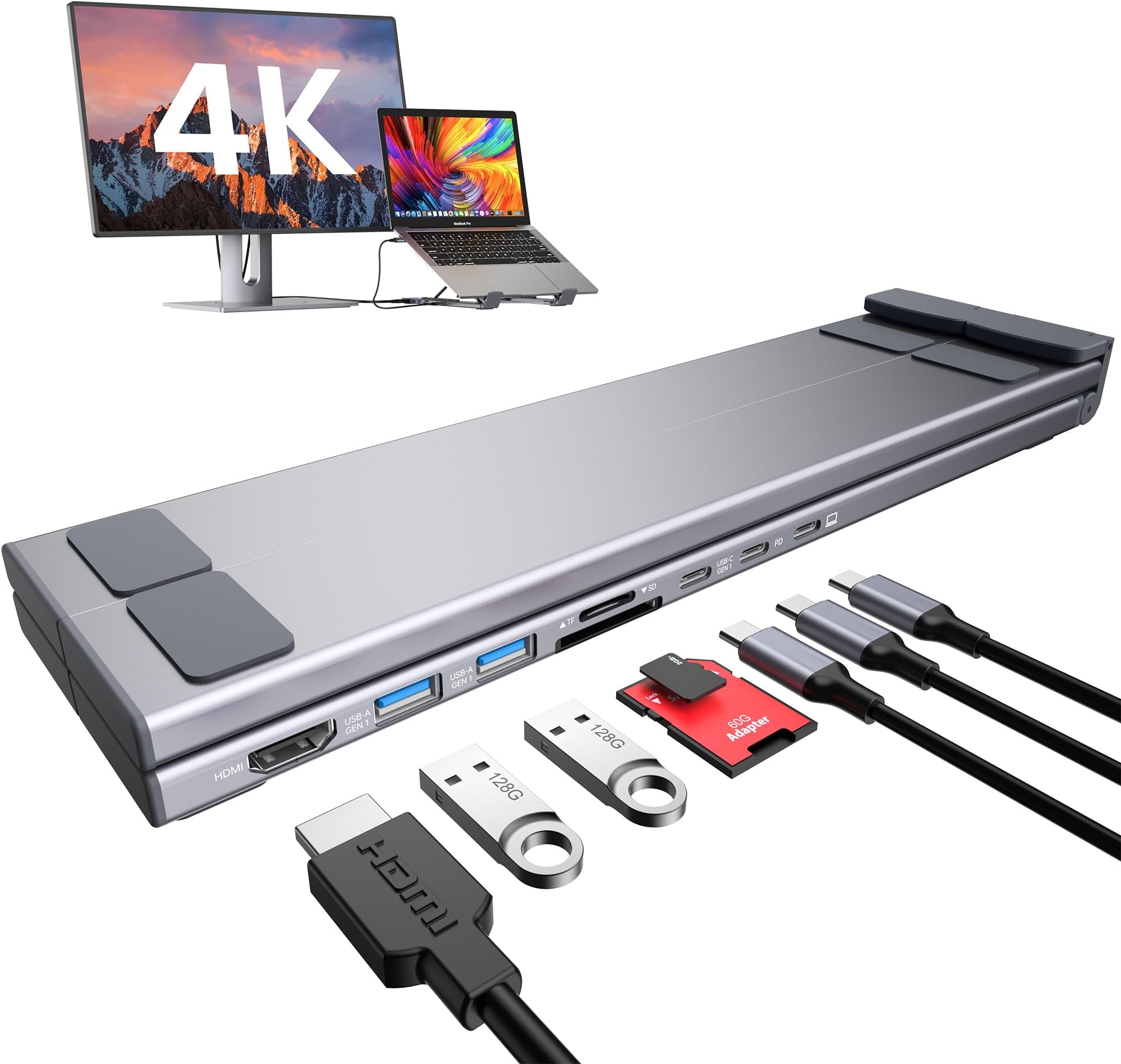
The Mukiya USB C Laptop Docking Station Stand is an 8-in-1 hub combining a sturdy, adjustable laptop stand with a versatile docking station. It supports 4K HDMI output, dual USB 3.0 ports with 5Gbps transfer speeds, and 85W power delivery for fast charging. Crafted from premium aluminum, it offers ergonomic height adjustments and enhanced cooling, while its compact, foldable design and included travel bag make it perfect for professionals on the move.


| ASIN | B0BWTQ1Z7Z |
| Best Sellers Rank | #3,632 in Electronics ( See Top 100 in Electronics ) #48 in Laptop Docking Stations |
| Brand | Mukiya |
| Color | black |
| Compatible Devices | USB-C laptops running macOS or Windows, including MacBook Pro 16 inch 2019/2021, 15 2016/2017/2018/2019, 14 2021, 13 2022/2021/2020/2019/2018/2017/2016, Air (Retina 13-inch) 2022/2020/2019/2018, Air, Pro, Microsoft Surface 7 / 8, HP Spectre x369, Dell XPS 9380/9370/9365/9360/9350/9300/7390 2-in-1/7390, Latitude E7490/E7480/E7470/E7370/13 E7370L/13 7000, Lenovo ThinkPad T series (T470, T480, T490), Asus Ling Yao 3, Zenbook flip ux370u, Acer aspire5 2019, etc., Dell, Lenovo, HP, Surface, Air; from other brands with compatible ports may also be compatible. Compatible Devices USB-C laptops running macOS or Windows, including MacBook Pro 16 inch 2019/2021, 15 2016/2017/2018/2019, 14 2021, 13 2022/2021/2020/2019/2018/2017/2016, Air (Retina 13-inch) 2022/2020/2019/2018, Air, Pro, Microsoft Surface 7 / 8, HP Spectre x369, Dell XPS 9380/9370/9365/9360/9350/9300/7390 2-in-1/7390, Latitude E7490/E7480/E7470/E7370/13 E7370L/13 7000, Lenovo ThinkPad T series (T470, T480, T490), Asus Ling Yao 3, Zenbook flip ux370u, Acer aspire5 2019, etc., Dell, Lenovo, HP, Surface, Air; from other brands with compatible ports may also be compatible. See more |
| Customer Reviews | 4.2 out of 5 stars 597 Reviews |
| Hardware Interface | USB 3.2 Gen 2 |
| Item Weight | 0.7 Pounds |
| Manufacturer | Shenzhen Dsenbor Technology Co.,Ltd |
| Mfr Part Number | HUB-M57 |
| Minimum Required Operating System Version | Windows 10 |
| Model Number | HUB-M48 |
| Number of Ports | 8 |
| Smart Home Compatibility | Not Smart Home Compatible |
| Total Number of HDMI Ports | 1 |
| Total USB Ports | 5 |
| Total Usb Ports | 5 |
| UPC | 652726562296 |
| Unit Count | 1.0 Count |
| Warranty Description | 2 years |
| Wattage | 85 watts |
D**.
My new laptop docking station
This thing is great. I mainly have been using it as a docking station, but if I go on any trips this will be going with me for sure. I didn't know if I would like to have my laptop tilted up, so I was hesitant on buying one of these for a long time. I am so glad I took the chance. This has little silicone pads on the bottom, also where your laptop sits, and fold-out feet with pads as well. This is very well-built! I think it is mostly aluminum, but it has enough weight to give it a quality feel. I thought it might be just cheap plastic, but I was pleasantly surprised at the premium build quality of it. There are 6 levels of tilt, (7 if you count the flat.) This gives it many options. The X-Wing folding brace allows a solid footing on all laptops. This is just solid, quick to set up, and creates a full desktop experience. The desktop experience. I have to admit that I mostly just set this up and drop my laptop on it. I got used to two monitors and now with one cable, I am all hooked up. The USB-C power is rated at 100w, but I only have a 65w charger. This is what came with my laptop, and it works great. So here is my setup. One USB-C power in the docking station to charge my laptop, one USB-C (included) cable connecting to my laptop, and one USB-C cable out charging my iPhone. And of course my HDMI cable hooked up to my TV (I use a TV as my second monitor.) "But wait there is more!" LOL TV commercial flashbacks... Now I have 2 USB-A ports to use and two different slots for Camera SD cards. My GoPro only has the one type, but it is nice to have both. What is really nice is once set up, I simply drop the laptop down on it and plug in one cable. To sum it up, this is a great buy. Premium build quality, more ports than I need, a great docking station plus travel hub, SD card reader, and tilts up your laptop for an ergonomic desktop experience.
M**Z
Mukiya USB C Laptop Docking Station Stand – Easy to Use & Perfect for Travel
Mukiya USB-C Laptop Docking Station Stand – Easy to Use & Perfect for Travel This Mukiya USB-C Laptop Docking Station Stand is a must-have for anyone needing a compact, reliable, and travel-friendly docking solution. Effortless Setup – Plug-and-play functionality makes it easy to use, requiring no complicated installation. Versatile Connectivity—It is equipped with multiple ports, including USB-C, USB 3.0, HDMI, and SD card slots, covering all your connection needs. Compact & Lightweight—Its foldable design makes it perfect for travel, fitting easily into a bag without adding bulk. Ergonomic Stand—This is not just a docking station—it also elevates your laptop, improving airflow and reducing strain on your neck. Reliable Performance—It works seamlessly with MacBooks, Windows laptops, and other USB-C devices, making it a great all-in-one solution. Final Thoughts If you need a portable, easy-to-use docking station for your laptop that’s perfect for travel, the Mukiya USB-C Laptop Docking Station Stand is a fantastic choice.
E**S
Great value travel dock/stand with lots of ports — a couple minor quirks
Really happy with this overall. It’s a great value for the price, has multiple ports, and it’s lightweight and easy to throw in a bag for travel. Setup was simple and it does exactly what I need. A couple small issues: in the most upright position my laptop can slide a bit because the feet/lip that hold it are small and the angle is pretty steep. It’s fine in the other positions, but that steepest setting could use a little more grip. I also think it would be even better with a second HDMI port. Overall, it does a great job and I’d still recommend it—especially if you want something portable with plenty of connections.
E**Z
A Needed Docking Station!
I’ve been using this since my original purchase and it’s been a great docking station stand! Very stable and I love the adjustability. I can fit my work laptop, a ThinkPad, and my Asus laptop, as well as my iPad Pro. It definitely helps me with my productivity as I don’t have to crane my neck to use my laptop and monitor. Only downside is that the USB-C cable it brings is small, so I had to swap it out for another cable to wrap behind the laptop to connect to my work laptop. Not a huge deal.
S**S
Docking Station
Pro: Very well designed, elevates the laptop screen at a good level, is easy to store for travel. Con: The HDMI port does not work, therefore, I can't use my external monitor so I have to keep unplugging it every time I want to move the laptop which defeats the purpose of having a docking. I will not recommend purchasing this item.
B**O
If you use a laptop then this is a MUST: you will "not" be disappointed.
My goal was to raise my laptop up for better cooling and for a more comfortable keyboard position. It checks "all" of the boxes and I never knew how convenient all of the input/output jacks and ports could be. Much better quality than I was expecting and very practical port/jack placement. Solid aluminum construction, very easy to use and the little carry pouch included is a nice touch. I wish I'd discovered this thing 10 years ago.
N**M
Hub-7-in-1 USB-C Hub & Laptop Stand Review: Compact, Versatile, & Easy to Carry for Multi-Device Use
Key Specifications 1. Ports Available: • USB-C Ports: It has three USB-C ports: • One for connecting to the computer. • One supporting PD 3.0 fast charging up to 20V/5A (100W max). • One for data transfer with a maximum speed of 5 Gbps (Gen 1). • USB-A Ports: Two USB 3.1 ports with data transfer speeds up to 5 Gbps. • SD/TF Card Slots: Supports USB 3.0 data reading for quick access to photos and videos. • HDMI Port: Supports 4K resolution at 30Hz, as well as 1080p at 60Hz and downward compatibility with lower resolutions. 2. Special Features: • Laptop Stand: The hub doubles as a laptop holder, offering a more ergonomic setup while providing extra ports. • 7-in-1 Functionality: Allows for a variety of connections, including HDMI, multiple USB types, and SD/TF cards, making it versatile for different setups and devices. 3. Usage Scenarios: • The HDMI port can be useful for connecting to displays, projectors, or monitors for 4K output. • USB ports allow connections to peripherals like keyboards, flash drives, and mice. • The SD/TF slots are beneficial for photographers or those working with media files, allowing easy access to external storage. Pros: • Port Variety: Covers a wide range of ports, which can simplify desk setups. • Power Delivery: Supports fast charging up to 100W, making it convenient for laptops that require high wattage. • Compact Design: Combines a hub and stand, saving desk space and reducing the need for additional equipment. Cons: • 4K HDMI Limited to 30Hz: While it supports 4K output, it’s limited to 30Hz, which may not be ideal for users who need smoother visuals (like in gaming or design work). Overall Impression The HUB-M48 seems like a great addition for users needing multiple connections in one device, especially those who work on laptops and need a portable, compact solution. It offers a good range of features that enhance functionality without occupying much space, though the 4K@30Hz HDMI limitation might not suit high-performance visual needs.
K**M
Good, no frills option
I bought this to enhance my work from home experience, my laptop doesn't have nearly as many ports as I need. From the jump, I liked that it is lightweight and easy to throw in your bag. It doesn't add a lot to your load, and it comes with it's own carrying case so it doesn't bang up against anything else. As far as stability, I do wish that it opened a little wider and I also wish that it had more options for height. I know that it's a laptop stand and not a monitor or tablet stand, but one of my laptops is a surface pro, so it would be nice to have more options. The options as far as connectivity are perfect. I have a fair amount of ports and what I would expect card reader wise. The speed is appropriate for the price. It gives a cohesive look with most Apple products, it matches my macbook, surface pro, and iPad. It comes with a USB C to USB C cable which made it compatible with my macbook and my iPad but incompatible with my surface pro. I tried using it with my surface pro using a USB A to USB C cable and it worked perfectly
H**Z
Compatibilidad
Muy buen artículo, un poquito debil de estructura, una laptop Gamming creo que no la soporta. Pero para mo Dell Latitude sin problema
L**N
Perfect stand
It is as good as advertised
D**N
Génial
Super pratique, s'adapte au pc portable comme à un table même au smartphone.
Y**K
Station USB très pratique
Très utile pour moi informaticien . La documentation fournie est très sommaire. Mais en cherchant sur youtube :"Mukiya Usb c" , on y trouve de très bonnes vidéos explicatives. Très satisfait, ce dec USB c marche très bien avec mes 2 mac book pro . Mon grand écran LG 32 pouce s'y connecte en HDMI et sert d'écran partagé avec mes mac book pro. Pour être plus précis je n'ai pas branché simultanément les 2 mac book pro et mon écran LG sur la station : un mac book + l'écran LG...touts les autres périphériques se connectent aux autres ports sans problème. Très bon achat
M**O
supporto pc 💻
tutto perfetto
Trustpilot
2 months ago
4 days ago