Buy anything from 5,000+ international stores. One checkout price. No surprise fees. Join 2M+ shoppers on Desertcart.
Desertcart purchases this item on your behalf and handles shipping, customs, and support to Croatia.
๐ฅ Capture Every Frame, Own Every Stream!
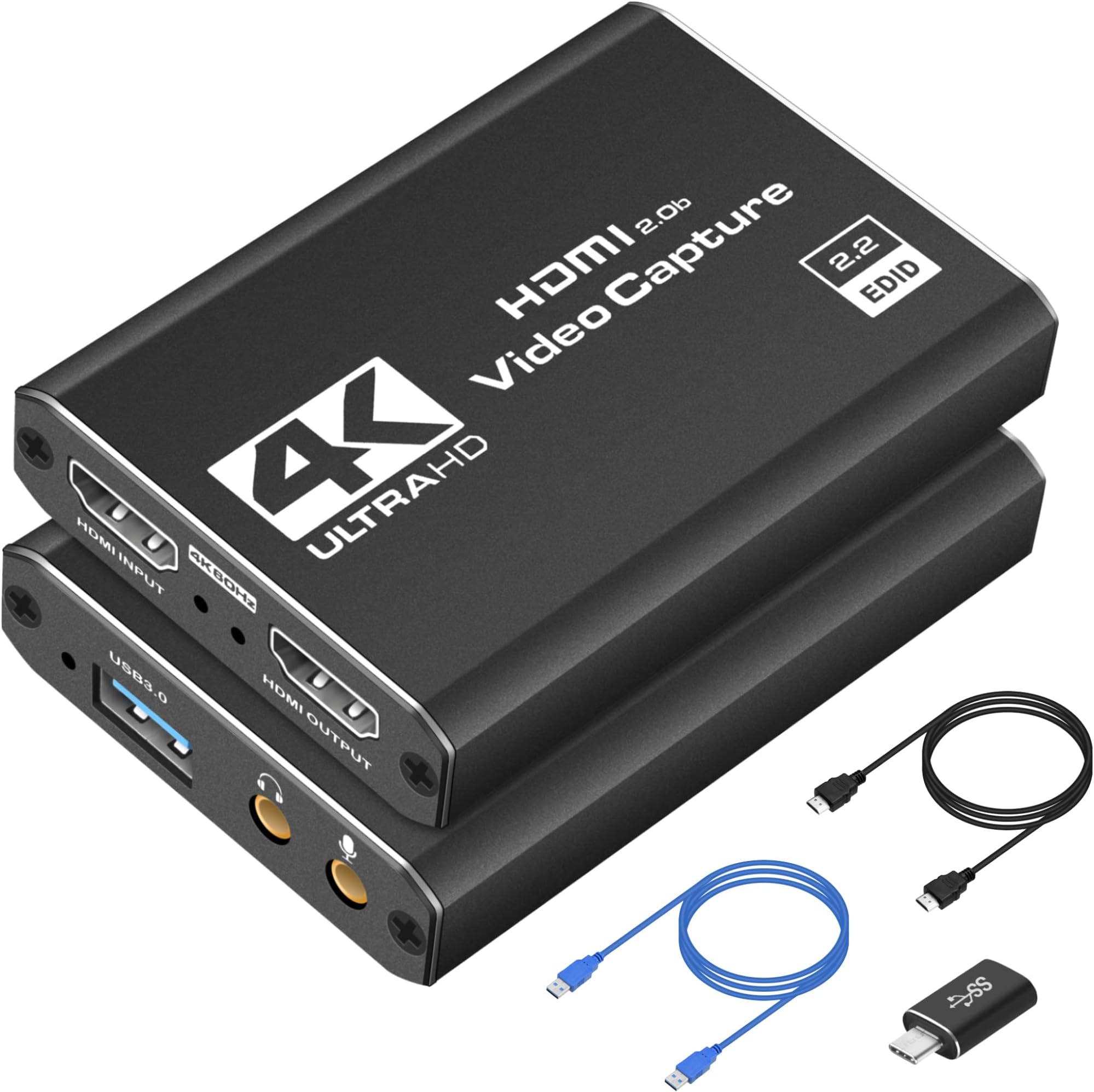
The 4K HDMI Capture Card USB 3.0 delivers crisp 1080p at 60FPS video capture with ultra-low latency, perfect for gamers and content creators. Featuring plug-and-play USB connectivity and broad compatibility with consoles and PCs, it supports HDMI loop-out for lag-free gameplay while streaming. Compact and portable, itโs designed for seamless, professional-quality streaming and recording on the go.


| ASIN | B0BWT35QW8 |
| AV Output | HDMI, YUY2 |
| Antenna Location | Video Recording |
| Best Sellers Rank | #1 in Internal TV Tuner & Video Capture Cards |
| Brand | Dcyfol |
| Built-In Media | Capture Card |
| Compatible Devices | Camera, Gaming Console, Personal Computer |
| Customer Reviews | 4.4 out of 5 stars 946 Reviews |
| Hardware Interface | USB |
| Item Weight | 0.21 Kilograms |
| Manufacturer | Dcyfol |
| Mfr Part Number | 022 |
| Minimum System Requirements | Compatible with Windows and Mac systems. Requires a USB 3.0 port. |
| Model Name | ozc3 |
| Model Number | ozc3 |
| Operating System | Windows, macOS |
| Other Special Features of the Product | 4K 60fps Capture, Plug and Play, Wide Compatibility, Real-time Preview, Built-in Microphone |
| Platform | Mac OS X, Windows |
| Recommended Uses For Product | Video Recording |
| Special Feature | 4K 60fps Capture, Plug and Play, Wide Compatibility, Real-time Preview, Built-in Microphone |
| UPC | 794969796035 |
| Unit Count | 1.0 Count |
| Video Capture Resolution | 1080p |
| Warranty Description | 1 |
K**A
Excellent value for money for streaming and gaming
I bought this capture card to stream my Nintendo Switch and PS5 gameplay, and I have been pleasantly surprised. For the price, it delivers a very solid image quality at a steady 1080p @ 60fps without any stuttering. The best part is that it is truly Plug & Play: I connected it to my PC with OBS and it recognized it instantlyโno complicated driver installation needed. The 'Loop Out' (HDMI output) works perfectly, allowing me to play on my main monitor with zero lag while the PC records the signal. It is compact, built with sturdy materials, and doesnโt overheat even after several hours of use. Highly recommended!
K**O
Reliable 4K HDMI Capture Card with Easy Setup
This HDMI 4K capture card works exactly as expected. Setup was quick and plug-and-play, and it connected smoothly to my computer without needing extra drivers. The video quality is sharp and stable, with low latency, making it great for streaming, recording gameplay, or capturing video from external devices. The build feels solid and the included cables are a nice bonus. Overall, a dependable and affordable option for anyone needing a simple capture solution.
Y**L
Extremely high high-quality and videographic autographic is amazing
I donโt usually leave reviews for products, but thatโs why I definitely had to the quality feels extremely nice. I thought it was gonna be some type of cheap plastic note. Itโs actually full metal has wait to it. The cables are pretty nice too, and donโt feel cheap at all. Now letโs get onto the real deal the streaming/recording. I use this for streaming and recording my content, I have a switch to and I use OBS which you need to install on your computer in order to get your content out of. Itโs free to use once you download OBS youโre gonna hit on the bottom ad and then youโre gonna add your capture card and then youโre gonna put a stream from USB port on the very top and the signal goes through very smoothly now to the quality. The video quality is amazing for the price. I mean itโs more than what I expected for this price the colors are actually very similar to the ones in the console. It just makes them a little not too bright like the console but thatโs normal. The audio is absolute perfect no crispy audio no echo audio issues pure audio amazing the set up was easy. The only thing was difficult to set up was the OBS to the capture card, but like I said, just follow my steps and you should do it. If you still donโt understand I donโt have trouble look up auditorium on YouTube and you should be running to streaming or capturing videos in no time itโs extremely easy to use. The resolution is amazing works well as intended. The durability feels like itโs gonna last very long as itโs made of metal and not one of those cheap plastic cover covers and the connectivity is super easy and once you have a pair to the OBS app on your computer it will pair automatically as soon as you plug the USB-C onto your computer and you have that open. It will automatically connect now to stream and record videos. You do have to click on your computer to start recording and then you just do anything that you want and then right before youโre done streaming or done finishing the game or recording. Make sure to stop the recording button and yeah, very easy to use extreme high-quality. Iโd recommend getting this 100%. Iโm definitely getting another one or unless you guys wanna send me another one I will gladly accept it and review it once again an amazing product definitely get this product. Also, I have a switch 2 and a paired perfectly. I was a little skeptical because there were some people here that were saying that it did not pair for me a pair perfectly and quickly. Iโm guessing they did not work out the OBS as itโs supposed to so make sure look up a tutorial on how to do that or follow my steps because if not, youโre just gonna get stuck on a black screen you need to activate it first, but it does work on the Nintendo switch 2
A**L
Easy Plug-and-Play Capture Card with Clean 1080p60 Video Quality
I bought this to capture gameplay and camera video for recording and streaming, and itโs been doing exactly what I need. Setup was simple. Plugged it into my computer, connected an HDMI source, and it showed up immediately as a capture device. No drivers, no complicated setup. It works with OBS and other common capture software without issues. Video quality looks clean at 1080p 60fps, which is perfect for streaming and YouTube recording. I havenโt noticed noticeable lag or audio sync problems, and passthrough works as expected so I can still play on my main display while capturing. The unit runs cool, feels solid for its size, and is easy to throw in a bag if you move between setups. For the price, it performs better than I expected. If you need a simple USB capture card for consoles, cameras, or PCs and donโt want to spend a lot, this is a solid choice.
M**D
Even with a MacBook and a Switch, it works on Discord and Twitch!
I bought this capture card to cast gameplay from my Nintendo Switch to Discord on my MacBook. This works perfectly well for its intended purpose and even gave me the confidence to stream on Twitch! The picture comes through clear and with no latency. I've since used it on other computers, such as my Predator Helios, and casted games like Jack Box with no problems. I am taking off a star for 2 reasons: 1, The connection in the USB3 port is a bit more fragile than I would like. On the off chance that the capture card does move or the connection is broken, the stream freezes and requires a reset to get it back up and running, reconnecting it does not work, you have to reset the input from either OBS or restart a discord stream. This isn't a problem if the capture card stays still, but its happened to me at least 5 times in the past year. 2, There are very minimal options for controlling the volume with this capture card. If you plug headphones into the capture card, it's VERY loud, and even if you have a volume adjuster on the headphones, it doesn't change. Sometimes the output into discord is very quiet and the only solution I've found so far is using obs Virtual camera and connecting my microphone to the capture card, which mean I can no longer control my microphone volume independently from my switch. Despite that, I think this is a great capture card. I was completely new to streaming when I bought this thing about a year ago. It's surprisingly durable and gives a vibrant, clear, picture with no delay! It works on mac and windows, and you really do just plug it in, set up your stream, and play! This is a wonderful tool for beginners and I highly recommend it for Mac users and switch players who are looking for a easy set up without extra buttons or fuss.
J**H
Tomodachi Lifesaver
Works as intended! No issues, and instructions were clear. Doesn't feel cheap and it's a really nice size.
L**S
Works great with windows PC and Switch 1
Haven't tested long term usage but it was basically plug and play to get it to let me stream my switch directly into OBS. Works great, instructions are pretty clear with lots of debugging options if you run into issues. I was able to test with using a virtual camera and discord and the sound and video didn't seem to suffer any distortion or loss of quality, so from my brief test, this is definitely going to help my setup.
G**E
Great, inexpensive capture card with a few caveats
I play often on my PS5, and my friends like to watch me play PS5 games on Discord. Since there is no way for PS5 to stream directly on Discord, I wanted a solution that would let me do this. I first tried Remote Play, which worked great, but then realized that I would need to connect my PS5 Controller to my computer, which would have me lose access to Dualsense features (haptic feedback, adaptive triggers, etc.). I then looked online and saw that you could use your PS5 controller wirelessly connected to your PS5 using a second account, so I tried this, but whenever I used Remote Play with this method there would be a really annoying notice on the top of my PS5 that wouldn't go away, stating that Remote Play was connected. So, I looked for a capture card to just go around the mess that was Remote Play. I found this capture card, and I can say that this is a pretty good purchase! Setup was really easy (just plug in the HDMI cable from your PS5 to the capture card, then your capture card to your monitor/TV), and I really appreciated the audio port on the capture card that let me connect my PS5 to my speakers. There is both audio and video capture on the capture card, but there was a small but noticeable audio delay so I just hooked up the card to my speakers with a cable. Just a couple things that make this purchase 4 stars instead of 5: 1) There is no way to adjust the volume from the capture card to my speakers. It is a bit on the louder side, and since I do most of my gaming from the evening to the night, I would prefer the volume to be adjustable. I can just adjust the volume on my speakers, but since they are connected to my PC as well when I'm listening to music or Youtube it affects the entire audio setup as a whole. 2) This capture card doesn't support HDR passthrough, which is a minor but notable setback. My PS5 to my monitor directly has HDR support, but through the capture card does not. Again, not a huge deal but definitely noticeable. All in all, for $30 or so this is a great deal. It does exactly what I need to do (which is get video and audio to OBS) and there aren't any huge delays with either video or audio. The instructions to setup everything on the product page were simple and nice (though I do wish they were included with the packaging) but for $30 you really cannot go wrong with this. If you want to a professional streaming setup, I would probably go with an Elgato, but for use cases like this, it's perfect. EDIT: I just figured out that you can stream the audio directly from your computer to your headphones/speakers, and you can adjust the volume in Windows settings. This is up to 5 stars!
Trustpilot
2 months ago
3 days ago