Desertcart purchases this item on your behalf and handles shipping, customs, and support to Croatia.
💻 Double your storage, halve your wait time!
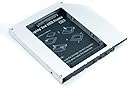
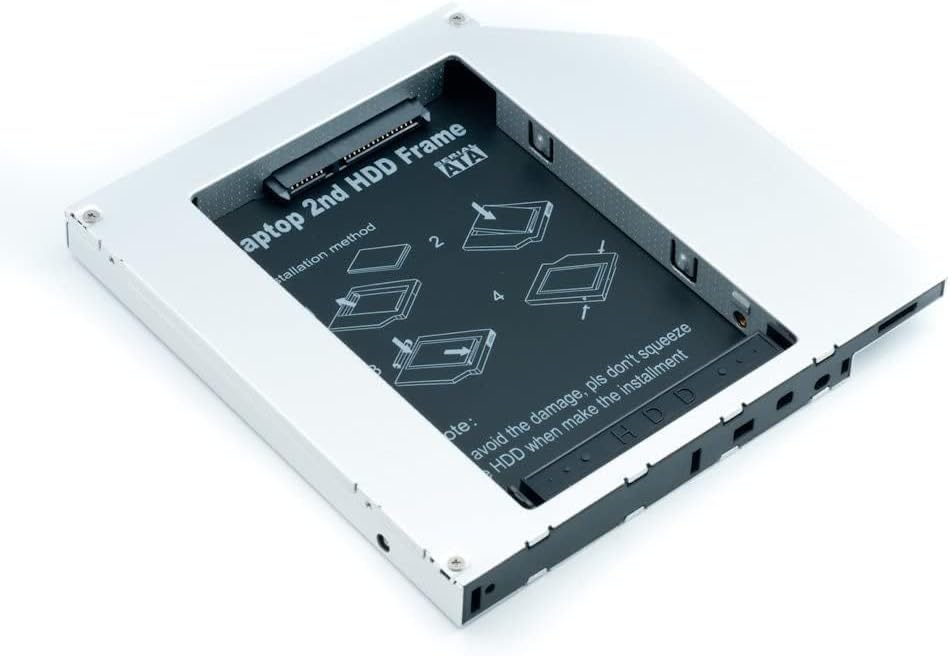
The QUMOX 2nd HDD SSD DVD Bay Caddy Adapter is a universal SATA-to-SATA enclosure designed to replace your laptop's optical drive with a second 2.5" HDD or SSD. Crafted from lightweight aluminum for durability and cooling, it supports hot swapping and requires no additional cables or software. Compatible with all major laptop brands, it offers an easy, tool-assisted installation to boost your laptop’s storage capacity and performance instantly.


| ASIN | B00C94HQV6 |
| Best Sellers Rank | 60,502 in Computers & Accessories ( See Top 100 in Computers & Accessories ) 271 in Enclosures |
| Brand | Qumox |
| Brand Name | Qumox |
| Colour | white |
| Compatible Devices | Laptop |
| Country of Origin | China |
| Customer Reviews | 4.3 out of 5 stars 987 Reviews |
| Enclosure Material | Plastic |
| Hardware Interface | Solid State Drive |
| Hardware Platform | Laptop |
| Hardware interface | Solid State Drive |
| Hardware platform | Laptop |
| Item Weight | 100 Grams |
| Item weight | 100 Grams |
| Manufacturer | QUMOX |
| Manufacturer Part Number | QUMOX |
| Material | Plastic |
| Model Number | QUMOX |
| Network Connectivity Technology | SATA |
| Supported Devices Quantity | 1 |
| The Standard Size of the Hard Drive or the Bay the Hard Drive Is Compatible With (in inches) | 2.5 Inches |
| Unit Count | 1.0 count |
M**I
Works Great
After months of using the device, I am very happy with it. It is easy to install (it even has a small screwdriver integrated into itself), it fits perfectly. And it works very well, no issues whatsoever.
R**H
WARNING: High CPU usage in Idle state
This product is great, HOWEVER.... If you were like me and you installed as it is, you may or may have not noticed in Task Manager that there are 2 processes called "System" and "System Interrupts" that are using anywhere between 10-20% CPU.. ALL THE TIME.. I spent HOURS trying to figure this out until I finally found the solution, so I'll spare you more hours and tell you that the solution is a simple flick of a switch located on the caddy itself, right next to the SATA connector (see photo) So test if you have the problem like me, close all running applications, and watch the Task Manager processes for a mintue and see if you have high CPU usage from System and Interrupts. You might not have a problem depending on the brand of your laptop. If you do, then you have to flip the switch on the caddy. I think there is 3 positions, move it once, if it works you're good to go, if not, try the last position. P.s If you are wondering why, it's because the BIOS of your laptop is constantly sending a signal to the CPU that your DVD tray is open, and since the caddy has no tray and you can't close it, this signal never ends.
M**A
Ensure compatibility
Incompatible with my pc - returned to Amazon who refunded without fuss. Item looked well made and was a fair price
T**R
Easy to install
Does what he says on the team
P**R
reduces wide SATA power to 2-wires
It fits into my Dell Optiplex 7010 SFF (Small Form Factor), which got delivered with one DVD drive and 2.5" SSD (inserted with special tray into the slot for 3.5" drive). I wanted to add another big disk, and did not quite needed the DVD anymore (all boots from USB these days just fine). My idea - remove DVD, move the 2.5" drive into the slot for DVD, use the freed space to insert a new 3.5" rotational hard drive. I got advised to just use the double side tape for the 2.5" drive. But I wanted to do it neatly and so the dust does not get in. After some tries and errors, I ordered this one, and it had the correct size (there are also "slim optical drive" versions with 9-and-something inch of height - this one is higher and properly fits into my slot). Mind you, this is advertised as for "laptops", but it fits nicely into Dell Optiplex workstation. So all worked, but I have 3 problems with it: 1) blanking plate is not provided - you either have a hole for all dust to be sucked in, or (as I did), transplant the faceplate from your DVD drive. It says "DVD" on the front now, and has the eject button, which does nothing :) 2) the SATA connector inside the caddy is soldered at a slight angle - it's not perfectly leveled. This look a little bit odd, but it's the SSD, platers don't rotate, so perfect angle does not matter that much. I saw one of the reviewers complained about it (and even provided photos) 3) the SATA connector inside converts the wide SATA power plug into the small one (because it's meant to be inserted into a laptop, which probably has only one power cord for the power connection - or there is no cord at all. Well, in my workstation, I wanted to use the 2nd wide SATA power connector, but I cannot. I would appreciate if it had BOTH, or at least give a pass-through to the physical drive inside, so I can reach into there with appropriately longer cable. Apparently the wider power cable is better for the disk and power saving. I gave up on the idea of cutting a hole in the caddy. So summarizing - I spend almost 10 quid on something that is not perfect anyway, and using double side tape could give you the same effect. Subtracting one star for it. Otherwise I'm fine with the purchase.
S**.
Don't buy it.. cheaply made!
Cheaply made .. not what's it's advertising.. don't recommend. Be aware of Sharp edges and some plastic parts that's doesn't fit
A**R
Very handy item
This functions very well as a receptacle for a second hdd used to store data in my Dell Latitude e5400. Couldn't get it to boot from this drive, but I think that's an issue with the laptop in question, not the caddy. Was easy to install and remove, but removal might prove rather more difficult in some laptops because the caddy has no release mechanism built in. On the whole I'm very satisfied with it at the price.
L**B
Does the job, no drama
This worked just as I hoped! It was easy to install and the way the screwdriver supplied tucks away when it's installed is a well thought out feature. For the money, it worked well for me. I did see some that were a few pence cheaper, but mine was delivered the next working day. You cannot complain, it works as expected in my Gigabyte laptop.
N**S
Great
Works perfectly to fit an SSD into my 2U server.
M**6
Parfait, montage facile pour qui s'y connait
Utilisé pour monter le disque dur d'origine dans la baie optique d'un laptop, et remplacer celui-ci par un SSD. Après démontage sur lecteur DVD sur un Asus X70IO, il faut récupérer les montant métalliques fixés à l'aide de toutes petites vis sur le lecteur d'origine afin de les revisser sur ce caddy aux trous standards, comme ça la fixation dans le laptop est parfait. Il en va de même pour la façade avant du lecteur optique qu'il faut détacher et reclipser sur ce caddy pour l'estétique. Par contre attention, pas de led disponible pour clignoter lors de l'accès du disque dans le caddy.
P**X
Ottimo prodotto, recensione per dettagli
Ho acquistato questo caddy insieme a un SSD Samsung per un ASUS N53SN e il montaggio è stato abbastanza semplice, il caddy è leggero, ma robusto e si adatta perfettamente alla guida del notebook. Ecco cosa ho fatto per montarlo al posto del masterizzatore e lettore dvd/blue-ray. Per sostituirlo è necessario, oltre al cacciavitino fornito insieme al caddy, anche un cacciavite a croce (o a stella) un po' più grande , usato di solito per smontare i computer e un cacciavite a taglio piccolo, tipo uno di questi . Ecco i passaggi: 1)Spegnere il pc e staccarlo da qualsiasi alimentazione (alimentatore e batteria) per evitare qualsiasi corto/scarica che potrebbe danneggiare i circuiti 2)Aprire il pc come se si volesse accenderlo. 3)Sulla tastiera, in alto, ci sono 5 linguette (sopra ESC, tra F4 e F5, F9, tasto STAMP e tasto FINE) che permettono di toglierla: premetele con il cacciavite a taglio piccolo e togliete la tastiera (ossia appoggiatela sopra il touchpad, non è necessario staccare i connettori dalla scheda madre) 4)Tolta la tastiera, circa dove c'erano i tasti per "è", "ò" e "à" ci sono 3 viti disposte in verticale, basta svitare, con il cacciavite a croce, la vite centrale, ora il lettore DVD è staccato. 5)Con delicatezza, tirate fuori il lettore (personalmente è bastato tirarlo con le dita ed è uscito) 6)Svitate le 4 viti che fanno da guida ad un carrello a L e le 2 viti che tengono il supporto per la vite smontata nel punto 4 (con il cacciavite fornito insieme al caddy) e rimontarle nel caddy (questa operazione è stata difficoltosa perché i buchi non erano perfettamente centrati). 7) togliete il frontalino del masterizzatore: .. a)aprite il lettore inserendo uno spillo nel buco utilizzato per togliere i cd forzatamente e spingendo un po' (si trova a destra del pulsante di apertura) .. b)spingete il cacciavite a taglio sulle 2 clip poste ai lati del frontalino, quindi questo vi verrà fuori .. c) chiudete il masterizzatore 8) Inserite il frontalino sul caddy facendo attenzione a inserire le tre plastichette nei buchi del caddy (c'è un solo verso, quindi non vi sbaglierete :) ) 9)inserite il caddy nel pc e chiudete la vite di fissaggio 10) richiudete la tastiera inserendo prima il lato della barra spaziatrice, in modo che le 3 linguette si inseriscano e poi premete nella parte alta della tastiera per ribloccarla Buon 2° HDD!
J**N
Reliable Drive Bay - Runs my Operating System without issue
Product works exactly as intended, and has been reliable with no outages running an Operating System on an SSD from this drive bay.
S**K
Comprovado con dos discos.
A mi me funciona a la perfección en mi Dell XPS 15 L501X. Encaja a la perfección con el embellecedor original, aunque sacarlo ya es más complicado puesto que tienes miedo de romper alguna pestañita (puedes ayudar a las laterales, pero la central yo he tenido que aplicar fuerza y rezar para que no se rompiera). Probado con dos discos viejunos de PS3 de 120 y 60 GB. El de 120 llega a velocidades de 80MBs y el de 60 a 45MBs. (el de 60 es una buena m****). Evidentemente eso es cosa del puerto SATA que tenga el ordenador ahí para el lector de CDs, pero en el caso de mi Dell ya véis que las velocidades son muy superiores a las que se usan para grabar DVDs. Ya me gustaría tener un SSD para confirmar que en el caso de ese modelo de portátil la velocidad que hay en el puerto del lector óptico es la máxima posible del SSD. Cosas incluidas: un tope, metes el HDD plano (nada de intentar conectarlo inclinado), y lo empujas contra las conexiones para que encaje, luego en el hueco que ha quedado detrás se pone un tope que ayudará amantenerlo completamente sujeto. Y por si esto fuera poco viene incluido un destornillador mini con un minitornillo ya medio entrado para sujetarlo aun mejor si cabe. Fantástico. Por cierto, por ahí leí que enviaba desde HongKong. La verdad ni me lo creo, envio brutalmente rápido!!
Trustpilot
3 weeks ago
2 weeks ago