Buy anything from 5,000+ international stores. One checkout price. No surprise fees. Join 2M+ shoppers on Desertcart.
Desertcart purchases this item on your behalf and handles shipping, customs, and support to Croatia.
🎞️ Turn nostalgia into now — digitize your memories with zero fuss!
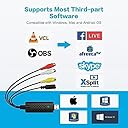
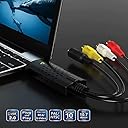
The VIXLW USB Video Capture Card converts analog RCA and S-Video signals from VHS, Mini DV, Hi8, and other legacy devices into HD 720P digital video with synchronized audio. Compatible with Mac, Windows, and Linux, it features plug-and-play installation requiring no external power or drivers. Its advanced signal processing ensures vibrant, detailed video capture, making it an affordable, compact, and reliable tool for preserving and editing vintage footage.


| ASIN | B0CB6BW6X4 |
| Best Sellers Rank | #7 in Video Converters |
| Brand | VIXLW |
| Brand Name | VIXLW |
| Compatible Devices | Camcorder, Personal Computer, Television |
| Customer Reviews | 4.4 out of 5 stars 1,061 Reviews |
| Included Components | Capture Card |
| Interface | USB |
| Interface Type | USB |
| Item Weight | 0.09 Kilograms |
| Manufacturer | VIXLW |
| Model | BR116 |
| Part Number | BR116 |
| Smart Home Compatibility | Not Smart Home Compatible |
| UPC | 797427861900 |
| Unit Count | 1.0 Count |
M**G
Works flawlessly with Mirroless Camera!
Are you looking for a substitute for the Elgato Cam link 4k? This is it! I have "TWO" Elgato 4K Camlink's that I purchase over the course of almost a 2 year period, and sadly both stopped working. I've tried multiple times to get my Elgato Cam link 4K to work recently without success. I barely even used it, and to me the price point is way over the top! You can purchase the VIXLW Cam Link 4K TWICE and still be around the same price for 1 Elgato Cam link. I was able to connect my Mirrorless Camera without any issue instantly, and I used OBS as a Source. Also a nice little surprise was that it ALSO came with an HDMI to HDMI cord! I'm very happy with that...what a deal!
R**Z
Quit working after few days
It quit working in less than a week! It worked fine for few days and then I couldn't get it to work with OBS studio, No matter what... returned
A**R
Easiest Setup Ever
My old setup for using a DSLR as a webcam felt like a house of cards. One app update, one cable shift, and suddenly everything was FUBAR. This makes it insanely easy to use your DSLR as a webcam. You plug HDMI from your camera into the device, plug the USB 3.0 into your computer, and it just shows up as a webcam. That’s it. Easy as pie. I had it connected to my Nikon and running through OBS and Zoom within minutes without any hiccups. I was prepared for recognition issues because my camera’s pretty old, but I had nothing to troubleshoot. It just appeared and worked flawlessly. Technically, this is pulling an HDMI signal and converting it into a UVC webcam feed over USB 3.0, which is why it plays nicely with pretty much anything. It supports up to 4K input, but realistically you’ll likely be using 1080p60 for most streaming or calls, which is where it feels the most consistent and smooth. Latency’s low enough it doesn’t feel weird talking on camera. I didn’t have any noticeable delay between what I was doing and what showed up on screen. The difference in image quality compared to a standard webcam isn’t subtle. Better lens, better sensor, better control over lighting. You immediately look super professional. The only thing to keep in mind is that your camera becomes the limiting factor. Battery life, overheating, clean HDMI output, etc. This device is only as good as your equipment.
D**!
doesn’t work
Says it works on mac but it’s not being detected at all through multiple usb ports. the green light comes on but that’s it. very disappointed.
A**O
Good
Funciona bien
A**R
Doesn't work as advertised.
The best that I can say is that it was cheap to buy, apparently cheap to make as well. It's not working for me, I managed to get lousy audio recorded from my Hi8 tape but no video at all. Since it will cost me more in gas to go to the UPS store to return it I'm going to save time and gas and toss it in the trash. I've successfully used other video capture devices so I'm not new to this. Hopefully the one I got is defective and everyone else will have better luck but as for me I'll be buying another brand.
J**T
Versatile with good quality and easy set up.
I got this capture card to use my Sony mirrorless camera as a webcam for video calls and streaming. The built-in webcam on my laptop wasn't producing professional quality video, and I wanted better image quality for client meetings and occasional streaming. Setup was genuinely plug-and-play as advertised. I connected my camera's HDMI output to the Cam Link, plugged the Cam Link into a USB 3.0 port on my computer, and it was immediately recognized as a webcam device. No driver installation, no software configuration, just instant functionality. This simplicity made getting started effortless. Compatibility with my Sony a6400 camera worked perfectly. The camera outputs clean HDMI without overlays, which the Cam Link captures and presents to my computer as a standard webcam input. Video conferencing apps like Zoom, Teams, and Google Meet all recognized the Cam Link as an available camera source. Image quality compared to built-in webcams is dramatically superior. The larger sensor and better lens on my camera produce noticeably sharper, more detailed video with better color and dynamic range. In video calls, the professional image quality makes a significant difference in how I present to clients. Streaming at 1080p60 through OBS works smoothly. The Cam Link captures my camera output reliably without dropped frames or sync issues. For recording and streaming, having 1080p at 60fps produces smooth professional-looking content. The 4K capability is there for higher resolution needs, though my current camera maxes at 4K30. Latency is impressively low. The delay between real action and what appears on screen is minimal, maybe 50-100 milliseconds estimated. This near-instant transmission makes the setup feel natural during video calls without the awkward delay some capture devices introduce. For streaming gaming content or live interactions, this low latency matters. USB 3.0 connection provides adequate bandwidth for high-quality video. I'm using a USB 3.0 port on my laptop without issues. The device draws power from USB, eliminating the need for separate power supplies. This bus-powered design keeps the setup simple. The compact size is convenient for portability. The Cam Link is small enough to fit in my laptop bag without taking significant space. For traveling or remote work setups, the portability makes bringing professional video quality practical. Heat generation is minimal. The device gets slightly warm during extended use but nothing concerning. No thermal throttling or performance degradation occurs during multi-hour sessions. Audio handling through the HDMI connection works when my camera has audio capabilities. However, I typically use a separate USB microphone for better audio quality, and routing audio from multiple sources works fine in OBS and other software. Reliability over six weeks of regular use has been solid. The Cam Link functions consistently without crashes or connection drops. Plugging and unplugging works reliably without needing restarts or troubleshooting. Compatibility across different software has been seamless. Beyond video conferencing, the Cam Link works with streaming software like OBS Studio and XSplit. Any application that can use a webcam input recognizes the Cam Link properly. Build quality feels adequate for a device that stays plugged in. The housing is plastic but doesn't feel flimsy. The HDMI and USB connections are solid without excessive play. Nothing suggests premature failure with normal use. Limitations include reliance on camera battery or AC power. Using a camera as a webcam drains battery relatively quickly. I use a dummy battery with AC adapter to power my camera continuously during extended sessions. This additional equipment isn't included but is necessary for serious use. The 4K60 capability is future-proof even though my current camera doesn't utilize it fully. When upgrading cameras, the Cam Link will handle higher resolution outputs. Value compared to lower-end capture cards is justified by the 4K capability, low latency, and reliable performance. Budget capture cards often have latency issues or resolution limitations. This mid-range option delivers professional functionality without extreme cost. One consideration is that camera overheating can occur during extended use. My camera isn't designed for continuous recording and gets warm during long sessions. Managing camera heat limits is necessary beyond what the Cam Link controls. After six weeks of using my camera as a webcam for video calls and occasional streaming, this capture card has elevated my video quality significantly. The plug-and-play simplicity, low latency, and reliable 1080p60 performance make professional video practical. For content creators, remote professionals, or anyone wanting superior webcam quality using existing cameras, this delivers the functionality to make it work seamlessly.
R**N
very POOR quality VIDEO and AUDIO playback
NOT SUITABLE FOR DIGITIZING VIDEO CASSETTES IN ANY DECENT QUALITY Bought this to use for digitizing old video cassettes, set up was as easy as you can imagine, just plug and play. Unfortunately the device is very poor quality and playback has a significant degradation of video quality and a constant loud static noise. The cables are also very positional and the quality of both audio and video varies drastically based on if the device is near any electronics (which obviously it will be near a computer) and is impossible to totally shield despite my best efforts. There is also significant audio desynchronization from the video using this card. Overall terrible purchase and returned it.
J**S
Awesome! No issues.
Worked perfectly to digitize a bunch of old VHS tapes. For anyone reading, I used OBS, and had to play around with resolution and framerate settings to get it to record properly (720x576 or 720x480, and 29.97 NTSC).
L**N
Reasonable with Quality
This is best Reasonable Product with best quality This works well with Windows 10 or higher And also this works with OBS Studio freely A Cd Driver available inside to Download its own software Best at cheap price
F**O
el costo beneficio y facilidad de uso
Funcionó perfecto en mi iMac con Mac OS X El Capitan. Use el programa OBS y lo configure en 2 minutos para capturar digital mis videos de cassettes VHS. Excelente compra!
V**R
Plug a
Does what it should and is plug and play
J**E
Works great
found some old Camcorder tapes and this has meant that I can download them digitally - brilliant
Trustpilot
2 days ago
3 weeks ago