Desertcart purchases this item on your behalf and handles shipping, customs, and support to Croatia.
🎬 Upgrade your retro gear to HD glory—because classics deserve the spotlight!
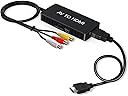
The VIXLW RCA to HDMI Converter effortlessly converts analog composite RCA signals into vibrant 1080P HDMI output at 60Hz, supporting multiple TV standards (PAL, NTSC, SECAM). Compatible with a wide range of legacy devices including gaming consoles (PS1-PS3, Xbox, Wii), VHS players, and DVD players, it offers a plug-and-play experience powered via USB. Its compact design and included cables make it the perfect bridge to modern HD displays, ensuring your vintage media stays relevant and visually stunning.


| Asin | B0C2T9P2VW |
| Best Sellers Rank | 818 in Electronics & Photo (See Top 100 in Electronics & Photo) 4 in Video Converters |
| Brand Name | VIXLW |
| Colour | Black |
| Compatible Devices | Gaming Console, MP3 Player, Monitor |
| Connector Type | RCA, HDMI |
| Current Rating | 1 Amps |
| Customer Reviews | 4.2 4.2 out of 5 stars (3,186) 4.2 out of 5 stars |
| Input Voltage | 5 Volts |
| Item Dimensions | 7 x 4 x 1 centimetres |
| Manufacturer | VIXLW |
| Manufacturer Part Number | V321A |
| Model Number | V321A |
| Nominal Power | 5 Watts |
| Number Of Items | 1 |
| Number Of Ports | 1 |
| Package Quantity | 1 |
| Power Plug Type | Type A - 2 pin (North American) |
| Product Finish Type | Matte |
| Specific Uses For Product | Connecting older devices with RCA composite outputs to HDMI displays |
| Unit Count | 1.0 count |
| Upc | 797427862068 |
| Warranty Type | Limited |
User
3 Tips for using with OBS software
Worked well for what I wanted, just digitising old family VHS-C videos. I used it with the OBS software (free download). Three points to note. 1) The instructions as written (or as I understood them) will leave you with a problem with the aspect ratio; everyone will look wider than they should :-). You can fiddle around in the user interface to get the correct values 2) Make sure to mute one of audio channels to avoid echo and be careful which one you mute or you will wind up with it being out-of-synch with the video 3) On start-up it would often flicker because the video didn't synchronise properly. I always found it worked ok if I switched the input to local camera and then back to the video capture card.
User
Worked a Treat! Easily converted my VHS tapes to digital files.
My conversion set up comprised a Windows 11 based PC, a Toshiba VHS player and the DigitNow media converter (which included all of the neccessary cables and SCART plugs in the box.)I had a few VHS cassettes that I needed to convert so that I could add them to a USB stick and watch them on my TV. I could then, finally, send my VHS player for scrap (it had been stored under the stairs for several years just waiting for me to transfer the last of my tapes).I used this device and it worked well. For my initial attempts at digitising my tapes I tried using the PotPlayer software but despite the clear instructions provided about how to configure everything I found it a little unintuitive so I swapped to using the OBS software. That was much better and easier to use, much more intutive. Your mileage might vary, as they say.All of the VHS tapes that I wanted to convert were easily captured and digitised although one tape was troublesome. To remedy that I tried fully winding the tape to the end at which point it snapped. I was able to repair it and rewind to the beginning but the conversion was troubled by frames jerking around - that is why, after the previous successful and trouble free captures, I put it down to detrioration of the tape itself. Fortunately, the content of that particular tape was not too important.As far as the conversion device is concerned, it did exactly what it "said on the tin."
User
It worked for me! (Windows 11 laptop with Scart only output on VHS player).
After frustration with another capture device which was not recognised by my Windows 11 laptop and Scart output only VHS player I was please to find out that connecting this device with the supplied Scart to Scart cable to my VHS player then using the supplied mini USB to USB cable to connect my Windows 11 laptop worked 1st time when using the free OBS capture software from the Internet.It is a very basic unit so the quality of the recording is very much dependent on the quality of the VHS your capturing, but it works and I can finally get around to transfering my family memories to a digital format that otherrs can view.One downside is that the video out signal is either through the Scart connection or the RCA ports (cables provided for both) and my TV is HDMI only (as most will be now). So without another HDMI adapter I can only view via the computer. However once captured it is easy to save to a USB stick or drive and connect to the any modern TV with a USB port).
User
Great product.
Great little product. Works perfectly and did the job well. Transferred 22 vhs c tapes. Saved me a tonne of money doing it myself.
User
worked brilliantly for 3 weeks then developed a fault
Brilliant - works perfectly and comes complete with all necessary cables. I can now use my Wii with my new television which does not have av input connections. Update - stopped working after 3 weeks !
User
Works well and easy to set up.
I didn't try the supplied software. Just downloaded OBS Studio (excellent free product)_, plugged this into my pc via supplied usb cable, and VHS player (via scart)and was capturing from old vs tapes in minutes. Then edit with DaVinci Resolve. Has been 100% reliable so far.
User
Sound was a fiddly thing to capture
Eventually got a picture through using SCART but no sound. OBS software tried. Had to route sound into my amp direct via phono leads. After a good few hours got it working.
User
Lifesaver for retrieving my old DV Tapes Reels!
I have lots of old DV tapes reels from begone eras but is not able to see them due to rapid tech advancement but found this beauty on Amazon and purchased it hoping to access this old vids clips as i tried to several times in the past but just could not watch the old DV clips as not compatible to my mini camera! What a great purchase! Its easy to use, just can be plugged on hdmi to my TV although video quality is not great (720kbph) as you expect from an old tech. Build quality is ok, functionality is good, great value for money but the best above all is to be able to watch your old dv vids on the big screen, bringing back good old days of fun, memories and adventure! Highly recommended.
User
Commodore 64
Werkt perfect op een retro computer.
User
Gute Ware
Es funktioniert einwandfrei.
User
Quality bad
Rubbish for my Xbox keeps cutting out and picture and sound quality bad
User
Devolución por qué no funciona
User
Fait son taf
Livre rapidement meme qu au magasin mais bcp moins cher merci
Trustpilot
1 day ago
2 weeks ago