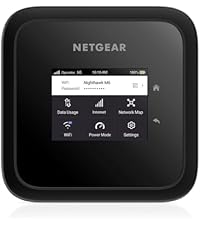
🌍 Stay connected anywhere, anytime — the world’s fastest WiFi in your pocket!
The NETGEAR Nighthawk M6 MR6150 is a cutting-edge 5G WiFi 6 mobile hotspot router delivering blazing speeds up to 2.5Gbps and supporting up to 32 devices simultaneously. Unlocked for international roaming in over 125 countries, it offers secure, private internet with extended coverage up to 1,000 sq. ft. when plugged in. Featuring a user-friendly 2.4” touchscreen and a powerful 13-hour battery, it’s the ultimate travel companion for professionals and families seeking reliable, high-speed connectivity on the go.


| ASIN | B01MSMAC9D |
| Are Batteries Included | Yes |
| Batteries | 1 Lithium Ion batteries required. (included) |
| Best Sellers Rank | 44,769 in Computers & Accessories ( See Top 100 in Computers & Accessories ) 333 in Routers |
| Brand | NETGEAR |
| Colour | Black |
| Computer Memory Type | DIMM |
| Customer Reviews | 3.8 3.8 out of 5 stars (1,181) |
| Date First Available | 8 Jun. 2023 |
| Delivery information | We cannot deliver certain products outside mainland UK ( Details ). We will only be able to confirm if this product can be delivered to your chosen address when you enter your delivery address at checkout. |
| Guaranteed software updates until | unknown |
| Item Weight | 250 g |
| Item model number | MR6150-100EUS |
| Lithium Battery Energy Content | 13 Watt Hours |
| Lithium Battery Packaging | Batteries contained in equipment |
| Lithium Battery Weight | 0.4 Kilograms |
| Manufacturer | NETGEAR |
| Number Of Lithium Ion Cells | 1 |
| Operating System | [Proprietary Netgear Firmware] |
| Product Dimensions | 10.5 x 10.5 x 2.15 cm; 250 g |
| Series | MR6150-100EUS |
| Voltage | 12 Volts (DC) |
| Wireless Type | 802.11ax |
C**E
Solid replacement for BT Infinity Homehub
I'd lately been experiencing wireless disconnection issues with my BT Homehub 3 (on a BT Infinity 2 package); either I couldn't get on the Internet at all, or it would kick me off after five minutes or so. No amount of tinkering with the router's settings would fix this. I changed everything, from using alternate channels to assigning manual IP addresses - only a tethered Ethernet cable worked. As it affected only some devices, I tested them out on friends' wi-fi and they worked as expected. With no BT line faults in my area, I determined the router was therefore at fault. I'd had Netgear routers before and liked their ease of use and solid build. However, I wasn't quite prepared for the size of this beast. The R7000 has up to twelve LEDs on the front and its overall design looks like the offspring of a Klingon cruiser and Stealth bomber. My Infinity connection means I still need the BT Openreach box with its Gigabit Ethernet cable, but within the Netgear's online settings, there is the facility to disable many of the LEDs leaving just the power indicator lit. (I haven't done this as I find it an excellent means of low-key lighting in my hallway at night.) Set-up took no more than a few minutes. Although at first I couldn't see how to attach and rotate additional aerials with the first one 'in the way', I found that they each pivot on both axes. If anyone else is changing routers with a BT connection, the username is '[email protected]' and the password is 'bt'. I used the Netgear Genie wizard, which has everything logically laid out on the screen, but obviously the first thing I did - once up and running - was to change the default administrator's password. Both 2.4 GHz and 5 GHz connections are listed in the network scan (if you make them visible) but the 5 GHz option didn't appear for a few devices, notably my two smart TVs, so I guess it depends upon the technology within each product. The router also has a QoS (Quality of Service) setting, which gives priority to downstream or upstream, depending on whether you respectively stream video content or do online gaming for the most part. I'm very happy with the reliability and speed delivered by the R7000; it's now been 24 hours since set-up and the connection has been rock solid. There is no overnight power save option as there was with the Homehub, but I can live with that.
A**R
Netgear failed it - again
I bought this router mainly to extend wifi coverage in my home. I have a main CISCO router supplied by the telco operator. Before this one I used a couple of cheap (30€) wifi-extender that used SSID/password and worked more or less fine but for the bandwidth and the tendecy to break down early. So I decided to move on to something more robust. Big mistake. Second time I buy a Netgear product, second time they don't do what's reasonably expected of them. Returned after three days of wrestling with the beast. The problem is this: you can either use proper WiFi extension (WDS - Wireless Distribution Standard) or bridging. The first method requires the main router to have it implemented too, and lacks security and reliability (google it): you have to hack around with MAC and so forth, but can't use both 2.4 and 5 Ghz at the same time. The second method uses SSID and password, and on this routher is labeled as "bridging": it tuns out to be completely useless, since once you set up the wifi bridging with the main router, you can only connect with a cable. Yes, I bought a "wifi estender" enabled device that only accepts wired connection after wifi bridging is enabled. Very useful for mobile phones and the like... The knowledge base on Netgear site is pitiful since it fails to mention about setting up MAC handshake on the main router for the first methond, and fails to mention as well that wifi is off when bridging - which I discovered the hard way and then was confirmed on the net too. Wifi coverage was not better than the cheaper 2.4 G CISCO router too, so I consider this unit a complete waste of my money and my time - as many others did before me. It only works well under average circumstances - e.g. no thick concrete walls - and with a standard wired internet connection. All other usages as far as I can tell are impossible.
S**C
Always original product in good price
A**N
Glitchy firmware. May restart by itself of even shut down. May go on 5G mode and provide zero traffic. May keep searching for tge network where network is existing (mobile phone pick strong signal for the same operator.) Regretted the purchase
D**S
Après 8 mois d’utilisation je suis assez déçu du produit au vu du prix. Il y a plein de fonctionnalités qui marchottent. Quand on active le wifi bi-bande 2,4 GHz et 5 GHz, on finit par perdre l’accès à internet depuis les appareils connectés en wifi. Ceux connectés en Ethernet continuent d’avoir accès à Internet. Le mode délestage wifi ne se reconnecte pas automatiquement au point d’accès quand il revient à portée du routeur. En gros en utilisation en fixe à la place d’une box, il est à éviter. Pour une utilisation nomade, où on l’allume de manière ponctuelle ça peut le faire. Et quasiment aucune mise à jour du firmware. Dommage
B**N
I bought this router as I was after a fast reliable router with range. The router promised all of this. I am on NBN to the premises. When it works, it works great, really fast download and upload speeds. But it will just stop working multiple times a day, it requires a reboot every time. When a new device is added, need to reboot. It is weird as when I logon to the router web browser interface it says that we have good internet connection, but no actual internet. I emailed support and it takes about 2 days to get a response. I called the support number instead. I was put in a 10 second loop of hold music and my call is important etc for 50 mins. I was then put on to a terrible voip connection with a support person asking me to reset the router. After waiting for 10 minutes for the internet to connect I mentioned that I would probably have to log in to my ISP. This was knocked back a number of times. I was then put on hold for 10 minutes. I decided to login to my ISP while on hold. When they got back to me I said that I am sure that the internet connection wasn't working because of the login, because now I have a connection, I was promptly hung up on. 1hour 40 minutes. No solution. Hung up on. So pissed off! I called back again the next day and spoke with someone, they asked me to change a few things. Still no luck. Still constant drop outs. I do not recommend this product, or the support. So bad.
V**K
Bought this R7000 to replace a TPLink AC1200 type router which gave enough problems for me to look at an upgrade. So far so good. Prompt delivery, neat packaging, very easy to setup, register and activate warranty with Netgear. Nighthawk app is handy. Router hardware is rigid. Good quality eth. cable, power adapter. I have two laptops, four mobile phones and one TV on wireless plus one wired NAS - out of these, three devices would constantly stream video and a laptop on VPN all the time. Haven't had any slowness complaint, disconnects or streaming issues so far. All are on 2.4Ghz. I live in a ~1000 sq. feet apt. I still haven't got a chance to play with Dynamic QoS and Cloud storage.
Trustpilot
1 month ago
2 months ago