Buy anything from 5,000+ international stores. One checkout price. No surprise fees. Join 2M+ shoppers on Desertcart.
Desertcart purchases this item on your behalf and handles shipping, customs, and support to Croatia.
🚀 Elevate your network game with silent, lightning-fast 10GbE power!
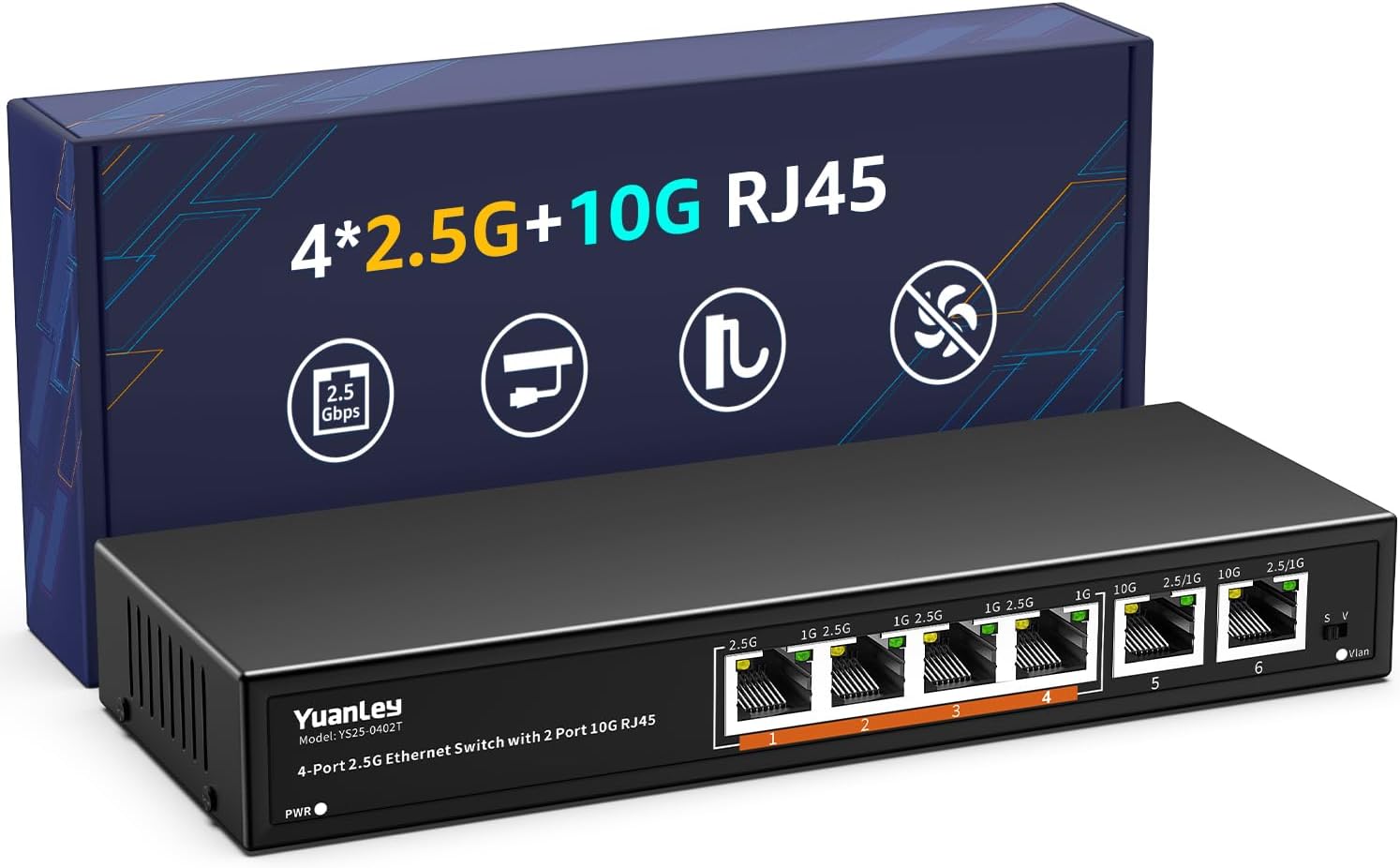
The YuanLey 6-Port 10 Gigabit Ethernet Switch delivers blazing 60Gbps switching capacity with 2 x 10G and 4 x 2.5G RJ45 ports. Its fanless metal design ensures silent, reliable operation, while one-key VLAN enhances security and network efficiency. Ideal for professionals upgrading home or office networks, it supports seamless plug-and-play setup and versatile deployment options including wall mounting.


| ASIN | B0F13DYZ8K |
| Best Sellers Rank | #86 in Computer Networking Switches |
| Brand | YuanLey |
| Built-In Media | User Manual, YuanLey 6-Port 2.5G Network Switch, Power Cable |
| Color | black |
| Compatible Devices | Camera, Desktop, Laptop |
| Customer Reviews | 4.5 out of 5 stars 462 Reviews |
| Data Transfer Rate | 60 Gigabits Per Second |
| Included Components | User Manual, YuanLey 6-Port 2.5G Network Switch, Power Cable |
| Interface | RJ45 |
| Item Weight | 0.63 Kilograms |
| Manufacturer | YuanLey |
| Mfr Part Number | YS25-0402T-EU |
| Model Number | 6 Port | 4x2.5G +2x10G RJ45 |
| Number of Ports | 6 |
| Platform | Not Machine Specific |
| Switch Type | unmanaged |
| UPC | 790885828713 |
| Unit Count | 6.0 Count |
| Upper Temperature Rating | 50 Degrees Celsius |
| Warranty Description | 1 year warranty |
K**S
Shockingly good value for real 2.5G networking
Honestly, I’m not sure how this thing is priced this low — but it works exactly as advertised. YuanLey is a Chinese brand, and while I was a little skeptical at first, this switch has performed flawlessly. I’m getting full 2.5Gbps across my wired devices, and everything else connects through Wi-Fi 7 back to the router, which is linked via a 10Gb SFP uplink. The build is solid, fanless and quiet, and setup is as simple as plug-and-play. For the price, this is a no-brainer if you want to upgrade your home or small office network without dropping a fortune.
M**A
Reliable and fast, unmanaged switch.
Nice 10G/2.5G ethernet switch. Has a 10G port for input (compatible with lower speeds if you don't have 10G) and one 10G port going out. All the other 8 ports are 2.5G. No drop offs noticed. Light on switch tells you speed you are at. This is plug and play. No setup required.
R**N
Solid product and a decent price
Product works perfectly for both 2.5gb and 5gb. I have not experienced any packet losses when transferring 700gb worth of data on the LAN with Macs.
M**Y
Get it. It's fine
Works well as my house switch but it does NOT like to be the first in the chain before a managed switch. That said, good size and good hub for my drops.
Y**N
Perfect 2.5G Switch to Unlock Full 2Gbps Frontier Speed! (Must-Read for Mac Users)
I upgraded to Frontier's 2Gbps plan, but my Wi-Fi speeds were only around 300–800 Mbps. Even when I hardwired my Mac mini M2 directly to the Frontier gateway/router in the closet, the speed maxed out at 800–900 Mbps. I soon realized that the built-in Ethernet port on the Mac mini is limited to 1Gbps. To get the full speed I am paying for, I purchased this YuanLey 2.5G Switch along with a USB-C to 2.5Gbps Ethernet Adapter and Cat.7 cables. The results are phenomenal! Both my 2019 MacBook Pro and Mac mini M2 now consistently hit amazing speeds between 1900 and 2300 Mbps. Installation & Troubleshooting Tips: 1. Setup: Connect the main Ethernet cable coming from your Frontier gateway into Port 1 of the switch. Then, connect your computers to Ports 2 through 5 using the 2.5G adapters. 2. Initial Connection issue: When you connect everything for the first time, it might not recognize the network right away. If this happens, simply reboot your computer, and it should connect perfectly. 3. Disconnection issues (Adapter Compatibility): If you experience intermittent disconnections, it is likely an issue with the USB Ethernet adapter. I actually had to return my first set of adapters due to this issue. After buying a different, high-quality 2.5G adapter, the connection became rock solid. If it keeps disconnecting, try swapping the adapter. The switch is completely silent (fanless) and stays cool. Highly recommended for anyone looking to build a budget-friendly 2.5G home network!
J**E
Works great
Got this because only 1 2.5gbps on my service provider gateway and I needed at least 2 for my router and pc then to my Xfinity gateway. So far it’s been working great.
T**3
I couldn't recommend this switch to anyone
I bought three of these units, and they all had the same issue. This device never attempts to update its internal CAM routing table and completely starts blocking traffic if the same MAC address is seen from a different port. This means that if used in a system such as a Wi-fi mesh system (as advertised as being compatible with), it will not work, and devices lose access to the Internet the moment they switch to a different AP.
K**H
YuanLey 8-Port 2.5GbE and 1xSFP+ Switch : Reliable Performance : A Great Find Under $100
I've been using the YuanLey 8x2.5GbE and 1xSFP+ switch since August 2023, and I'm thrilled to report that it has performed flawlessly. I had a spare 10G QSFPTEK SFP+ copper module that I used with CAT8 cables, and it worked seamlessly with this switch. Additionally, I tested it with a new 10G SFP+ DAC Twinax Cable, Passive, and it performed without a hitch. The compatibility and performance exceeded my expectations. What stands out most is the incredible value this switch offers for under $100. The ability to handle multiple high-speed connections at this price point is remarkable. I've extensively tested this switch with my NAS storage, Homelab servers, and access points, and I'm pleased to report that no issues were encountered. Even during extended use, the switch's temperature remains at room temperature, which is a testament to its reliability and efficiency. I'm extremely pleased with its performance and versatility. Here's hoping this switch continues to deliver for a long time to come.
R**S
Je recommande
Fonctionne très bien, aucune perte de débit
R**G
Good quality build
Got this to connect my house to my router and so far is working great. solid construction made out of metal
M**K
Network
Great unit works perfectly and very fast. You will need a UK to Australian plug converter or equivalent power supply
P**P
El motor que tu red de 10Gbps necesitaba
La pieza que faltaba para exprimir de verdad una conexión de fibra de alta velocidad. Con dos puertos de 10Gbps y ocho de 2.5Gbps, es el equilibrio perfecto para conectar tu PC principal y tu NAS a máxima potencia, dejando el resto para dispositivos que no necesitan tanto ancho de banda. Un cambio radical en el rendimiento de tu red doméstica. Si has dado el salto a los 10Gbps de Digi y tienes un rack montado en casa, sabrás que el router de la operadora suele ser el primer cuello de botella. Necesitaba algo que me permitiera repartir esa velocidad bruta entre mis dispositivos más exigentes y este switch ha dado en el clavo. Lo mejor es su configuración: tiene dos puertos de 10Gbps, lo que me permite usar uno para la entrada de internet y el otro para conectar directamente mi PC o el NAS. El resto de puertos a 2.5Gbps son más que suficientes para el mini PC y otros servicios que, aunque no necesiten 10 gigas, vuelan comparado con el estándar de 1Gbps de toda la vida. El cambio en la red local es, sencillamente, tremendo. Mover archivos pesados entre el equipo de trabajo y el almacenamiento o gestionar contenedores en Proxmox es ahora una experiencia instantánea. Además, un punto muy a favor es que no tiene ventiladores. Al ser totalmente silencioso, te olvidas de ese molesto zumbido constante que suelen tener los equipos de red potentes, algo que se agradece muchísimo si tienes el rack cerca de donde trabajas. La carcasa metálica disipa el calor bastante bien, aunque al no tener ventilación activa, se nota que coge algo de temperatura cuando le das caña, pero nada que preocupe. Es un switch no gestionado, lo que significa que es pinchar y listo, sin configuraciones complicadas. Si buscas una forma asequible y eficiente de profesionalizar tu red y dejar de estar limitado por puertos antiguos, este aparato es una compra obligatoria para cualquier entusiasta del home lab. Pros: - Velocidad real: Los puertos de 10Gbps cumplen lo que prometen y transforman la experiencia de red. - Silencio absoluto: Al no llevar ventilador, es perfecto para tenerlo en cualquier habitación sin ruidos. - Construcción robusta: La carcasa de metal se siente de calidad y ayuda a gestionar el calor. - Instalación directa: Sin menús ni complicaciones, conectar los cables y a volar. Contras: - Calor: Se calienta un poco bajo carga intensa debido a su diseño sin ventilador. - Distribución de puertos: Solo tiene dos puertos de 10Gbps; si tienes más de un equipo que necesite esa velocidad máxima, se te quedará corto rápido. - Sin gestión: No permite configurar VLANs ni otras opciones avanzadas, es puramente "enchufar y listo".
S**S
Solid Value & performance
Network switches are not the most exciting of things, so writing any kind of review isn't easy. Unless you're a network professional, a switch like this is likely all you'll need. Now, I am by no means any kind of networking expert. No! I'm in the camp of: Plug it in an I want it to just work. For those interested, and very new to all this stuff, there are two basic kinds of network switches: managed and unmanaged. Most switches at the lower end of the price range, of which this is one, are unmanaged. What does that mean? The likelihood is that if you have to ask, you don't require a managed switch. What I do know is that a managed switch allows much greater control of the connections, including the ability to link aggregate, AKA bonding, I think, groups of Ethernet ports to act together at a hardware level. Beyond that, there are other things you can do, but that is way beyond my needs or abilities. For most regular consumers who find themselves needing a switch, there are two metrics. Speed and number of ports. By far the most common speed for network switches is still the 1 Gigabit AKA 1 GbE variety. pretty much any computer that has an Ethernet port will offer at least a 1 Gbe connection speed. One of the most common errors I hear from people is the confusing of Gigabyte and Gigabit. They are two vastly different speed ratings. Even ISP's when pushing their Internet speed option will often substitute Gigabit/megabit with Gigabyte/Megabyte. Be aware the actual speed differences are significant. A Gigabit translates to a theoretical max throughput speed of 125 Megabytes/sec. A Gigabyte per second speed translates to approx 1,000 Megabytes/sec. For most home users, a 1 Gigabit Ethernet network switch is plenty enough for their needs. however, a newer, faster speed, 2.5GbE has become increasingly mainstream and, as it's name suggests, offers up to 2.5x the speed of 1 GbE Ethernet. The most relevant metric for most home users will be the number of Ethernet ports offered. Of course, this depends on your needs, but it is useful to opt for a switch that has more ports than you think you will need right now. If you're looking at this review and are still wondering what a network switch is and why you might need one, stay with me. I am someone that believes a review should also encompass those just starting out and may not know the things others do. The easiest way to think of a network switch is like a power bar adaptor. You know, those plug bars you use when you've run out of available power sockets next to your TV. Network switches perform the same basic function. They allow you to connect multiple Ethernet cables into a single box with one of them going to a computer or your router etc. With a router connected to one port, any devices connected to the other ports on the switch will also have access to the Internet over a wired connection. Unmanaged switches, like this one, are just plug and play. You connect your Ethernet cables and it all just works, and that's the way most home users want it. This switch is an eight port model that offers eight 2.5GbE standard RJ45 type Ethernet ports and a 10GbE SFP port (likely never used by most people, but really nice to have). Now, bear in mind that a switch offering up to 2.5 Gigabit/sec is of little value if all your devices only support 1GbE. A 2.5GbE switch like this isn't going to magically turn your existing 1GbE network into a 2.5GbE one. So, for example, my main PC has a 2.5GbE Ethernet port which I have a standard Cat 5E cable attached to (Cat 5E will work with 2.5GbE connections, so no need to spend more on CAT 6 or 7 Ethernet cables) and now connects, via this switch, to a second PC that has recently had a cheap 2.5GbE Network card installed to replace the built-in 1GbE one. Transferring large files across between these machines sees transfer rates of up to around 240 Megabytes/sec. This compares to around 110 Megabytes using standard 1GbE connections. However, another machine connected to this new switch, but only fitted with a 1GbE Network adaptor will not benefit from the faster switch. So, given that currently there is quite a price premium on 2.5GbE switches compared to standard 1 Gig offerings, it might be worth bearing the above example in mind. Still, I opted for this switch due to a Black Friday sale and the fact that it was significantly cheaper, even when not in sale, than more readily recognizable brands, such as TP-Link, Netgear etc. So, for me, to have an eight port switch capable of 2.5GbE on all eight ports and a 10GbE SFP port too, and all for under £90, was a bit of a bargain I couldn't resist. The switch itself is a long, rectangular box that has LED's above each port and a power jack on the opposing side. This may be a negative to some who prefer all connectors, including power, to be on the same side. For me, though, this worked out quite well with my cabling arrangements. While on that subject, what was awkward was the power plug supplied with this unit. It has an overhang that can potentially block other nearby power sockets, but has the overhang raised a little to help avoid this. Alas, my switch is connected into a APC UPS that has two rows of sockets that are staggered opposite one another. I was not able to seat the supplied plug with other plugs inserted in an opposite socket due to this overhang. Fortunately, my old 5 port switch I am replacing had a very similar shaped plug of the same voltage, but its overhang was just a fraction higher and cleared the other connected plug. Manufacturers need to think a little more about the shape of their power plugs to avoid such things. If you had a similar issue, you could likely get around it by using a double adaptor plug block to raise it up, but it's not the tidiest of solutions. As most of my devices are operating at 1 GbE speed and I only have one port using 2.5GbE speeds of the five I have connected, the switch runs very cool, only slightly warm to the touch. What this does lack, like so many other modern devices, is a set of rubber feet to elevate the unit a little off the surface if not wall mounted to facilitate better air flow around the unit. In addition, rubber feet prevent my switch from slipping under the torque of the various connected cables tugging this way and that. So, I had to purchase a cheap set of pads and stick them to it to fix this. Not a big problem, but one that is common place these days on appliances. Other than that, there is not a lot more to say about this switch. It works and works well. Switches are not fancy or glamorous, they just sit there doing their job and we forget about them. This is as it should be and so far after a month or so of use, this switch has performed flawlessly.
Trustpilot
2 days ago
1 week ago